
1. Introduction
This manual provides essential instructions for the safe and efficient operation of your Motorola Solutions MOTOTRBO R2 UHF Two-Way Radio. The MOTOTRBO R2 is designed for reliable communication, featuring superior range, configurable audio, and robust construction. Please read this manual thoroughly before using your radio to ensure proper functionality and to understand all safety precautions.
2. Package Contents
Verify that all items listed below are present in your product package:
- MOTOTRBO R2 Radio Unit
- Rechargeable Lithium-Ion Battery
- Belt Clip
- Charger (Charging Base and Power Adapter)
- UHF Antenna
3. Product Overview
Familiarize yourself with the components of your MOTOTRBO R2 radio.
3.1 Radio Components

Figure 1: Front View. This image displays the front of the Motorola MOTOTRBO R2 radio, showing the speaker grille, microphone, and the Motorola branding. The R2 model designation is visible at the bottom.

Figure 2: Right Side View. This image shows the right side of the radio, highlighting the large Push-To-Talk (PTT) button and two smaller programmable buttons below it. The textured grip is also visible.

Figure 3: Left Side View. This image illustrates the left side of the radio, featuring the accessory port cover, which protects connections for external audio accessories.
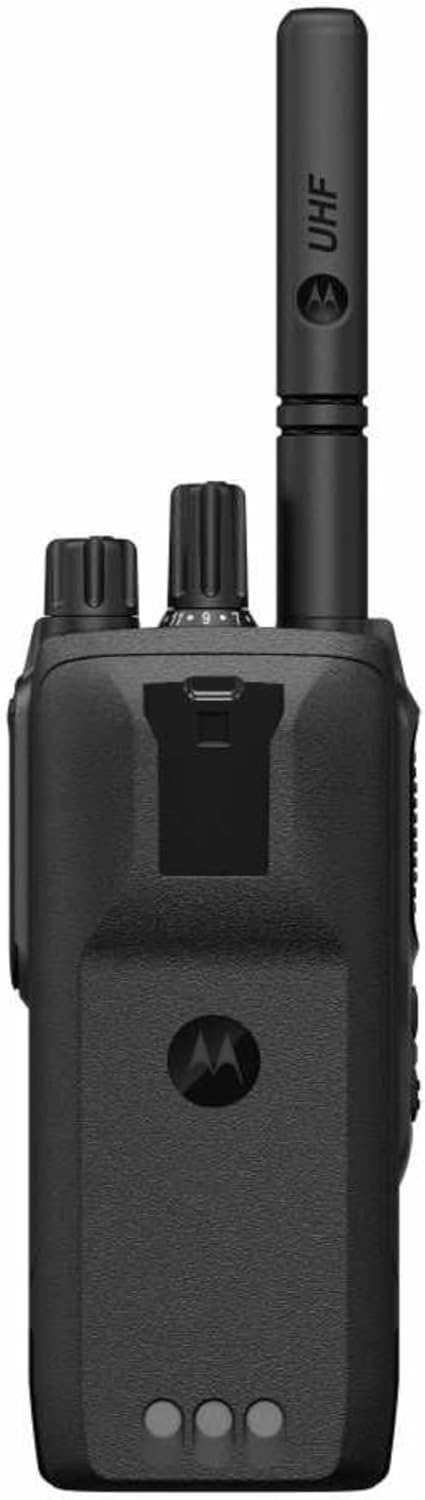
Figure 4: Top View. This image provides a top-down view of the radio, showing the attached UHF antenna, the channel selector knob, and the On/Off/Volume control knob.
- Antenna: For transmitting and receiving radio signals.
- On/Off/Volume Knob: Rotates to power the radio on or off and adjust the audio volume.
- Channel Selector Knob: Rotates to select one of the 64 available channels.
- Push-To-Talk (PTT) Button: Press and hold to transmit, release to receive.
- Programmable Side Buttons: Can be configured for various functions (e.g., scan, monitor).
- Speaker/Microphone: Integrated for audio output and input.
- Accessory Connector: For connecting external audio accessories.
- LED Indicator: Provides status information, including battery level and transmission status.
4. Setup
4.1 Attaching the Antenna
- Align the antenna with the connector on top of the radio.
- Turn the antenna clockwise until it is finger-tight. Do not overtighten.
4.2 Installing the Battery
- Ensure the radio is powered off.
- Align the battery with the grooves on the back of the radio.
- Slide the battery upwards until it clicks into place.
- To remove, slide the battery latch (if present) and slide the battery downwards.
4.3 Charging the Battery
- Connect the power adapter to the charging base and plug it into an AC outlet.
- Place the radio with the battery attached into the charging base.
- The charger's LED indicator will show the charging status (e.g., red for charging, green for fully charged).
- A full charge typically takes several hours.
5. Operating Instructions
5.1 Powering On/Off and Volume Adjustment
- To power on, rotate the On/Off/Volume knob clockwise until you hear a click.
- Continue rotating clockwise to increase volume; rotate counter-clockwise to decrease volume.
- To power off, rotate the knob counter-clockwise until you hear a click.
5.2 Selecting a Channel
- Rotate the Channel Selector knob to choose the desired channel (1-64).
- The radio may provide a voice announcement of the selected channel number.
5.3 Transmitting and Receiving
- To Transmit: Press and hold the PTT button. Speak clearly into the microphone. The LED indicator will typically glow red during transmission.
- To Receive: Release the PTT button. The LED indicator will typically glow green when receiving a signal.
- Ensure you are on the same channel as the party you wish to communicate with.
5.4 SINC+ Noise Suppression
The MOTOTRBO R2 features SINC+ Noise Suppression (CFS) to enhance audio clarity in noisy environments. This feature automatically filters out background noise, allowing for clearer voice communication.
5.5 LED Battery Indicator
The radio's LED indicator provides battery status. When the battery charge is low, the LED will blink red to signal that recharging is required.
6. Maintenance
6.1 Cleaning the Radio
- Wipe the radio's surface with a soft, damp cloth.
- Do not use harsh chemicals, solvents, or abrasive cleaners.
- Ensure the accessory port cover is securely closed to maintain the IP55 rating.
6.2 Battery Care
- Charge the battery fully before initial use.
- Avoid overcharging or completely draining the battery for extended periods to prolong its lifespan.
- Store the battery in a cool, dry place when not in use.
6.3 General Handling
- The radio has an IP55 rating, meaning it is protected against dust ingress and low-pressure water jets from any direction. It is not designed for submersion.
- Avoid dropping the radio or subjecting it to severe impacts.
7. Troubleshooting
| Problem | Possible Cause | Solution |
|---|---|---|
| Radio does not power on. | Battery is not installed correctly or is depleted. | Ensure battery is securely installed. Charge the battery. |
| Cannot transmit or receive. | Incorrect channel selected, out of range, or antenna not attached. | Verify channel. Move closer to other radios. Check antenna connection. |
| Poor audio quality. | Volume too low, SINC+ noise suppression active in quiet environment, or interference. | Adjust volume. Ensure microphone is not obstructed. Move away from sources of interference. |
| Battery drains quickly. | Battery nearing end of life or frequent long transmissions. | Replace battery if old. Minimize unnecessary transmissions. |
8. Specifications
| Feature | Detail |
|---|---|
| Model Number | MOTOTRBO-R2 |
| Brand | Motorola Solutions |
| Frequency Range | 400-480 MHz (UHF) |
| Number of Channels | 64 |
| Power Output | 4 Watt (Analog) |
| IP Rating | IP55 (splashing water resistant) |
| Battery Type | Lithium Ion (included) |
| Voltage | 7.5 Volts (DC) |
| Item Weight | Approximately 4 pounds (including battery) |
| Product Dimensions | 1 x 2 x 4 inches (approximate) |
| Special Features | SINC+ Noise Suppression, Voice Announcements, LED Battery Indicator, Call Alert, Voice Operated Transmission |
| Talking Range Maximum | 3 Miles (line of sight, terrain dependent) |
9. Warranty and Support
9.1 Manufacturer's Warranty
The Motorola Solutions MOTOTRBO R2 radio comes with a 2-Year Manufacturer's Warranty. This warranty covers defects in materials and workmanship under normal use. Please retain your proof of purchase for warranty claims.
9.2 Customer Support
For technical assistance, troubleshooting beyond this manual, or warranty service, please contact Motorola Solutions customer support. Refer to the official Motorola Solutions website or your purchase documentation for the most current contact information.
You can visit the official Motorola Solutions Store on Amazon for more product information and support resources.


