
EDM 33516
EDM Portable Air Conditioner Model 33516 User Manual
Model: 33516 | Brand: EDM
Introduction
Thank you for choosing the EDM Portable Air Conditioner Model 33516. This manual provides important information for the safe and efficient operation, maintenance, and troubleshooting of your new appliance. Please read this manual thoroughly before use and keep it for future reference.
Important Safety Instructions
- Read all instructions before using the appliance.
- Ensure the voltage indicated on the rating label matches your main power supply.
- Do not immerse the appliance, cord, or plug in water or other liquids.
- Supervise children to ensure they do not play with the appliance.
- Unplug from the outlet when not in use and before cleaning.
- Do not operate any appliance with a damaged cord or plug, or after the appliance malfunctions or has been damaged in any manner.
- Do not use outdoors.
- Do not block air openings.
- Place the unit on a stable, flat surface.
- Only use clean water in the water tank.
Product Overview
The EDM Portable Air Conditioner Model 33516 is a compact evaporative air cooler designed for personal and ambient climate control. It features a removable water tank, three speed settings, and integrated wheels for easy mobility.
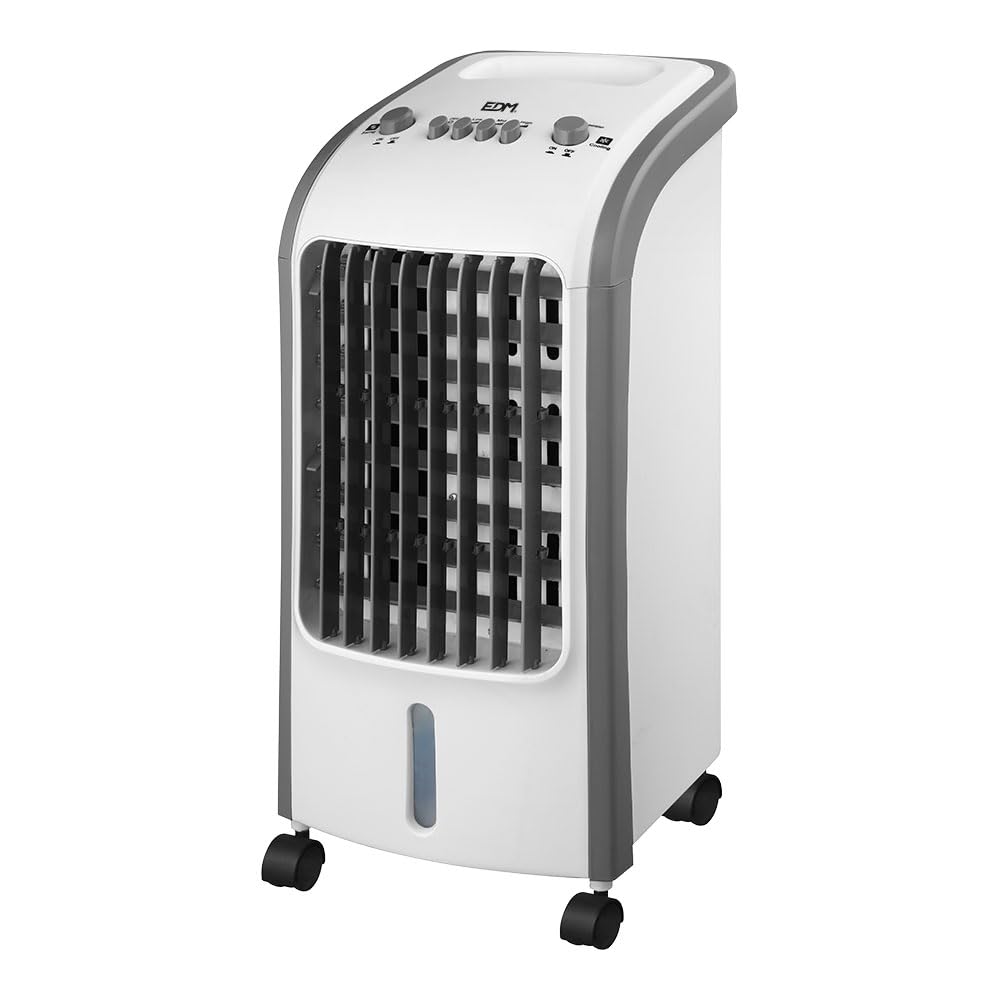
Figure 1: Front view of the EDM Portable Air Conditioner Model 33516. The unit is white and grey, with a front grille, control panel on top, and casters at the base.
Components:
- Control Panel (Top)
- Air Outlet Grille (Front)
- Water Tank (Bottom, removable)
- Casters (Base)
- Power Cord (Rear)
- Air Inlet Filter (Rear/Side)
Setup Instructions
1. Unpacking and Placement
- Carefully remove the air conditioner from its packaging.
- Place the unit on a firm, level surface. Ensure there is at least 20 cm (8 inches) of clear space around the unit for proper airflow.
2. Filling the Water Tank
For cooling and humidification, the water tank must be filled with clean water.
- Gently pull out the water tank from the bottom of the unit.
- Fill the tank with clean tap water. Do not exceed the "MAX" fill line.
- Carefully slide the water tank back into the unit until it clicks into place. Ensure it is securely seated to prevent leaks.

Figure 2: The removable water tank located at the bottom of the unit, shown partially pulled out for filling or cleaning.
3. Using Ice Packs (Optional)
For enhanced cooling, you can use the provided ice packs (or standard ice cubes) in the water tank.
- Freeze the ice packs thoroughly before use.
- After filling the water tank (as described above), place the frozen ice packs directly into the water tank.
- Close the water tank securely.

Figure 3: Top left shows two blue ice packs next to the open water tank. These can be placed in the tank for colder air.
Operating Instructions
Ensure the unit is plugged into a 220-240V power outlet before operation.
Figure 4: Close-up of the control panel. Buttons include 'Swing ON/OFF', 'OFF', 'LOW', 'MID', 'HIGH' for fan speed, and 'Cool ON/OFF'.
Control Panel Functions:
- OFF: Turns the unit off.
- LOW / MID / HIGH: Selects the desired fan speed.
- Swing ON/OFF: Activates or deactivates the automatic oscillation of the air outlet louvers.
- Cool ON/OFF: Activates or deactivates the evaporative cooling function. This function requires water in the tank.
Basic Operation:
- Power On: Press any of the speed buttons (LOW, MID, HIGH) to turn on the fan.
- Adjust Fan Speed: Press the desired speed button (LOW, MID, HIGH).
- Activate Cooling: Press the "Cool ON/OFF" button. The unit will begin evaporative cooling. Ensure the water tank is filled.
- Activate Swing: Press the "Swing ON/OFF" button to enable the automatic oscillation of the air louvers. Press again to stop.
- Power Off: Press the "OFF" button to turn off the unit.
Maintenance
Regular cleaning and maintenance will ensure optimal performance and extend the lifespan of your air conditioner.
1. Cleaning the Exterior
- Always unplug the unit before cleaning.
- Wipe the exterior surfaces with a soft, damp cloth. Do not use abrasive cleaners or solvents.
- Ensure no water enters the control panel or other electrical components.
2. Cleaning the Water Tank
- Unplug the unit.
- Pull out the water tank (refer to Figure 2).
- Empty any remaining water.
- Clean the tank with a mild detergent and rinse thoroughly with clean water.
- Allow the tank to air dry completely before reinserting it into the unit.
- Clean the water tank regularly (e.g., weekly) to prevent mold and mildew growth.
3. Cleaning the Air Filter (Evaporative Pad)
The air filter/evaporative pad is located behind the rear grille. It should be cleaned periodically.
- Unplug the unit.
- Remove the rear grille (consult diagram if available, or gently unclip).
- Carefully remove the evaporative pad.
- Rinse the pad under running water to remove dust and mineral deposits. For heavy deposits, soak in a mild descaling solution (e.g., vinegar and water) before rinsing.
- Allow the pad to air dry completely before reinserting.
- Reattach the rear grille.
4. Storage
- If the unit will not be used for an extended period, empty and clean the water tank and evaporative pad thoroughly.
- Ensure all parts are dry.
- Store the unit in a cool, dry place, preferably in its original packaging.
Troubleshooting
| Problem | Possible Cause | Solution |
|---|---|---|
| Unit does not turn on. | No power supply. Power cord not properly plugged in. | Check if the unit is plugged into a working outlet. Ensure the power cord is securely connected. |
| No cool air / Weak cooling effect. | Water tank is empty. "Cool" function is not activated. Evaporative pad is dirty or dry. Room humidity is too high. | Fill the water tank. Press the "Cool ON/OFF" button. Clean or moisten the evaporative pad. Evaporative coolers are less effective in high humidity. Consider ventilation. |
| Unpleasant odor. | Stagnant water or mold in the tank/pad. | Empty and clean the water tank and evaporative pad thoroughly. Use fresh water. |
| Water leakage. | Water tank not properly seated. Water level exceeds MAX line. | Ensure the water tank is pushed in completely and securely. Do not overfill the water tank. |
If the problem persists after checking these points, please contact customer support.
Specifications
| Model Number | 33516 |
| Brand | EDM |
| Type | Portable Evaporative Air Cooler |
| Power | 80 W |
| Voltage | 220-240 V |
| Water Tank Capacity | 3.6 Liters |
| Speeds | 3 Speeds (Low, Mid, High) |
| Control Type | Buttons |
| Material | Plastic |
| Dimensions (L x W x H) | 24 x 26 x 57 cm (approx.) |
| Weight | 4.83 kg |
| Special Features | Removable water tank, With wheels, Swing function |
| Noise Level | 20 dB (typical) |

Figure 5: Dimensional drawing of the unit, showing approximate measurements of 24 cm (depth), 26 cm (width), and 57 cm (height).
Warranty and Support
For warranty information or technical support, please refer to the warranty card included with your product or contact your retailer. Keep your proof of purchase for any warranty claims.
Related documents33516

Ask a question about this manual
Ask about setup, troubleshooting, compatibility, parts, safety, or missing instructions. Manuals+ will review the question and use this page’s manual context to help answer it.