
Introduction
This manual provides essential information for the safe and effective use of your HON Ignition 2.0 ReActiv Ergonomic Fabric Mid-Back Task Chair. Please read these instructions carefully before assembly and operation to ensure proper function and longevity of your product.
Safety Warnings
Always follow these safety guidelines:
- Ensure all components are securely fastened before use.
- Do not stand on the chair.
- Avoid using the chair on uneven surfaces.
- Exercise caution when using the tilting mechanism to prevent injury.
- Keep small parts away from children during assembly.
Setup and Assembly
Follow these steps to assemble your HON Ignition 2.0 ReActiv Task Chair:
- Attach Casters to Base: Insert each caster into the holes at the end of each leg of the chair base until it clicks securely into place.
- Insert Gas Lift Cylinder: Place the larger end of the gas lift cylinder into the center hole of the chair base.
- Attach Seat Mechanism: Secure the seat mechanism to the underside of the seat cushion using the provided screws. Ensure the front of the mechanism aligns with the front of the seat.
- Connect Seat to Cylinder: Carefully place the assembled seat onto the top of the gas lift cylinder, ensuring it is centered.
- Attach Backrest: Align the backrest with the mounting plate on the seat mechanism and secure it with the appropriate screws.
- Install Armrests: Attach the armrests to the designated slots on the seat mechanism or chair frame, tightening all screws firmly.
After assembly, verify that all connections are tight and the chair is stable before use.
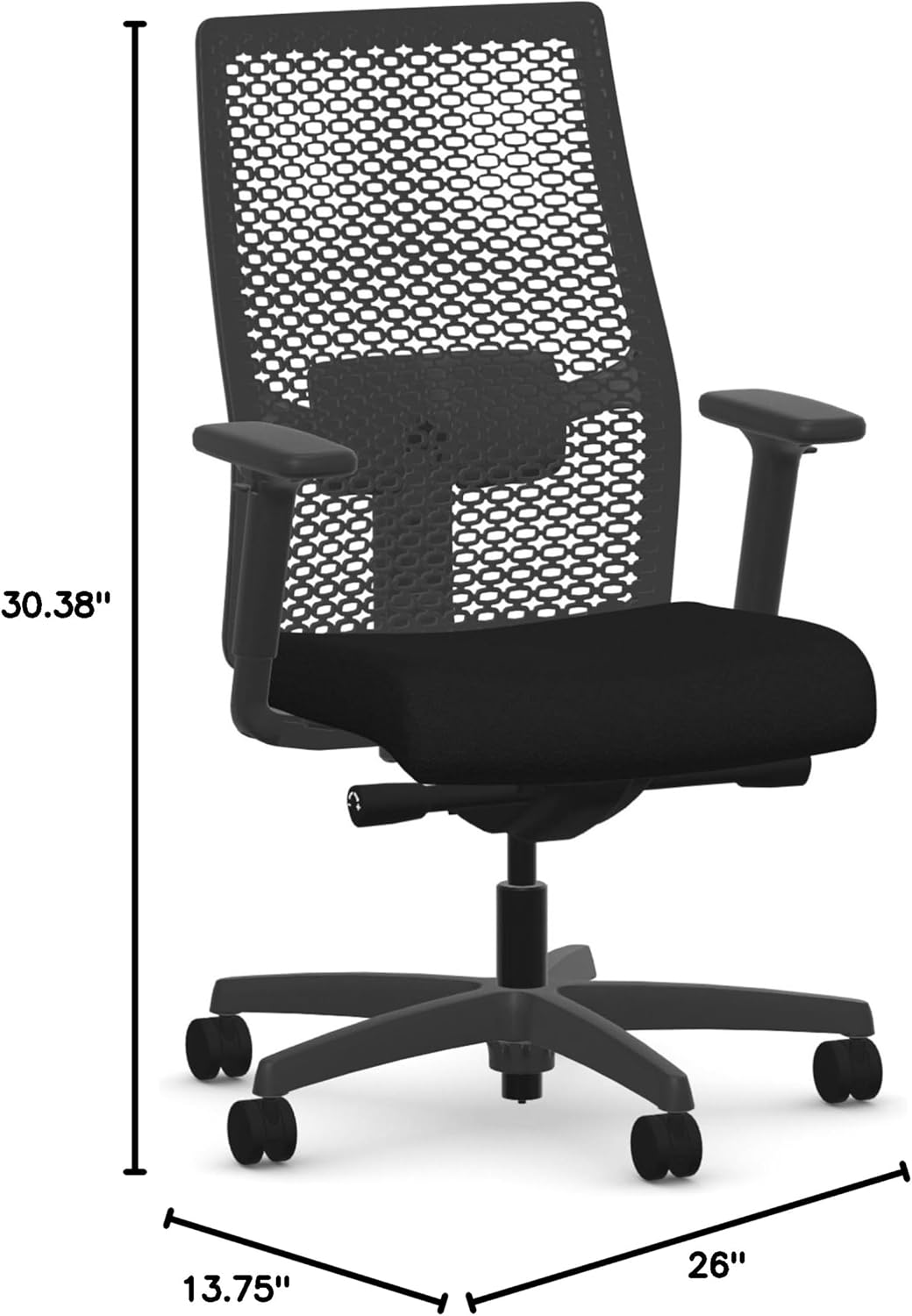
Image: Front view of the HON Ignition 2.0 ReActiv Task Chair with overall dimensions (26"D x 13.75"W x 30.38"H) indicated.
Operating and Adjustments
Your HON Ignition 2.0 ReActiv chair offers multiple adjustments for personalized comfort:
- Seat Height Adjustment: Locate the lever on the right side, under the seat. Pull the lever up to raise the seat; release to lock. To lower, sit on the chair, pull the lever up, and release when at desired height.
- Lumbar Support Adjustment: The lumbar support can be adjusted to provide optimal lower back comfort. Locate the adjustment knob or lever on the backrest and rotate or slide it to position the support correctly for your back.
- Armrest Adjustment: The armrests are adjustable in both height and width. Use the buttons or levers located on the armrest supports to raise or lower them, and to slide them inward or outward for a comfortable arm position.
- Tilt and Recline: This chair features a tilting mechanism with 3 reclining positions. Use the tilt lock lever (typically on the left side under the seat) to engage or disengage the tilt. Adjust the tension knob (usually at the front center under the seat) to control the resistance of the recline.
- Swivel Function: The chair is designed with a 360-degree swivel base for easy movement and access to your workspace.

Image: Frontal view of the HON Ignition 2.0 ReActiv Task Chair, highlighting the seat and armrests.

Image: Rear view of the HON Ignition 2.0 ReActiv Task Chair, showing the mesh backrest and lumbar support area.
Maintenance and Care
To maintain the appearance and functionality of your chair:
- Cleaning Fabric: For general cleaning, use a soft cloth and a mild detergent solution. For spills, spot clean immediately with a clean, damp cloth. Avoid harsh chemicals or abrasive cleaners.
- Cleaning Frame: Wipe the stainless steel frame and plastic components with a soft, damp cloth.
- Caster Care: Periodically check casters for hair or debris and clean as needed to ensure smooth movement.
- Fastener Check: Regularly inspect all screws and bolts to ensure they are tight. Retighten if necessary.

Image: Close-up detail of the black fabric used on the seat of the HON Ignition 2.0 ReActiv Task Chair.
Troubleshooting
If you encounter issues with your chair, refer to the following common solutions:
- Chair Squeaks: Check all bolts and screws for tightness and retighten if loose. A small amount of silicone spray on moving parts (avoiding fabric) may help.
- Difficulty Adjusting Height: Ensure the gas lift lever is fully engaged. If the cylinder is not responding, it may need replacement.
- Chair Feels Unstable: Verify that all casters are fully inserted into the base and that the base is not damaged. Ensure all assembly screws are tight.
- Armrests Not Holding Position: Check the adjustment mechanisms on the armrests for any obstructions or damage.
Specifications
| Feature | Detail |
|---|---|
| Brand | HON |
| Model Name | Ignition 2.0 ReActiv |
| Model Number | Ignition 2.0 ReActiv |
| Color | Black |
| Material (Frame) | Stainless Steel |
| Material (Seat/Fill) | Foam |
| Product Dimensions (D x W x H) | 26"D x 13.75"W x 30.38"H |
| Item Weight | 54 Pounds |
| Recommended Uses | Office |
| Age Range Description | Adult |
| Included Components | Arm Pad |
| Surface Recommendation | Hard Floor |
| Indoor Outdoor Usage | Indoor |
| UPC | 196235079055 |
| Additional Features | Adjustable Height |
| Furniture Base Movement | Swivel |
| Reclining Position Count | 3 |
| Tilting | Yes |
| Back Style | Solid Back |
| Pattern | Solid |
| Finish Types | Powder Coated |
| Shape | Rectangular |
| Arm Style | With arms |
| Leg Style | Tapered Leg |
| Product Care Instructions | Spot Clean |
Warranty Information
For detailed warranty information regarding your HON Ignition 2.0 ReActiv Task Chair, please refer to the official HON website or contact HON customer service directly. Warranty terms and conditions may vary.
Customer Support
If you require further assistance, have questions about assembly, operation, or need to report a defect, please contact HON customer support. Contact details can typically be found on the manufacturer's official website or on the product packaging.


