
Introduction
This manual provides essential instructions for the safe operation, maintenance, and troubleshooting of your Yato YT-82818 Cordless Multi-Purpose Oscillating Tool. Please read this manual thoroughly before using the tool to ensure proper and safe operation. Keep this manual for future reference.
The Yato YT-82818 is a versatile cordless oscillating tool designed for various applications including cutting, sanding, and scraping on wood and metal surfaces. Its battery-operated design offers portability and convenience for a wide range of tasks.
General Safety Instructions
Always follow basic safety precautions to reduce the risk of fire, electric shock, and personal injury. Familiarize yourself with all warnings and instructions provided with the tool.
- Work Area Safety: Keep the work area clean and well-lit. Cluttered or dark areas invite accidents. Do not operate power tools in explosive atmospheres, such as in the presence of flammable liquids, gases, or dust.
- Electrical Safety: Avoid body contact with earthed or grounded surfaces. Do not expose power tools to rain or wet conditions.
- Personal Safety: Always wear eye protection, hearing protection, and a dust mask when operating the tool. Dress properly; avoid loose clothing or jewelry that can get caught in moving parts.
- Tool Use and Care: Do not force the power tool. Use the correct power tool for your application. Disconnect the battery pack from the power tool before making any adjustments, changing accessories, or storing power tools.
- Battery Pack Use and Care: Recharge only with the charger specified by the manufacturer. Do not use battery packs with any other power tools.
Product Components and Features
The Yato YT-82818 Cordless Multi-Purpose Oscillating Tool features a robust design for various tasks. Key components include the tool body, battery compartment, accessory attachment point, and speed control dial.

Image 1: Overview of the Yato YT-82818 Cordless Multi-Purpose Oscillating Tool. This image displays the tool from an angled perspective, showing the main body, the attached 18V Li-Ion battery, and the quick-release system for accessories. The Yato logo is visible on both the tool and the battery.
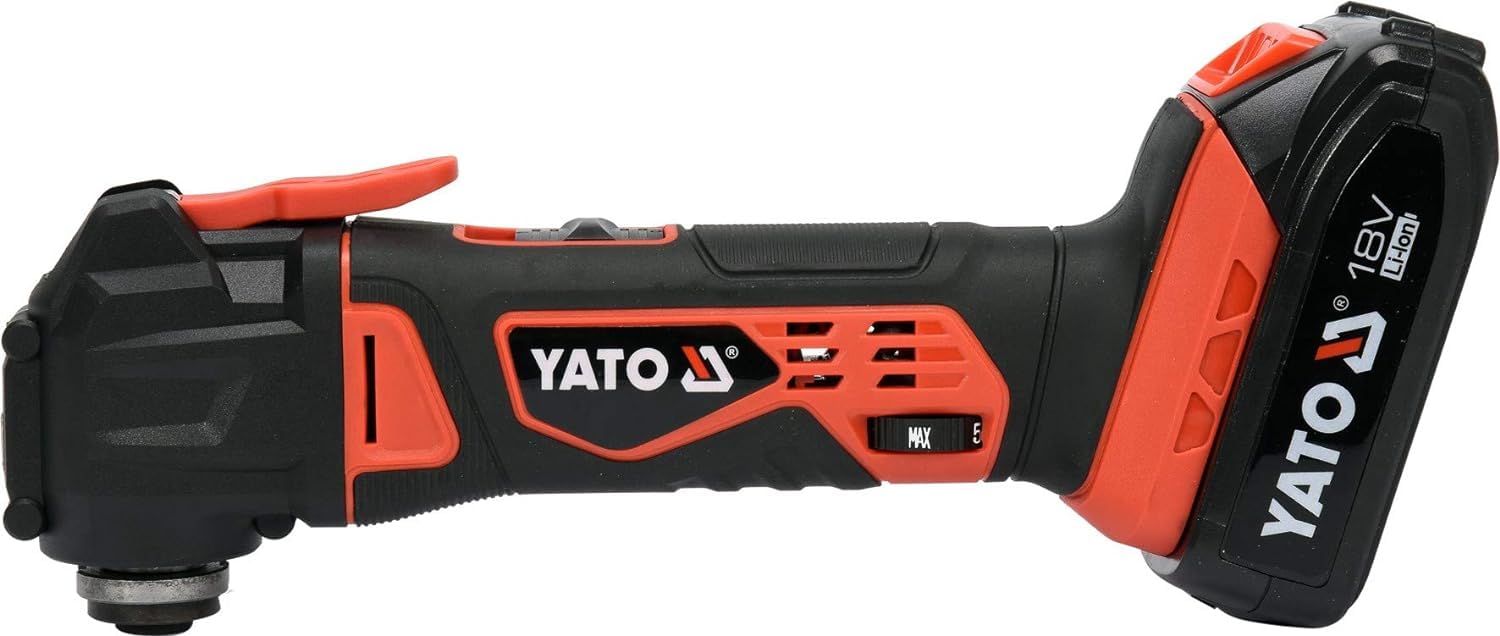
Image 2: Side view of the Yato YT-82818 Oscillating Tool. This image provides a clear profile view of the tool, highlighting the ergonomic grip, the power switch, and the speed adjustment dial. The 18V Li-Ion battery is attached at the rear.

Image 3: Various oscillating tool accessories with dimensions. This image illustrates different types of blades and sanding pads compatible with the tool, including a semi-circular saw blade (88mm), a triangular sanding pad (80mm x 86mm), a straight cutting blade (34mm wide), and a scraping blade (50mm wide). Dimensions are clearly marked.

Image 4: Yato Quick Release System and key specifications. This graphic highlights the 18V Li-Ion battery compatibility, the 8000-18000 min⁻¹ oscillation range, 2.0 Ah battery capacity, and 1-hour quick charging. It also visually demonstrates the quick-release mechanism for changing accessories (steps 1, 2, 3).

Image 5: Speed adjustment dial. This image shows a rotary dial with settings from 1 to 5, indicating the variable speed control feature of the oscillating tool. Arrows suggest rotation for increasing or decreasing speed.
Setup and Assembly
1. Charging the Battery
Ensure the battery is fully charged before first use. Connect the battery to the specified Yato charger. The charging indicator on the charger will show the charging status. A 2.0 Ah battery typically charges in approximately 1 hour.
2. Attaching the Battery Pack
- Align the battery pack with the battery port on the tool handle.
- Slide the battery pack into the tool until it clicks securely into place.
- To remove, press the battery release button and slide the battery out.
3. Installing Accessories (Quick Release System)
The Yato YT-82818 features a quick-release system for easy accessory changes.
- Ensure the tool is switched off and the battery is removed.
- Locate the quick-release lever on the tool head (refer to Image 4, step 1).
- Push the lever to open the accessory clamp (refer to Image 4, step 2).
- Insert the desired accessory (e.g., saw blade, sanding pad) into the accessory holder, ensuring it is properly seated.
- Release the quick-release lever to secure the accessory (refer to Image 4, step 3). Verify the accessory is firmly attached before use.
Operating Instructions
1. Powering On/Off
- To turn on the tool, slide the ON/OFF switch to the "ON" position.
- To turn off the tool, slide the ON/OFF switch to the "OFF" position.
2. Adjusting Speed
The tool features a variable speed control dial (refer to Image 5) with settings from 1 to 5, corresponding to 8000-18000 RPM.
- Rotate the dial clockwise to increase the oscillation speed.
- Rotate the dial counter-clockwise to decrease the oscillation speed.
- Select a lower speed for delicate work or softer materials, and a higher speed for aggressive cutting or harder materials.
3. General Usage Tips
- Always hold the tool firmly with both hands during operation.
- Apply light, consistent pressure. Do not force the tool, as this can lead to overheating and reduced performance.
- Allow the tool to reach full speed before engaging with the workpiece.
- For cutting, use a gentle oscillating motion. For sanding, move the tool evenly across the surface.
- Regularly check the accessory for wear and replace it when dull or damaged.
Maintenance
Regular maintenance ensures the longevity and optimal performance of your Yato YT-82818 tool.
- Cleaning: After each use, clean the tool body with a soft, dry cloth. Remove any dust or debris from the ventilation openings to prevent overheating. Do not use harsh chemicals or abrasive cleaners.
- Accessory Inspection: Inspect accessories (blades, sanding pads) before and after each use for wear, damage, or dullness. Replace worn accessories promptly.
- Battery Care: Store batteries in a cool, dry place away from direct sunlight. Do not store fully discharged batteries for extended periods. Recharge them periodically if not in use.
- Storage: Store the tool and its accessories in a dry, secure location, out of reach of children. The included case (refer to Image 6) is ideal for storage and transport.

Image 6: Packaging box for the Yato YT-82818 Oscillating Tool. This image shows the retail packaging, which often includes a carrying case for the tool and its accessories, emphasizing proper storage.
Troubleshooting
| Problem | Possible Cause | Solution |
|---|---|---|
| Tool does not start. | Battery not charged or improperly installed. | Ensure battery is fully charged and correctly seated. |
| Reduced power or performance. | Low battery charge; worn or dull accessory; excessive pressure. | Recharge battery; replace accessory; reduce pressure. |
| Tool overheats. | Blocked ventilation openings; continuous heavy use. | Clean ventilation openings; allow tool to cool down; reduce workload. |
| Accessory not secure. | Quick-release lever not fully engaged. | Ensure quick-release lever is fully closed and accessory is seated correctly. |
Technical Specifications
| Feature | Specification |
|---|---|
| Brand | Yato |
| Model Number | YT-82818 |
| Type of Product | Oscillating Multi Tool |
| Power Source | Cordless (Battery Operated) |
| Battery Type | 18V Li-Ion (2.0 Ah recommended) |
| No Load Speed | 8000-18000 RPM (oscillations per minute) |
| Application | Wood and metal |
| Item Weight | 3 kg |
| Product Dimensions (L x W x H) | 10 x 10 x 10 cm |
| Included Components | Case |
Warranty and Support
For warranty information and customer support, please refer to the documentation provided with your purchase or contact Yato customer service directly. Keep your proof of purchase for warranty claims.
Manufacturer: Yato Tools (Shangai) Co. Ltd
For service or technical assistance, please visit the official Yato website or contact your local distributor.