
1. Introduction
Thank you for choosing the HOMCOM 6-in-1 Evolutionary Tricycle. This manual provides essential information for the safe assembly, operation, and maintenance of your new tricycle. Please read it thoroughly before use and retain it for future reference.
This versatile tricycle is designed to adapt to your child's growth, offering 6 different stages of use to ensure comfort and safety from approximately 12 to 60 months of age.

Image 1.1: The HOMCOM Evolutionary Tricycle in use with a child and parent.
2. Safety Information
WARNING: Failure to follow these instructions may result in serious injury.
- Always supervise children when using the tricycle. Never leave a child unattended.
- This tricycle is suitable for children aged approximately 12 to 60 months.
- The maximum weight capacity for this tricycle is 25 kg (55 lbs). Do not exceed this limit.
- Ensure all locking mechanisms, buckles, and fasteners are securely engaged before each use.
- Always use the safety harness to secure your child in the seat.
- Do not use the tricycle on public roads, near motor vehicles, steep inclines, or stairs.
- Keep children's fingers and clothing away from moving parts.
- Regularly inspect the tricycle for loose parts, damage, or wear. Do not use if damaged.
- Assembly must be performed by an adult.
- Remove the push handle and safety bar when the child is old enough to ride independently.
3. Package Contents
Please check the package carefully to ensure all components are present and undamaged. If any parts are missing or damaged, contact customer support immediately.
- Tricycle Frame
- Wheels (Front and Rear)
- Seat with Safety Harness
- Removable Canopy
- Adjustable Push Handle
- Front Safety Bar
- Foldable Footrest
- Rear Storage Basket
- Handlebar Bag
- Bottle Holder
- Assembly Hardware (screws, nuts, washers)
- Basic Assembly Tools (if included)
- Instruction Manual

Image 3.1: Key product details and included accessories.
4. Setup and Assembly
Assembly of the HOMCOM 6-in-1 Evolutionary Tricycle requires adult supervision and basic tools. Follow these general steps. Refer to the detailed diagrams in the separate assembly guide for specific instructions.
- Unpack Components: Carefully remove all parts from the packaging and lay them out on a clean, flat surface. Verify all components are present against the package contents list.
- Attach Wheels: Securely attach the front and rear wheels to the tricycle frame according to the assembly diagrams. Ensure they rotate freely.
- Install Seat and Safety Bar: Mount the seat onto the frame and attach the front safety bar. Ensure the safety harness is correctly threaded and adjustable.
- Attach Push Handle: Insert the adjustable push handle into its designated slot at the rear of the tricycle. Ensure it locks securely into place.
- Mount Canopy: Attach the removable canopy to the tricycle frame.
- Add Accessories: Attach the handlebar bag, bottle holder, and rear storage basket.
- Final Check: Before first use, double-check all screws, bolts, and connections to ensure they are tight and secure. Test all adjustable features and safety mechanisms.
5. Operating Instructions
The HOMCOM 6-in-1 Evolutionary Tricycle is designed to adapt through various stages of your child's development. The following outlines the general operation and how to transition between stages.

Image 5.1: Multifunctional use diagram showing the tricycle's evolution.
5.1. 6-in-1 Evolutionary Stages
The tricycle transitions through stages by adding or removing components:
- Stage 1 (Stroller Mode): For younger infants, use with the push handle, canopy, safety bar, and footrest. The child is secured by the harness, and the parent controls direction.
- Stage 2 (Push Tricycle Mode): As the child grows, they can use the pedals, but the parent still controls steering with the push handle. The safety bar and canopy may remain.
- Stage 3 (Training Tricycle Mode): Remove the safety bar. The child can practice steering while the parent still assists with the push handle. The footrest can be folded away.
- Stage 4 (Independent Tricycle Mode): Remove the push handle and canopy. The child can now ride independently, pedaling and steering on their own.
- Further Stages: Additional stages involve removing the backrest or other components as the child gains confidence and requires a simpler tricycle.
5.2. Adjustable Features
- Push Handle: The push handle is height-adjustable to suit different parent heights. It can also be detached when no longer needed. Refer to Image 5.2 for details.
- Canopy: The canopy is adjustable to provide optimal shade and sun protection. It is also removable. Refer to Image 5.3 for details.
- Footrest: The footrest is foldable. When the child is not pedaling, it provides a comfortable place for their feet. When they are ready to pedal, it can be folded away to prevent interference.
- Safety Harness: The 3-point safety harness ensures your child is securely fastened in the seat. Always adjust it snugly.
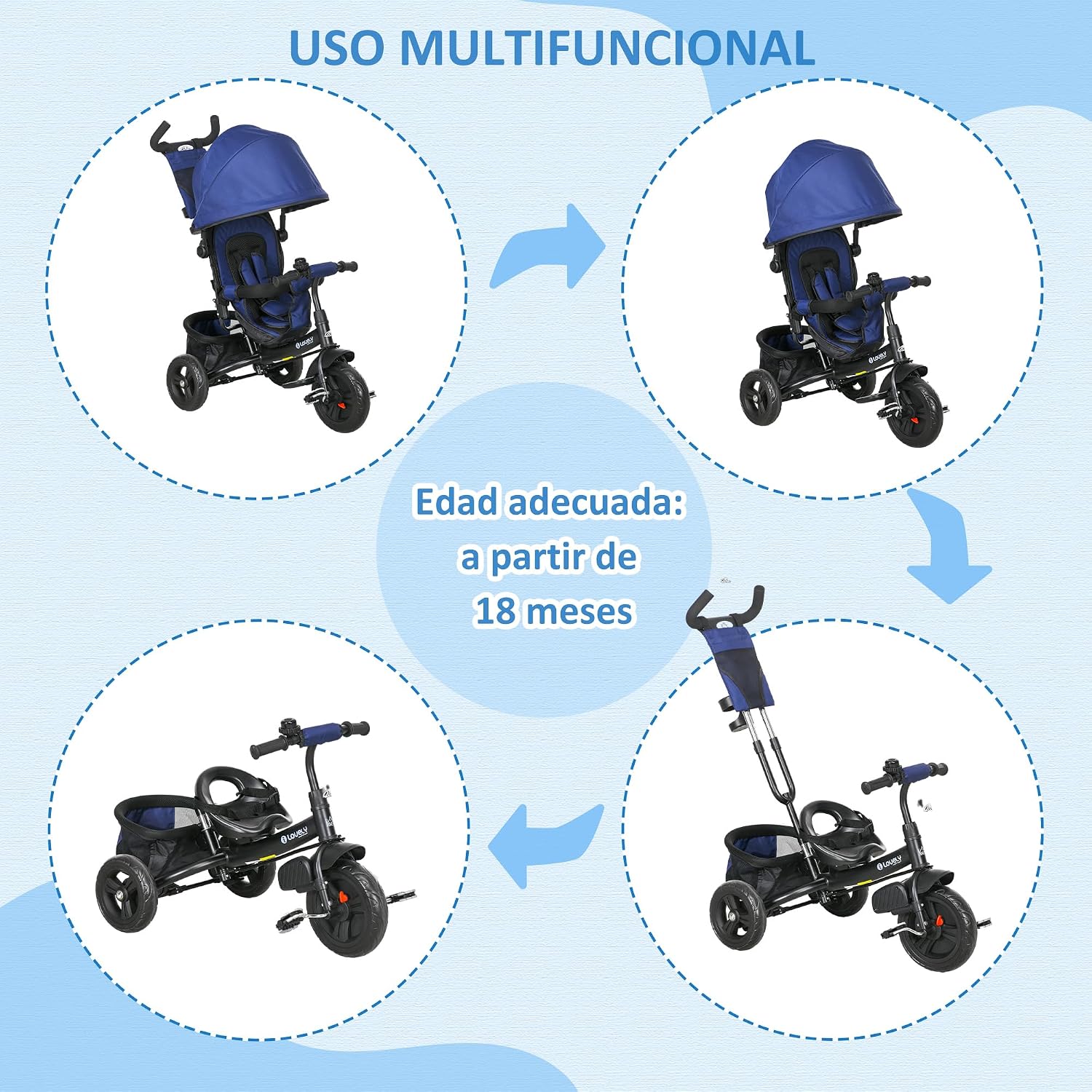
Image 5.2: Adjustable and detachable push handle for parental control.

Image 5.3: Adaptable canopy for sun protection and suitability for various terrains.
6. Maintenance
Regular maintenance will extend the life of your tricycle and ensure continued safe operation.
- Cleaning: Wipe down the frame and plastic parts with a damp cloth and mild soap. Do not use abrasive cleaners. The fabric covers are removable and washable.
- Lubrication: Periodically apply a small amount of lubricant to moving parts like wheel axles and pedal mechanisms to ensure smooth operation.
- Inspection: Regularly check all bolts, nuts, and screws for tightness. Inspect tires for wear and tear. Ensure the safety harness and buckles are in good working condition.
- Storage: Store the tricycle in a dry, cool place away from direct sunlight and extreme temperatures to prevent material degradation.
7. Troubleshooting
If you encounter any issues with your HOMCOM tricycle, refer to the following common solutions:
- Tricycle is difficult to steer: Check if the push handle is securely attached and locked. Ensure the front wheel is properly aligned.
- Wheels are stiff or noisy: Inspect for any debris caught in the wheels. Apply lubricant to the axles if necessary.
- Parts feel loose: Re-tighten all screws, bolts, and connections. Do not overtighten.
- Child cannot reach pedals: Ensure the footrest is in the correct position for their height, or fold it away if they are ready to pedal. The tricycle is designed for evolutionary use, so ensure the stage is appropriate for the child's size.
- Canopy does not stay in position: Check the canopy's attachment points and adjustment mechanisms for proper engagement.
If problems persist, please contact HOMCOM customer support.
8. Specifications
| Feature | Detail |
|---|---|
| Model Number | 370-027V00DB |
| Overall Dimensions (LxWxH) | 102 x 49 x 102 cm |
| Product Weight | 8.6 kg |
| Maximum Weight Capacity | 25 kg |
| Recommended Age Range | 12 to 60 months |
| Material | Metal, Plastic |
| Assembly Required | Yes |
| Included Components | 1 Basket, 1 Bag, 1 Handle |

Image 8.1: Tricycle dimensions.
9. Warranty and Support
HOMCOM products are manufactured to high-quality standards. For warranty information, please refer to the warranty card included with your purchase or visit the official HOMCOM website. If you have any questions, require assistance with assembly, or need replacement parts, please contact HOMCOM customer support directly.
Please have your model number (370-027V00DB) and purchase date ready when contacting support.

