
Introduction
The TechniSat STEREOMAN 2 V2 is a 2.4 GHz wireless stereo headphone system designed for an immersive audio experience with unrestricted movement. It features an elegant design and high-quality sound, perfect for enjoying music and movies wirelessly.
The adjustable headband ensures a secure and comfortable fit for extended listening sessions. The included docking station serves as both a transmitter and a convenient charging and storage solution for your headphones.
Key features include:
- 2.4 GHz wireless stereo headphones
- Adjustable headband for a perfect fit
- Wireless music and movie enjoyment
- Docking station/transmitter included
- Analog audio input (AUX-in)
- Optical audio input (Toslink)
- Ni-MH rechargeable batteries (2 x 700 mAh AAA)
Setup
Package Contents
Before you begin, ensure all components are present:
- STEREOMAN 2 V2 Headphones
- Transmitter/Docking Station
- Power Adapter
- Audio Cable (3.5 mm jack)
- S/PDIF Cable (Optical)
- 2 x Ni-MH AAA Rechargeable Batteries
1. Inserting Batteries
Open the battery compartment on the headphones and insert the two supplied Ni-MH AAA rechargeable batteries, observing the correct polarity.
2. Connecting the Docking Station
Connect the power adapter to the docking station's power input and plug it into a wall outlet. The docking station will power on.
Next, connect the docking station to your audio source (TV, Hi-Fi system, MP3 player) using one of the following methods:
- Analog Audio (AUX-in): Use the supplied 3.5 mm jack audio cable to connect the 'AUX IN' port on the docking station to the audio output of your device.
- Optical Audio (Toslink): Use the supplied S/PDIF optical cable to connect the 'OPTICAL IN' port on the docking station to the optical audio output of your device.
Ensure the correct audio output is selected on your source device.
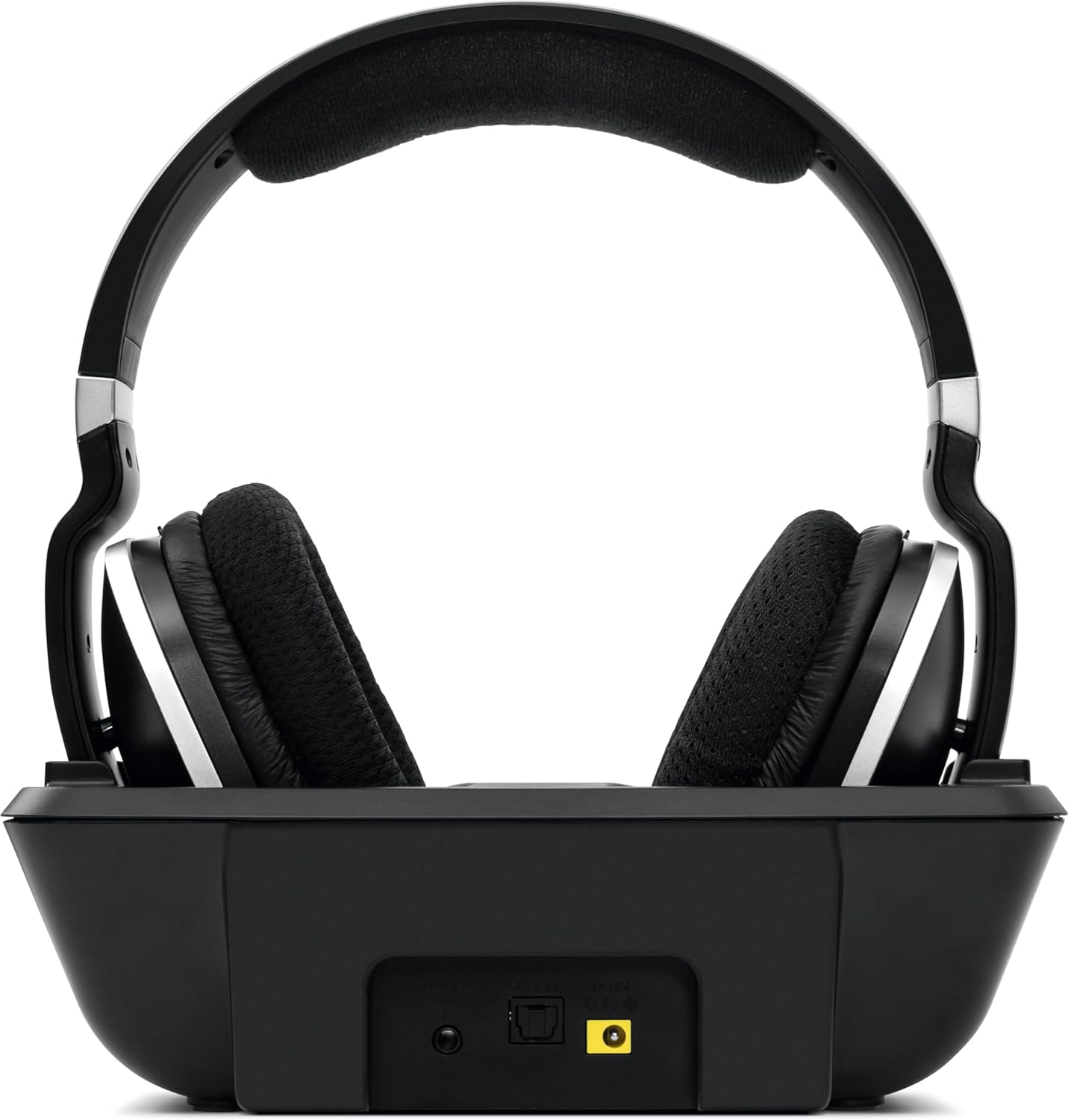
Figure 1: Rear view of the docking station with connection ports.
3. Initial Charging
Place the headphones onto the docking station. The 'CHARGE' indicator on the docking station should illuminate, indicating that the headphones are charging. For first use, charge the headphones for approximately 8 hours to ensure full battery capacity.
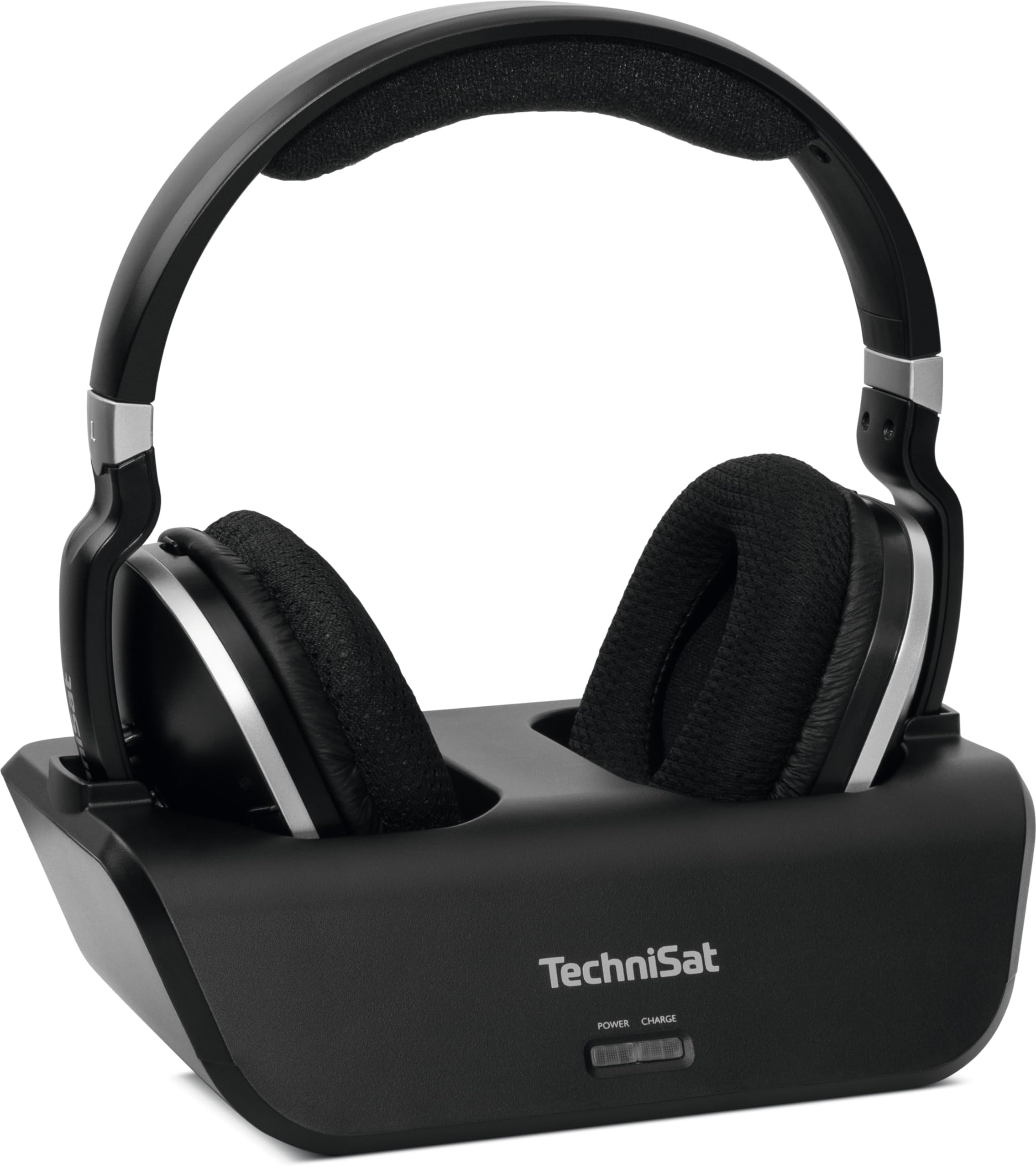
Figure 2: Headphones on the docking station for charging.
Operating Instructions
1. Powering On/Off
To power on the headphones, press and hold the Power button located on the right earcup until the indicator light illuminates. To power off, press and hold the Power button again until the indicator light turns off.

Figure 3: Headphone with Power button.
2. Volume Control
Adjust the listening volume using the Volume Control buttons (up/down) located on the left earcup of the headphones.

Figure 4: Headphone with Volume Control.
3. Wireless Connection
Once the headphones are powered on and the docking station is connected to an audio source and powered, the headphones will automatically establish a 2.4 GHz wireless connection with the transmitter. Ensure the audio source is playing content.
4. Charging During Use
When the headphone battery is low, the indicator light may change color or flash. Place the headphones back on the docking station to recharge. A full charge provides up to 10 hours of listening pleasure.
Maintenance
Cleaning
Wipe the headphones and docking station with a soft, dry cloth. Do not use abrasive cleaners or solvents. Avoid exposing the device to excessive moisture.
Battery Care
The headphones use Ni-MH rechargeable batteries. To prolong battery life, avoid completely discharging the batteries frequently. If the headphones will not be used for an extended period, fully charge them before storage and recharge them every few months.
Troubleshooting
No Sound
- Ensure the headphones are powered on and fully charged.
- Verify the docking station is powered on and its 'POWER' indicator is lit.
- Check all audio cables are securely connected between the docking station and your audio source.
- Confirm the correct audio output is selected on your TV or music system.
- Increase the volume on both the headphones and the audio source.
Charging Issues
- Ensure the headphones are correctly seated on the docking station. The 'CHARGE' indicator should illuminate.
- Check that the power adapter is securely connected to the docking station and a working power outlet.
- If charging is intermittent, try repositioning the headphones on the dock to ensure proper contact with the charging pins.
- Verify the Ni-MH AAA batteries are correctly inserted and are not depleted beyond recovery.
Poor Audio Quality or Interruption
- Ensure the headphones are within the operating range of the docking station.
- Avoid obstructions between the headphones and the docking station.
- Check for potential interference from other 2.4 GHz devices (e.g., Wi-Fi routers, cordless phones).
Specifications
| Feature | Specification |
|---|---|
| Model Name | STEREOMAN 2 - V2 |
| Model Number | 0002/9124 |
| Connectivity Technology | Wireless (Radio-frequency) |
| Wireless Communication Technology | 2.4 GHz Radio-frequency |
| Ear Placement | On-Ear (Supra-aural) |
| Form Factor | Over-Ear (Circum-aural) |
| Control Type | Volume Control, Touch Control |
| Special Features | Optical Audio Input (Toslink), Extendable Headband Design, Wireless Music/Movies, Docking Station/Transmitter Included |
| Compatible Devices | Music Systems, Televisions |
| Battery Composition | NiMH |
| Rechargeable Battery | Yes (2 x AAA included) |
| Charge Time | Approximately 8 hours |
| Play Time | Up to 10 hours (on a full charge) |
| Material | Plastic |
| Color | Black |
| Water Resistance Level | Waterproof |
Warranty Information
For detailed warranty information regarding your TechniSat STEREOMAN 2 V2 Wireless Headphones, please refer to the warranty card included with your product or consult your purchase documentation. Warranty terms and conditions may vary by region and retailer.
Customer Support
If you encounter any issues or have questions not covered in this manual, please contact TechniSat customer service. You can find contact information on the official TechniSat website or through your local retailer.
TechniSat Official Website: www.technisat.com
