
1. Introduction
This manual provides detailed instructions for the installation, operation, and maintenance of your NALsa M300S Android 12 Car Stereo Multimedia Player. This system is specifically designed for Peugeot 407, 407 CC, and 407 SW models manufactured between 2004 and 2011. Please read this manual thoroughly before installation and use to ensure proper function and safety.

Image 1.1: The NALsa M300S Android 12 Car Stereo unit, showcasing its display and included rearview camera.
2. Safety Information
- Professional Installation Recommended: Installation of this Android radio requires specialized skills or expertise. It is highly recommended to seek professional installation from a qualified auto repair shop.
- Vehicle Compatibility: This unit is compatible only with Peugeot 407 CC SW 407CC models from 2004-2011. Verify compatibility by comparing your original center console with product images before purchase.
- Power Disconnection: Always disconnect the vehicle's battery before performing any electrical work to prevent short circuits and damage.
- Wiring: Ensure all wiring connections are secure and correctly matched to avoid electrical malfunctions. Refer to the wiring diagrams provided.
- Driving Safety: Do not operate complex functions or watch videos that may distract you while driving. Always prioritize road safety.
- Temperature: Avoid exposing the unit to extreme temperatures or direct sunlight for prolonged periods.
3. Package Contents
Upon opening the package, verify that all components are present and undamaged. The standard package for the M300S model includes:
- Android Host (Screen)
- All necessary accessories and cable adapters
- AHD 720P Reversing Camera (complimentary gift)
- RCA Cable
- USB Cables (x3 for M300S)
- Microphone
- 4G Antenna
- GPS Antenna
- Power Cable
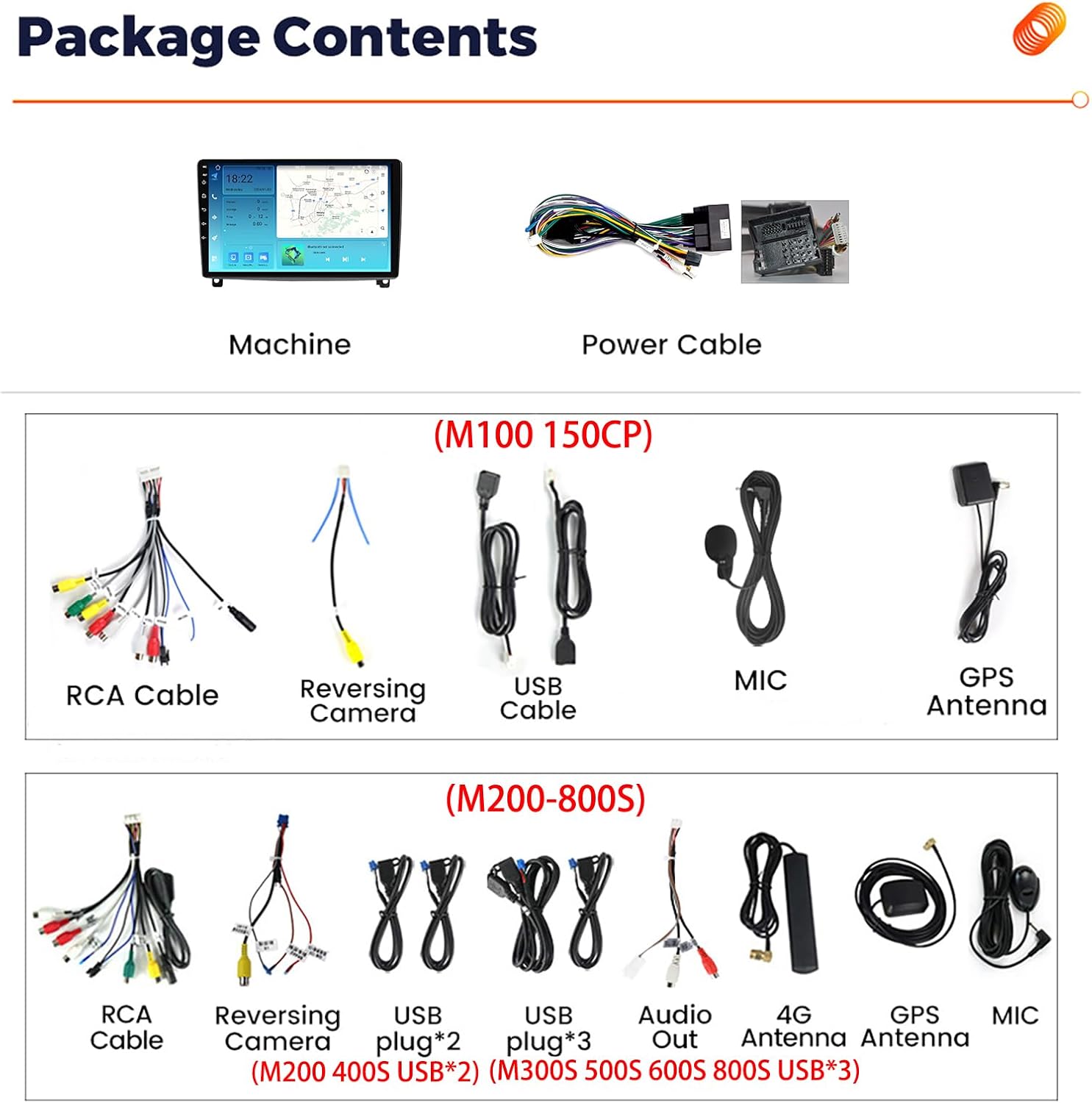
Image 3.1: Overview of the NALsa M300S package contents, including the main head unit, various cables, and antennas. The reversing camera is also shown.
4. Setup and Installation
This section outlines the general steps for installing the NALsa M300S car stereo. Due to the complexity of vehicle electronics, professional installation is strongly recommended.
4.1 Pre-Installation Check
- Confirm vehicle compatibility (Peugeot 407, 407 CC, 407 SW 2004-2011).
- Ensure all package contents are present.
- Gather necessary tools (e.g., trim removal tools, screwdrivers, wire strippers).
- Disconnect the vehicle's negative battery terminal.
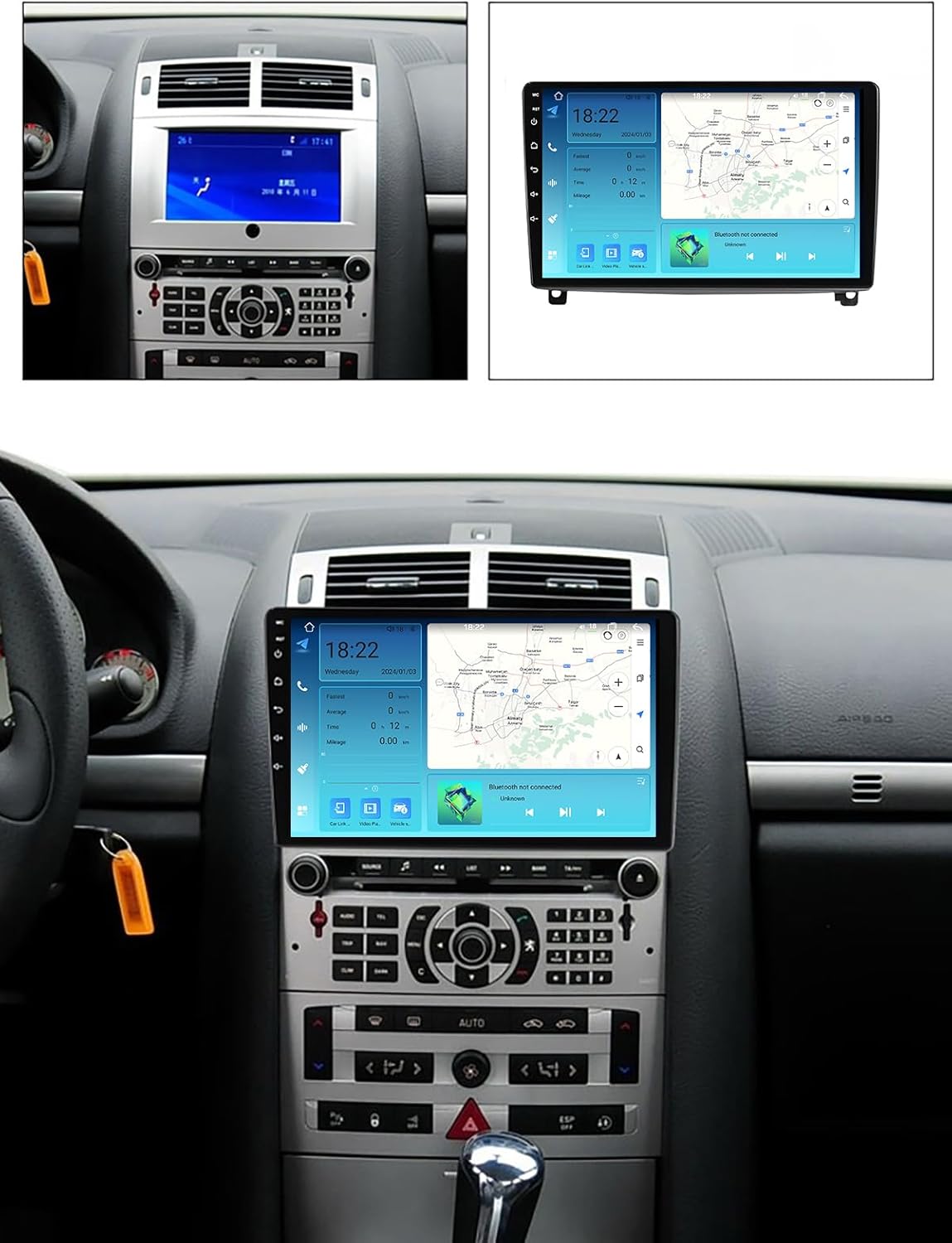
Image 4.1: Visual comparison of the original Peugeot 407 dashboard and the dashboard with the NALsa M300S unit installed, demonstrating fitment.
4.2 Wiring Connections
Refer to the detailed wiring diagrams for your specific model (M300S falls under M200S-M800S wiring). Ensure each wire is connected to its corresponding function in the vehicle's harness.

Image 4.2: Wiring diagrams for the rear of the head unit, illustrating connections for power, speakers, GPS, USB, and other peripherals. The M200S-M800S diagram is relevant for the M300S model.
- Power Cable: Connect the main power harness to the vehicle's power supply.
- RCA Cables: Connect for audio/video output to external amplifiers or monitors.
- USB Cables: Connect the provided USB cables for data transfer, media playback, and Android Auto/CarPlay.
- GPS Antenna: Mount the GPS antenna in a location with a clear view of the sky for optimal signal reception.
- 4G Antenna: For models with 4G LTE support (M200S-M800S), connect the 4G antenna. Insert the SIM card with the chip facing the system module.
- Reversing Camera: Connect the AHD 720P reversing camera according to the diagram. Ensure the trigger wire is connected to the reverse light signal.
- Steering Wheel Control (SWC): Connect the SWC wires to integrate with your vehicle's steering wheel buttons. This unit supports digital SWC.
4.3 Initial Power-Up and Configuration
After all connections are made, reconnect the vehicle's battery. The unit should power on automatically or when the ignition is turned on. Follow the on-screen prompts for initial setup, including language selection, time zone, and network configuration.
5. Operating Instructions
The NALsa M300S operates on Android 12, offering a familiar and intuitive user interface. Navigation is primarily via the 2.5D IPS multi-touch screen.
5.1 Basic Navigation
- Home Screen: Access frequently used apps and widgets.
- App Drawer: Swipe up or tap the app icon to view all installed applications.
- Settings: Access system settings for Wi-Fi, Bluetooth, display, sound, and vehicle-specific configurations.
5.2 Key Features Operation
- GPS Navigation: The unit has a built-in GPS module supporting online and offline maps. Use pre-installed navigation apps or download your preferred ones from the Google Play Store.

Image 5.1: Display showing GPS navigation in action, along with other features like steering wheel control and network connectivity options.
- Bluetooth: Pair your smartphone for hands-free calling and audio streaming.
- Go to Settings > Bluetooth.
- Enable Bluetooth on your phone and the car stereo.
- Select your phone from the list of available devices on the stereo and pair.
- CarPlay / Android Auto (Wireless): The M300S supports wireless CarPlay and Android Auto.
- Ensure your phone's Wi-Fi and Bluetooth are enabled.
- On the car stereo, open the "CarLink" or "ZLink" app.
- Follow the on-screen instructions to connect your phone wirelessly.
- Multimedia Playback: Play audio and video files from USB drives, internal storage, or streaming apps. The unit supports mp3, mp4, mp5, WMA, and JPEG formats.
- Radio (FM/AM/RDS): Access the built-in radio tuner. RDS (Radio Data System) is supported for enhanced radio information.
- Steering Wheel Control (SWC): Configure the steering wheel buttons to control various functions of the stereo, such as volume, track skipping, and mode selection.
- Reversing Camera: When the vehicle is put into reverse gear, the display will automatically switch to the rearview camera feed.
6. Advanced Features
- Android 12 Operating System: Provides a modern, responsive interface with access to the Google Play Store for a wide range of applications.
- High-Resolution IPS Touch Screen: A 1024*600 or 1280*720 resolution 2.5D IPS multi-touch screen offers clear visuals and responsive interaction.

Image 6.1: Visual explanation of the IPS screen technology, highlighting wider viewing angles and improved color reproduction compared to standard TFT screens.
- DSP (Digital Sound Processor): Built-in DSP allows for advanced audio tuning, including surround sound adjustment, bass enhancement, and treble filtering, providing a customizable audio experience.
- 4G LTE & 5G WiFi Connectivity: Stay connected on the go with support for 4G LTE (via SIM card) and 5G WiFi (802.11 b/g/n) for internet access, streaming, and online navigation.
- Cooling Fan: The M300S model includes a powerful cooling fan at the rear to manage heat, ensuring stable performance during extended use.
- Split Screen Functionality: Run two applications simultaneously on the screen, such as navigation and music playback.
- External Device Support: Supports optional external connections for ADAS DVR, TPMS (Tire Pressure Monitoring System), OBD2 (On-Board Diagnostics), and DAB+ (Digital Audio Broadcasting).
7. Maintenance
- Screen Cleaning: Use a soft, lint-free cloth to gently wipe the screen. For stubborn smudges, slightly dampen the cloth with water or a screen-safe cleaner. Avoid harsh chemicals.
- Software Updates: Periodically check for system updates through the device's settings to ensure optimal performance and access to new features.
- Ventilation: Ensure the cooling fan and vents are not obstructed to prevent overheating.
- Cable Connections: Occasionally check all cable connections to ensure they remain secure, especially after driving on rough terrain.
8. Troubleshooting
| Problem | Possible Cause | Solution |
|---|---|---|
| Unit does not power on. | Incorrect power wiring; blown fuse; loose battery connection. | Check power cable connections; inspect vehicle fuses; ensure battery terminals are secure. |
| No sound. | Volume too low; speaker wires disconnected; incorrect audio settings. | Increase volume; check speaker wiring; verify audio output settings in the system. |
| GPS signal weak or lost. | GPS antenna obstructed or improperly mounted; antenna cable loose. | Ensure GPS antenna has a clear view of the sky; check antenna connection. |
| Bluetooth not connecting. | Bluetooth disabled on phone or stereo; incorrect pairing process. | Enable Bluetooth on both devices; re-attempt pairing process from stereo settings. |
| CarPlay/Android Auto not working. | Incorrect app used; phone not compatible; Wi-Fi/Bluetooth issues. | Use "CarLink" or "ZLink" app; ensure phone is compatible and Wi-Fi/Bluetooth are active. |
| Touch screen unresponsive. | System freeze; screen protector interference; physical damage. | Restart the unit (if possible); remove any screen protectors; contact support if persistent. |
If you encounter issues not listed here or require further assistance, please contact NALsa customer support. Professional technical support is available.
9. Specifications (NALsa M300S)
| Feature | Detail |
|---|---|
| Model | M300S |
| Operating System | Android 12.0 (API 29) |
| CPU | 8-core |
| RAM | 4GB |
| ROM (Internal Storage) | 32GB |
| Screen Size | 9 or 10 inch (depending on specific variant) |
| Display Type | 2.5D IPS High-resolution multi-touch |
| Resolution | 1024*600 / 1280*720 (depending on specific variant) |
| Internet Connectivity | 4G LTE (via SIM), 5G WiFi (802.11 b/g/n) |
| Bluetooth Version | 5.0 |
| CarPlay / Android Auto | Wireless Support |
| DSP | Built-in (supports surround sound, bass, treble filtering) |
| Amplifier IC | Toshiba 7851/7850/7838 |
| Cooling | Aluminum heat sink, powerful cooling fan |
| GPS | Built-in module, supports online/offline maps (GPS, BDS, GLONASS) |
| Digital Media Formats | MP3, MP4, MP5, WMA, JPEG |
| Voltage | 12 Volts |
| Item Weight | 5.5 pounds |
| Manufacturer Part Number | MA2-Pe407 |

Image 9.1: Detailed parameter comparison table for various NALsa car multimedia player models, including the M300S, highlighting key specifications.
10. Warranty and Support
NALsa provides professional pre- and post-sales technical support for its products. If you have any questions regarding compatibility, installation, operation, or troubleshooting, please contact customer service.
- Technical Support: Online technical service and professional installation technical support are available.
- Contact: For assistance, you can send a photo of your car's model, year of manufacture, and dashboard center console via chat or Amazon mail to verify compatibility or resolve issues.
Specific warranty details may vary. Please refer to your purchase documentation or contact NALsa customer service for comprehensive warranty information.