
Angrox B0CZRTVDKZ
Angrox Universal Remote Control for Sharp AQUOS TVs
User Instruction Manual
Introduction
This manual provides essential information for the proper setup, operation, and maintenance of your new Angrox Universal Remote Control for Sharp AQUOS TVs. Please read this manual thoroughly before using the product to ensure optimal performance and longevity.
This remote control is designed to be a universal replacement for Sharp LCD TVs released after 2003. It replicates the functionality and design of genuine AQUOS remote controls, providing a seamless user experience.
Product Overview

Figure 1: Front, side, and back views of the Angrox Universal Remote Control. The remote features a standard button layout for easy navigation and a sleek, ergonomic design.
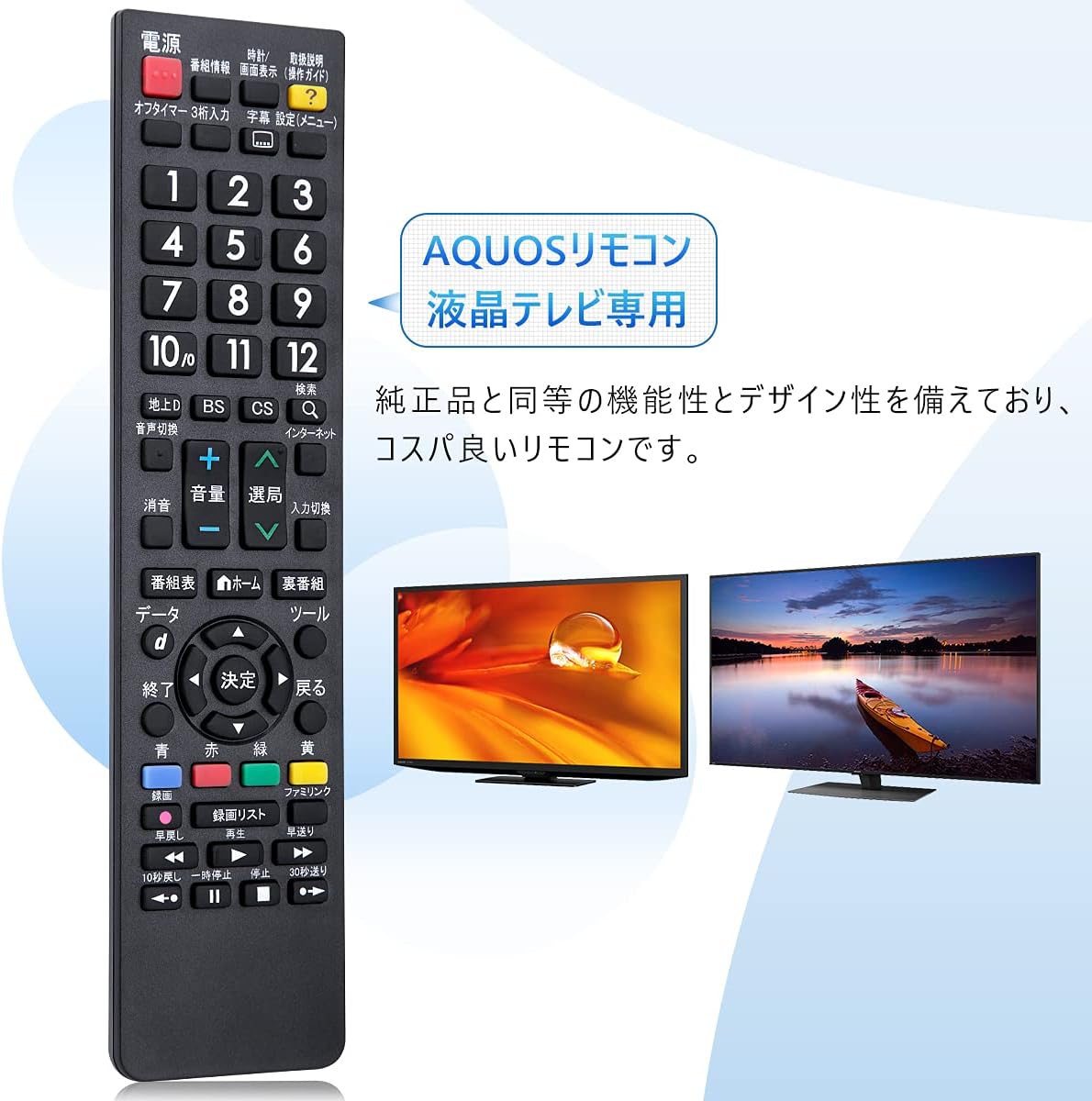
Figure 2: The Angrox remote control, specifically designed for Sharp AQUOS LCD TVs, offering functionality similar to the original remote.

Figure 3: A visual comparison between the Angrox remote and a genuine Sharp AN-58RC1 remote. Note that only four key positions have been changed, with all other functions remaining identical.
Setup
1. Battery Installation
The Angrox Universal Remote Control requires two AAA batteries (sold separately) for operation. No complex setup or programming is needed; simply insert the batteries, and the remote is ready to use.
- Open the battery compartment cover on the back of the remote control.
- Insert two AAA batteries, ensuring the positive (+) and negative (-) terminals align correctly with the markings inside the compartment.
- Close the battery compartment cover securely.

Figure 4: Illustration of battery installation. The remote is designed for immediate use upon battery insertion, requiring no additional setup.
2. Remote Control Number Setting (If Applicable)
If your TV displays a message such as "Remote control number setting is different," you may need to synchronize the remote control number with your TV. It is recommended to set this remote control to "Remote Control 1."
- Press and hold the [1] or [2] button on the remote.
- While holding, press the [Power] button for 5 seconds.
- Match the setting on the main unit (TV) to the remote control's setting.
Operating Instructions
This remote control is designed for intuitive use with Sharp AQUOS LCD TVs. All buttons are pre-configured to match the functions of a genuine AQUOS remote.

Figure 5: The remote control features clear, easy-to-read button labels for comfortable and efficient operation.
Key Functions:

Figure 6: A comprehensive guide to the remote control's buttons and their corresponding functions for Sharp AQUOS TVs.
| Button/Section | Function |
|---|---|
| 電源 (Power) | Turns the TV on or off. |
| 番組情報 (Program Info) | Displays program information. |
| 画面表示 (Screen Display) | Adjusts screen display settings. |
| 取扱説明 (Operation Guide) | Accesses the TV's operation guide. |
| オフタイマー・3桁入力 (Off Timer / 3-digit Input) | Sets off timer or inputs 3-digit numbers. |
| 字幕 (Subtitles) | Toggles subtitles. |
| 設定 (Menu) | Opens the TV's menu. |
| 数字ボタン (0-12) | Selects channels or inputs numbers. |
| 地上D / BS / CS / Q (Terrestrial Digital / BS / CS / Search) | Switches between broadcast types (Terrestrial Digital, BS Digital, 110-degree CS Digital) and search function. |
| 音声切換 (Audio Switch) | Switches audio tracks. |
| 消音 (Mute) | Mutes or unmutes sound. |
| 音量 (+/-) (Volume) | Adjusts volume up or down. |
| 選局 (Channel Select) | Changes channels up or down. |
| 入力切換 (Input Switch) | Switches input sources. |
| 番組表 (Program Guide) | Displays the electronic program guide. |
| ホーム (Home) | Accesses the TV's home screen. |
| 裏番組 (Sub-program) | Switches to a sub-program. |
| データ (Data) | Accesses data broadcasting. |
| 終了 (Exit) | Exits current menu or function. |
| 決定 (Enter) | Confirms selection. |
| ツール (Tools) | Accesses tool menu. |
| 戻る (Back) | Goes back to the previous screen. |
| カラーボタン (青/赤/緑/黄) (Color Buttons) | Functions vary by TV menu or application. |
| 録画 (Record) | Starts recording. |
| 録画リスト (Recording List) | Displays recorded content list. |
| ファミリンク (FamiLink) | Activates AQUOS FamiLink functions. |
| 早戻し / 再生 / 早送り (Rewind / Play / Fast Forward) | Media playback controls. |
| 10秒戻し / 一時停止 / 停止 / 30秒送り (10s Back / Pause / Stop / 30s Forward) | Detailed media playback controls. |
Operating Distance:
For optimal performance, operate the remote control within 10 meters (approximately 33 feet) of your TV. Ensure there are no obstacles between the remote control and the TV's infrared receiver.

Figure 7: The remote control offers long-distance precision control, allowing operation from up to 10 meters away.
Maintenance
- Cleaning: Wipe the remote control with a soft, dry cloth. Do not use abrasive cleaners or solvents.
- Battery Replacement: When the remote control's response becomes sluggish or it stops functioning, replace both AAA batteries with new ones of the same type/model. Do not mix old and new batteries, or different types of batteries.
- Storage: Store the remote control in a cool, dry place away from direct sunlight and extreme temperatures.
Troubleshooting
If you experience issues with your remote control, please refer to the following common problems and solutions:

Figure 8: Visual troubleshooting tips for common remote control issues.
Remote Control Not Functioning?
- Is the TV power on? Ensure your television is powered on.
- Are the batteries depleted? Check if the batteries are exhausted.
- Are the battery polarities reversed? Verify that the positive (+) and negative (-) terminals of the batteries are inserted correctly.
- Does the remote control number match the TV? If your TV displays "Remote control number setting is different," you need to set the same code for the remote control and the TV. (Refer to "Remote Control Number Setting" in the Setup section).
Remote Control Difficult to Operate Under Certain Conditions:
- Obstacles: Ensure there are no obstacles between the remote control and the TV's infrared receiver.
- Direct Sunlight/Strong Lighting: Is the remote receiver exposed to direct sunlight or strong lighting? Change the direction of the lighting if necessary.
- Fluorescent Lights: Are there fluorescent lights nearby?
- Battery Terminals: Are the battery terminals oxidized (slightly blackened)?
- Room Temperature: Has the room temperature dropped extremely low?
Specifications
| Feature | Detail |
|---|---|
| Brand | Angrox |
| Model Number | B0CZRTVDKZ |
| Compatible Devices | Sharp AQUOS LCD TVs (released after 2003) |
| Connectivity Technology | Infrared (IR) |
| Power Source | 2 x AAA Batteries (not included) |
| Product Dimensions | 21.3 x 5 x 1.9 cm (8.39 x 1.97 x 0.75 inches) |
| Weight | 80 g (2.82 ounces) |
| Special Features | No setup required, direct use |
| Maximum Compatible Devices | 1 (TV) |
Support and Warranty
Contacting Support:
If you have any questions or require assistance with your Angrox Universal Remote Control, please contact our customer support team. While a printed instruction manual is not included with the product, our support team is available to help with any unclear points.
You can reach us through the following methods:
- Via Product Page: On the product page, locate and click the "Contact Seller" button next to "Buy Now" (or similar phrasing).
- Via Order History: Go to your order history page, find your order for this product, and click the "Problem with order" button.
Returns and Exchanges:
Our products are fulfilled by Amazon (FBA), which allows for prompt processing of returns. If you wish to return or exchange the product, please contact our store through the methods mentioned above to arrange the process.
Related documentsB0CZRTVDKZ


Ask a question about this manual
Ask about setup, troubleshooting, compatibility, parts, safety, or missing instructions. Manuals+ will review the question and use this page’s manual context to help answer it.