
1. Overview
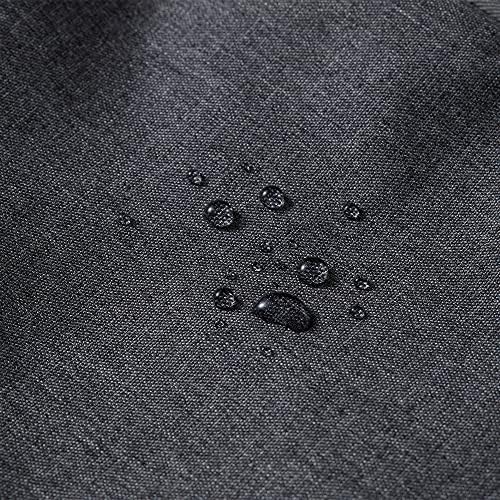
The XPPen ACJ02 Protective Tablet Sleeve is designed to safeguard your pen display or tablet. This sleeve accommodates devices up to 13.3 inches, including XPPen Artist 10, 12, and 13 pen displays. It offers comprehensive protection against daily wear, water splashes, and minor impacts, ensuring your device remains secure during transport and storage.
Key Features:
- Ideal Fit: Specifically tailored for pen tablets and displays up to 13.3 inches.
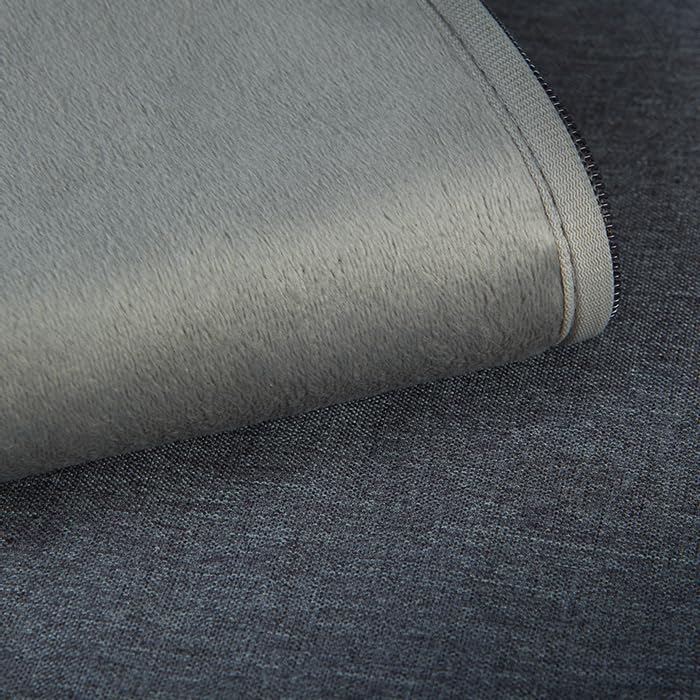
- Durable Construction: Made with a wear-resistant polyester outer fabric.
- Waterproof Design: Provides protection against water damage.
- Shockproof Protection: Offers defense against accidental drops or impacts.
- Soft Fluffy Lining: Cushioned interior protects the screen from scratches.
- Dual Compartments: Features easy-glide zippers and two compartments for organizing your device and accessories.

2. Setup
Follow these steps to prepare your ACJ02 sleeve for use:
- Unpack the Sleeve: Carefully remove the ACJ02 sleeve from its packaging.
- Inspect for Damage: Before first use, visually inspect the sleeve for any signs of damage that may have occurred during shipping.
- Insert Your Device: Gently slide your pen display or tablet into the main compartment. Ensure it fits snugly without requiring excessive force.
- Organize Accessories: Utilize the additional front compartment for storing cables, pens, or other small accessories.
3. Operating
The ACJ02 sleeve is designed for convenient and secure transport of your device and its accessories.
- Carrying: The sleeve can be carried by its integrated handle or placed inside a larger bag for added portability.
- Accessing Contents: Use the smooth-gliding zippers to easily open and close the main and accessory compartments.
- Protection: The combination of the durable outer fabric and soft inner lining provides protection against scratches, dust, and light bumps during transit.

4. Maintenance
To ensure the longevity and effectiveness of your XPPen ACJ02 sleeve, follow these maintenance guidelines:
- Cleaning: Wipe the exterior with a soft, damp cloth. For stubborn spots, a mild soap solution can be used, followed by wiping with a clean, damp cloth. Allow the sleeve to air dry completely before reuse.
- Do Not Machine Wash: Machine washing or tumble drying is not recommended as it may damage the protective layers and fabric integrity of the sleeve.
- Storage: Store the sleeve in a cool, dry place when not in use. Avoid prolonged exposure to direct sunlight or extreme temperatures.
5. Troubleshooting
If you encounter any issues with your ACJ02 sleeve, refer to the following common solutions:
- Device Does Not Fit: Verify that your device's dimensions are within the compatible size of 13.3 inches. The ACJ02 is designed for specific XPPen models and similar-sized tablets.
- Zippers Are Stiff: Ensure no fabric is caught in the zipper teeth. If stiffness persists, a small amount of zipper lubricant (e.g., beeswax or silicone spray) can be applied carefully to the zipper teeth.
- Water Resistance Appears Reduced: While the sleeve is designed to be waterproof, prolonged exposure to heavy rain or submersion is not recommended. Ensure the zippers are fully closed for optimal water resistance.
6. Specifications
| Feature | Detail |
|---|---|
| Brand | XPPen |
| Model Number | ACJ02 |
| Colour | Grey |
| Compatible Devices | Tablets, Pen Displays (up to 13.3 inches) |
| Form Factor | Sleeve |
| Shell Type | Soft |
| Compatible Device Size Maximum | 13.3 Inches |
| Product Features | Lightweight, Waterproof, Wear-resistant, Shockproof |
| Water Resistance Level | Waterproof |
| Enclosure Material | Fur, Polyester |
| Item Dimensions (L x W x H) | 43.5 x 26 x 3 Centimeters |
| Country of Origin | China |

7. Warranty
The XPPen ACJ02 Protective Tablet Sleeve comes with a 1-Year Replacement Warranty. Please retain your proof of purchase for all warranty claims. This warranty covers manufacturing defects and material flaws under normal use.
8. Support
For product inquiries, technical assistance, or warranty claims, please contact the following:
- Importer: M/s DNS Overseas - 1003, Raheja Chambers, 213 Nariman Point, Mumbai - 400 021
- Manufacturer: Hanvon Ugee Technology Co. Ltd. Address: No. 4 Building, Fulongte Industrial Park, Huaxing Road, Dalang Street, Longhua District, Shenzhen, China 518019