
BOMATA B619
BOMATA Waterproof IPX6 Kitchen Scale Instruction Manual
Model: B619
1. Setup
Before first use, please ensure you follow these steps for optimal performance.
1.1 Unpacking and Initial Inspection
- Carefully remove the scale from its packaging.
- Inspect the scale for any visible damage. If damaged, do not use and contact customer support.
- Ensure all components are present: Kitchen Scale unit, AAA batteries.
1.2 Battery Installation
The BOMATA Kitchen Scale is powered by two AAA batteries (included).
- Locate the battery compartment on the underside of the scale.
- Open the battery compartment cover.
- Insert two AAA batteries, ensuring correct polarity (+/-).
- Close the battery compartment cover securely.
1.3 Removing Protective Pads
For accurate measurements, it is crucial to remove the rubber pads located at the bottom of the scale pan before use.
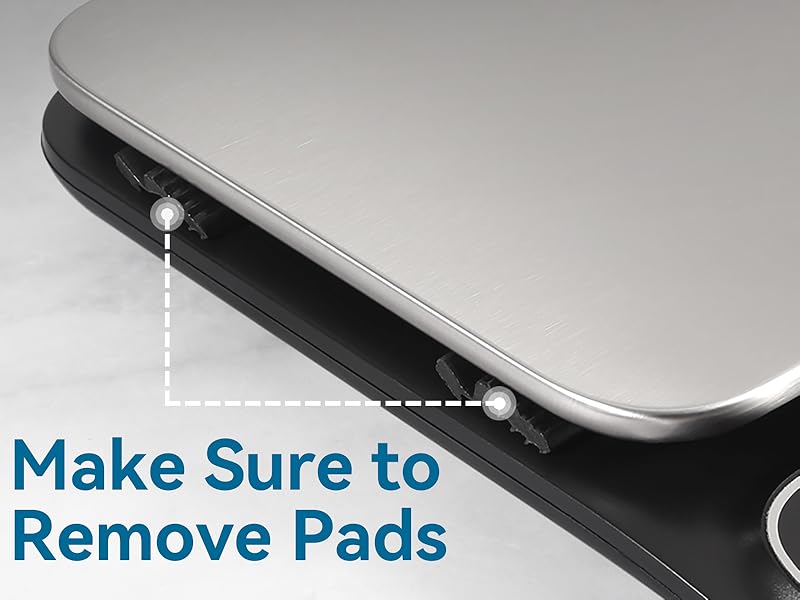
Image: Underside of the scale highlighting the rubber pads to be removed before use.
1.4 Placement
Place the scale on a hard, flat, and stable surface to ensure accurate readings. Avoid soft or uneven surfaces.
2. Operating Instructions
The BOMATA Kitchen Scale is designed for ease of use with touch-sensitive buttons and a clear LCD display.
2.1 Power On/Off
- To power on the scale, press the TARE button (power symbol).
- To power off the scale, press and hold the TARE button until the display turns off.
- The scale features an auto-off function to conserve battery life.
2.2 Unit Conversion
The scale supports 7 units of measurement for versatile use.
- Press the UNIT button to cycle through the available units: oz, lb:oz, fl'oz, fl'oz(milk), g, ml, ml(milk).

Image: The scale displaying different measurement units, including grams, milliliters, pounds, and ounces.
2.3 Tare Function
The Tare function allows you to subtract the weight of a container or previous ingredients, providing an accurate measurement of only the new item.
- Place an empty container on the weighing platform. The display will show its weight.
- Press the TARE button. The display will reset to "0.00".
- Add the item you wish to weigh into the container. The display will show only the weight of the added item.

Image: Step-by-step illustration of using the Tare function to weigh ingredients accurately.
2.4 High Precision Measurement
The scale offers high precision for accurate weighing of small quantities.
- Resolution/Increment: 0.1 g / 0.01 oz.
- Measuring range: 0.5 g to 5 kg (0.01 oz to 11 lb).

Image: The scale displaying a precise measurement of a small amount of powder.
2.5 Customizing Settings (Auto-off & Beep)
You can adjust the auto-off time and disable the beep sound.
- To set auto-off time: Press and hold the 'Mode' button. The first setting displayed will be the auto-off time in minutes (options typically include 2, 4, 6, 8, or 10 minutes). Use the 'Unit' button to cycle through options and 'Tare' to confirm.
- To disable/enable beep: After setting the auto-off time, press 'Tare' again. The second setting will be for the beep sound (on/off). Use the 'Unit' button to toggle and 'Tare' to confirm.
3. Maintenance
Proper maintenance ensures the longevity and accuracy of your BOMATA Kitchen Scale.
3.1 Cleaning
The scale features an IPX6 waterproof design, making cleaning simple and effective.
- The scale's internals are waterproof, allowing it to be rinsed directly under running water.
- Use a soft cloth and mild detergent if necessary.
- After rinsing, dry the scale thoroughly with a clean cloth.
- Important: While the scale is waterproof, avoid submerging it completely, especially the battery compartment. If the battery compartment gets wet, remove the batteries and dry the compartment thoroughly to prevent corrosion.

Image: The scale being rinsed under running water, demonstrating its IPX6 waterproof capability.
3.2 Storage
Store the scale in a dry place away from extreme temperatures and humidity.
- Its compact size allows for convenient storage in a drawer or cabinet.
4. Troubleshooting
If you encounter any issues with your scale, refer to the following common problems and solutions.
- Inaccurate Readings / Scale Not Zeroing:
Ensure the scale is placed on a hard, flat, and stable surface. Uneven surfaces can affect accuracy. Also, verify that the protective rubber pads have been removed from the bottom of the scale pan. - Display Not Turning On / No Power:
Check if the AAA batteries are inserted correctly with the proper polarity. Replace batteries if they are old or depleted. - Scale Gets "Stuck" / Unresponsive:
Occasionally, the scale may become unresponsive. A light tap or two on the weighing platform can often resolve this issue, returning it to normal operation. - Corrosion in Battery Compartment:
If the scale has been exposed to water, ensure the battery compartment is completely dry. Remove batteries and dry the compartment thoroughly to prevent corrosion.
5. Specifications
Detailed technical specifications for the BOMATA Kitchen Scale.
| Brand | BOMATA |
| Model | B619 |
| Color | 0.1g/5kg Non-rechargeable Black |
| Display Type | LCD with Backlight |
| Weight Limit | 5 Kilograms (11 lbs) |
| Readout Accuracy | 0.1 g or 0.01 oz |
| Material | Stainless Steel Weighing Pan |
| Product Dimensions | 7.8 x 5.79 x 1.18 inches (19.8 x 14.7 x 3 cm) |
| Item Weight | 1.41 pounds |
| Power Source | 2 x AAA Batteries (included) |
| Waterproof Rating | IPX6 |
| Manufacturer | Shanghai Daoqian Investment Management Co., LTD |

Image: Visual representation of the scale's dimensions.
6. Warranty and Support
For warranty information and customer support, please refer to the product packaging or contact the seller directly through your purchase platform. Keep your proof of purchase for any warranty claims.
Ask a question about this manual
Ask about setup, troubleshooting, compatibility, parts, safety, or missing instructions. Manuals+ will review the question and use this page’s manual context to help answer it.