
IHomeAdore F6364-2024
IHomeAdore 52 Inch Ceiling Fan User Manual
Model: F6364-2024
1. Product Overview
The IHomeAdore 52 Inch Ceiling Fan is designed to provide efficient air circulation for various indoor and outdoor spaces such as farmhouses, patios, living rooms, and bedrooms. This model features a reversible DC motor, remote control operation, and 6 adjustable speeds, ensuring comfort throughout the year while maintaining quiet operation and energy efficiency.


2. Safety Information
Please read all instructions carefully before beginning installation. Failure to follow these instructions could result in electric shock, fire, or personal injury.
- Ensure the power is turned off at the circuit breaker before installation or maintenance.
- All wiring must be in accordance with national and local electrical codes.
- The fan must be mounted to a ceiling joist or support structure capable of supporting the fan's weight (7.7 pounds).
- Do not operate the fan with damaged wiring or components.
- Keep hands, hair, and clothing clear of the fan blades when in operation.
3. Package Contents
Verify that all components are present and undamaged before proceeding with installation.
- Ceiling Fan Motor Assembly
- Fan Blades (3)
- Downrods (4" and 10" included)
- Mounting Bracket
- Remote Control
- Hardware Pack (screws, washers, wire nuts)
- Instruction Manual
4. Specifications
| Feature | Detail |
|---|---|
| Brand | IHomeAdore |
| Model Name | F6364-2024 |
| Size | 52 Inch |
| Color | Black |
| Material | Iron |
| Motor Type | DC Motor (Reversible) |
| Airflow | 5800 CFM |
| Speeds | 6 |
| Control Method | Remote Control |
| Noise Level | Ultra-quiet (approx. 30dB) |
| Power Source | DC, 120 Volts |
| Wattage | 40 watts |
| Product Dimensions | 52"L x 52"W x 10.2"H |
| Item Weight | 7.7 Pounds |
| Assembly Required | Yes |
| Indoor/Outdoor Usage | Outdoor (Covered Patios) / Indoor |


5. Installation Guide
Professional installation is recommended. Ensure all power is disconnected before starting.
5.1 Mounting the Bracket
- Locate a suitable ceiling joist or outlet box rated for fan support.
- Secure the mounting bracket to the ceiling using the provided screws. Ensure it is firmly attached.
5.2 Assembling the Fan
- Attach the chosen downrod (4" or 10") to the motor assembly.
- Carefully feed the electrical wires from the motor through the downrod.
- Attach the fan blades to the motor housing using the blade screws. Ensure they are securely fastened.

5.3 Wiring the Fan
- Hang the fan assembly onto the mounting bracket.
- Connect the fan's electrical wires to the household wiring according to the wiring diagram in the full manual (typically black to black, white to white, and green/bare copper to ground). Use wire nuts to secure connections.
- Tuck all wires neatly into the outlet box.
5.4 Final Assembly
- Slide the canopy up to the ceiling and secure it to the mounting bracket with the provided screws.
- Restore power at the circuit breaker.
- Test the fan operation using the remote control.
6. Operation Guide
Your IHomeAdore ceiling fan is operated via the included remote control.
6.1 Remote Control Functions

- Fan ON/OFF: Press to turn the fan on or off.
- Fan 1-6 Speed: Adjust fan speed from 1 (lowest) to 6 (highest).
- Direction of the Fan (Forward/Reverse): Toggles between downdraft (summer mode) and updraft (winter mode).
- Natural Wind: Activates a mode that simulates natural breeze by varying fan speed.
- 30Min / 2H Timing: Sets a timer for the fan to operate for 30 minutes or 2 hours before automatically turning off.
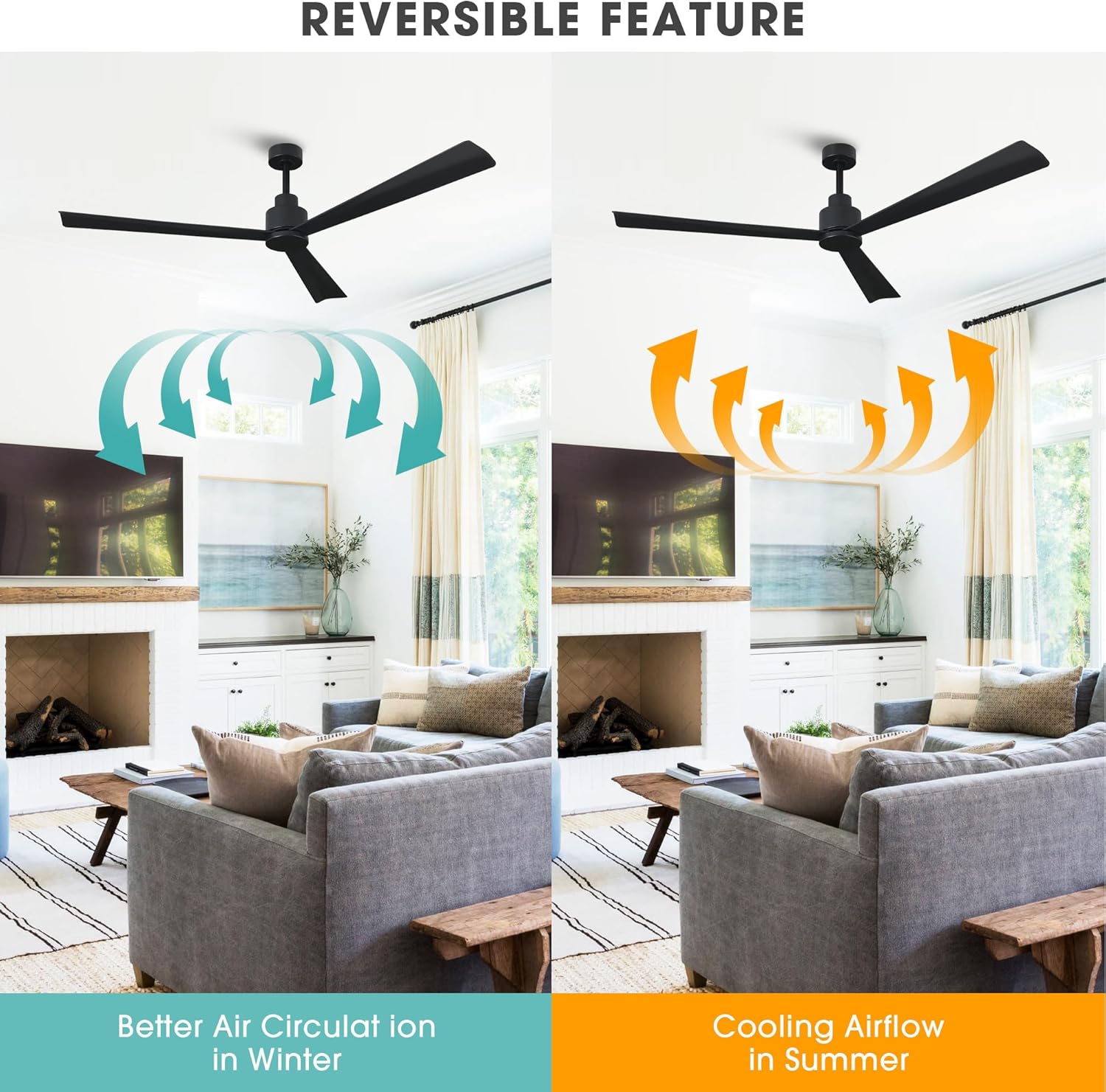
6.2 Reversible Function
The reversible DC motor allows for year-round comfort:
- Summer Mode (Downdraft): Blades rotate counter-clockwise, pushing cool air down, creating a cooling effect.
- Winter Mode (Updraft): Blades rotate clockwise, drawing warm air up and distributing it evenly throughout the room, helping to reduce heating costs.
7. Maintenance
Regular maintenance ensures optimal performance and longevity of your ceiling fan.
- Cleaning: Dust the fan blades and motor housing periodically with a soft, damp cloth. Do not use abrasive cleaners or solvents.
- Blade Balance: If the fan wobbles, check that all blade screws are tight. A balancing kit (not included) may be used if wobbling persists.
- Motor Lubrication: The DC motor is permanently lubricated and does not require additional oiling.
- Remote Control: Replace batteries in the remote control when its range decreases or it becomes unresponsive.
8. Troubleshooting
| Problem | Possible Cause | Solution |
|---|---|---|
| Fan does not start | No power to the fan; Loose wire connections; Remote control battery dead. | Check circuit breaker; Verify all wire connections are secure; Replace remote control battery. |
| Fan wobbles | Loose blade screws; Unbalanced blades; Loose mounting bracket. | Tighten all blade screws; Use a balancing kit; Ensure mounting bracket is secure. |
| Remote control not working | Dead battery; Incorrect pairing; Obstruction between remote and receiver. | Replace battery; Refer to remote pairing instructions (if applicable); Remove obstructions. |
| Fan makes unusual noise | Loose screws; Motor issue; Blades hitting an obstruction. | Check and tighten all screws; Contact customer support if motor noise persists; Ensure no obstructions are near blades. |
9. Warranty and Support
IHomeAdore offers a Lifetime Warranty on this ceiling fan, ensuring peace of mind regarding its quality and durability.
For technical support, warranty claims, or any inquiries, please contact IHomeAdore customer service through their official website or the contact information provided at the point of purchase. Please have your model number (F6364-2024) and purchase date ready when contacting support.
Visit the official IHomeAdore store for more information: IHomeAdore Store
Related documentsF6364-2024


Ask a question about this manual
Ask about setup, troubleshooting, compatibility, parts, safety, or missing instructions. Manuals+ will review the question and use this page’s manual context to help answer it.