
1. Introduction
Thank you for choosing the Monster Solar X Speaker. This outdoor wireless speaker combines solar charging capabilities with 360-degree immersive sound and adjustable LED lighting, designed for versatile indoor and outdoor use. This manual provides essential information for setting up, operating, and maintaining your speaker to ensure optimal performance.

Figure 1: Monster Solar X Speaker
2. Product Overview
Key Features:
- Wireless Connectivity: Seamless Bluetooth pairing with smartphones, tablets, and other compatible devices within 3 feet.
- Multi-Speaker Pairing: Connect up to 8 Monster Solar X speakers using EZ Play2 technology for synchronized audio.
- Solar Charging: Integrated solar panels provide extended playtime, ideal for outdoor environments.
- 360° Immersive Sound: Features adjustable omni-directional sound with 75dB THD + Noise, 30W max power, and a built-in subwoofer.
- Adjustable LED Ambient Lighting: Customizable lighting options with a convenient light timer.
- Long Battery Life: Up to 8 hours of playtime on a single charge.
- Weather Resistant: IPX5 rating ensures durability against wind, light rain, dust, and temperatures from 32°F to 104°F.
- Portable Design: Lightweight at 9 lbs with a convenient carrying handle.
Components and Controls:

Figure 2: Speaker Controls and Features
- Solar Panel: Located on the top surface for solar charging.
- Carrying Handle: Integrated for easy portability.
- 360° Light: Provides ambient LED lighting.
- 360° Sound: Speaker grille for omni-directional audio output.
- Sub-Woofer: Down-firing for enhanced bass.
- USB-C Charging Port: For wired charging and powering external devices.
- Power Button: Turns the speaker on/off.
- Bluetooth Pairing Button: Initiates Bluetooth pairing mode.
- EZ Play 2 Pairing Button: For connecting multiple speakers.
- Color Button: Changes LED light colors and modes.
- Volume Down/Up Buttons: Adjusts audio volume.
3. Setup
Initial Charge:
Before first use, fully charge the Monster Solar X Speaker for 6.5 hours using the provided USB-C charging cable. A wall adapter is not included.
Powering On/Off:
To power on the speaker, press and hold the Power Button for 2 seconds. The speaker will emit an audible confirmation. To power off, press and hold the Power Button again for 2 seconds.

Figure 3: Speaker ready for outdoor use
4. Charging
Solar Charging:
The Monster Solar X Speaker features a built-in solar panel on its top surface. Place the speaker in direct sunlight to utilize solar charging. Full solar charging takes approximately 8 hours and provides over 8 hours of playtime.
USB-C Charging:
For faster charging or when sunlight is unavailable, connect the provided USB-C cable to the speaker's USB-C port and a compatible USB wall adapter (not included). The red light indicates charging, and a solid red light signifies a full charge. A quick flashing red light indicates low battery.

Figure 4: Solar panel for convenient outdoor charging
Product Overview Video:
Video 1: Official Monster Solar X Product Overview. This video provides a brief visual introduction to the speaker's features and design.
5. Bluetooth Connection
To connect your device to the Monster Solar X Speaker via Bluetooth:
- Ensure the speaker is powered on. It will automatically enter Bluetooth pairing mode if unpaired, indicated by a flashing blue LED.
- On your smartphone, tablet, or other compatible device, open the Bluetooth settings.
- Search for and select "Monster SolarX" from the list of available devices.
- Once connected, the blue LED will become solid, and the speaker will emit a confirmation tone.
- The speaker will automatically reconnect to the last paired device when powered on, if within range.
6. EZ Play 2 Multi-Speaker Pairing
The EZ Play2 technology allows you to connect up to 8 Monster Solar X speakers for a synchronized audio experience.

Figure 5: EZ Play 2 Multi-Speaker Setup
- Power on all speakers you wish to connect.
- Pair your mobile device with one speaker (this will be your Master Speaker) via Bluetooth as described in Section 5.
- On the Master Speaker, press the EZ Play 2 Pairing Button (infinity symbol). The white LED lights will become solid, and the speaker will say "Tone" to confirm EZ Play 2 mode is active.
- The other speakers will automatically detect and connect to the Master Speaker. Once connected, their white LED lights will also become solid.
7. LED Lighting Control
The Monster Solar X Speaker features adjustable LED ambient lighting to enhance your listening experience.
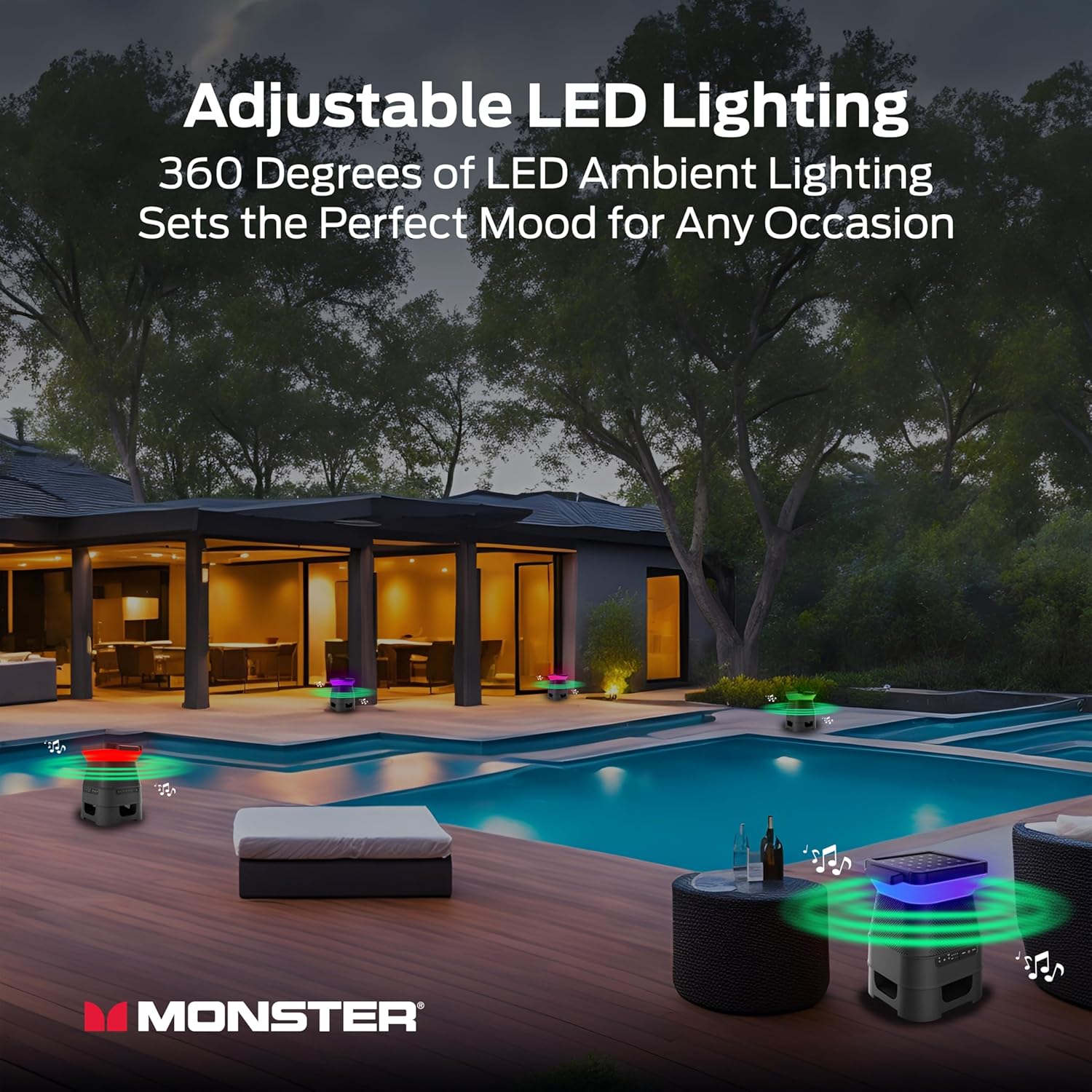
Figure 6: Speakers providing ambient lighting by a pool
On-Device Control:
Press the Color Button on the speaker to cycle through various LED colors and lighting modes. This allows for quick adjustments to suit your mood or environment.
App Control:
For advanced control over lighting effects, colors, brightness levels, and to set a light timer, download the Monster app available on iOS and Android devices. The app provides a comprehensive interface for customization.

Figure 7: Controlling LED lighting via the Monster App
8. Operating Instructions
Audio Playback:
Once connected via Bluetooth, simply start playing audio from your paired device. Use the volume buttons on the speaker or your device to adjust the sound level.
Portability:
The speaker's lightweight design and integrated carrying handle make it easy to transport. Its weather-resistant features allow for use in various outdoor settings.

Figure 8: Speaker in a portable outdoor setting
9. Maintenance
Cleaning:
Wipe the speaker with a soft, damp cloth. Avoid using harsh chemicals or abrasive cleaners, as these can damage the surface or internal components.
Water Resistance:
The speaker has an IPX5 water resistance rating, meaning it is protected against low-pressure water jets from any direction. It is resistant to light rain and splashes but should not be submerged in water.
Storage:
When not in use for extended periods, store the speaker in a cool, dry place. Ensure it is fully charged before storing to prolong battery life.
10. Troubleshooting
- No Power: Ensure the speaker is fully charged. Connect it to a power source using the USB-C cable.
- Cannot Pair Bluetooth: Make sure the speaker is in pairing mode (flashing blue LED). Check that your device's Bluetooth is enabled and within 3 feet of the speaker. Try unpairing and re-pairing the device.
- No Sound: Check the volume levels on both the speaker and your paired device. Ensure the speaker is properly connected via Bluetooth.
- EZ Play 2 Connection Issues: Ensure all speakers are powered on and within range of the Master Speaker. Re-initiate EZ Play 2 pairing on the Master Speaker.
- LED Lights Not Working: Check if the speaker is powered on. Use the Color Button or the Monster app to cycle through lighting modes.
11. Specifications
| Feature | Specification |
|---|---|
| Model Name | MNSOLX-BLK |
| Brand | Monster |
| Speaker Type | Outdoor |
| Connectivity Technology | Bluetooth |
| Wireless Communication Technology | Bluetooth |
| Bluetooth Range | 3 Feet |
| Power Source | Solar Power, USB-C |
| Speaker Maximum Output Power | 30 Watts |
| Signal-to-Noise Ratio | 75 dB |
| Audio Output Mode | Stereo |
| Surround Sound Channel Configuration | 2.1 |
| Water Resistance Level | IPX5 (Water Resistant) |
| Product Dimensions | 14.25"D x 11.25"W x 11.25"H |
| Item Weight | 8.82 pounds (4000 Grams) |
| Battery | 1 Lithium Ion battery (included) |
| Charging Time (First Use) | 6.5 Hours |
| Playtime | Up to 8 hours |
12. Safety Information
- Do not expose the speaker to extreme temperatures outside its operating range (32°F – 104°F).
- Avoid direct submersion in water despite its water-resistant rating.
- Keep the speaker away from open flames or heat sources.
- Do not attempt to disassemble or modify the speaker. This will void the warranty.
- Use only the provided USB-C cable for charging.
13. Warranty and Support
The Monster Solar X Speaker comes with a Limited Warranty. For detailed warranty information, product support, or service inquiries, please refer to the official Monster website or contact their customer service. The included product manual and quick start guide also contain additional support information.


