1. Introduction
This manual provides essential information for the proper setup, operation, and maintenance of your Hisense 65U72NQ Mini-LED 4K Smart TV. Please read this manual thoroughly before using the television to ensure safe and optimal performance.

Front view of the Hisense 65U72NQ Mini-LED 4K Smart TV, showcasing its sleek design and vibrant display.
2. Setup and Installation
2.1 What's in the Box
Verify that all components are present before proceeding with the setup.
- Televisore (Television)
- Cavo di Alimentazione (Power Cable)
- Telecomando (Remote Control)
- User Manual (This document)

An illustration detailing the dimensions of the 65-inch Hisense TV and a list of items included in the packaging.
2.2 Physical Installation
Choose a stable and level surface for the television. Ensure adequate ventilation around the unit. For wall mounting, use a VESA compatible bracket (400x300 mm for this model) and consult a professional for installation.

Various views of the Hisense TV, including the back panel, side profile, and close-ups of the stand and thin bezel.
2.3 Connecting Devices
Connect your external devices such as gaming consoles, soundbars, and media players to the appropriate ports on the TV's rear panel.
- HDMI: Four HDMI 2.1 ports are available, with one supporting eARC for enhanced audio return.
- USB: Two USB ports for flash drives.
- Ethernet: For wired network connection.
- Antenna/Cable: Two antenna inputs (ANT 1 for DVB-T2/T/C, ANT 2 for DVB-S2/S).
- Digital Audio Out: For connecting to external audio systems.
- Headphone: For private listening.

A detailed diagram of the Hisense TV's back panel, clearly labeling all available input and output ports including HDMI, USB, Ethernet, and antenna connections.
3. Operating the Television
3.1 Remote Control Functions
The included remote control allows full navigation and control of your TV. It features one-touch access buttons for popular streaming services and supports voice commands.
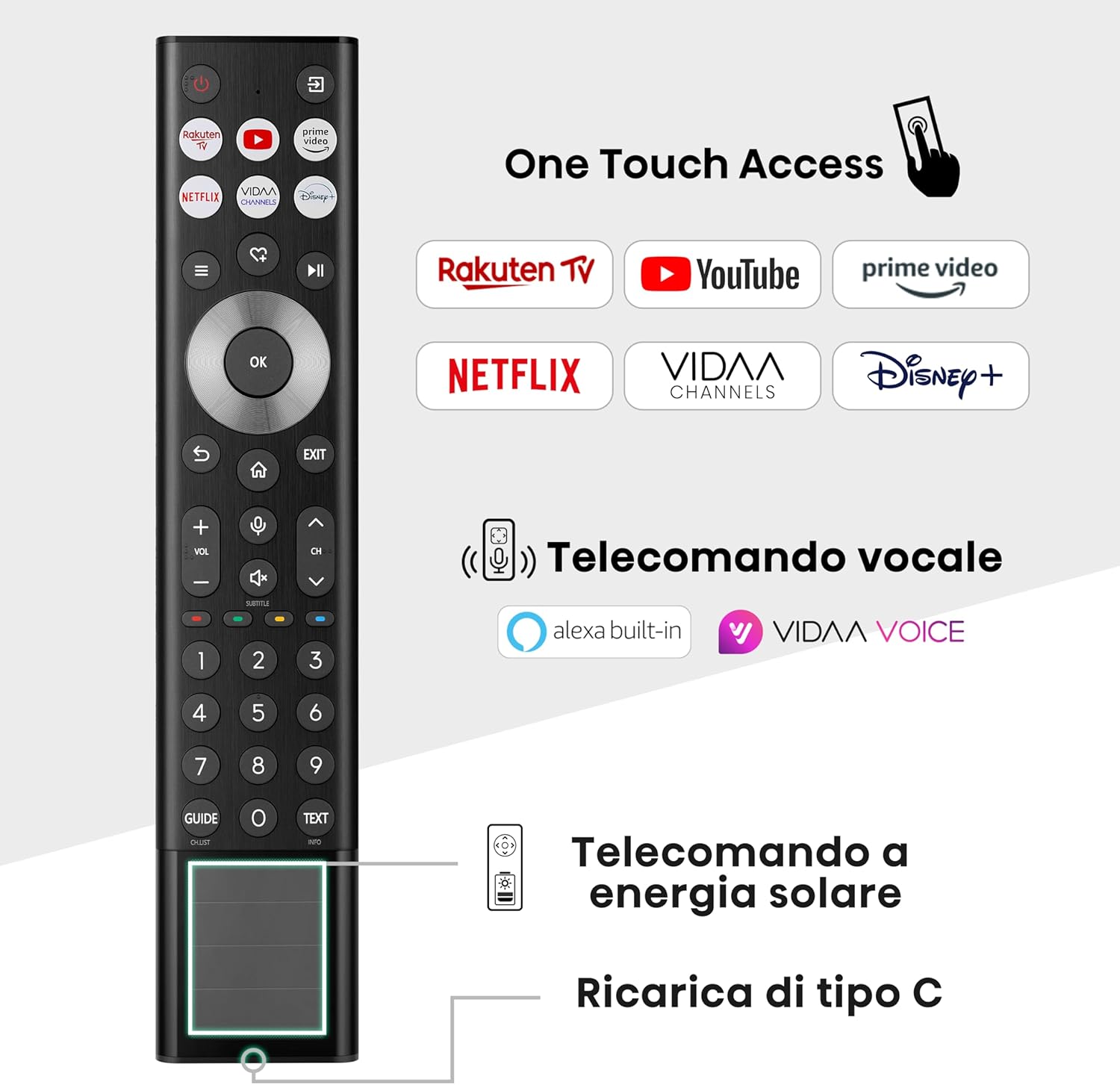
An image of the Hisense TV remote control, highlighting its solar charging capability, USB-C charging port, and dedicated buttons for voice control and popular streaming apps like Netflix and Prime Video.
3.2 Smart TV Features (VIDAA U7)
Your Hisense TV runs on the VIDAA U7 Smart TV operating system, offering a fast and intuitive user experience with integrated Alexa and VIDAA Voice for hands-free control.
- Voice Control: Use Alexa Built-in or VIDAA Voice for hands-free commands.
- Streaming Apps: Access popular services like Netflix, Prime Video, YouTube, and Disney+.
- Screen Sharing: Supports Airplay 2 and Android Screen Sharing for casting content from your mobile devices.

A screenshot of the Hisense VIDAA Smart TV interface, displaying a selection of streaming applications and content recommendations.
3.3 Picture and Sound Settings
The 65U72NQ features Mini-LED PRO technology with Full Array Local Dimming for enhanced contrast and brightness up to 1500 nits. The Hi-View Engine PRO optimizes picture quality using AI.
- Display Technology: Mini-LED PRO, QLED Display with Quantum Dot Colour.
- HDR Support: Dolby Vision IQ, HDR 10+ Adaptive, HLG, HDR10.
- Audio: Integrated subwoofer for deep bass, Dolby Atmos support for immersive sound.

An overview graphic highlighting key features of the Hisense U7 MiniLED ULED TV, including Mini-LED PRO, Quantum Dot Color, Hi-View Engine PRO, AI Sports Mode, HDR compatibility, Dolby Vision/Atmos, 144Hz Game Mode PRO, and integrated subwoofer.

An illustrative diagram demonstrating the Mini-LED Pro technology with Full Array Local Dimming, showing how precise backlighting enhances picture quality and achieves up to 1500 nits of brightness.
3.4 Gaming Features
Experience smooth and responsive gaming with the 144Hz Game Mode PRO, featuring AMD FreeSync Premium Pro and Variable Refresh Rate (VRR).

A visual comparison demonstrating the fluidity of 144Hz Game Mode PRO with VRR, showing a racing car scene with and without the feature enabled.
4. Maintenance
Regular maintenance ensures the longevity and optimal performance of your television.
- Cleaning: Gently wipe the screen with a soft, dry microfiber cloth. For stubborn marks, use a screen-specific cleaning solution applied to the cloth, not directly to the screen. Clean the TV's exterior with a soft, damp cloth.
- Ventilation: Ensure the ventilation openings on the back of the TV are not blocked to prevent overheating.
- Software Updates: Periodically check for and install software updates through the TV's settings menu to ensure you have the latest features and bug fixes.
5. Troubleshooting
If you encounter issues with your television, refer to the following common solutions before contacting customer support.
| Problem | Possible Solution |
|---|---|
| No Power | Ensure the power cable is securely connected to both the TV and a working power outlet. Check the power indicator light on the TV. |
| No Picture/Sound | Verify the correct input source is selected. Check all cable connections (HDMI, antenna). Try a different source device. |
| Remote Control Not Working | Check the remote's battery level (solar charging or USB-C). Ensure there are no obstructions between the remote and the TV. |
| Smart Features Not Responding | Check your internet connection (wired or Wi-Fi). Restart the TV by unplugging it for a few minutes and plugging it back in. |
6. Specifications
Key technical specifications for the Hisense 65U72NQ television.
| Feature | Detail |
|---|---|
| Model Number | 65U72NQ |
| Screen Size | 65 Inches / 166 cm |
| Display Technology | Mini LED, QLED |
| Resolution | 4K (3840x2160) |
| Refresh Rate | 144 Hz |
| Peak Brightness | Up to 1500 nits |
| HDR Support | Dolby Vision IQ, HDR 10+ Adaptive, HLG, HDR10 |
| Smart TV Platform | VIDAA U7 |
| Voice Assistant | Alexa Built-in, VIDAA Voice |
| Connectivity | Bluetooth, Wi-Fi, USB, Ethernet, HDMI (4x HDMI 2.1, 1x eARC) |
| Dimensions (WxDxH) | 144.9 x 7.7 x 83.8 cm (without stand) |
| Weight | 20.8 kg |
| Energy Efficiency Class | D |
7. Warranty and Support
For warranty information and customer support, please refer to the details below.
- Returns Policy: If you wish to return a product within 30 days of receipt because you have changed your mind, please consult the Amazon help page on returns.
- Defective/Damaged Products: If you have received a defective or damaged product, please consult the Amazon help page on defective or damaged products.
- Marketplace Purchases: For specific information on purchases made on the Marketplace, consult the Amazon help page on Marketplace purchases.
- Customer Support: For further assistance, please contact Hisense customer support or refer to the official Hisense website for detailed support resources.