
1. Introduction
This manual provides detailed instructions for the safe operation, installation, and maintenance of your DJCLUB 60W LED Moving Head Stage Light. Please read this manual thoroughly before using the product to ensure proper function and to prevent damage or injury. This product is designed for professional stage lighting applications, offering dynamic lighting effects with its powerful LED engine, gobo, and color wheels.
2. Safety Instructions
- Always connect the unit to a grounded circuit to avoid the risk of electrocution.
- Ensure the power voltage matches the rated voltage of the unit.
- Do not open the housing. There are no user-serviceable parts inside. Refer all servicing to qualified personnel.
- Avoid direct eye exposure to the light source.
- Ensure adequate ventilation around the unit to prevent overheating. Maintain a minimum distance of 0.5 meters from flammable materials.
- Mount the unit securely using appropriate hardware. Always use a safety cable when mounting overhead.
- Disconnect power before cleaning or performing any maintenance.
- Do not operate the unit if the power cord is damaged.
3. What's in the Box
Upon unpacking, please verify that all components listed below are included and in good condition:
- LED Moving Head 60W Stage Lighting Unit (2 units for this package)
- Power Cable
- DMX Cable
- Omega Bracket
- Instruction Manual

A pair of DJCLUB 60W LED Moving Head Stage Lights, showcasing their compact design and control panel.
4. Product Features
- Light Source: Powerful 60W cool white LED engine for stable and bright output.
- Color Wheel: 8 colors + half-color effect + color rotation with adjustable speed.
- Gobo Wheel: 7 gobos + open, with gobo shaking and rotation functions.
- Movement: Automatic error correction for rotation. Pan (X-axis): 540°, Tilt (Y-axis): 270°. Speed controllable.
- Control Modes: Automatic operation, Sound activated, DMX512 (9/11 channels), Master-Slave, Strobe, Pattern Dithering.
- Brightness: Up to 20500 Lux.
- Beam Angle: 13°.
- Construction: Durable Acrylonitrile Butadiene Styrene (ABS), Aluminum, and Iron materials.
- Cooling: Efficient heat dissipation system with a smart cooling silent fan.
- Compact Design: Dimensions of 6.1 inches * 5.7 inches * 10.6 inches, making it portable and easy to mount.

Detailed view of the DJCLUB 60W LED Moving Head Light, highlighting its dimensions (15.5cm width, 14.5cm depth, 27cm height) and illustrating its 7 colors, white, split colors, and rainbow effect capabilities.

An illustration of the DJCLUB 60W LED Moving Head Light's movement capabilities, showing a 540-degree pan and 180-degree tilt rotation.

Visual representation of the 7 colors plus white, and various gobo patterns (7 gobos plus open) that can be projected by the moving head light, including gobo shaking and half-color effects.
5. Setup
5.1 Unpacking
Carefully remove the unit from its packaging. Inspect for any damage during transit. Retain the packaging for future transport or storage.
5.2 Mounting
The DJCLUB Moving Head Light can be mounted in various positions:
- Floor Mount: Place the unit on a stable, level surface.
- Truss Mount: Use the included Omega bracket to securely attach the unit to a truss system. Always use a safety cable (not included) as a secondary attachment.
Ensure the mounting surface or truss can support the weight of the fixture and any additional equipment.
5.3 Power Connection
Connect the provided power cable to the unit's power input and then to a suitable grounded power outlet (110 Volts AC). Ensure the power switch is in the OFF position before connecting.
5.4 DMX Connection (Optional)
For DMX control, connect a DMX cable from your DMX controller's output to the DMX IN port of the first fixture. For multiple fixtures, daisy-chain them by connecting the DMX OUT of the first fixture to the DMX IN of the next, and so on. A DMX terminator is recommended for the last fixture in a chain.
6. Operating Modes
The unit features a digital display and control buttons (MENU, UP, DOWN, ENTER) for mode selection and parameter adjustment.
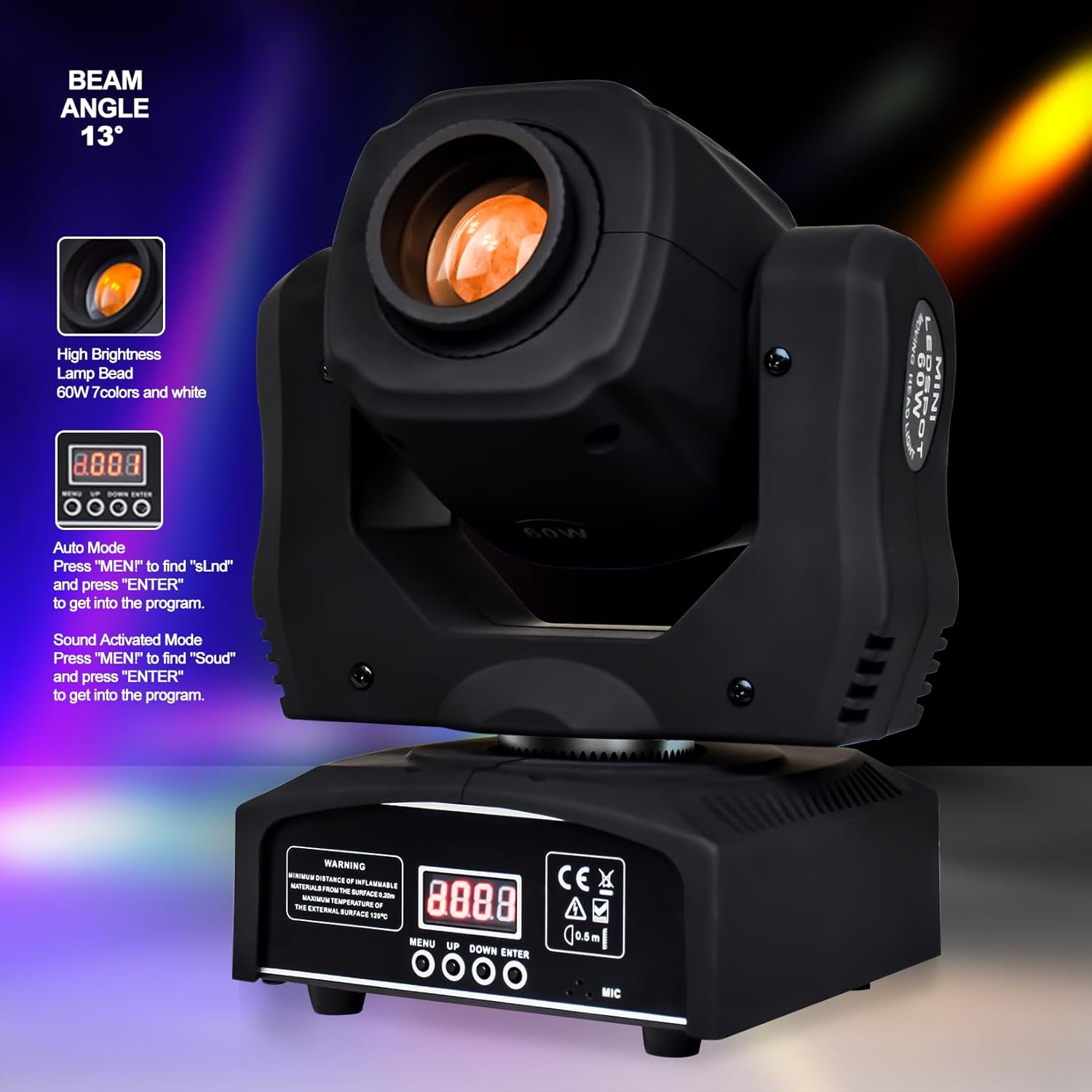
The control panel of the DJCLUB 60W LED Moving Head Light, illustrating the display and buttons for mode selection.
6.1 Automatic Operation Mode
This mode allows the light to run through pre-programmed sequences without external control.
- Press MENU to find "SLnd" (or similar auto program setting).
- Press ENTER to select and activate the program.
- Use UP/DOWN to cycle through different auto programs (e.g., SLOW, FAST).
6.2 Sound Activated Mode
The light will react to ambient sound, changing patterns and movements in sync with music.
- Press MENU to find "Soud" (or similar sound mode setting).
- Press ENTER to select and activate the sound mode.
- Adjust microphone sensitivity if available (refer to specific menu options).
6.3 DMX512 Mode
For professional control using a DMX controller. The fixture supports 9 or 11 DMX channels.
- Press MENU to find the DMX address setting (e.g., "A001").
- Use UP/DOWN to set the desired DMX start address.
- Press ENTER to confirm.
- Select the channel mode (9CH or 11CH) if available in the menu.
6.4 Master-Slave Mode
Allows multiple fixtures to operate in synchronization without a DMX controller. One unit acts as the master, and others as slaves.
- Set the first unit to an Automatic or Sound Activated mode (this will be the Master).
- Connect the DMX OUT of the Master unit to the DMX IN of the first Slave unit.
- Set all other units (Slaves) to "SLAV" mode (or similar slave setting) via their menu.
6.5 Strobe Mode & Pattern Dithering
These effects are typically integrated within the Automatic or DMX modes, or accessible as specific menu options. Consult the on-screen menu for direct access or parameter adjustments for strobe speed and pattern dithering effects.
7. DMX Control
The DJCLUB 60W LED Moving Head Light utilizes the DMX512 protocol for advanced control. It offers two channel modes: 9-channel and 11-channel, providing varying levels of control over its features.
7.1 DMX Channel Modes
Refer to the fixture's menu to select either 9-channel or 11-channel mode. The specific functions assigned to each channel will vary based on the selected mode. A detailed DMX chart is usually provided in the physical manual or can be found on the manufacturer's website.
7.2 Basic DMX Channel Functions (Example - consult actual DMX chart for specifics)
| Channel | Function | Value Range |
|---|---|---|
| 1 | Pan Movement | 0-255 |
| 2 | Tilt Movement | 0-255 |
| 3 | Pan/Tilt Speed | 0-255 |
| 4 | Dimmer | 0-255 |
| 5 | Strobe | 0-255 |
| 6 | Color Wheel | 0-255 |
| 7 | Gobo Wheel | 0-255 |
| 8 | Gobo Rotation | 0-255 |
| 9 | Function/Mode Select | 0-255 |
Note: This table is an example. Always refer to the specific DMX chart provided with your product for accurate channel assignments and values.
8. Maintenance
8.1 Cleaning
Regular cleaning of the light fixture is recommended to maintain optimal performance and extend its lifespan.
- Disconnect power before cleaning.
- Use a soft, lint-free cloth dampened with a mild glass cleaner to wipe the lens and exterior surfaces.
- Do not use abrasive cleaners or solvents.
- Periodically clean the cooling fan and vents to ensure proper airflow and prevent dust buildup.

A side view of the moving head light, emphasizing its manual focus feature, gobo wheel, and the smart cooling silent fan designed for efficient heat dissipation and noise reduction.
8.2 General Care
- Store the unit in a dry, dust-free environment when not in use.
- Avoid exposing the unit to extreme temperatures or humidity.
- Regularly check all cables and connections for wear or damage.
9. Troubleshooting
If you encounter issues with your DJCLUB Moving Head Light, refer to the following common problems and solutions:
| Problem | Possible Cause | Solution |
|---|---|---|
| No power | Power cable not connected; Power outlet faulty; Unit switch off | Check power cable connection; Test outlet with another device; Ensure power switch is ON |
| No light output | Dimmer channel at 0; Light source failure; Unit in blackout mode | Increase dimmer level (DMX or menu); Contact support if LED is faulty; Check menu for blackout settings |
| No DMX control | Incorrect DMX address; Faulty DMX cable; Incorrect DMX mode selected; DMX controller issue | Verify DMX address and channel mode; Test DMX cable; Check DMX controller output |
| Movement erratic or limited | Obstruction; Calibration error; DMX values incorrect | Check for physical obstructions; Perform a reset via the menu; Adjust DMX Pan/Tilt values |
| Menu difficult to navigate | Unfamiliarity with interface; Specific menu logic | Refer to the manual's operating modes section; Practice navigating the menu to understand its flow. |
10. Specifications
| Feature | Specification |
|---|---|
| Model Number | DJ-G60W02 |
| Light Source | 60W LED (Cool White) |
| Brightness | 20500 Lux |
| Beam Angle | 13° |
| Color Temperature | 7800 Kelvin |
| Color Rendering Index (CRI) | 92 |
| Pan Movement | 540° |
| Tilt Movement | 270° |
| Control Modes | Auto, Sound, DMX512, Master-Slave, Strobe, Pattern Dithering |
| DMX Channels | 9/11 Channels |
| Voltage | 110 Volts (AC) |
| Amperage | 2.5 Amps |
| Power Consumption | 60 Watts |
| Material | Acrylonitrile Butadiene Styrene (ABS), Aluminum, Iron |
| Finish Type | Rubber paint |
| Product Dimensions (L x W x H) | 7.87" x 5.91" x 11.02" |
| Item Weight | 16 Pounds (for the pair) |
| Certifications | CE, RoHS |

A diagram showing the 13-degree beam angle of the light and its lux diameter at distances from 1 to 5 meters, indicating brightness levels.
11. Warranty and Support
DJCLUB LED Moving Head Lights come with a 30-day money-back guarantee and a 90-day warranty from the date of purchase. This warranty covers manufacturing defects and ensures the product functions as intended under normal use.
For technical support, warranty claims, or any questions regarding your product, please contact DJCLUB customer service through the retailer's platform or the contact information provided with your purchase documentation. Please have your model number (DJ-G60W02) and purchase date ready when contacting support.