
FREEBOY J01 PRO
FREEBOY J01 PRO Electric Scooter User Manual
Model: J01 PRO | Brand: FREEBOY
1. Product Overview

The FREEBOY J01 PRO Electric Scooter, featuring a robust design and integrated seat for enhanced comfort.
The FREEBOY J01 PRO is an advanced electric scooter designed for adults, offering a powerful motor, long range, and comfortable riding experience. It is equipped with features for safe and efficient commuting, including dual braking and shock absorption systems, and a multi-light system for visibility.
Key Features:
- 800W Peak Motor: Provides strong acceleration and climbing ability (18°-25° slopes).
- Extended Range: Up to 30-33 miles on a single charge, ideal for long-distance commuting.
- Dual Braking System: Front and rear disc brakes for reliable stopping power.
- Dual Shock Absorption: Front and rear shock absorbers ensure a smooth and comfortable ride.
- 10" Off-Road Solid Tires: Durable tires suitable for various terrains.
- Adjustable Handlebar & Seat: Customizable for rider comfort and foldable design for portability.
- Multi-Lights System: Includes automatic LED headlight, rear brake light, pedal light, and turn signals for enhanced safety.
- Smart LCD Display: Shows real-time speed, speed mode, battery life, and light indicators.
2. Setup and Assembly
Your FREEBOY J01 PRO electric scooter comes partially assembled. Follow these steps to complete the setup and prepare your scooter for its first ride. A detailed assembly video is provided below for visual guidance.
Unboxing and Initial Inspection:
- Carefully remove all components from the packaging.
- Verify that all parts listed in the packing list are present: scooter, charger, two keys, instruction manual, and tool kit.
- Inspect the scooter for any visible damage that may have occurred during shipping.
Assembly Steps:
- Unfolding the Scooter:
Locate the folding mechanism at the base of the handlebar stem. Press the release button/latch down and lift the handlebar pole upwards until it locks into place. Ensure the latch retainer is securely inserted into the designated hole.
- Handlebar Setup:
Open the handlebar by twisting and tightening the two spiral rings on the pole until the handlebar is fixed and stable.
- Seat Installation (if applicable):
Stand the seat up and press the button below the seat post. Press the latch down tightly again to secure the seat. Adjust the seat cushion to your appropriate riding position and fix it firmly.
- Securing Components:
Use the provided hex wrenches to secure the instrument panel (No. 2 hex wrench), turn signals (No. 3 hex wrench), brake levers (No. 5 hex wrench), and headlight (No. 5 socket wrench) to their respective positions on the handlebar and front fork. Ensure all connections are tight and secure.
Official FREEBOY Electric Scooter assembly and folding demonstration. This video provides a step-by-step guide on how to set up your scooter, including unfolding, handlebar adjustment, seat installation, and securing various components. It also demonstrates the folding process for storage.
3. Operating Instructions
Familiarize yourself with the controls and functions of your FREEBOY J01 PRO electric scooter before riding.
Powering On and Display Functions:
- Starting the Scooter:
Insert the key into the ignition and turn it to the right once. Then, press the power button on the meter display to turn on the scooter's electrical system and activate the display.
- Display Information:
The LCD display provides essential riding information. Press the power switch once to cycle through different displays: total mileage, battery voltage, ride time, and single drive mileage.
- Speed Modes:
Press the 'M' button on the display to shift between speed gears. The scooter offers three speed modes:
- First Gear (Eco): Up to 15 km/h (approximately 9.3 mph)
- Second Gear (D): Up to 30 km/h (approximately 18.6 mph)
- Third Gear (S): Up to 45 km/h (approximately 28 mph)
To lift the speed limit, press the 'M' key 5 times in a row. Press it five more times to re-engage the speed limit.
- Cruise Control:
To activate cruise control, maintain a constant speed for a few seconds until you hear a beep. The scooter will then maintain this speed automatically.
Lighting and Safety Features:
- Headlight:
The scooter features a bright automatic LED headlight for night riding visibility.
- Walking Lights (Pedal Lights):
The pedal area is equipped with LED colorful side lights for added visibility and style.
- Turn Signals:
Use the left and right turn signal buttons on the handlebar to indicate your turning intentions.
- Horn:
Press the horn button (buzzer) to alert pedestrians or other riders.
- Brake Light:
The rear brake light illuminates when the brakes are applied, signaling to those behind you.
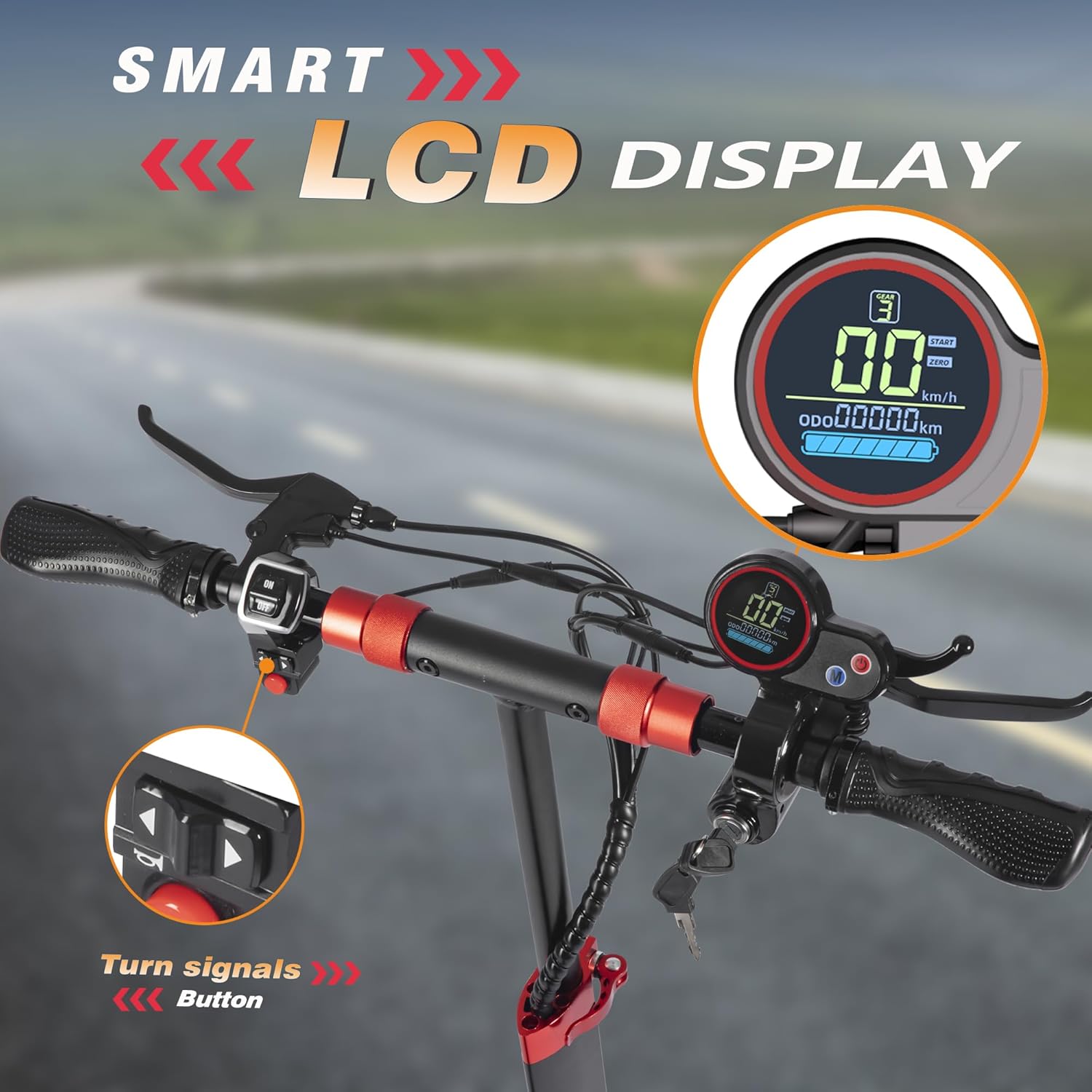
Close-up of the smart LCD display and turn signal controls.

Illustration of the multi-lights system, including headlight, turn signals, taillight, and LED colorful side lights.
4. Maintenance
Regular maintenance ensures the longevity and safe operation of your FREEBOY J01 PRO electric scooter. Perform these checks periodically:
- Tire Pressure: Although equipped with solid tires, regularly inspect them for wear and tear. Ensure they are free from embedded debris.
- Brakes: Check brake levers for proper tension and responsiveness. Ensure the disc brakes engage smoothly and effectively. Adjust if necessary.
- Battery Care: Charge the battery fully after each use. Avoid completely draining the battery. Store the scooter in a cool, dry place when not in use for extended periods.
- Cleaning: Wipe down the scooter with a damp cloth. Avoid using high-pressure water jets directly on electrical components.
- Fasteners: Periodically check all screws and bolts, especially on the folding mechanism, handlebars, and wheels, to ensure they are tight.
5. Troubleshooting
If you encounter issues with your FREEBOY J01 PRO, refer to these common troubleshooting tips:
| Problem | Possible Cause | Solution |
|---|---|---|
| Scooter does not power on. | Battery low or dead; Key not fully turned; Power button not pressed. | Charge the battery; Ensure key is fully turned to the right; Press the power button on the display. |
| Motor not engaging. | Low battery; Loose motor connection; Faulty throttle. | Charge battery; Check motor cable connections; Contact support if throttle is unresponsive. |
| Brakes feel weak. | Brake pads worn; Brake cable loose. | Inspect and replace brake pads if worn; Adjust brake cable tension. |
| Unusual noises during operation. | Loose components; Debris in wheels; Motor issue. | Check all fasteners; Inspect wheels for foreign objects; Contact support for motor issues. |
If the problem persists after attempting these solutions, please contact FREEBOY customer support.
6. Specifications
| Feature | Detail |
|---|---|
| Brand | FREEBOY |
| Model Name | J01 PRO |
| Motor Power | 800W Peak Motor |
| Max Speed | Up to 28 Mph (45 km/h) |
| Max Range | 30-33 Miles |
| Tire Size | 10 Inches Off-Road Solid Tires |
| Weight Limit | 330 Pounds (150 kg) |
| Item Weight | 55 Pounds (24.9 kg) |
| Product Dimensions (LxWxH) | 45.3" x 11.4" x 47.2" (115 x 29 x 120 cm) |
| Brake Style | Front and Rear Disc Braking |
| Suspension Type | Dual Suspension (Front & Rear) |
| Special Features | Foldable, Lights (Headlight, Taillight, Turn Signals, Pedal Lights), Adjustable Handlebar, Seat |
| Material | Aluminum |

Illustration highlighting the 800W motor, max speed, and climbing ability.
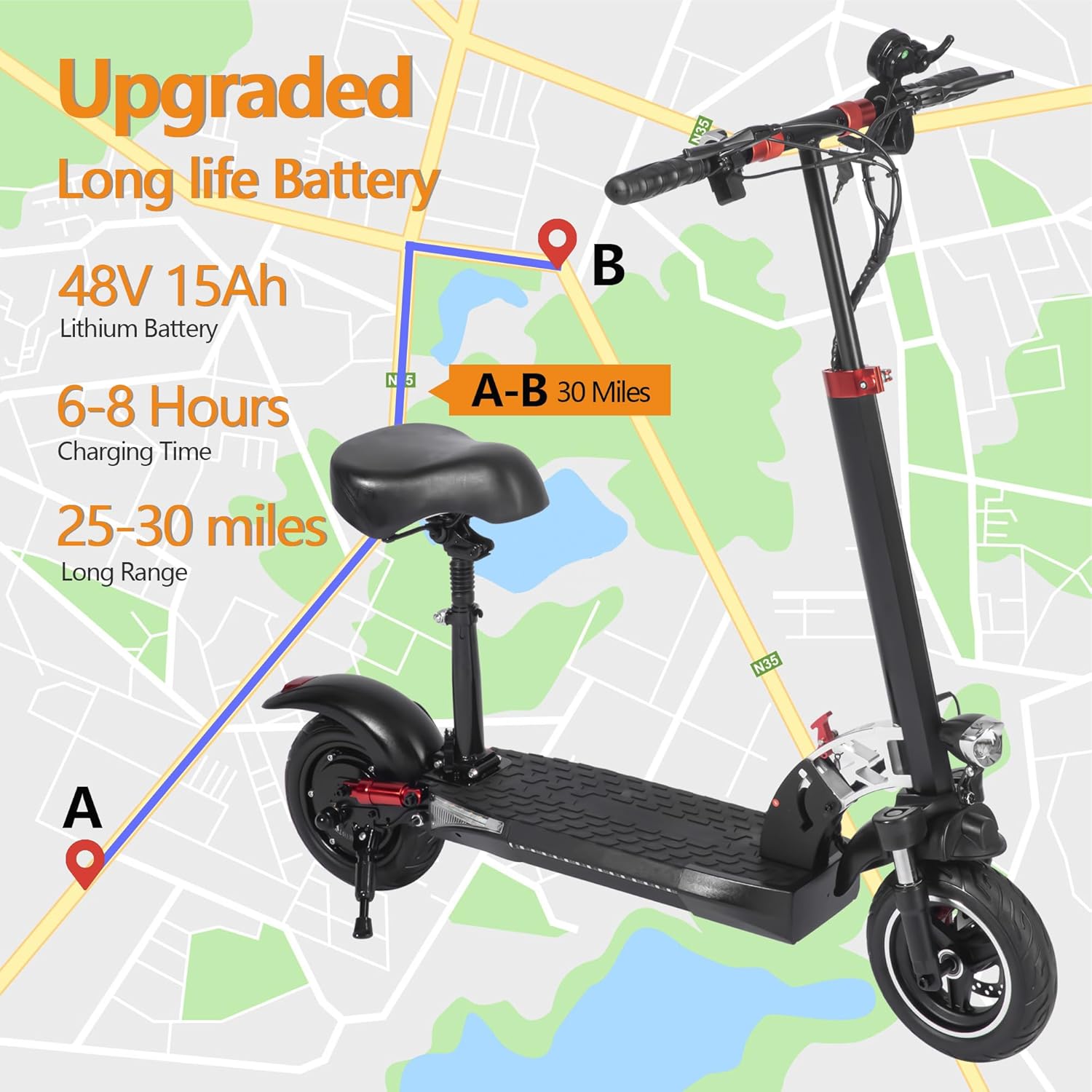
Visual representation of the long-life battery, charging time, and extended range.

Detailed view of the 10" off-road solid tires, front dual shock absorbers, and rear dual shock absorbers.

Diagram showing the scooter's dimensions and its compact folded state, suitable for transport.
7. Warranty and Support
FREEBOY is committed to providing high-quality products and excellent customer service.
Warranty Information:
The FREEBOY J01 PRO electric scooter comes with a 12-month or 6-month warranty for different parts. Please refer to the user manual included in your package for specific warranty details pertaining to each component.
Customer Support:
For any questions, concerns, or technical assistance, please do not hesitate to contact our customer support team. We aim to respond to all inquiries within 24 hours.
Email: tangsanscooter@126.com

FREEBOY customer support team ready to assist.
Related Documents - J01 PRO
 |
J01 Electric Scooter User Manual - Freeboy Comprehensive user manual for the Freeboy J01 Electric Scooter, detailing setup, operation, maintenance, and safety. Learn about recommendations, parts, controls, and troubleshooting. |
 |
Freeboy H6 Electric Scooter Instruction Manual Comprehensive user manual for the Freeboy H6 electric scooter, covering safety instructions, operation, maintenance, and technical specifications. Learn how to safely operate and care for your H6 scooter. |
 |
Freeboy H14 Electric Scooter Assembly and Unboxing Guide Comprehensive guide for unboxing and assembling the Freeboy H14 Electric Scooter. Includes a detailed parts list and step-by-step instructions for installation. |
 |
FREEBOY M9 Electric Scooter User Manual: Operation, Safety, and Specifications This user manual provides comprehensive instructions for the FREEBOY M9 electric scooter, covering its features, operation, charging, maintenance, safety guidelines, and technical specifications. Essential reading for all owners. |
 |
Freeboy J30MAX Electric Scooter User Manual Comprehensive user manual for the Freeboy J30MAX electric scooter, covering product overview, charging, riding, folding, specifications, safety, and maintenance instructions. |
 |
Freeboy J11 Electric Scooter User Manual Comprehensive user manual for the Freeboy J11 electric scooter, covering package contents, product overview, operation, safety instructions, specifications, and maintenance. |