
1. Introduction
Thank you for choosing the COLAMY Wide Office Chair. This manual provides essential information for the safe assembly, operation, and maintenance of your chair. Please read these instructions carefully before use and retain them for future reference.

Image 1.1: COLAMY Wide Office Chair, Dark Grey.
Safety Information
- The maximum weight limit for this chair is 275 lbs (125 kg).
- This product is intended for indoor use only.
- Assemble the chair strictly according to the provided instructions.
- Follow all care instructions for cleaning and maintenance.
- Keep the chair away from direct heat sources.
- Do not use the chair if any part is damaged or missing.
- Always use the chair with caution, ensuring stability and proper use of adjustable features.
2. Components List
Before assembly, verify that all components are present and undamaged. All necessary hardware and tools are included in the package.

Image 2.1: Exploded view of chair components and hardware.
Parts Included:
- Seat Cushion
- Backrest
- Base (Star Base)
- Casters (Wheels)
- Gas Lift Cylinder
- Mechanism Plate
- Hardware (Screws, Washers, Allen Wrench)
3. Setup and Assembly
Assembly typically takes 10-15 minutes. Follow these steps carefully.
- Attach Casters to Base: Insert each caster into the holes at the end of the star base until securely seated.
- Insert Gas Lift: Place the gas lift cylinder into the center hole of the assembled star base.
- Attach Mechanism Plate to Seat: Align the mechanism plate with the pre-drilled holes on the underside of the seat cushion. Secure it with the provided screws and Allen wrench. Ensure the front of the mechanism plate faces the front of the seat.
- Attach Backrest to Seat: Align the backrest with the mounting points on the seat cushion. Secure it with the provided screws.
- Connect Seat Assembly to Gas Lift: Carefully place the assembled seat onto the gas lift cylinder, ensuring the center hole of the mechanism plate aligns with the top of the gas lift. Press down firmly to secure.
Once assembled, test all functions to ensure proper operation.
4. Operating Instructions
The COLAMY Wide Office Chair features several adjustable functions for personalized comfort.

Image 4.1: Overview of adjustable features.
Height Adjustment
- To raise the seat height: While standing, pull the lever located under the right side of the seat upwards. The seat will rise automatically. Release the lever at the desired height.
- To lower the seat height: While seated, pull the lever located under the right side of the seat upwards. The seat will lower. Release the lever at the desired height.
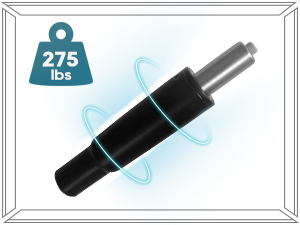
Image 4.2: Gas lift mechanism for height adjustment.
Reclining Function (100°-115° Rocking)
- To recline: Lean back in the chair. The chair allows for a rocking motion between 100 and 115 degrees.
- To adjust tilt tension: Use the round knob located under the front-center of the seat. Turn clockwise to increase tension (making it harder to recline) or counter-clockwise to decrease tension (making it easier to recline).

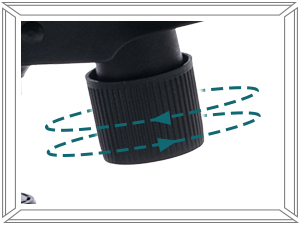
Image 4.3: Reclining angle and tilt tension knob.
360-Degree Swivel and Casters
- The chair seat can rotate 360 degrees for flexible movement.
- The smooth-rolling casters allow for easy movement across various floor types, including carpet, tile, and wood.
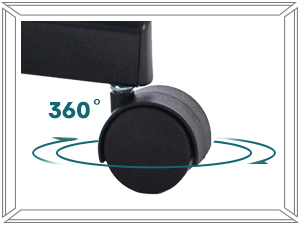
Image 4.4: 360-degree swivel casters.
Ergonomic Design Features
- Wide Seat: The chair features a generously sized 64.69 cm (25.39 inches) wide seat cushion, providing ample space.
- High-Density Foam Cushion: The seat cushion is crafted from high-density foam for support and comfort, designed to resist deformation.
- U-Shaped Thick Cushion: This design helps relieve pressure on the hips during prolonged sitting.
- Supportive Shell-shaped Backrest: The backrest is designed to provide ergonomic support.
- Armless Design: Offers flexibility for movement and allows the chair to be easily tucked under desks.

Image 4.5: Ergonomic structure and breathable fabric.


Image 4.6: Wide seat and high-density sponge details.
5. Maintenance
Proper care will extend the life of your chair.
- Cleaning: For general cleaning, wipe surfaces with a damp cloth. For spot cleaning, use a mild fabric cleaner as directed by the product instructions. Avoid harsh chemicals.
- Inspection: Periodically check all screws and connections to ensure they are tight. Re-tighten if necessary.
- Caster Care: Keep casters free of hair and debris to ensure smooth rolling.
6. Troubleshooting
Refer to this section for solutions to common issues.
| Problem | Possible Cause | Solution |
|---|---|---|
| Chair feels unstable or wobbly. | Loose screws or connections. | Check and tighten all screws, especially where the backrest connects to the seat and the mechanism plate to the seat. Ensure the gas lift is fully seated in the base. |
| Seat height adjustment not working. | Gas lift cylinder malfunction or lever not engaged. | Ensure the height adjustment lever is fully pulled. If the issue persists, the gas lift cylinder may need replacement. |
| Chair does not recline or is too stiff/loose. | Tilt tension knob adjustment. | Adjust the tilt tension knob under the seat. Turn clockwise to increase tension (stiffer recline) or counter-clockwise to decrease tension (looser recline). |
| Casters not rolling smoothly. | Debris caught in casters. | Turn the chair over and remove any hair, dust, or debris from the caster wheels. |
7. Specifications
Detailed product specifications for the COLAMY Wide Office Chair.

Image 7.1: Product dimensions.
| Feature | Detail |
|---|---|
| Brand | COLAMY |
| Model Number | 7261+7261W |
| Colour | Dark Grey |
| Product Dimensions | 67.3 x 65.5 x 94.4 cm (26.5 x 25.8 x 37.2 inches) |
| Material | Metal frame, Fabric upholstery |
| Item Weight | 13.6 kg (29.98 lbs) |
| Maximum Weight Capacity | 275 lbs (125 kg) |
| Special Features | Adjustable Height, Cushion Availability, Ergonomic, Rolling Casters, Swivel, 115° Rocking |
| Back Style | Cushion Back |
| Certifications | BIFIMA certified |
8. Warranty and Customer Support
COLAMY offers a one-year warranty for this product.
For any questions, concerns, or assistance with your COLAMY Wide Office Chair, please contact the manufacturer directly. Contact information can typically be found on the product packaging or the official COLAMY website. We are committed to providing support and resolving any issues you may encounter.


