1. Introduction
This manual provides detailed instructions for the installation, operation, and maintenance of your Genius Premium Pro Universal Anti-theft Automotive Alarm System. This system is designed to provide advanced security for your vehicle with features such as variable code anti-cloning technology and comprehensive remote control functions.
Please read this manual thoroughly before attempting any installation or operation to ensure proper functionality and to maximize the security benefits of your new alarm system.
2. Product Components
Your Genius Premium Pro alarm system includes the following components:
- Programmable Computerized Module
- Electric Siren (6 tones - 20W)
- Wiring Harness with Fuse Holder
- 2 Remote Transmitters (370 MHz frequency, expandable up to 4 transmitters)
- Impact Sensor
- Relay
- Valet Button
- LED Indicator
- User Manual

Image: Overview of the Genius Premium Pro alarm system components.

Image: Detailed view of the wiring harnesses.
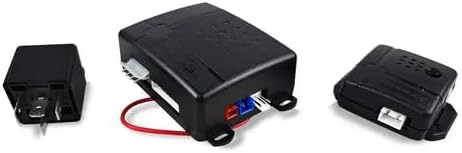
Image: The programmable module and relay.

Image: The 20W electric siren.
3. Setup and Installation
Installation of this automotive alarm system requires technical knowledge and experience with vehicle electrical systems. It is highly recommended that installation be performed by a qualified professional to ensure correct wiring and optimal performance, and to avoid damage to your vehicle or the alarm system.
General Installation Guidelines (Professional Installation Recommended):
- Disconnect Battery: Always disconnect the vehicle's negative battery terminal before beginning any electrical work.
- Mount Main Module: Securely mount the programmable module in a hidden, dry location within the vehicle, away from excessive heat or moisture.
- Install Siren: Mount the electric siren in the engine bay, facing downwards to prevent water accumulation, and away from direct heat sources.
- Connect Wiring Harness: Carefully connect the wiring harness to the vehicle's electrical system according to the detailed wiring diagram provided in the separate installation guide (not included in this user manual). This includes connections for power, ground, ignition, door triggers, trunk trigger, hood trigger, and central locking.
- Install Impact Sensor: Mount the impact sensor securely to a rigid part of the vehicle's chassis, ensuring it is not easily accessible. Adjust sensitivity as needed after installation.
- Install Valet Button and LED: Install the valet button and LED indicator in a discreet but accessible location within the vehicle's cabin.
- Connect Relays: Connect any necessary relays (e.g., for starter kill) as per the installation diagram.
- Test System: After all connections are made and secured, reconnect the battery and test all alarm functions thoroughly.
4. Operating Instructions
Your Genius Premium Pro alarm system is operated primarily via the included remote controls. The system features variable code anti-cloning technology for enhanced security.

Image: The two remote controls included with the system.
Key Functions:
- Arming/Disarming: Press the lock button on the remote to arm the alarm. Press the unlock button to disarm. The system will provide audible and visual confirmations.
- Anti-Assault (Panic): In an emergency, press and hold the panic button (often marked with an asterisk or bell icon) to activate the siren and flashing lights, drawing attention to the vehicle.
- Vehicle Finder: Press the vehicle finder button (often marked with a car icon or speaker) to locate your vehicle in a crowded parking lot by briefly activating the siren and lights.
- Valet Mode: This mode allows the vehicle to be serviced without triggering the alarm. Typically activated by a sequence of remote button presses or using the valet button. Consult the specific installation guide for activation/deactivation steps.
- Automatic Closing: This feature, if enabled during installation, automatically locks the vehicle doors after a set period when the ignition is turned off or the last door is closed.
- Impact Sensor: The adjustable impact sensor detects physical shocks to the vehicle. A light impact may trigger a warning chirp, while a stronger impact will trigger the full alarm.
- Remote Trunk Release: If connected during installation, a dedicated button on the remote (often marked with an open trunk icon) can remotely open the vehicle's trunk.
5. Maintenance
The Genius Premium Pro alarm system is designed for low maintenance. Follow these general guidelines:
- Remote Control Batteries: Replace remote control batteries when the range decreases or the LED indicator on the remote dims. Refer to the remote's specific instructions for battery type and replacement.
- Keep Components Dry: Ensure all alarm components, especially the main module and siren, remain dry and free from moisture.
- Wiring Inspection: Periodically inspect visible wiring for any signs of wear, fraying, or loose connections. If any issues are found, consult a professional for repair.
- Clean Components: Gently wipe down external components like the siren or LED with a soft, dry cloth if they become dirty. Do not use harsh chemicals or abrasive cleaners.
6. Troubleshooting
If you experience issues with your alarm system, consider the following common troubleshooting steps:
- Alarm Not Responding to Remote:
- Check remote control battery.
- Ensure you are within range of the vehicle.
- Verify the alarm system is not in Valet Mode.
- Alarm Triggers Randomly:
- Adjust the sensitivity of the impact sensor. It may be set too high.
- Check all door, hood, and trunk pins/sensors for proper closure and function. A faulty sensor can cause false alarms.
- Ensure no loose wiring is causing intermittent connections.
- Siren Not Sounding:
- Check the siren's wiring connection.
- Verify the siren itself is not damaged.
- Vehicle Not Starting After Alarm Trigger:
- Ensure the alarm is fully disarmed.
- If a starter kill feature is installed, ensure it has disengaged. You may need to use the valet button to override.
If these steps do not resolve the issue, please contact a professional installer or the seller for further assistance.
7. Specifications
| Feature | Specification |
|---|---|
| Brand | Genius |
| Model | Premium Pro |
| Compatible Devices | Vehicles |
| Remote Control Frequency | 370 MHz |
| Number of Remote Controls Included | 2 (expandable to 4) |
| Siren Power | 20W, 6 tones |
| Anti-cloning Technology | Variable Code |
| Batteries Required | No (for main unit) |
| Package Dimensions | 17.8 x 12.1 x 9.4 cm |
| Item Weight | 570 g |
8. Warranty and Support
For warranty information, please refer to the documentation provided at the time of purchase or contact the authorized Genius dealer or seller from whom you purchased this product. Keep your proof of purchase for warranty claims.
For technical support, installation assistance, or troubleshooting beyond the scope of this manual, please contact the seller or an authorized service center. The seller for this product is GENIUS AUDIO MÉXICO.
You can often find additional support resources or contact information on the official Genius Audio México website or through the platform where the product was purchased.


