
1. Introduction
Welcome to the user manual for your new TCL 43C61B 4K Ultra HD Smart QLED Google TV. This guide provides essential information for setting up, operating, maintaining, and troubleshooting your television. Please read this manual thoroughly before using your TV to ensure proper and safe operation.
2. Safety Information
Observe the following safety precautions to prevent fire, electric shock, or injury:
- Do not expose the TV to rain or moisture.
- Ensure proper ventilation; do not block ventilation openings.
- Place the TV on a stable, level surface to prevent it from falling.
- Do not place objects containing liquids on the TV.
- Unplug the TV during lightning storms or when unused for long periods.
- Refer all servicing to qualified service personnel.
3. Package Contents
Verify that all items are present in the package:
- 1N LED TV
- 1N Audio Cable
- 1N Stand
- 1N Power cord
- 1N Remote Control
- 2N AAA Batteries
4. Setup
4.1 Unpacking
Carefully remove the TV and all accessories from the packaging. Retain the packaging materials for future transport or service needs.
4.2 Stand Installation
If you are not wall-mounting your TV, attach the included stand:
- Place the TV face down on a soft, flat surface to prevent screen damage.
- Align the stand bases with the corresponding screw holes on the bottom of the TV.
- Secure the stand bases using the provided screws. Ensure they are tightened firmly.

Image: Front view of the TCL 43C61B TV with its stand installed.

Image: Side and top views illustrating the TV's slim design and stand.
4.3 Wall Mounting (Optional)
If you choose to wall-mount your TV, ensure you use a VESA-compatible wall mount kit (sold separately) and follow the instructions provided with the wall mount. Professional installation is recommended.
4.4 Connecting External Devices
Your TV offers various ports for connecting external devices:
- HDMI Ports (3): Connect set-top boxes, Blu-ray players, gaming consoles. HDMI 3 supports eARC/ARC for enhanced audio return.
- USB Port (1): Connect USB hard drives or other USB devices for media playback.
- LAN (Ethernet): For a wired internet connection.
- Wi-Fi & Bluetooth: For wireless network and accessory connections.
- Headphone Output: For connecting headphones.
- Digital Audio Out (Optical): For connecting to external audio systems.
- Antenna/Cable In: For connecting an antenna or cable TV signal.
- AV IN adapter: For connecting older analog devices.

Image: Detailed view of the TV's connectivity ports.
4.5 Power Connection
After connecting all necessary devices, plug the power cord into the TV's power input and then into a wall outlet.
4.6 Initial Setup Wizard
Upon first power-on, the TV will guide you through an initial setup process. This includes selecting your language, connecting to a network (Wi-Fi or Ethernet), and signing in to your Google account to access Google TV features.
5. Operating Your TV
5.1 Remote Control
The included smart remote control provides easy access to all TV functions and smart features. Insert the two AAA batteries into the remote control, ensuring correct polarity.
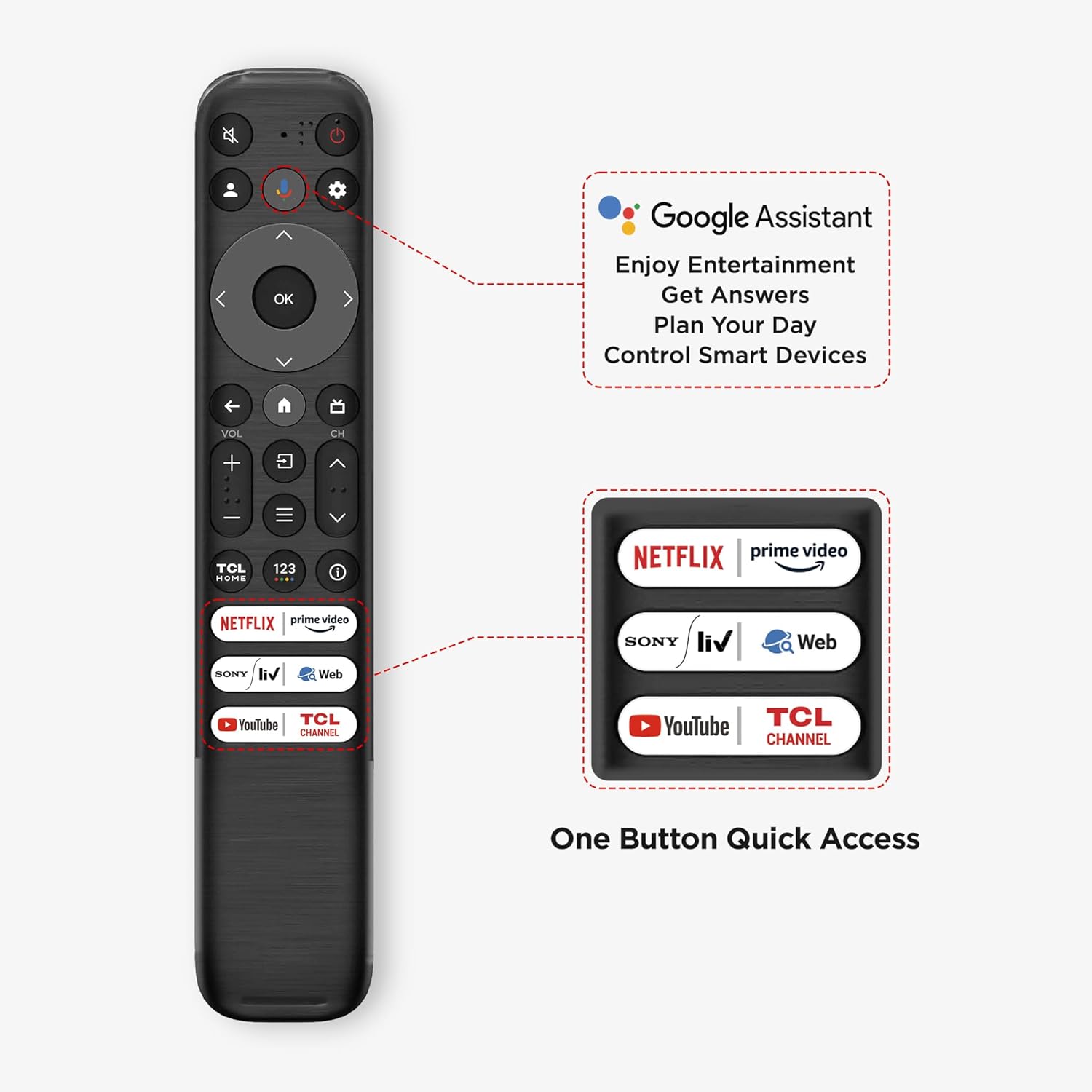
Image: Overview of the smart remote control, highlighting Google Assistant and quick access buttons.
- Power Button: Turns the TV on or off.
- Navigation Pad (OK button): Navigate menus and confirm selections.
- Volume +/-: Adjusts the volume level.
- Channel +/-: Changes TV channels.
- Google Assistant Button: Activates voice control for commands and searches.
- Dedicated App Buttons: Quick access to popular streaming services like Netflix, Prime Video, YouTube, etc.
5.2 Google TV Interface
Your TCL 43C61B runs on Google TV, offering a personalized home screen that organizes movies, shows, and live TV from all your apps and subscriptions. Use the remote to navigate through recommendations, watchlists, and app libraries.

Image: The Google TV home screen with various content options.
5.3 Picture Settings
Access the TV's settings menu to customize your viewing experience:
- QLED Pro: Enhances color volume and brightness for a vibrant display.
- AiPQ Pro Processor: Optimizes picture and sound in real-time for clarity and performance.
- T-Screen Pro: Reduces glare and enhances contrast for better viewing in various lighting conditions.
- Dolby Vision & HDR 10+: Provides superior contrast, brightness, and color detail for compatible content.
- MEMC: Motion Estimation, Motion Compensation technology reduces motion blur in fast-moving scenes.
- Multiple Eye Care: Features designed to reduce eye strain during prolonged viewing.

Image: Visual representation of QLED Pro display technology.

Image: The AiPQ Pro Processor, responsible for image and sound optimization.

Image: T-Screen Pro technology for enhanced viewing clarity.
5.4 Sound Settings
Adjust audio output to your preference:
- Dolby Atmos & DTS Virtual:X: Provides immersive, multi-dimensional audio experiences.
- Sound Modes: Select from various preset sound modes (e.g., Standard, Music, Movie, Sport) or customize your own.
- Audio Output: Choose between TV speakers, external audio systems, or headphones.

Image: Visual representation of Dolby Atmos and DTS:X audio technologies.
5.5 Smart Features
- Hands-Free Voice Control: Use voice commands directly to the TV without the remote.
- Multi View: Display multiple content sources simultaneously on the screen.
- Mobile to TV Mirroring: Cast content from your mobile device to the TV.
- Web Browser: Browse the internet directly on your TV.
5.6 Gaming Features
The TCL 43C61B is equipped with features to enhance your gaming experience:
- Game Master: Optimizes settings for gaming.
- ALLM (Auto Low Latency Mode): Automatically switches to a low-latency mode when a game console is detected, reducing input lag.
- HDMI 2.1: Supports advanced gaming features.

Image: The Game Master feature for optimized gaming.
6. Maintenance
6.1 Cleaning the Screen
Gently wipe the screen with a soft, lint-free cloth. For stubborn marks, lightly dampen the cloth with water or a specialized screen cleaner. Do not spray liquid directly onto the screen.
6.2 Cleaning the TV Body
Use a soft, dry cloth to wipe the TV's frame and back panel. Avoid abrasive cleaners or solvents.
7. Troubleshooting
If you encounter issues, refer to the following common solutions:
- No Power: Ensure the power cord is securely plugged into both the TV and the wall outlet. Check if the outlet is functional.
- No Picture/Sound: Verify that the correct input source is selected. Check all cable connections (HDMI, AV, etc.) for secure fit.
- Remote Control Not Working: Replace the batteries. Ensure there are no obstructions between the remote and the TV's IR sensor.
- Network Connection Issues: Restart your router and modem. Reconnect the TV to your Wi-Fi network or check the Ethernet cable.
- Smart Features Lagging: Try restarting the TV. Clear the cache of individual apps if specific apps are slow.
8. Specifications
Key technical specifications for the TCL 43C61B TV:
| Feature | Specification |
|---|---|
| Model | 43C61B |
| Screen Size | 43 Inches (108 cm) |
| Display Technology | QLED |
| Resolution | 4K Ultra HD (3840 x 2160) |
| Refresh Rate | 60 Hz |
| Operating System | Google TV |
| RAM Memory | 2 GB |
| Storage Capacity | 32 GB |
| Sound Output | 30 Watts (Dolby Atmos, DTS Virtual:X) |
| Connectivity | 3 HDMI, 1 USB, Ethernet, Wi-Fi, Bluetooth, Headphone Out, Optical Out |
| Processor | AiPQ Pro Processor |
| Product Dimensions (with stand) | 18.5D x 95.6W x 60H cm |
| Item Weight | 6.7 kg |
| Power Consumption (On-mode) | 130 Watts |

Image: Energy efficiency label for the TCL 43C61B TV.
9. Warranty and Support
Your TCL 43C61B TV comes with a 2-year warranty provided by the manufacturer from the date of purchase. The remote control has a 6-month warranty. Warranty claims can be processed using your Amazon e-invoice.
For technical support or service inquiries, please refer to the contact information provided on the official TCL website or your purchase documentation.


