
1. Introduction
This manual provides comprehensive instructions for the Loddery 9-inch Android 13 Car Stereo Radio. It is designed to assist users with the installation, operation, and maintenance of the device, ensuring optimal performance and user experience. Please read this manual thoroughly before installation and use.
2. Package Contents
Verify that all items listed below are included in your package:
- 1 x Car Radio Stereo With Frame
- 1 x GPS Cable
- 2 x USB Cable
- 1 x Power Cable With Canbus
- 1 x RCA Cable
- 1 x Camera Input Cable
- 1 x Radio Adapter Cable
- 1 x User's Manual

Figure 2.1: Included Components
3. Setup and Installation
3.1 Vehicle Compatibility
This Loddery car stereo is designed for specific Chrysler 200 models. It is compatible with Chrysler 200, 200C, and 200S vehicles manufactured between 2015 and 2019.

Figure 3.1: Vehicle Compatibility Overview
3.2 Installation Process
Detailed installation instructions are provided in the included user manual. Professional installation is recommended. During installation, it is necessary to transfer the vehicle's original vent and emergency light button components from the factory radio to the new unit.

Figure 3.2: Before and After Installation
3.3 Screen Calibration
After installation, screen calibration may be required to ensure accurate touch response. Refer to the video below for guidance on calibrating the car radio screen.
Video 3.1: Guide to Calibrate Car Radio Screen
4. Operating Instructions
4.1 Wireless/Wired CarPlay & Android Auto
The unit supports both wireless and wired Apple CarPlay and Android Auto. This feature allows seamless integration of your smartphone, providing access to navigation, calls, messages, and music directly on the car stereo display. Android 11 or above is required for wireless Android Auto.

Figure 4.1: CarPlay and Android Auto Interface
4.2 GPS Navigation
The car stereo features built-in GPS navigation. After connecting to Wi-Fi, online maps are supported, allowing for real-time navigation. Offline maps can also be used.

Figure 4.2: GPS Navigation and Wi-Fi
4.3 Wi-Fi Connectivity
The unit includes built-in Wi-Fi, enabling connection to mobile hotspots for internet access. This allows for online services, app downloads, and real-time traffic updates for navigation.
4.4 Bluetooth Functionality
Equipped with Bluetooth 4.0, the stereo supports hands-free calling, phone book download, and music playback from connected devices.

Figure 4.3: Bluetooth Interface
4.5 FM/RDS Radio
The stereo includes an FM/RDS radio tuner, allowing you to listen to local radio stations. The RDS (Radio Data System) feature displays station information where available.
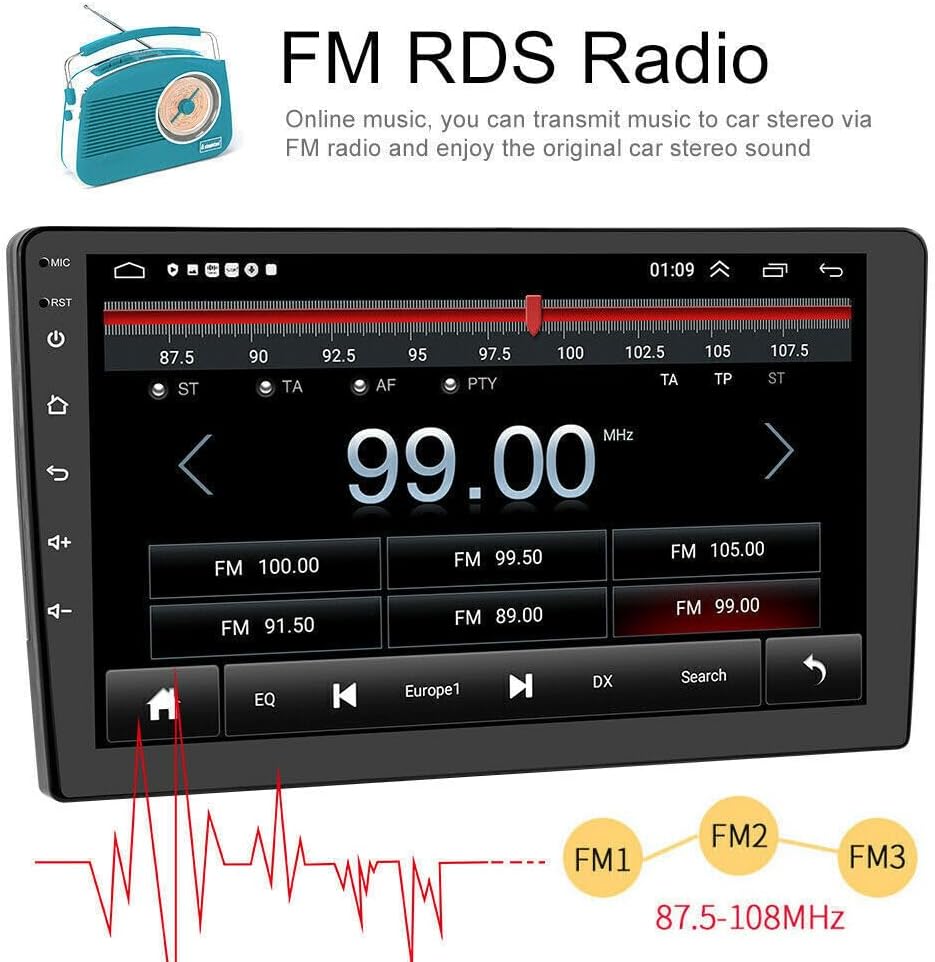
Figure 4.4: FM/RDS Radio Interface
4.6 Auxiliary System (Optional)
The unit supports various optional auxiliary systems to enhance your driving experience:
- HD Rear View Camera: Provides clear visuals for reversing.
- ADAS Recorder: Advanced Driver-Assistance System for recording driving footage.
- Tire Pressure Detection: Monitors tire pressure and temperature.
- Bluetooth OBD II: Retrieves real-time data and trouble codes from your vehicle's computer.
5. Maintenance
To ensure the longevity and optimal performance of your Loddery car stereo, follow these maintenance guidelines:
- Screen Cleaning: Use a soft, lint-free cloth to gently wipe the screen. For stubborn smudges, slightly dampen the cloth with water or a screen-safe cleaner. Avoid harsh chemicals or abrasive materials.
- Software Updates: Periodically check for available software updates to ensure the system runs efficiently and has the latest features. Follow the on-screen prompts or consult the full user manual for update procedures.
- Environmental Conditions: Avoid exposing the unit to extreme temperatures, direct sunlight for prolonged periods, or excessive moisture.
- Cable Connections: Ensure all cables are securely connected. Loose connections can lead to intermittent functionality.
6. Troubleshooting
If you encounter issues with your car stereo, refer to the following common problems and solutions:
- Unit Does Not Power On: Check all power connections. Ensure the vehicle's ignition is on. Verify the fuse is intact.
- No Sound: Check speaker connections. Ensure the volume is not muted or set to zero. Verify audio output settings.
- Touch Screen Unresponsive/Inaccurate: Perform a screen calibration (refer to Section 3.3). If the issue persists, a system reset may be required.
- GPS Not Functioning: Ensure the GPS antenna is properly connected and has a clear view of the sky. Verify location services are enabled in the settings.
- Bluetooth Connectivity Issues: Ensure Bluetooth is enabled on both the stereo and your device. Delete previous pairings and attempt to re-pair.
- Date/Time Incorrect: Access system settings to manually set the date and time or enable automatic synchronization via GPS or network time.
- Music Stops When Reversing: This behavior may be a system setting related to the reverse camera input. Check the system settings for options to disable audio interruption during reverse.
- Canbus Issues: Ensure the Canbus box is correctly installed and configured for your specific vehicle model and year. Incorrect Canbus settings can affect vehicle feature integration.
For persistent issues not covered here, please contact Loddery customer support.
7. Specifications
| Feature | Specification |
|---|---|
| Brand | Loddery |
| Model Number | QA1572X-5974-1417104221 |
| Vehicle Service Type | Chrysler 200 2015-2019 |
| Screen Size | 9 Inches |
| Operating System | Android |
| Memory Storage Capacity | 32 GB |
| Resolution | 1920 x 1080 |
| Connectivity Technology | Wi-Fi |
| Connectivity Protocol | Wi-Fi |
| Special Features | WIFI, Bluetooth, GPS, Navigation |
| Supported Satellite Navigation System | GPS |
| Audio Output Mode | Stereo |
| Mounting Type | Dashboard Mount |
| Touch Screen Type | Capacitive |
| Display Type | LCD |
| Human-Interface Input | Touchscreen |
| Control Method | Voice |
| Item Weight | 1875 Grams |
8. Warranty and Support
For any questions or concerns regarding your Loddery car stereo, please contact customer support. The product includes a warranty as described by the seller. For specific warranty details and claims, refer to your purchase documentation or contact the seller directly.