
Timeusb 24V25Ah
Timeusb 24V 25Ah LiFePO4 Battery User Manual
Model: 24V25Ah
1. Introduction
This manual provides essential information for the safe and efficient use of your Timeusb 24V 25Ah LiFePO4 Battery. Please read this manual thoroughly before installation and operation. Keep it for future reference.
The Timeusb 24V 25Ah LiFePO4 battery is designed for various applications requiring reliable and high-performance power. It features a 2C high discharge rate, a built-in 50A Battery Management System (BMS), and offers 1280W continuous load power. Its compact and lightweight design makes it suitable for mobility scooters, electric wheelchairs, and farm equipment.
2. Product Specifications
| Feature | Specification |
|---|---|
| Brand | Timeusb |
| Model | 24V25Ah |
| Battery Type | LiFePO4 (Lithium Iron Phosphate) |
| Nominal Voltage | 24V (25.6V) |
| Capacity | 25Ah |
| Energy | 640Wh |
| Max. Continuous Charge Current | 25A |
| Max. Continuous Discharge Current | 50A |
| Max. Continuous Load Power | 1280W |
| Dimensions (L x W x H) | 7.79"D x 6.53"W x 6.69"H |
| Item Weight | 13.34 lbs |
| Number of Cells | 8 |
| Terminal Type | M8 |
| Cycle Life | 4000+ cycles at 100% DOD, 6000+ cycles at 80% DOD, 15000+ cycles at 60% DOD |
The battery features a built-in 50A advanced Battery Management System (BMS) for protection against over-charging, over-discharging, overcurrent, short circuit, and high-temperature conditions.
3. What's in the Box
Upon opening your Timeusb 24V 25Ah LiFePO4 Battery package, you should find the following items:
- 24V25Ah LiFePO4 Battery (2 units for 2-pack)
- M8 Terminal Bolts (2 per battery)
- Insulating Caps for Bolts (2 per battery)
- User Manual
- Installation Guide
Please inspect all items for any damage or missing components immediately after unboxing. Contact customer support if any issues are found.
4. Setup and Installation
4.1 Unboxing and Initial Inspection
Carefully remove the battery from its packaging. Check the battery for any visible damage. Ensure all accessories listed in the "What's in the Box" section are present.
4.2 Initial Charging and Balancing
Before connecting the batteries in series or parallel, it is crucial to fully charge and balance each battery individually. This ensures optimal performance and longevity of your battery system. Use a compatible LiFePO4 charger (not included) for this process.
Important: Ensure all batteries have identical specifications (battery type, capacity, voltage, and BMS) and were purchased within one month of each other for optimal balancing and performance in a multi-battery system.
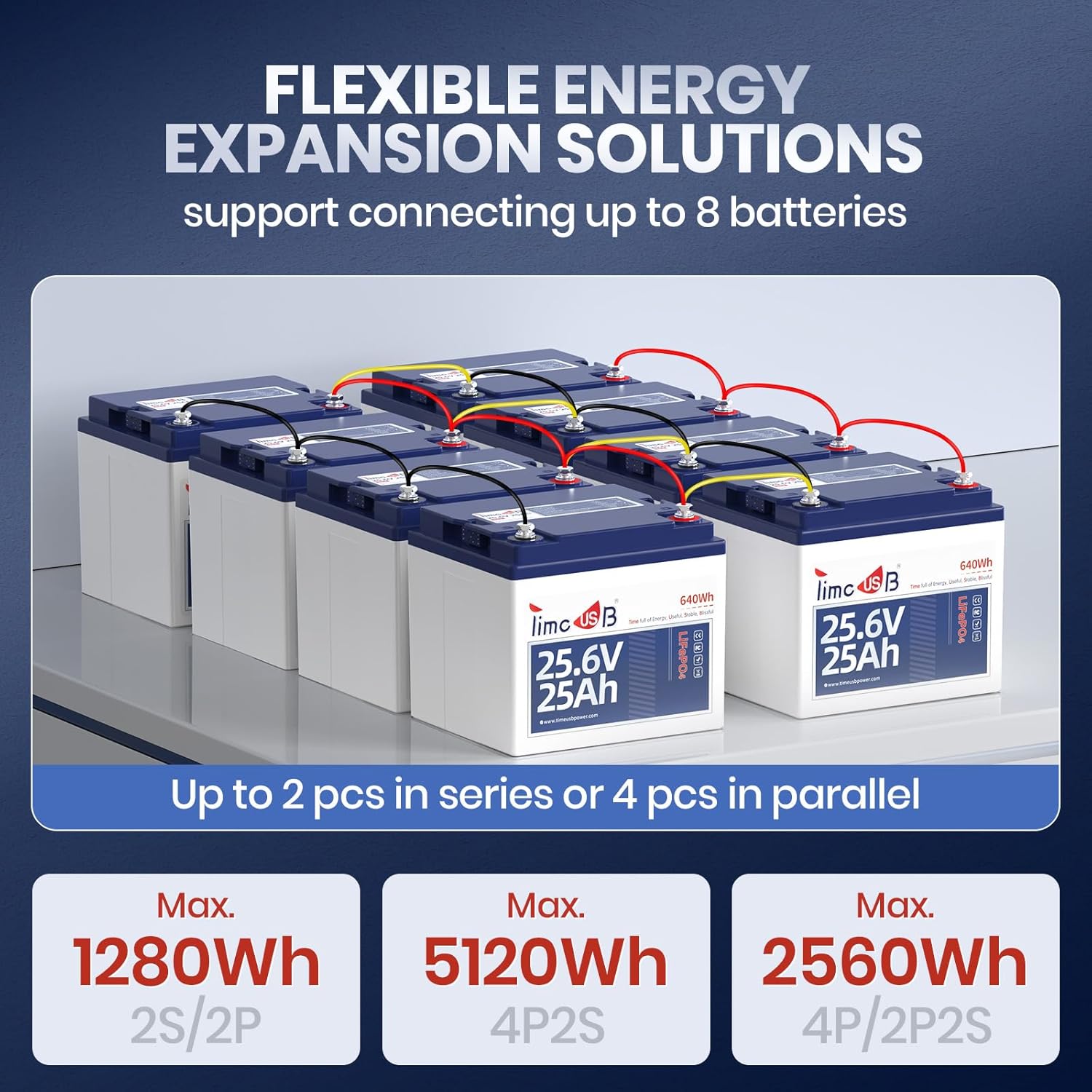
4.3 Connecting Batteries in Parallel
Parallel connections increase the total capacity (Ah) of your battery system while maintaining the same voltage. For parallel connections, it is recommended to use copper bus bars to balance input and output currents and prevent overheating of terminals.
- Connect the negative terminals of all batteries to a common negative bus bar.
- Connect the positive terminals of all batteries to a common positive bus bar.
- Ensure all connections are tightened securely using a torque wrench (12-14 N·m for M8 bolts).
After parallel connection, allow the batteries to balance for 12-24 hours before connecting to your load.
4.4 Connecting Batteries in Series
Series connections increase the total voltage of your battery system while maintaining the same capacity. For series connections, it is highly recommended to use a battery balancer to ensure even voltage distribution across all batteries.
- Connect the negative terminal of the first battery to the positive terminal of the second battery using a short, heavy-gauge cable.
- Continue this pattern for additional batteries in the series.
- Connect the battery balancer according to its specific instructions, typically across the terminals of each battery in the series.
- Ensure all connections are tightened securely using a torque wrench (12-14 N·m for M8 bolts).
Note: The total voltage of a series-connected system should not exceed 51.2V. For systems requiring more than 4 batteries in parallel or specific series/parallel combinations, consult Timeusb customer service.
4.5 App Connection (if applicable)
Some Timeusb LiFePO4 batteries feature Bluetooth connectivity, allowing you to monitor battery status via a smartphone application. Refer to the specific instructions provided with your battery for app download and connection procedures.
5. Operating Instructions
Your Timeusb 24V 25Ah LiFePO4 battery is designed for deep cycle applications, providing consistent power for extended periods.
- Discharge Rate: The battery supports a 2C high discharge rate, enabling 1280W of continuous load power. This is higher than many standard 24V 25Ah LiFePO4 batteries.
- Depth of Discharge (DOD): The battery can achieve 100% DOD, meaning you can utilize its full capacity without significantly impacting its lifespan.
- Applications: Ideal for electric mobility scooters, electric wheelchairs, farm equipment (e.g., electric lawn mowers, dump carts), off-grid systems, solar storage, campers, RVs, and trolling motors (20-30 Lb).

Always ensure your load's power requirements do not exceed the battery's maximum continuous load power to prevent damage and ensure safe operation.
6. Maintenance
The Timeusb LiFePO4 battery is designed for low maintenance, thanks to its advanced built-in BMS and robust cell structure.
- BMS Protection: The integrated 50A BMS protects the battery from common issues such as over-charging, over-discharging, overcurrent, short circuits, and high temperatures.
- Storage: If storing the battery for an extended period, ensure it is charged to approximately 50% State of Charge (SOC) and stored in a cool, dry place. Periodically check the voltage and recharge if necessary.
- Cleaning: Keep the battery terminals clean and free of corrosion. Use a dry cloth to wipe down the battery casing.

7. Troubleshooting
If you encounter issues with your Timeusb LiFePO4 battery, consider the following common troubleshooting steps:
- Battery Not Charging:
- Ensure the charger is compatible with LiFePO4 batteries and the correct voltage (24V).
- Check all connections between the charger and the battery for secure contact.
- Verify the power source for the charger is active.
- The BMS may have activated a protection mode (e.g., over-discharge). Try connecting the battery to a compatible charger to reset the BMS.
- Battery Not Discharging/Providing Power:
- Check all connections to your load for secure contact.
- Verify the load's power requirements do not exceed the battery's maximum continuous discharge current (50A) or load power (1280W).
- The BMS may have activated a protection mode (e.g., short circuit, overcurrent). Disconnect the load, wait a few minutes, and try reconnecting.
- Check the battery's State of Charge (SOC) via the app (if applicable) or a voltmeter.
- Unusual Heat:
- If the battery feels excessively hot, immediately disconnect it from the charger and load.
- Ensure proper ventilation around the battery.
- Verify that the charging/discharging currents are within the specified limits.
For persistent issues or concerns, please refer to the "Warranty and Support" section for contact information.
8. Safety Information
Always follow these safety guidelines when handling and operating your LiFePO4 battery:
- Do not short-circuit the battery terminals.
- Use only chargers specifically designed for LiFePO4 batteries with the correct voltage and current ratings.
- Do not expose the battery to extreme temperatures (above 60°C or below -20°C) or direct sunlight for prolonged periods.
- Do not disassemble, puncture, or modify the battery. This can lead to severe injury or fire.
- Keep the battery away from water, fire, and flammable materials.
- Ensure proper ventilation when charging or discharging the battery.
- Wear appropriate personal protective equipment (PPE), such as insulated gloves and eye protection, when handling batteries.
- Keep out of reach of children.
9. Warranty and Support
For detailed warranty information, please refer to the warranty card included with your product or visit the official Timeusb website. If you require technical assistance, have questions about installation, or need to report a product issue, please contact Timeusb customer support.
You can find more information and contact details on the official Timeusb store: Timeusb Store.
Ask a question about this manual
Ask about setup, troubleshooting, compatibility, parts, safety, or missing instructions. Manuals+ will review the question and use this page’s manual context to help answer it.