
1. Introduction
This manual provides detailed instructions for the VILTROX AF 56mm F1.7 XF APS-C lens. Designed for Fujifilm X-Mount mirrorless cameras, this prime portrait-length lens offers an 85mm equivalent focal length, a bright f/1.7 maximum aperture, and quiet autofocus, making it suitable for various photographic applications, especially portraiture and low-light conditions. Please read this manual thoroughly before using the lens to ensure optimal performance and longevity.
2. Product Overview & Package Contents
The VILTROX AF 56mm F1.7 XF lens is a compact and lightweight optic. Below is an image illustrating the lens and its included accessories.
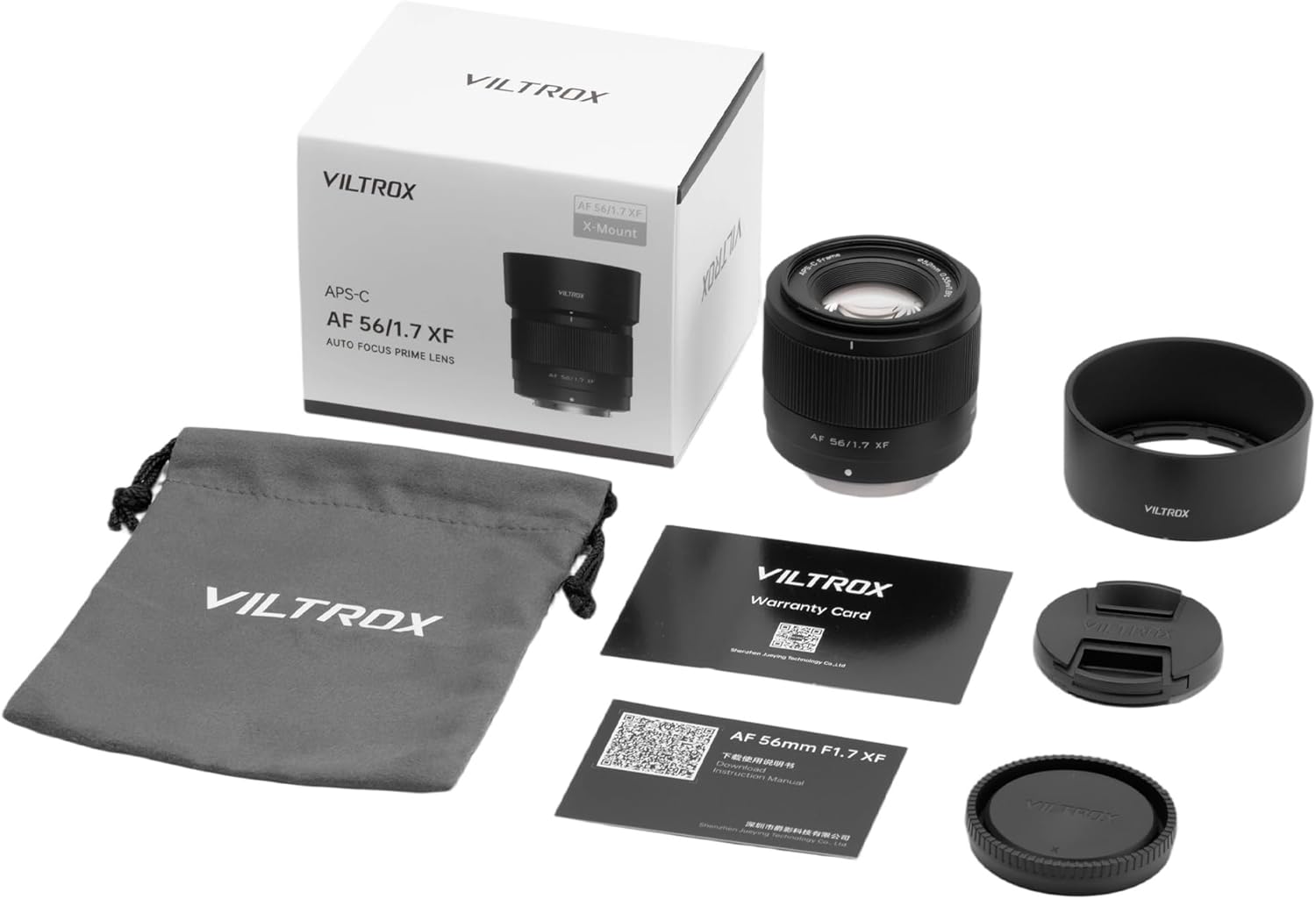
Figure 2.1: VILTROX AF 56mm F1.7 XF lens and its package contents.
2.1. Package Contents
- VILTROX AF 56mm F1.7 X-mount Lens
- Lens Hood
- Lens Pouch
- Front Lens Cap
- Rear Lens Cap
- Warranty Card
- User Manual
2.2. Lens Components

Figure 2.2: Front view of the VILTROX AF 56mm F1.7 XF lens with lens hood attached.

Figure 2.3: Rear view of the VILTROX AF 56mm F1.7 XF lens, highlighting the metal mount and USB-C port for firmware updates.
3. Key Features
- Portrait-Length Prime: Designed for APS-C-format FUJIFILM X-mount mirrorless cameras, providing an 85mm equivalent focal length.
- Bright Aperture: f/1.7 maximum aperture excels in low-light conditions and offers precise control over depth of field for selective focus.
- Compact & Lightweight: Weighing only 171g, its design is ideal for travel and everyday use, ensuring compatibility with Fujifilm cameras.
- Advanced Optical Design: Features 9 groups, 11 piece optical structures, including 4 ED (Extra-low Dispersion) lenses and 3 high refraction index lenses for superior image quality.
- Quiet Autofocus: Utilizes an STM (Stepping Motor) for silent, fast, and accurate autofocus performance, suitable for both photo and video recording.
- Smooth Bokeh: A nine-blade diaphragm contributes to a pleasing and smooth bokeh quality.
- Firmware Updatable: Integrated micro-USB port allows for convenient lens firmware updates.
4. Technical Specifications
| Specification | Value |
|---|---|
| Brand | VILTROX |
| Model Number | AF 56/1.7 XF |
| Focal Length | 56mm (85mm equivalent on APS-C) |
| Maximum Aperture | f/1.7 |
| Minimum Aperture | Not specified (typically f/16 or f/22) |
| Optical Structure | 11 elements in 9 groups (including 4 ED, 3 high refraction index) |
| Diaphragm Blades | 9 |
| Autofocus Motor | STM (Stepping Motor) |
| Minimum Focusing Distance | 0.55m (1.8ft) |
| Filter Size | 52mm |
| Product Dimensions | 2.5 x 2.1 x 2.1 inches |
| Item Weight | 13.1 ounces (approx. 371g) |
| Firmware Update Port | USB-C |
5. Getting Started (Setup)
5.1. Attaching the Lens
- Ensure your camera is turned off.
- Remove the rear lens cap from the VILTROX AF 56mm F1.7 XF lens and the body cap from your Fujifilm X-Mount camera.
- Align the white dot on the lens barrel with the white dot on your camera's lens mount.
- Gently insert the lens into the camera mount and rotate it clockwise until it clicks into place. Do not force the lens.
Video 5.1: Unboxing and mounting the VILTROX AF 56mm F1.7 XF lens on a Fujifilm camera. This video demonstrates the physical attachment process.
5.2. Detaching the Lens
- Ensure your camera is turned off.
- Press and hold the lens release button on your camera body.
- Rotate the lens counter-clockwise until it detaches from the camera mount.
- Immediately attach the rear lens cap to the lens and the body cap to your camera to protect them from dust and damage.
6. Operating the Lens
6.1. Autofocus (AF)
The VILTROX AF 56mm F1.7 XF lens features an STM (Stepping Motor) for fast, quiet, and accurate autofocus. This motor is designed to minimize noise during video recording and is responsive for still photography.
- Set your camera's focus mode to AF (Autofocus).
- The lens will automatically focus when the shutter button is half-pressed.
- The STM motor provides precise focus, even with features like face and eye recognition on compatible Fujifilm cameras.
Video 6.1: A detailed review of the VILTROX 56mm f/1.7 lens, including demonstrations of its autofocus capabilities in various scenarios.
6.2. Manual Focus (MF)
To use manual focus, set your camera's focus mode to MF (Manual Focus). The lens features a smooth-turning plastic focus ring. While not lightning-fast, the manual focus response is precise enough for accurate adjustments.
6.3. Aperture Control
The lens has a bright f/1.7 maximum aperture, allowing for excellent performance in low-light conditions and significant control over depth of field. Aperture is controlled electronically via the camera body, as the lens does not feature a physical aperture ring.
6.4. Firmware Updates
The VILTROX AF 56mm F1.7 XF lens includes an integrated micro-USB port on the lens mount for firmware updates. To update the firmware:
- Visit the official VILTROX website to download the latest firmware for your lens model.
- Connect the lens directly to your computer using a USB-C cable.
- Follow the instructions provided with the firmware download to complete the update process.
7. Image Quality Characteristics
The VILTROX AF 56mm F1.7 XF lens delivers strong optical performance, especially considering its compact size and price point. Here's a summary of its image quality characteristics:
7.1. Sharpness & Contrast
The lens exhibits excellent sharpness and good contrast, even wide open at f/1.7 in the center of the image. The image corners are also remarkably sharp, which is a pleasant surprise for a lens in this category. Stopping down slightly to f/2.8 can yield a tiny bit of extra resolution, but overall sharpness is impressive across the frame.
7.2. Distortion & Vignetting
When shooting in RAW format without in-camera corrections, the lens may exhibit a small amount of pincushion distortion. More notably, there can be heavy vignetting at f/1.7. However, stopping down to f/2 begins to clear this up, and by f/2.8 or f/4, vignetting is mostly gone. If shooting in RAW, vignetting is the primary optical aberration to consider correcting in post-processing.
7.3. Bokeh
The nine-blade diaphragm contributes to impressively smooth out-of-focus backgrounds (bokeh). Even in transitional zones, the bokeh appears smooth with almost no outlining on highlights, resulting in a pleasing aesthetic for portrait photography.
7.4. Chromatic Aberration
Longitudinal chromatic aberration is minimal with this lens. At f/1.7, a tiny bit might be visible through low contrast areas, but stopping down to f/2 or f/2.8 effectively mitigates this, making it a non-issue for most shooting scenarios.
8. Maintenance & Care
- Cleaning: Use a soft, lint-free cloth or a lens brush to remove dust from the lens surface. For smudges or fingerprints, use a specialized lens cleaning solution and a microfiber cloth. Avoid harsh chemicals or abrasive materials.
- Storage: When not in use, store the lens with both front and rear caps attached in the provided lens pouch or a dry, cool place away from direct sunlight and extreme temperatures. Avoid storing in areas with high humidity to prevent mold growth.
- Handling: Always handle the lens by its barrel, not by the front element. Avoid dropping or subjecting the lens to strong impacts.
- Weather Sealing: Please note that this lens does not feature weather sealing. Exercise caution when using it in dusty, humid, or rainy environments.
9. Troubleshooting
- Lens not recognized by camera: Ensure the lens is securely attached to the camera body and that the camera's firmware is up to date. Try cleaning the electrical contacts on both the lens and camera with a clean, dry cloth.
- Autofocus is slow or inaccurate: Check that the camera's focus mode is set to AF. Ensure there is sufficient light for the autofocus system to operate effectively. If the issue persists, consider updating the lens firmware.
- Image quality issues (e.g., vignetting, distortion): For RAW images, these can often be corrected in post-processing software. Ensure your camera's in-camera lens corrections are enabled if shooting JPEGs.
- Lens not turning on/off: This lens is powered by the camera. Ensure the camera battery is charged and the camera is functioning correctly.
10. Warranty & Support
For warranty information, please refer to the Warranty Card included in your package. For technical support, firmware downloads, or further assistance, please visit the official VILTROX website or contact their customer service department.
VILTROX Official Store: Visit Store


