
1. Introduction
Thank you for choosing the TREEWELL THRS25A Remote Control Outlet. This device allows you to wirelessly control your electrical appliances with ease, offering convenience and energy savings. Please read this manual carefully before installation and operation to ensure proper use and to prevent damage.
2. Safety Information
Always follow basic safety precautions when using electrical products to reduce the risk of fire, electric shock, and injury.
- Do not exceed the maximum load rating of 15A/1875W. Overloading can cause overheating and fire.
- Do not immerse the device in water or expose it to rain or moisture.
- Do not disassemble or modify the device. There are no user-serviceable parts inside.
- Ensure the outlet is properly grounded before plugging in the receiver.
- Keep out of reach of children.
- Unplug the device from the wall outlet before cleaning.
3. Product Overview
The TREEWELL THRS25A Remote Control Outlet system consists of wireless receivers (outlets) and a remote control transmitter. Each receiver features a manual ON/OFF switch and an indicator light.

Image: The TREEWELL THRS25A Remote Control Outlet receiver plugged into a wall outlet, with the remote control shown alongside. Key features highlighted include remote control functionality, an ON/OFF switch on the receiver, a 200FT range, and a maximum power rating of 1875W.
The system is designed for plug-and-play operation, offering a 200-foot range and the ability to control multiple devices individually or in groups.
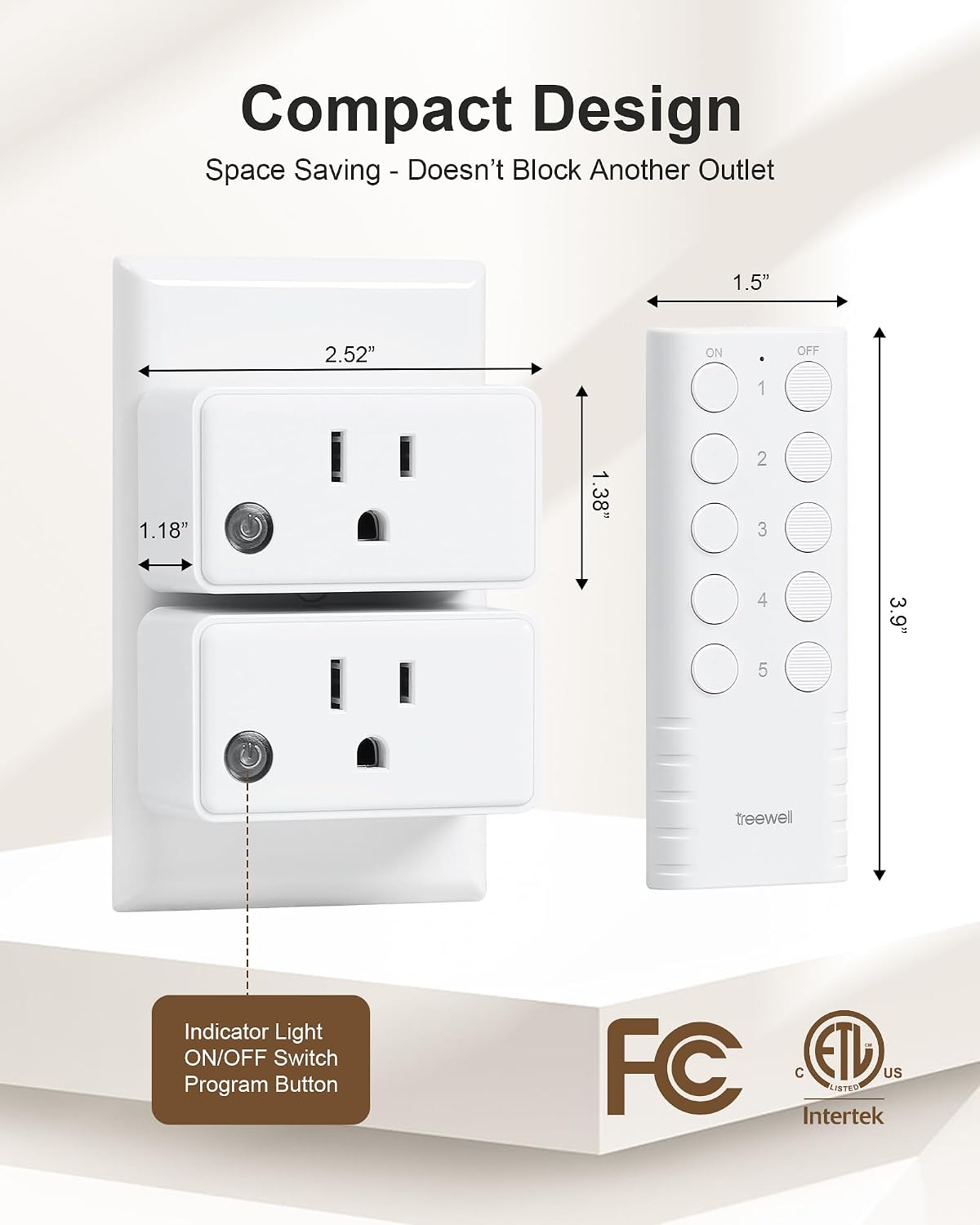
Image: A close-up view of the compact TREEWELL THRS25A remote control outlet and its remote. Dimensions are provided: the outlet measures 2.52 inches wide and 1.38 inches high, while the remote is 1.5 inches wide and 3.9 inches high. The image also points out the indicator light, ON/OFF switch, and program button on the receiver.
4. Setup and Pairing
The TREEWELL THRS25A system is designed for easy setup. Follow these steps to pair your remote control with the receivers:
- Plug in the Receiver: Insert the remote control outlet receiver into a standard wall outlet. The indicator light on the receiver will flash.
- Connect Your Device: Plug the appliance or device you wish to control into the remote control outlet receiver.
- Initiate Pairing: Press and hold the small program button on the side of the receiver for approximately 3 seconds until the indicator light starts blinking rapidly.
- Pair with Remote: Within 5 seconds of the receiver's light blinking, press the desired 'ON' or 'OFF' button (e.g., '1 ON' or '1 OFF') on the remote control. The receiver's indicator light will stop blinking and remain solid for a moment, then turn off, indicating successful pairing.
- Test: Press the corresponding 'ON' or 'OFF' button on the remote to ensure the connected device responds.
You can pair multiple receivers to a single remote button, or multiple remote buttons to a single receiver, or even multiple remotes to a single receiver. The system offers flexible pairing options.

Image: Diagram illustrating the flexible pairing options for the TREEWELL THRS25A system. It shows how one switch can control one outlet, multiple switches can control one outlet, and one switch can control multiple outlets, emphasizing 'Free Pairing, No Interference'.
5. Operating Instructions
Once paired, operating your TREEWELL THRS25A Remote Control Outlet is straightforward.
- Remote Control: Use the numbered 'ON' and 'OFF' buttons on the remote control to switch the corresponding paired receivers and their connected appliances on or off.
- Manual Control: Each receiver has a manual ON/OFF switch (the program button) that allows you to turn the connected appliance on or off directly at the outlet, regardless of the remote control's state.
- Range: The remote control operates effectively up to 200 feet in open areas. The strong RF signal can penetrate walls, doors, and ceilings, providing reliable control throughout your home or office.

Image: A user comfortably operating multiple TREEWELL THRS25A remote control outlets from a distance using a single remote. The image highlights the ability to 'Control Each Outlet Separately' and the convenience of having '2 Remotes and 5 Outlets' for managing various devices around a room.
6. Maintenance
The TREEWELL THRS25A Remote Control Outlet requires minimal maintenance.
- Cleaning: Wipe the device with a dry, soft cloth. Do not use abrasive cleaners or solvents. Ensure the device is unplugged before cleaning.
- Remote Battery: The remote control uses a standard coin cell battery (e.g., CR2032). If the remote's range decreases or it becomes unresponsive, replace the battery. To replace, open the battery compartment on the back of the remote, insert a new battery with the correct polarity, and close the compartment.
7. Troubleshooting
If you encounter issues with your TREEWELL THRS25A Remote Control Outlet, refer to the following troubleshooting guide:
| Problem | Possible Cause | Solution |
|---|---|---|
| Device does not turn ON/OFF via remote. | 1. Receiver not plugged in or no power. 2. Remote battery is low or dead. 3. Receiver and remote are not paired. 4. Out of range. | 1. Check if the receiver is securely plugged into a live outlet. 2. Replace the remote control battery. 3. Re-pair the receiver with the remote control (refer to Section 4). 4. Move closer to the receiver. |
| Indicator light on receiver does not turn on. | 1. No power to the outlet. 2. Receiver is faulty. | 1. Check the wall outlet with another device. Check circuit breaker. 2. Contact customer support if the outlet has power but the receiver remains unresponsive. |
| Reduced remote control range. | 1. Low remote battery. 2. Obstructions (thick walls, metal objects). 3. Interference from other RF devices. | 1. Replace the remote control battery. 2. Try to minimize obstructions or reposition the receiver/remote. 3. Re-pair the devices to a different channel if possible, or move away from interfering devices. |
| Connected appliance does not work. | 1. Appliance is not plugged in correctly. 2. Appliance is faulty. 3. Overload. | 1. Ensure the appliance is securely plugged into the receiver. 2. Test the appliance by plugging it directly into a wall outlet. 3. Ensure the appliance's wattage does not exceed 1875W. |
8. Specifications
- Model: THRS25A
- Brand: TREEWELL
- Voltage: 120V AC, 60Hz
- Max Load: 15A / 1875W Resistive
- Wireless Frequency: RF 433.92 MHz
- Remote Range: Up to 200 feet (60 meters) in open areas
- Remote Battery: CR2032 (included)
- Receiver Dimensions (approx.): 2.52" W x 1.38" H (excluding prongs)
- Remote Dimensions (approx.): 1.5" W x 3.9" H

Image: A close-up of the TREEWELL THRS25A remote control outlet, highlighting its 'Rated High-Power 15A/1875W' capability. Below, various household appliances such as holiday decorations, fans, lamps, humidifiers, coffee makers, and heaters are shown, illustrating the wide range of devices suitable for use with this outlet.
9. Warranty and Support
TREEWELL products are designed for reliability and performance. For warranty information, technical support, or any questions regarding your THRS25A Remote Control Outlet, please refer to the contact information provided with your purchase or visit the official TREEWELL website. Please have your model number (THRS25A) ready when contacting support.