
1. Product Overview
This Loddery 9-inch Android 13.0 Car Stereo is designed to upgrade the infotainment system in Ford Transit Tourneo Custom vehicles manufactured between 2013 and 2019. It features a high-definition touchscreen, integrated GPS navigation, wireless Carplay and Android Auto, Wi-Fi connectivity, Bluetooth, and support for an AHD backup camera.
The system provides a modern and intuitive interface for enhanced driving experience, offering access to various applications, media playback, and communication features directly from your dashboard.
2. Package Contents
Before installation, please verify that all components listed below are present in your package:
- 1 x Car Android Stereo Radio (Main Unit)
- 2 x Power Cables
- 1 x GPS Antenna
- 1 x AHD Camera
- 1 x RCA Cable
- 2 x USB Cables
- 1 x Microphone
- 1 x Canbus Box
- 1 x Camera Input Cable
- 1 x Radio Extension Cable
- 1 x Instruction Manual (this document)
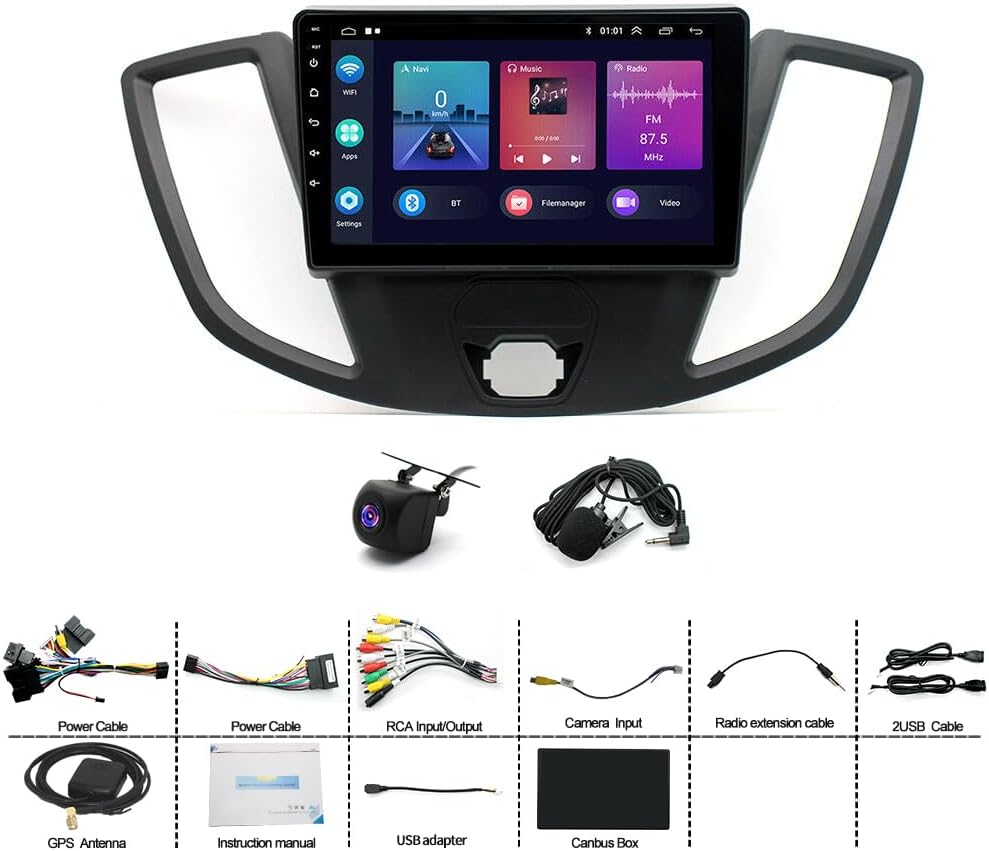
Image: Overview of the Loddery 9-inch Android Car Stereo and its included accessories, such as power cables, GPS antenna, AHD camera, RCA cable, USB cables, microphone, Canbus box, camera input cable, radio extension cable, and the instruction manual.
3. Setup and Installation
Professional installation is recommended for this product. Ensure the vehicle's battery is disconnected before beginning installation to prevent electrical damage.
3.1 Pre-Installation Check
Compare the new head unit with your vehicle's existing dashboard layout to ensure compatibility. The unit is designed for Ford Transit Tourneo Custom models from 2013-2019.

Image: A visual comparison showing the Ford Transit dashboard before and after the installation of the 9-inch Android Car Stereo, highlighting the integrated fit.
3.2 Wiring Connections
Refer to the wiring diagram provided in the separate wiring guide (if applicable) or consult a professional installer. Key connections include:
- Power Cables: Connect to the vehicle's power supply (constant 12V, accessory 12V, and ground).
- Canbus Box: Integrate the Canbus box as instructed to ensure proper communication with vehicle systems, especially for steering wheel controls.
- GPS Antenna: Mount the GPS antenna in a location with a clear view of the sky, typically on the dashboard or under the windshield.
- AHD Camera: Connect the AHD backup camera to the dedicated camera input cable. Ensure proper routing of the cable to the rear of the vehicle.
- USB Cables: Route the USB extension cables to an accessible location for connecting external devices.
- Microphone: Connect the external microphone for improved voice command and call quality.
- RCA Cables: Use for external audio/video input/output if required.
4. Operating Instructions
4.1 Initial Power On and System Setup
After installation, reconnect the vehicle's battery. The unit will power on automatically or by pressing the power button. Follow the on-screen prompts for initial setup, including language selection and time zone.
4.2 Wireless Carplay & Android Auto
The system supports both wireless and wired Carplay for iOS devices and Android Auto for Android devices. This feature integrates your smartphone's functions (navigation, calls, messages, music) directly into the car stereo display.
- Wireless Connection: Enable Bluetooth and Wi-Fi on your smartphone. Pair your phone with the car stereo via Bluetooth. Once paired, the system will prompt you to activate Carplay or Android Auto wirelessly.
- Wired Connection: Connect your smartphone to one of the USB ports using a high-quality USB cable. The system should automatically detect and launch Carplay or Android Auto.
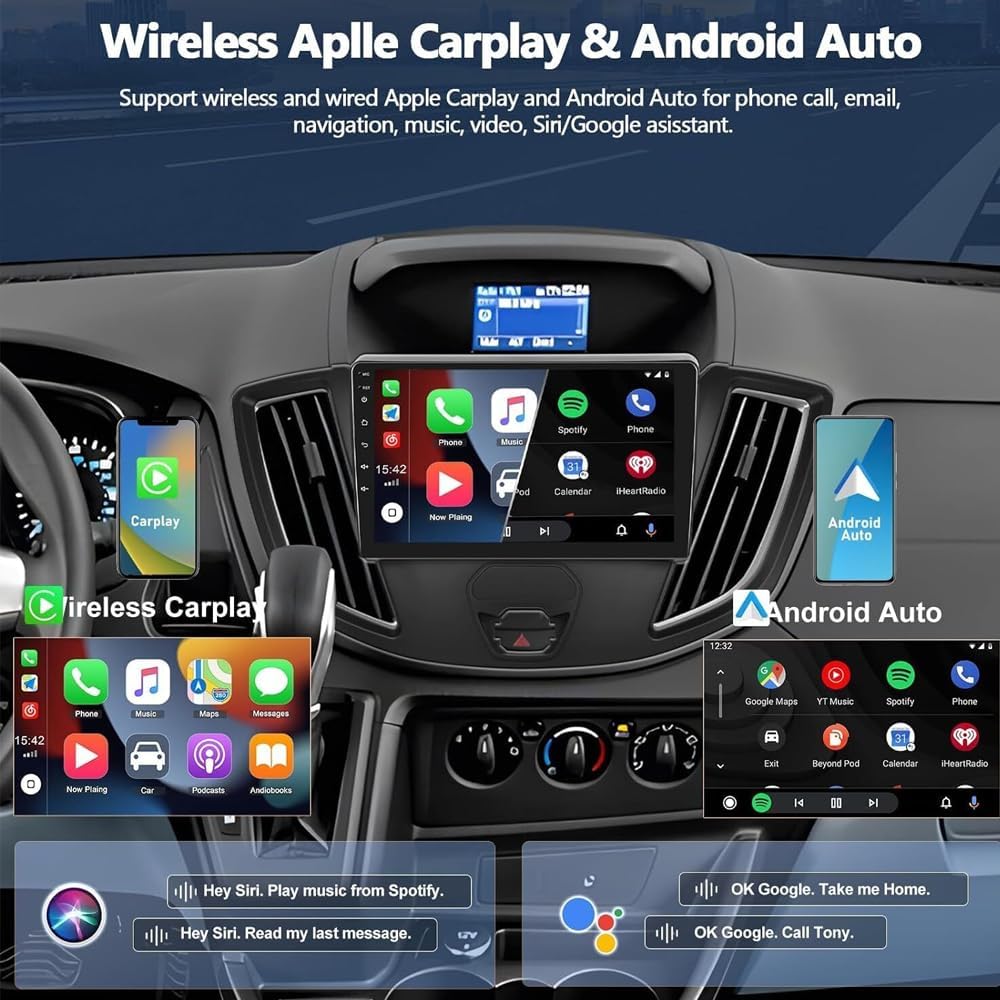
Image: Screenshots demonstrating the user interface for Wireless Apple Carplay and Android Auto, showing integrated phone calls, navigation, music, and voice assistant features on the car stereo display.
4.3 GPS Navigation
The unit has built-in GPS navigation. You can download offline maps directly from the Play Store. For online navigation, connect the unit to Wi-Fi, and use applications like Google Maps.

Image: Visual representation of the GPS navigation interface showing a route on a map, alongside icons indicating Wi-Fi connectivity and various social media/messaging applications available for download.
4.4 Wi-Fi Connectivity
Connect the stereo to a Wi-Fi hotspot (e.g., from your smartphone) to access online features, download apps from the Play Store, stream music, and use online navigation services.
4.5 AHD Reverse Input (Backup Camera)
When the vehicle is shifted into reverse gear, the system will automatically display the image from the connected AHD backup camera. The camera provides a wide-angle view with night vision capabilities.
4.6 Steering Wheel Control
If your vehicle is equipped with steering wheel controls and the Canbus box is correctly installed, you can configure the stereo to respond to these controls. Access the "SteeringWheelKey" settings in the system menu to learn and assign functions to your steering wheel buttons.

Image: Illustration of the AHD reverse input showing a car backing up with a wide-angle camera view, and a diagram explaining how to set up steering wheel controls by assigning functions to buttons on the car stereo interface.
4.7 Media Playback and USB Connectivity
The unit supports various media formats. You can play music from your smartphone via Bluetooth or connect USB drives to the provided USB ports for media playback. The file manager allows you to browse, install, and manage applications.
5. Maintenance
To ensure the longevity and optimal performance of your car stereo, follow these maintenance guidelines:
- Cleaning the Screen: Use a soft, lint-free cloth slightly dampened with water or a screen cleaner specifically designed for electronic displays. Avoid harsh chemicals or abrasive materials.
- Software Updates: Periodically check for system software updates via the Wi-Fi connection in the system settings. Keeping the software updated ensures optimal performance and access to new features.
- Environmental Conditions: Avoid exposing the unit to extreme temperatures, direct sunlight for prolonged periods, or excessive moisture.
6. Troubleshooting
If you encounter issues with your car stereo, refer to the following common problems and solutions:
- No Power:
- Check all power cable connections.
- Verify the vehicle's fuse for the stereo.
- Ensure the vehicle's battery is charged.
- No Sound:
- Check speaker connections.
- Ensure volume is not muted or set to minimum.
- Verify audio output settings in the system menu.
- GPS Not Working / Inaccurate:
- Ensure the GPS antenna is properly connected and mounted with a clear view of the sky.
- Check GPS settings in the system menu.
- If using online maps, verify Wi-Fi connectivity.
- Carplay/Android Auto Not Connecting:
- Ensure Bluetooth and Wi-Fi are enabled on your phone.
- Try connecting with a different USB cable (for wired connection).
- Restart both the car stereo and your smartphone.
- Backup Camera Not Displaying:
- Check the AHD camera and camera input cable connections.
- Ensure the vehicle is in reverse gear.
- Verify camera settings in the system menu (CVBS/AHD selection).
If problems persist, please contact customer support.
7. Specifications

Image: A front view of the Loddery 9-inch Android Car Stereo display, showing its dimensions (228mm width, 130mm height) and various on-screen icons and physical buttons (MIC, Reset, Power, Menu, Back, Vol+, Vol-).
| Feature | Detail |
|---|---|
| Model Name | Ford Transit Tourneo Custom 2013-2019 |
| Display Size | 9 Inches |
| Operating System | Android 13.0 |
| Connectivity | Wi-Fi, Bluetooth, USB |
| Special Features | Wireless Carplay, Wireless Android Auto, GPS Navigation, AHD Backup Camera Support, Steering Wheel Control, Microphone, Touchscreen |
| Audio Output Mode | Stereo |
| Mounting Type | Dashboard Mount |
| Supported Languages | Chinese, English, French, Italian, Korean, Japanese, Arabic, Spanish, Portuguese, Russian, Turkish, Vietnamese, Hebrew, Polish, German (and more, up to 40 national languages) |
| Item Weight | 4.13 pounds |
| Package Dimensions | 14.96 x 12.2 x 6.69 inches |
8. Warranty and Support
8.1 Warranty Information
For specific warranty details and terms, please refer to the warranty card included with your product or contact the manufacturer directly. The warranty typically covers manufacturing defects for a specified period from the date of purchase.
8.2 Customer Support
If you have any questions regarding the installation, operation, or troubleshooting of your Loddery car stereo, please contact our customer support team. Refer to the contact information provided on the product packaging or the official Loddery website for assistance.