
1. Introduction
The ATTACK SHARK AK680 is a compact 60% wired mechanical gaming keyboard designed for both gaming and office use. It features a 68-key layout, hot-swappable switches, RGB rainbow backlighting, UV printed keycaps, and EVA sound control for an enhanced user experience. This manual provides detailed instructions for setting up, operating, and maintaining your AK680 keyboard.
2. Package Contents
Upon opening the package, please verify that all the following items are included:
- ATTACK SHARK AK680 Mechanical Keyboard
- Detachable Type-C to USB-A Cable
- User Manual
- Keycap Puller
- Switch Puller
- Extra Brown Switches (x2)

Figure 2.1: Contents included in the AK680 keyboard package.
3. Product Overview
The AK680 features a compact 60% layout with 68 keys, optimizing desk space while retaining essential functionalities. The keyboard is constructed with high-quality ABS injection molding and features stylish ball-shaped keycaps with UV printing for durability.

Figure 3.1: Front view of the AK680 keyboard.
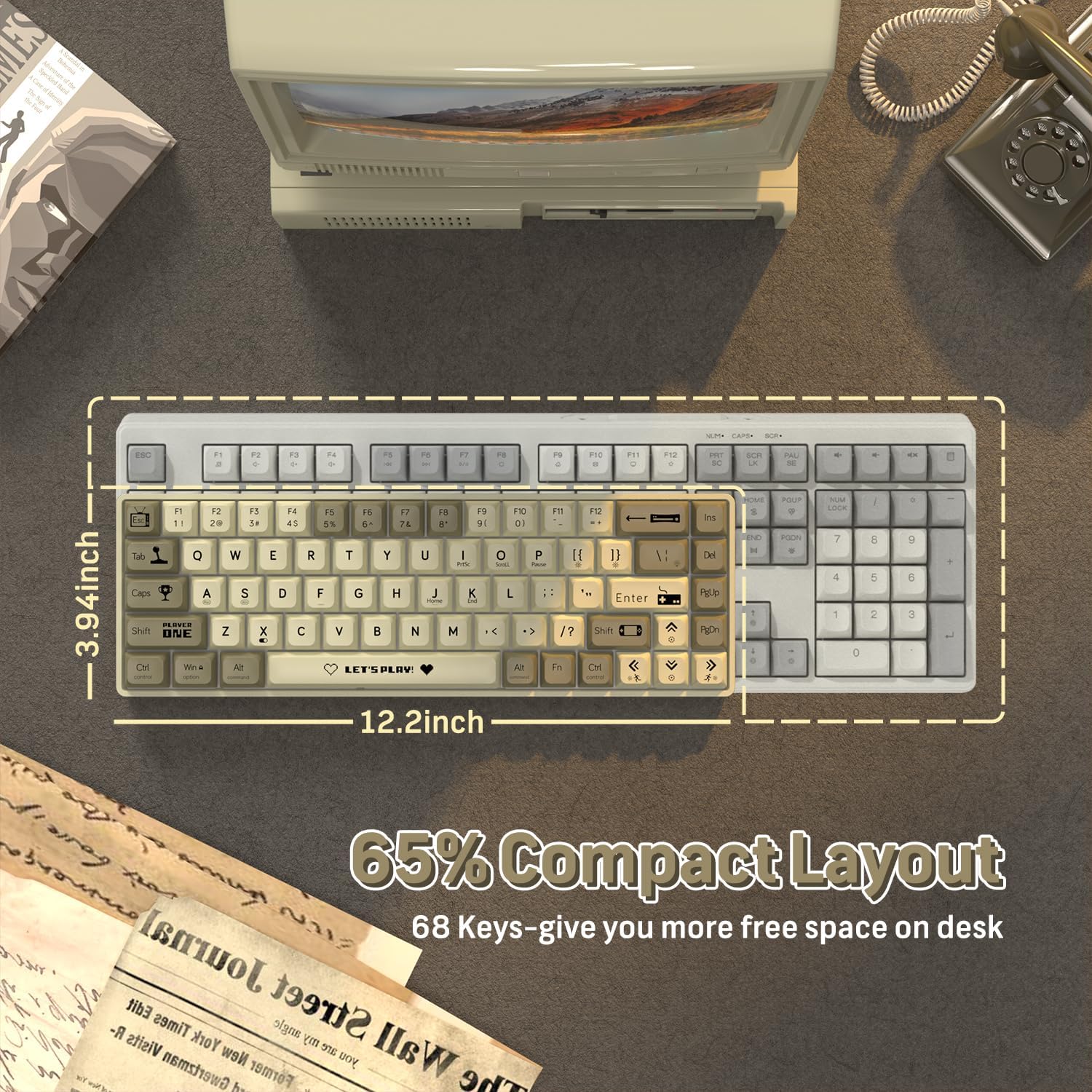
Figure 3.2: Compact 65% layout of the AK680 keyboard.

Figure 3.3: Available color variations of the AK680 keyboard.
4. Setup
The AK680 keyboard is designed for plug-and-play functionality, requiring no complex driver installations.
- Locate the detachable Type-C to USB-A cable included in the package.
- Connect the Type-C end of the cable to the port on the AK680 keyboard.
- Connect the USB-A end of the cable to an available USB port on your computer (Windows, Mac, or Linux).
- The keyboard will be automatically recognized by your operating system and is ready for use.

Figure 4.1: Connecting the AK680 keyboard via Type-C cable.
5. Operating Instructions
The AK680 keyboard offers full anti-ghosting capabilities, ensuring that all key presses are registered accurately, even during rapid typing or complex gaming commands. This feature prevents missed keystrokes and provides reliable performance.

Figure 5.1: Full Anti-Ghosting functionality.
6. Customization and Features
6.1 Hot-Swappable Switches
The AK680 keyboard features hot-swappable sockets, allowing users to change 3-pin mechanical switches without soldering. This provides flexibility for customizing the typing feel and sound to personal preference.

Figure 6.1: Hot-swappable mechanical switches.

Figure 6.2: 3-pin hot-swappable switch compatibility.
6.2 RGB Rainbow Backlighting
The keyboard features 19 dynamic RGB rainbow light effects. Users can easily switch between effects and adjust brightness and speed using FN+ combination keys to personalize their experience.

Figure 6.3: Customized RGB backlighting and programmable features.
6.3 Programmable Functionality
The AK680 offers extensive customization through user-friendly software, allowing for macro creation and key rebindings to tailor the keyboard to specific user needs and preferences.
6.4 EVA Sound Control
Equipped with professional EVA sandwich sound control foam, the keyboard effectively reduces the sound of keystrokes, contributing to a quieter working and gaming environment.

Figure 6.4: Innovative multi-layer design with EVA sound control.

Figure 6.5: XDA Height Design for comfortable keystrokes.

Figure 6.6: XDA Keycap Profile.

Figure 6.7: Brown Switch specifications.
7. Maintenance
Regular maintenance helps ensure the longevity and optimal performance of your AK680 keyboard.
- Cleaning: Use a soft, dry cloth to wipe down the keycaps and keyboard surface. For deeper cleaning, use a can of compressed air to remove dust and debris from between the keys.
- Keycap Removal: Use the included keycap puller to carefully remove keycaps for cleaning or replacement. Gently pull straight up on the keycap.
- Switch Replacement: As the keyboard is hot-swappable, you can replace individual switches. Use the included switch puller to gently grasp the switch and pull it straight out. When inserting a new switch, align the pins carefully with the sockets and press down firmly until it clicks into place. Ensure the switch is a 3-pin mechanical switch.
8. Troubleshooting
If you encounter issues with your AK680 keyboard, consider the following common solutions:
- Keyboard Not Responding:
- Ensure the Type-C cable is securely connected to both the keyboard and the computer's USB port.
- Try connecting the keyboard to a different USB port on your computer.
- Test the keyboard on another computer to determine if the issue is with the keyboard or the computer.
- Keys Not Registering / Double Typing:
- Check if any debris is lodged under the affected keycap or switch.
- If the keyboard is hot-swappable, try removing and re-inserting the switch for the problematic key. If the issue persists, consider replacing the switch with one of the included spares.
- Backlight Issues:
- Ensure the keyboard is properly powered.
- Use the FN+ combination keys to cycle through backlight modes and adjust brightness. Refer to the quick guide for specific key combinations.
For further assistance, please refer to the official ATTACK SHARK support channels.
9. Specifications
| Feature | Detail |
|---|---|
| Model | AK680 |
| Layout | 60% (68-key) |
| Connectivity | Wired (Detachable Type-C USB Cable) |
| Switch Type | Brown Mechanical Switches (Hot-Swappable 3-pin) |
| Keycap Material | ABS with UV Printing |
| Backlight | RGB Rainbow Backlit (19 dynamic effects) |
| Anti-Ghosting | Full Key Anti-Ghosting |
| Sound Control | EVA Sandwich Sound Control Foam |
| Compatible Systems | Windows, MAC, Linux |
| Dimensions | 12.99 x 5.51 x 1.57 inches |
| Item Weight | 1.25 pounds |
| Manufacturer | ATTACK SHARK |
| Country of Origin | China |
10. Official Product Video
Video 10.1: An overview of the ATTACK SHARK AK680 60% Wired Mechanical Gaming Keyboard, demonstrating its features and design. This video showcases the keyboard in use, highlighting its compact size and aesthetic appeal.
11. Warranty and Support
ATTACK SHARK products are designed for reliability and performance. For warranty information, technical support, or any inquiries regarding your AK680 keyboard, please visit the official ATTACK SHARK website or contact their customer service. Keep your purchase receipt for warranty claims.
For more information, visit the ATTACK SHARK Store on Amazon.


