
1. Introduction
This manual provides detailed instructions for the safe and effective use of your DJCLUB 100W LED Moving Head Light, model DJ-G100WM. Please read this manual thoroughly before operating the device to ensure proper function and to prevent damage.
1.1. Product Overview
The DJCLUB 100W LED Moving Head Light is a versatile stage lighting fixture designed for various events. It features a powerful 100W cool white LED engine, multiple gobo wheels, a color wheel, and a 5-facet rotating prism for dynamic lighting effects.

Image 1.1: Two DJCLUB 100W LED Moving Head Lights. These units feature a black casing, a central lens, and a control panel at the base with a display and buttons.
1.2. What's in the Box
Verify that all components are present upon unpacking:
- Stage Lighting Unit (DJCLUB 100W LED Moving Head Light)
- DMX Cable
- Power Cable
- Omega Bracket
- Instruction Manual
2. Safety Instructions
To reduce the risk of electrical shock, fire, or injury, always follow these basic safety precautions:
- Read all instructions: Before operating the product.
- Grounding: Ensure the product is properly grounded.
- Power Source: Connect only to a 110V AC power source.
- Ventilation: Do not block ventilation openings. Ensure adequate airflow around the unit.
- Moisture: Do not expose the unit to rain or moisture.
- Servicing: Refer all servicing to qualified service personnel. Do not attempt to repair the unit yourself.
- Mounting: Securely mount the unit using appropriate hardware and ensure it can support the weight.
- Temperature: Avoid operating in excessively high temperatures.
- Direct Eye Exposure: Do not look directly into the light source when the unit is operating.
3. Product Features
The DJCLUB 100W LED Moving Head Light offers a range of features for dynamic lighting control:
- Light Source: 100W cool white LED engine for stable and bright output.
- Gobo Wheels:
- Rotating Gobo Wheel: 6 rotating gobos + spot, with gobo shaking and rotation effects.
- Static Gobo Wheel: 7 static gobos + spot, offering diverse patterns.
- Color Wheel: 8 colors + half-color effect + color rotation, with adjustable speed.
- Prism Effect: 5-facet rotating prism for expansive and intricate light patterns.
- Movement: Automatic error correction for X-axis (540°) and Y-axis (200°) rotation, with controllable speed.
- Dimming: 0-100% variable electronic dimmer.
- Strobe: 15 flashes per second across all colors.
- Beam Angle: Adjustable beam angle of 12° to 18°.
- Connectivity: Three-core XLR input/output for DMX control.
3.1. Electric Focusing and Dimming
The unit features electric focusing for precise beam adjustment and 0-100% electronic dimming for intensity control.

Image 3.1: Illustration of electric focusing and electronic dimming. The diagram shows how the light beam can be adjusted from sharp to blurred, and a mechanical component for dimming from 0% to 100%.
3.2. Color Wheel
The color wheel provides 8 distinct colors, half-color effects, and continuous color rotation.

Image 3.2: A circular color wheel diagram displaying 8 distinct colors (white, red, orange, yellow, green, blue, cyan, magenta) and examples of half-color effects.
3.3. Rotating Gobo Wheel
The rotating gobo wheel includes 6 patterns plus an open spot, allowing for dynamic projected shapes.

Image 3.3: A rotating gobo wheel mechanism showing 6 distinct patterns (e.g., butterfly, swirl, abstract shapes) and an open spot, with examples of projected patterns.
3.4. Static Gobo Wheel
The static gobo wheel features 7 fixed patterns plus an open spot for consistent projections.

Image 3.4: A static gobo wheel displaying 7 fixed patterns (e.g., rose, dots, star, swirl) and an open spot, with examples of projected patterns.
3.5. 5-Face Prism Effect
Engage the 5-face rotating prism to split the light beam into multiple, repeating patterns.

Image 3.5: A blue light projection on a wall, demonstrating the intricate, star-like pattern created by the 5-face rotating prism effect.
4. Setup and Installation
Proper setup is crucial for the performance and safety of your moving head light.
4.1. Mounting
The unit can be floor-mounted or securely attached to a truss using the provided Omega bracket. Ensure the mounting surface or structure can safely support the unit's weight (approximately 29 pounds).
- Attach the Omega bracket to the bottom of the fixture using the designated screws.
- Secure the Omega bracket to a truss or other suitable mounting point with appropriate clamps (not included).
- Always use a safety cable (not included) as a secondary attachment when mounting overhead.
4.2. Power Connection
Connect the provided power cable to the unit's power input and then to a standard 110V AC power outlet. Ensure the power source is stable and properly grounded.
4.3. DMX Connection (Optional)
For DMX control, connect a DMX cable from your DMX controller's output to the unit's DMX input. If using multiple units, daisy-chain them by connecting the DMX output of the first unit to the DMX input of the next, and so on. Terminate the last unit in the chain with a DMX terminator.
5. Operating Modes
The DJCLUB 100W LED Moving Head Light supports several operating modes:
- Automatic Operation Mode: The unit runs through pre-programmed light sequences without external control.
- Sound-Activated Mode: The light reacts to ambient sound, changing patterns and movements in sync with music.
- DMX512 Mode: Provides full control over all functions (pan, tilt, color, gobo, prism, dimming, strobe) via a DMX controller. Refer to the DMX channel chart (typically found in a separate DMX manual or appendix) for specific channel assignments.
- Master-Slave Mode: Link multiple units together. One unit acts as the "master" (e.g., in Auto or Sound-Activated mode), and the other units (slaves) will synchronize their operations with the master.
- Strobe Mode: Activates a continuous strobe effect.
- Pattern Dithering: Refers to the gobo shaking effect.
Use the control panel display and buttons on the base of the unit to select and configure the desired operating mode.
6. Specifications
Detailed technical specifications for the DJCLUB 100W LED Moving Head Light (Model DJ-G100WM):
| Feature | Specification |
|---|---|
| Model Number | DJ-G100WM |
| Light Source | 100W Cool White LED |
| Voltage | 110 Volts (AC) |
| Wattage | 100 Watts |
| Amperage | 12 Amps |
| Brightness | 81210 Lux |
| Color Temperature | 7800 Kelvin |
| Color Rendering Index (CRI) | 90 |
| Beam Angle | 12° - 18° |
| Pan Movement (X-axis) | 540° |
| Tilt Movement (Y-axis) | 200° |
| Dimming | 0-100% Electronic |
| Strobe Rate | 15 flashes per second |
| Color Wheel | 8 colors + half-color + rotation |
| Rotating Gobo Wheel | 6 gobos + spot + rotation + shaking |
| Static Gobo Wheel | 7 gobos + spot |
| Prism | 5-facet rotating prism |
| Control Modes | Auto, Sound-Activated, DMX512, Master-Slave |
| DMX Channels | 15 (specific channel chart in DMX manual) |
| Material | Aluminum, Iron, Plastic |
| Finish Type | Frosted paint |
| Product Dimensions | 8.7"L x 7.5"W x 11.5"H |
| Item Weight | 29 pounds |
| Certifications | CE, RoHS |
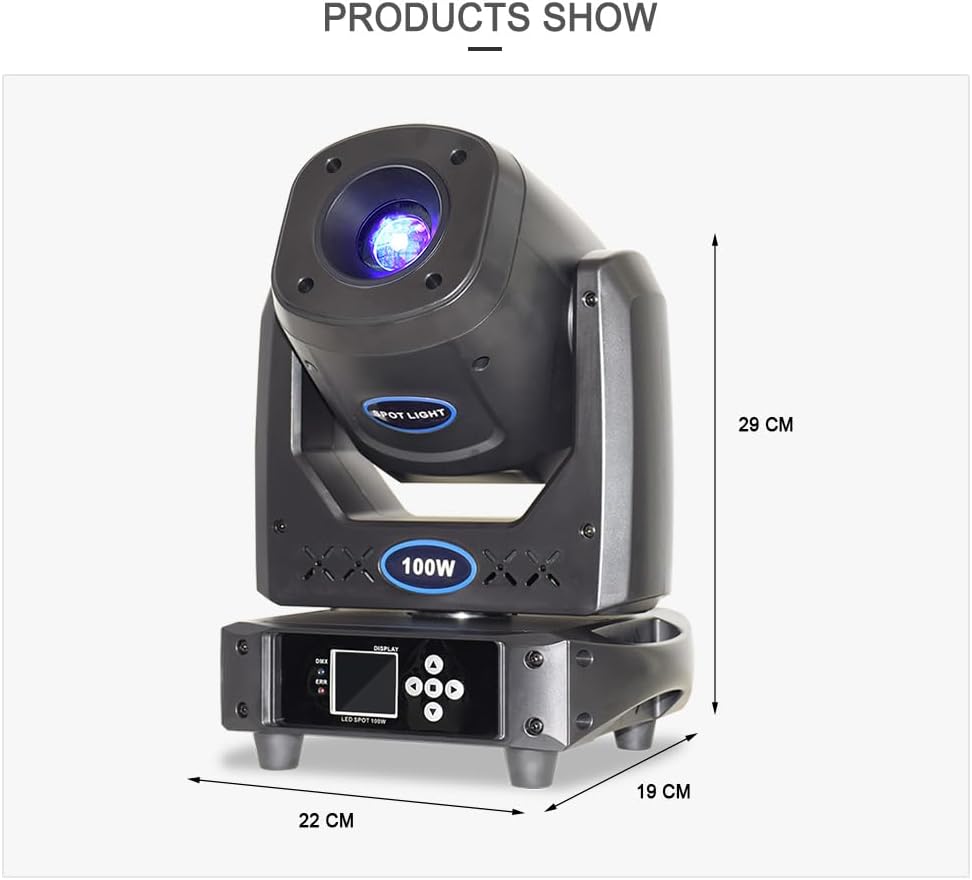
Image 6.1: Product dimensions. The image shows the moving head light with measurements: 22 cm (8.7 inches) width, 19 cm (7.5 inches) depth, and 29 cm (11.5 inches) height.

Image 6.2: Lux live test map illustrating beam intensity and spread (12°-18° angle) over distance, alongside detailed specifications for the G100W LED module including current, angle, voltage, quantity, color temperature, and luminous flux.
7. Maintenance
Regular maintenance ensures the longevity and optimal performance of your moving head light.
- Cleaning: Periodically clean the lenses and exterior casing with a soft, lint-free cloth. Do not use abrasive cleaners or solvents.
- Ventilation: Ensure ventilation openings are free from dust and debris. Use compressed air to clear any blockages.
- Inspection: Regularly inspect power and DMX cables for any signs of damage. Replace damaged cables immediately.
- Moving Parts: The internal moving parts are factory-lubricated and generally do not require user maintenance. If unusual noises or movements occur, contact customer support.
- Storage: When not in use, store the unit in a dry, dust-free environment.
8. Troubleshooting
This section addresses common issues you might encounter. For problems not listed here, contact customer support.
| Problem | Possible Cause | Solution |
|---|---|---|
| No power | Power cable disconnected; no power from outlet; faulty fuse. | Check power cable connection; test outlet with another device; check/replace fuse (if accessible and safe). |
| No DMX control | Incorrect DMX address; faulty DMX cable; no DMX terminator; DMX controller issue. | Verify DMX address setting; check DMX cable integrity; ensure DMX terminator is used; test DMX controller. |
| Light output is dim or flickering | Dimmer setting too low; overheating; internal component issue. | Adjust dimmer setting; ensure proper ventilation; if problem persists, contact support. |
| Movement erratic or unresponsive | DMX signal issue; motor calibration error; physical obstruction. | Check DMX connection; power cycle the unit; ensure no physical obstructions; if problem persists, contact support. |
9. Warranty and Support
DJCLUB provides the following warranty and support for this product:
- Money Back Guarantee: 30-day money back guarantee from the date of purchase.
- Warranty: 90-day warranty from the date of purchase.
- Contact Support: For any problems or inquiries, please contact us via our after-sales email. Refer to your purchase documentation for contact details.