
Introduction
This manual provides essential information for the safe and efficient installation, operation, and maintenance of your DWFSKZKV LED Astral PAR56 Pool Light. Please read these instructions carefully before installation and retain them for future reference.
Important Safety Warnings
- Voltage Compatibility: Do not connect the lamp to AC110V, AC230V, or any voltage greater than 12V. This product is designed for 12V AC/DC input only. Connecting to higher voltages will damage the lamp and void the warranty.
- Operation Out of Water: Do not operate the lamp for more than 3 minutes when it is out of water. Prolonged operation without water cooling will cause overheating and permanent damage to the LED components.
- Professional Installation Recommended: Installation should be performed by a qualified electrician or pool professional in accordance with local electrical codes and regulations.
Setup and Installation
The DWFSKZKV LED Astral PAR56 Pool Lamp is designed as a direct replacement for traditional halogen PAR56 bulbs or existing LED PAR56 bulbs. This allows for installation into existing niches without requiring changes to the old niche, power cable, or transformer.
Wiring Diagram
Ensure the power supply is disconnected before beginning any wiring. Connect the lamp to a 12V AC/DC transformer as shown in the diagram below. The transformer converts standard household voltage (AC110V or AC230V) to the required safe 12V AC/DC for the pool light.
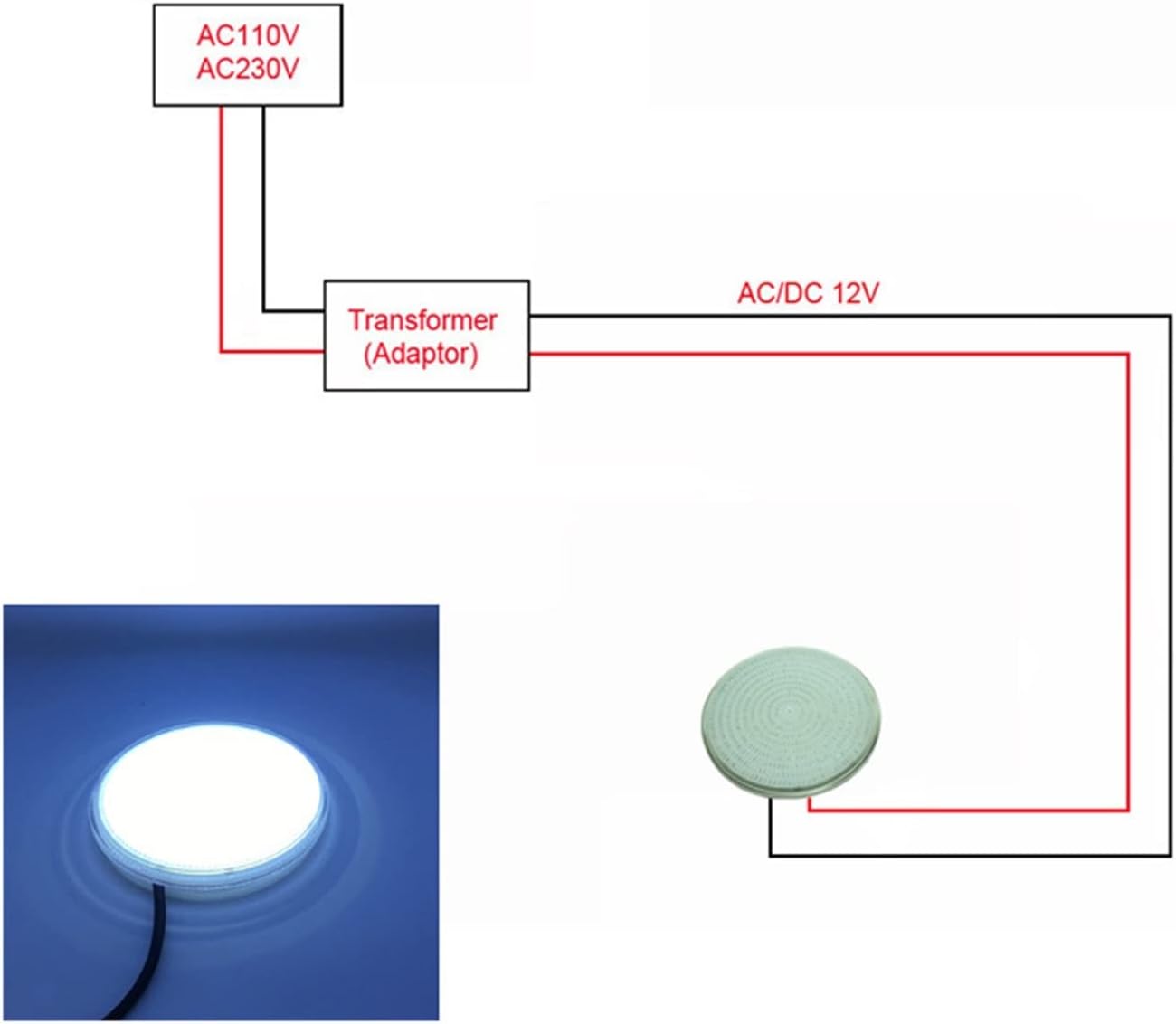
Figure 1: Wiring diagram illustrating the connection of the pool light to a 12V AC/DC transformer.
Installation into Existing Niche
The PAR56 lamp is designed to fit standard PAR56 niches. The resin-filled technology provides superior waterproofing. If you are replacing an existing PAR56 bulb, simply remove the old bulb and install the new LED PAR56 lamp. Ensure all seals and gaskets are properly seated to maintain the IP68 waterproof rating.
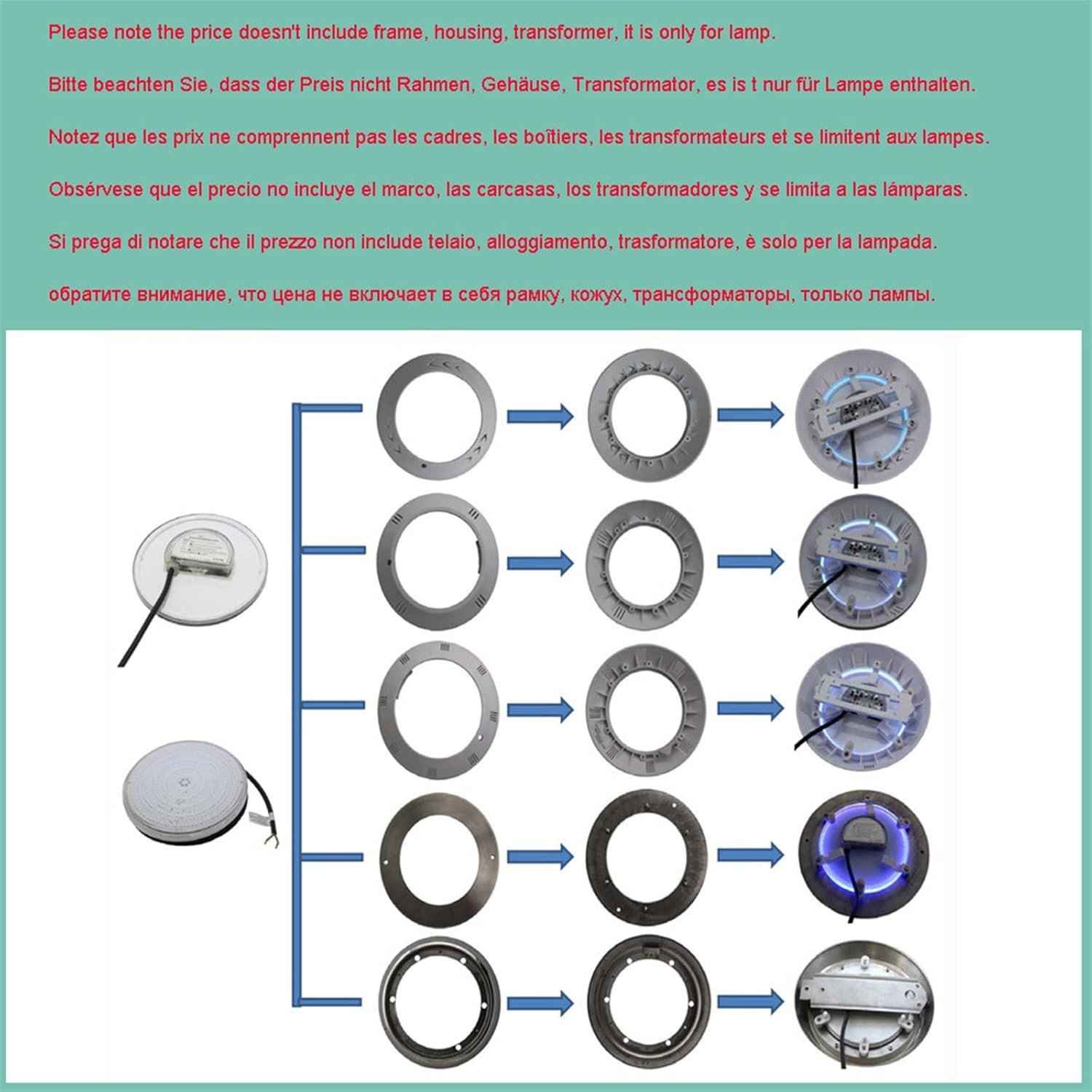
Figure 2: Illustration of replacing an older pool light with the new PAR56 LED light within an existing niche.
Wall-Mounted Installation (with suitable accessories)
The lamp can also be wall-mounted if suitable accessories (frame/housing) are purchased separately. This converts the lamp into a flat-style fixture. The following diagram illustrates various installation options with different frames and housings.

Figure 3: Various installation configurations for the PAR56 LED light using optional frames and housings.
Operation
Powering On/Off
Once properly installed and connected to a 12V AC/DC power source, the light will illuminate. For RGB versions with a remote, use the remote control to power on/off. For RGB versions without a remote, an external controller is required (not included).
Color Versions and Control
- Pure White: Provides a bright, clear white light (5500-6300K).
- Warm White: Emits a softer, warmer white light (2700-3500K).
- RGB with Remote: Offers multiple colors and dynamic modes, controlled by the included RF remote. This version works with both AC12V and DC12V.
- RGB no Remote: Offers multiple colors and dynamic modes, controlled by an external controller (not included). This version only works with DC12V.
The RGB color options include red, green, blue, cyan, purple, yellow, white, and various dynamic modes.

Figure 4: Examples of available color outputs from the LED pool light.
Remote Control (for RGB with Remote versions)
The remote control uses RF technology, providing a longer control range than IR remotes. One remote can control multiple lamps (two or more), but for synchronized color display, it is recommended to connect them to the same AC12V transformer.

Figure 5: Remote control layout and function buttons for RGB versions.
Note: The remote control requires a 12V, 23A/27A battery (not included).
Maintenance
The DWFSKZKV LED Astral PAR56 Pool Light is designed for durability and minimal maintenance. Its resin-filled technology provides excellent waterproofing, and the plastic body is resistant to breakage.
- Cleaning: Periodically clean the lens of the light to ensure maximum light output. Use a soft cloth and mild cleaning solution suitable for pool environments. Avoid abrasive cleaners.
- Inspection: Regularly inspect the power cable and connections for any signs of wear, damage, or corrosion. Ensure the light remains securely installed in its niche or mounting.
- Water Level: Ensure the light remains submerged in water during operation to prevent overheating.
Troubleshooting
| Problem | Possible Cause | Solution |
|---|---|---|
| Light does not turn on | No power supply Incorrect voltage Faulty wiring Remote battery dead (RGB with remote) | Check power connection to transformer. Verify input voltage is 12V AC/DC. Inspect wiring for loose connections or damage. Replace remote battery (12V, 23A/27A). |
| Light flickers or dims | Unstable power supply Loose connection Overheating (if operated out of water) | Ensure stable 12V AC/DC power. Check all electrical connections. Ensure light is fully submerged in water during operation. |
| RGB colors are not synchronized (multiple lights) | Lights connected to different transformers | For best synchronization, connect all RGB lights to the same AC12V transformer. |
| Remote control not working | Dead battery Obstruction Out of range | Replace battery (12V, 23A/27A). Ensure clear line of sight (though RF is less sensitive). Move closer to the light. |
Specifications
| Feature | Specification |
|---|---|
| Input Voltage | 12V AC/DC |
| Light Source | SMD 2835 LED |
| Wattage Options | 18W, 24W, 30W, 35W, 42W |
| Lumen Output | 18W=1746lm, 24W=2328lm, 30W=2910lm, 35W=3395lm, 42W=4074lm |
| Lamp Body Material | Plastic |
| Dimensions (Light) | D176mm x H43mm |
| Waterproof Grade | IP68 (Can be put into water directly) |
| Power Cable Length | 1.5 meters |
| Life Span | 50,000 hours |
| LED Color Versions | Warm White (2700-3500K), Pure White (5500-6300K), RGB with remote, RGB no remote |
| Remote Battery (RGB with remote) | 12V, 23A/27A (not included) |
| Model Number | PAR56 |

Figure 6: Dimensional drawing of the DWFSKZKV LED Astral PAR56 Pool Light.
Warranty Information
This DWFSKZKV LED Astral PAR56 Pool Light comes with a 2-year warranty from the date of purchase. This warranty covers defects in materials and workmanship under normal use. It does not cover damage resulting from improper installation, misuse, accidents, unauthorized repairs, or operation outside of specified conditions (e.g., operating out of water for extended periods, incorrect voltage). Please retain your proof of purchase for warranty claims.
Customer Support
If you encounter any issues or have questions regarding the installation, operation, or maintenance of your DWFSKZKV LED Astral PAR56 Pool Light, please refer to the troubleshooting section of this manual first. If the problem persists or you require further assistance, please contact your retailer or the manufacturer's customer service department. Contact information can typically be found on the product packaging or the retailer's website.