
1. Product Overview
The Gillette Intimate i5 Pubic Hair Trimmer and Anti-Chafe Stick Gift Set is designed for gentle and effective grooming of intimate areas. The i5 Trimmer features SkinFirst technology with closely spaced blades to minimize skin irritation and protect against nicks and cuts. It is powered by a long-lasting Li-Ion battery, offering up to 100 minutes of cordless operation, and is fully waterproof for wet or dry use. The set also includes an Anti-Chafe Stick formulated to reduce friction and irritation in the pubic region.
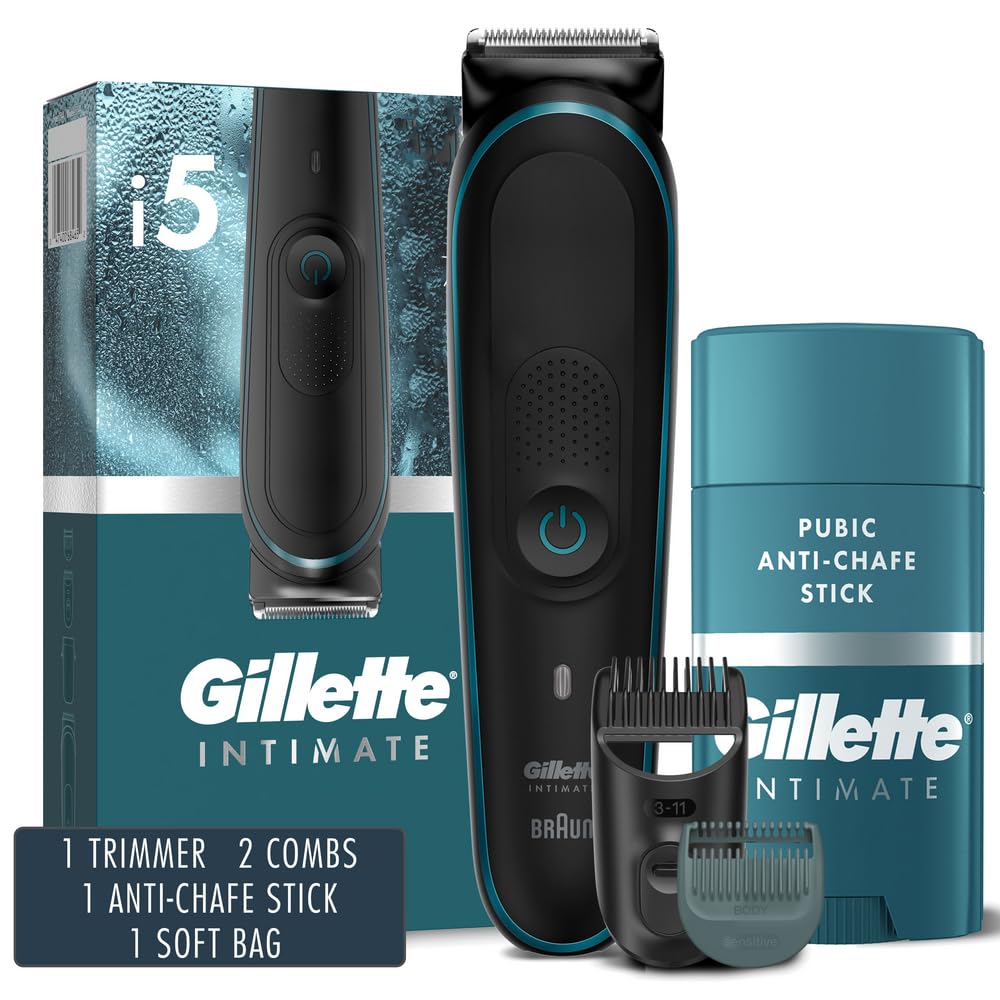
Figure 1: Gillette Intimate i5 Trimmer Gift Set including trimmer, combs, anti-chafe stick, and soft bag.
Key Features:
- Gillette Pubic Trimmer: Engineered for intimate skin, tough on hair.
- SkinFirst Technology: Closely spaced blades reduce skin bulging, preventing snags, cuts, and irritation.
- Protective Combs: Includes attachable combs for comfort and to minimize blade contact.
- Waterproof and Cordless: Up to 100 minutes of cordless trimming with a powerful Li-Ion battery, suitable for wet or dry use.
- Anti-Chafe Stick: Helps reduce friction and irritation in the groin and pubic area for lasting comfort.
2. Safety Information
Please read all safety instructions before using the product. Failure to follow these instructions may result in injury or damage to the product.
- FOR EXTERNAL USE ONLY.
- DO NOT APPLY TO BROKEN SKIN.
- If rash or irritation develops, discontinue use.
- Use only as directed.
- Keep out of reach of children.
- Ensure the trimmer is fully charged before first use to ensure optimal performance.
- Do not attempt to disassemble or repair the trimmer yourself. Contact customer support for assistance.
3. Package Contents
Verify that all items are present in your package:
- 1 x Gillette Intimate i5 Pubic Hair Trimmer
- 2 x Protective Combs (different lengths)
- 1 x Gillette Intimate Pubic Anti-Chafe Stick
- 1 x Soft Storage Bag
- 1 x Charger
4. Setup and Charging
4.1 Charging the Trimmer
- Connect the charger to the trimmer and plug it into a power outlet.
- The charging indicator light will illuminate.
- Allow the trimmer to charge fully before its first use. A full charge provides up to 100 minutes of cordless operation.
- The trimmer is equipped with a powerful Li-Ion rechargeable battery.

Figure 2: The Gillette Intimate i5 Trimmer is waterproof and provides up to 100 minutes of use per charge.
4.2 Attaching and Removing Protective Combs
- To attach a comb, align the comb with the trimmer head and push it firmly until it clicks into place.
- To remove a comb, gently pull it away from the trimmer head.
- Choose the appropriate comb length for your desired trim.

Figure 3: Attaching a sensitive comb to the trimmer head to protect skin from the blade.
5. Operating Instructions
5.1 Using the i5 Pubic Hair Trimmer
- Ensure the trimmer is charged and a protective comb is attached if desired.
- Press the power button to turn on the trimmer.
- Gently glide the trimmer over the desired area, moving against the direction of hair growth for best results.
- The trimmer can be used wet (in the shower) or dry.
- After use, press the power button to turn off the trimmer.

Figure 4: The trimmer features German engineered blades designed for durability and precision.
5.2 Applying the Anti-Chafe Stick
The Anti-Chafe Stick is designed to protect delicate skin against rubbing that causes chafing and irritation.
- Ensure the skin in the pubic region is clean and dry.
- Twist the base of the stick to expose a small amount of product.
- Apply a thin, even layer to areas prone to chafing or friction.
- Can be used daily or after showering for reduced itching and friction.

Figure 5: The Anti-Chafe Stick provides smooth, non-greasy protection from friction.
6. Maintenance
6.1 Cleaning the Trimmer
- Turn off the trimmer and disconnect it from the charger before cleaning.
- Remove any attached protective combs.
- Rinse the trimmer head and blades under running water. The trimmer is fully waterproof.
- Shake off excess water and allow the trimmer to air dry completely before storing or recharging.
- Use the provided cleaning brush (if included) to remove any stubborn hair particles.
6.2 Blade Care
The Gillette Intimate i5 Trimmer features lifetime sharp blades that do not require replacement under normal use. To maintain blade performance, ensure regular cleaning as described above.
7. Troubleshooting
If you encounter issues with your Gillette Intimate i5 Trimmer, please refer to the following common solutions:
- Trimmer not turning on: Ensure the trimmer is fully charged. If the battery is depleted, connect it to the charger.
- Trimmer not charging: Check if the charger is properly connected to both the trimmer and the power outlet. Verify the power outlet is functional.
- Poor trimming performance: Clean the trimmer head and blades thoroughly to remove any accumulated hair. Ensure the protective comb is correctly attached.
- Skin irritation: Ensure you are using a protective comb. Always trim against the direction of hair growth. If irritation persists, discontinue use and consult a dermatologist.
For further assistance, please contact Gillette customer support.
8. Specifications
| Feature | Detail |
|---|---|
| Model | i5 Pubic Hair Trimmer |
| Power Source | Battery Powered (1 Lithium Ion battery included) |
| Battery Life | Up to 100 minutes per charge |
| Special Feature | Waterproof |
| UPC | 047400693838 |
| Manufacturer | Procter & Gamble |
| Package Dimensions | 10.35 x 6.38 x 3.11 inches |
| Weight | 1.1 Pounds |
9. Warranty and Support
For warranty information or technical support, please contact Gillette customer service. Keep your proof of purchase for any warranty claims.
Contact information can typically be found on the official Gillette website or on the product packaging.