
1. Introduction
This manual provides detailed instructions for the installation, operation, and maintenance of the YOURRYONG ZK-R502H Audio Amplifier Module. This dual-channel amplifier module features volume, treble, and bass controls, along with USB and AUX inputs, delivering 2x50W output. Please read this manual thoroughly before using the product to ensure proper function and safety.
2. Safety Information
- Ensure the power supply voltage is within the specified range of DC 9-24V. Incorrect voltage can damage the module.
- Do not expose the module to moisture, water, or extreme temperatures.
- Avoid short-circuiting the output terminals.
- Disconnect power before making any connections or disconnections.
- Keep out of reach of children.
- Do not attempt to modify or disassemble the module, as this will void the warranty and may cause damage or injury.
3. Product Overview
3.1 Components and Controls
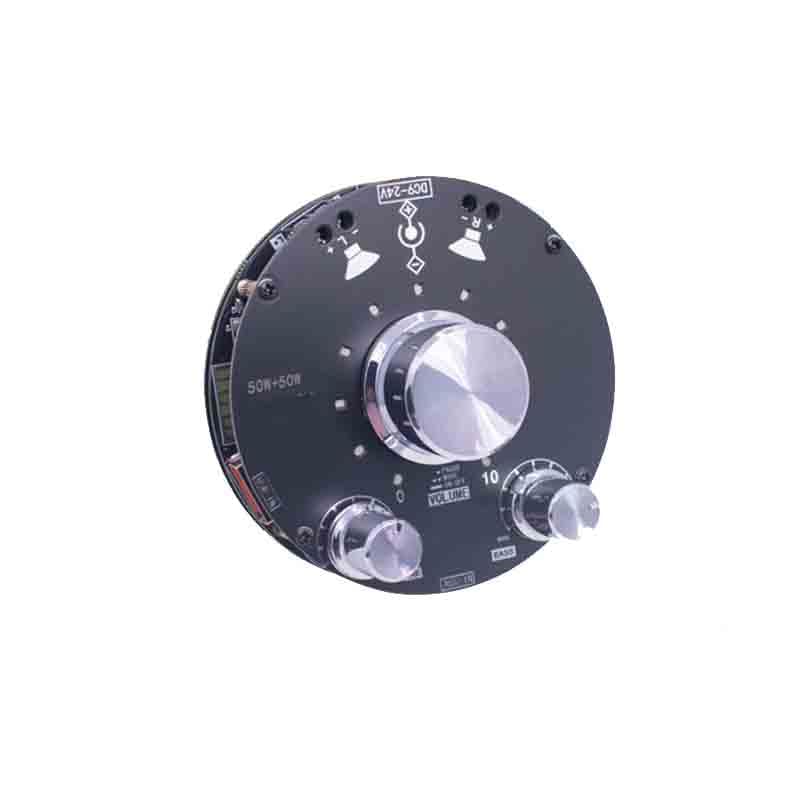
Image: Top view of the ZK-R502H Audio Amplifier Module, showing its various controls and input/output ports. The main large knob is for volume, flanked by smaller knobs for treble and bass. Input ports include USB-IN and AUX-IN, with power input labeled DC9-24V and speaker output 50W+50W.
- DC9-24V Input: Power input terminal for connecting a DC power supply ranging from 9 to 24 volts.
- 50W+50W Output: Speaker output terminals for connecting two speakers, each up to 50 watts.
- USB-IN: USB input port for audio playback from compatible devices.
- AUX-IN: Auxiliary input port for connecting external audio sources via a 3.5mm audio cable.
- VOLUME Knob: Main control knob to adjust the overall audio output level. Pressing this knob typically functions as ON/OFF or PAUSE/MODE selection.
- TRE (Treble) Knob: Adjusts the high-frequency audio response. Turn clockwise for more treble, counter-clockwise for less.
- BASS Knob: Adjusts the low-frequency audio response. Turn clockwise for more bass, counter-clockwise for less.
4. Setup
- Connect Speakers: Connect your passive speakers to the 50W+50W output terminals. Ensure correct polarity (+ to + and - to -).
- Connect Audio Source:
- For USB audio, insert a USB drive or connect a compatible device to the USB-IN port.
- For auxiliary audio, connect your audio source (e.g., smartphone, MP3 player) to the AUX-IN port using a 3.5mm audio cable.
- Connect Power: Connect a DC 9-24V power adapter (not included) to the DC9-24V input terminal. Ensure the power adapter is suitable for the module's power requirements.
- Power On: The module should power on automatically or by pressing the VOLUME knob.
5. Operating Instructions
5.1 Basic Operation
- Volume Control: Rotate the large VOLUME knob clockwise to increase volume and counter-clockwise to decrease it.
- Power ON/OFF: Press and hold the VOLUME knob to power the module ON or OFF.
- Input Selection/Mode: Short press the VOLUME knob to cycle through available input modes (e.g., USB, AUX).
- Treble Adjustment: Rotate the TRE knob to adjust the treble level to your preference.
- Bass Adjustment: Rotate the BASS knob to adjust the bass level to your preference.
5.2 Audio Playback
Once an audio source is connected and the correct input mode is selected, audio will play through the connected speakers. Adjust volume, treble, and bass as desired for optimal sound.
6. Maintenance
- Keep the module clean by wiping it with a soft, dry cloth. Do not use liquid cleaners or solvents.
- Ensure proper ventilation around the module to prevent overheating.
- Store the module in a dry, dust-free environment when not in use.
- Regularly check all connections for security and proper contact.
7. Troubleshooting
| Problem | Possible Cause | Solution |
|---|---|---|
| No sound output |
|
|
| Distorted sound |
|
|
| Module does not power on |
|
|
8. Specifications
| Feature | Specification |
|---|---|
| Brand | YOURRYONG |
| Model Number | ZK-R502H (also compatible with ZK-R502E, ZK-R302 series) |
| Power Output | 2 x 50W |
| Number of Channels | 2 (Dual Channel) |
| Power Supply | DC 9-24V |
| Audio Inputs | USB-IN, AUX-IN (3.5mm) |
| Controls | Volume (with ON/OFF, Mode/Pause), Treble, Bass |
| UPC | 764921351688 |
9. Warranty and Support
This product is covered by a standard manufacturer's warranty against defects in materials and workmanship. For specific warranty terms and conditions, please refer to the product packaging or contact your retailer. For technical support or inquiries, please reach out to the seller or manufacturer through the platform where the product was purchased.
Please retain your proof of purchase for warranty claims.