
Introduction
This manual provides detailed instructions for the setup, operation, maintenance, and troubleshooting of your YOURRYONG ZK-R502E Audio Amplifier Module. This dual-channel amplifier module delivers 2x50W output and features integrated volume, treble, and bass controls, along with a volume indicator. Please read this manual thoroughly before use to ensure proper functionality and longevity of the product.
Product Overview
The ZK-R502E is a compact audio amplifier module designed for various audio applications. It features multiple input options and adjustable tone controls for a customized listening experience.
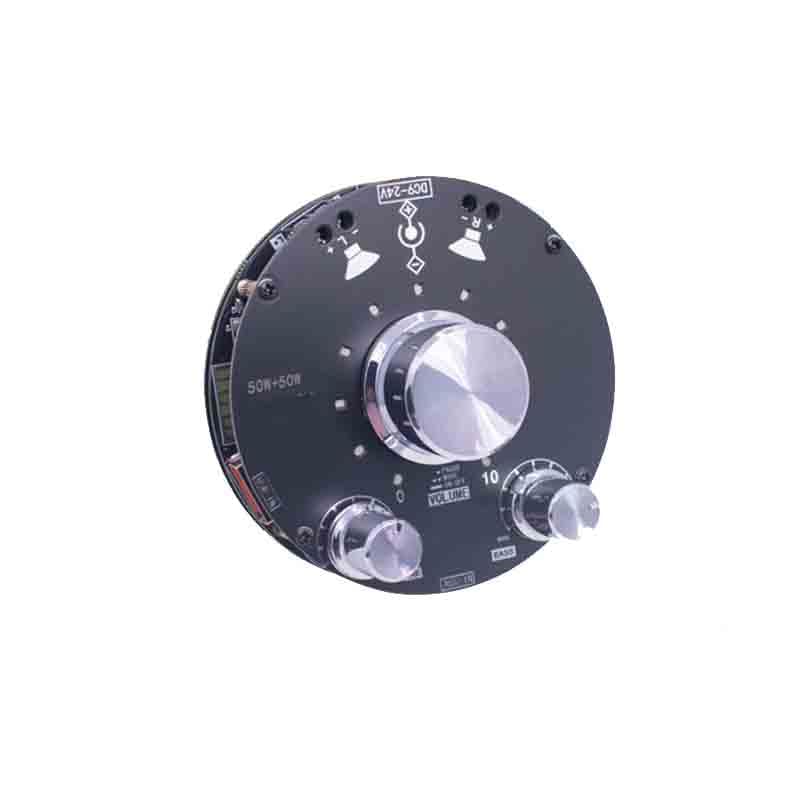
Figure 1: Top view of the YOURRYONG ZK-R502E Audio Amplifier Module. Visible components include the main volume knob, smaller bass and treble knobs, USB-IN port, AUX-IN port, DC9-24V power input, and 50W+50W speaker outputs. The module also features LED indicators for volume and status.
Setup
Package Contents
- YOURRYONG ZK-R502E Audio Amplifier Module
- User Manual (this document)
- (Additional cables or accessories may be included depending on the specific package)
Power Connection
- Ensure the amplifier module is turned off before connecting power.
- Connect a DC power supply (9-24V) to the DC9-24V input port on the module. Observe correct polarity.
- Use a power supply with sufficient current capacity for stable operation (e.g., 2A or higher for 24V).
Audio Input Connection
The module supports multiple audio input methods:
- AUX-IN: Connect your audio source (e.g., smartphone, MP3 player, computer) to the AUX-IN port using a 3.5mm audio cable.
- USB-IN: Connect a USB device (e.g., USB flash drive with audio files) to the USB-IN port. The module will automatically detect and play supported audio formats.
Speaker Output Connection
- Connect your passive speakers to the 50W+50W output terminals.
- Ensure correct polarity (+ to + and - to -) for each speaker channel. Incorrect polarity can lead to poor audio quality.
- Verify that your speakers' impedance matches the amplifier's requirements (typically 4-8 ohms).
Operating Instructions
Basic Controls
- VOLUME Knob: Main control for audio output level. Press to toggle power ON/OFF.
- BASS Knob: Adjusts the low-frequency audio response. Turn clockwise for more bass, counter-clockwise for less.
- TREBLE Knob: Adjusts the high-frequency audio response. Turn clockwise for more treble, counter-clockwise for less.
- MODE Button: (Often integrated with the main volume knob or a separate button) Selects between different input sources (e.g., AUX, USB).
- PAUSE/PLAY Button: (Often integrated with the main volume knob or a separate button) Controls playback for USB input.
Power On/Off
Press and hold the VOLUME knob for approximately 3 seconds to turn the module ON or OFF. A visual indicator (LED) may confirm the power status.
Adjusting Volume
Rotate the large VOLUME knob clockwise to increase the audio output level and counter-clockwise to decrease it. The integrated volume indicator will show the current level.
Adjusting Tone
- Use the BASS knob to fine-tune the low-frequency response of your audio.
- Use the TREBLE knob to fine-tune the high-frequency response of your audio.
Selecting Input Source
If your module has a dedicated MODE button or if the VOLUME knob has a short-press function, use it to cycle through available input sources (AUX-IN, USB-IN).
Maintenance
Cleaning
- Disconnect power before cleaning.
- Use a soft, dry cloth to wipe the surface of the module.
- Do not use liquid cleaners, solvents, or abrasive materials, as these can damage the components.
Storage
- Store the module in a cool, dry place away from direct sunlight and extreme temperatures.
- Keep out of reach of children and pets.
Troubleshooting
| Problem | Possible Cause | Solution |
|---|---|---|
| No sound output |
|
|
| Distorted sound |
|
|
| Module does not power on |
|
|
Specifications
| Feature | Detail |
|---|---|
| Model | ZK-R502E |
| Output Power | 2 x 50W (Stereo) |
| Input Voltage | DC 9-24V |
| Audio Inputs | AUX-IN (3.5mm), USB-IN |
| Controls | Volume (with ON/OFF), Bass, Treble, Mode/Pause |
| Features | Volume Indicator, High and Low Bass Adjustment |
| Brand | YOURRYONG |
| Part Number | 764921351688 |
| UPC | 764921351695 |
Warranty and Support
YOURRYONG products are designed for reliability and performance. For warranty information, technical support, or service inquiries, please refer to the contact information provided with your purchase or visit the official YOURRYONG website. Keep your purchase receipt as proof of purchase for warranty claims.