
Baseus A00069101113-00
Contents
Baseus AirGo AS01 Clip-On Open-Ear Earphones User Manual
Model: A00069101113-00
Introduction
Thank you for choosing the Baseus AirGo AS01 Clip-On Open-Ear Earphones. These wireless earbuds are designed to provide a comfortable and safe listening experience, allowing you to stay aware of your surroundings while enjoying high-quality audio. Featuring Bluetooth 5.3 connectivity, an innovative clip-on design, and long battery life, the AirGo AS01 is ideal for sports, daily commutes, and casual listening.
Safety Information
- Do not expose the earbuds or charging case to extreme temperatures, humidity, or liquids.
- Avoid dropping, impacting, or disassembling the device.
- Keep out of reach of children and pets.
- Use only the provided charging cable or a certified equivalent.
- Do not use the earbuds at excessively high volumes for prolonged periods to prevent hearing damage.
- Be aware of your surroundings when using open-ear earphones, especially in traffic or hazardous environments.
Package Contents
Please check the package for the following items:
- Baseus AirGo AS01 Clip-On Open-Ear Earphones (Left and Right)
- Charging Case
- USB-C Charging Cable
- User Manual
Product Overview

The Baseus AirGo AS01 earbuds are shown resting inside their sleek black charging case, ready for use or charging.

This image illustrates the ergonomic clip-on design of the earbuds, highlighting their lightweight nature at approximately 4.6g per earbud, designed for comfortable and stable fit without inserting into the ear canal.

A transparent view of the earbud's internal components, emphasizing the dual-mic ENC (Environmental Noise Cancellation) system and noise-canceling microphone for clear call quality.
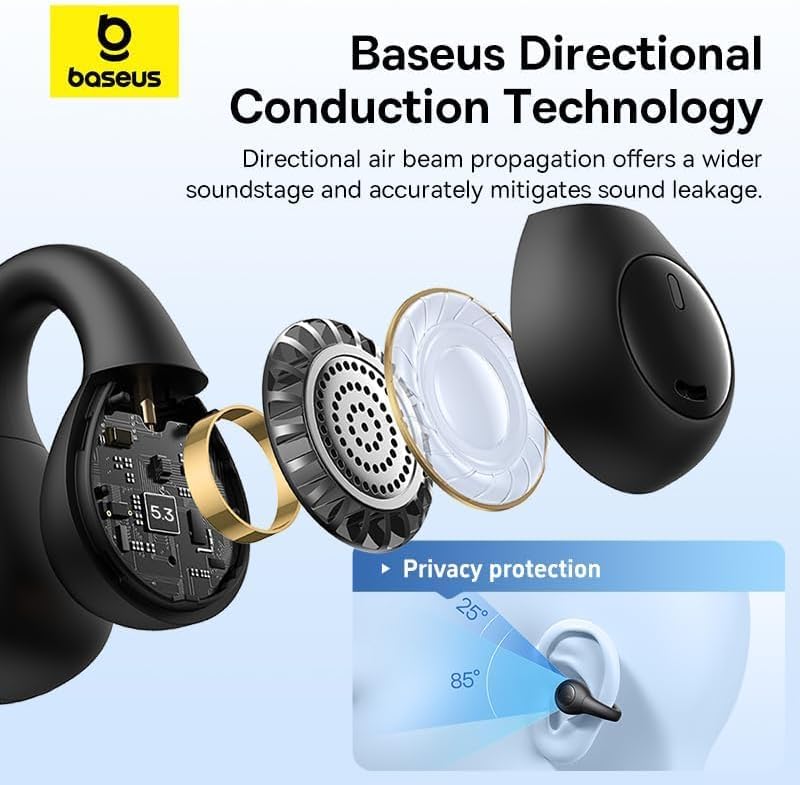
An exploded diagram of the earbud showing its internal acoustic structure, illustrating Baseus Directional Conduction Technology which uses directional air beam propagation to widen the soundstage and mitigate sound leakage, ensuring privacy.
Setup
1. Charging the Earbuds and Case
Before first use, fully charge the earbuds and the charging case. Place the earbuds into the charging case. Connect the USB-C charging cable to the charging port on the case and a power source. The indicator light on the case will show charging status.

This image displays the charging case and indicates a total battery life of approximately 25 hours with the charging case, and about 6 hours of earbud battery life on a single charge. It also highlights Baseus Rapid Charge technology.
2. Pairing with a Device
- Ensure the earbuds are charged.
- Open the charging case. The earbuds will automatically enter pairing mode, indicated by a flashing light.
- On your device (smartphone, tablet, etc.), enable Bluetooth.
- Search for "Baseus AirGo AS01" in the list of available Bluetooth devices.
- Select it to connect. Once connected, the indicator light on the earbuds will turn off or show a steady light, and you will hear a confirmation tone.

A visual representation of the advanced Bluetooth 5.3 chip, emphasizing its role in providing stable connectivity and efficient processing power for the earbuds.
Operating
1. Wearing the Earbuds
The Baseus AirGo AS01 features an open-ear clip-on design. Gently clip the earbuds onto your ear, ensuring a comfortable and secure fit. The design allows for awareness of ambient sounds.

This image highlights the comfort and stability of the earbuds, showing how the highly flexible TPU ear clips accommodate different ear shapes and sizes, providing a secure yet comfortable fit.
2. Touch Controls
The earbuds feature sensitive touch control panels for easy management of music and calls.
| Action | Gesture |
|---|---|
| Play/Pause | Press twice L or R |
| Previous track | Press and hold L for 1.5s |
| Next track | Press and hold R for 1.5s |
| Answer/Hang up | Press twice L or R |
| Decline call | Press and hold L or R for 1.5s |

A visual guide to the touch controls on the earbud, detailing gestures for play/pause, track navigation, and call management.
3. Smooth Transition (Multi-Device Connection)
The Baseus AirGo AS01 supports connecting to two devices simultaneously. With Baseus Smart Connect technology, the earbuds automatically switch the connection to your communication device when a call comes in, ensuring you don't miss important phone calls.

This image shows the earbuds seamlessly connected to both a smartphone and a tablet, illustrating the smooth transition feature for calls and media.
4. Baseus App Customization
Download the official Baseus App to unlock additional features and customization options for your AirGo AS01 earbuds. This includes button customization, finding your earbuds' location, and accessing 12 EQ presets to tailor your audio experience.

Screenshots of the Baseus App interface, demonstrating options for EQ mode selection, gesture settings, and earbud location tracking.
Maintenance
- Clean the earbuds and charging case regularly with a soft, dry cloth.
- Do not use abrasive cleaners or solvents.
- Store the earbuds in their charging case when not in use to protect them and keep them charged.
- Avoid exposing the device to direct sunlight or high temperatures for extended periods.
Troubleshooting
| Problem | Possible Solution |
|---|---|
| Earbuds not pairing | Ensure earbuds are charged. Turn off and on Bluetooth on your device. Try resetting the earbuds (refer to Baseus App or online support for specific reset instructions). |
| No sound from one earbud | Place both earbuds back in the case, close the lid, then open again. Ensure both earbuds are charged. Re-pair the earbuds with your device. |
| Low volume | Adjust volume on both your device and the earbuds. Ensure earbuds are properly positioned on your ears. |
| Charging issue | Check the charging cable and power adapter. Ensure charging contacts on earbuds and case are clean and dry. |
| Poor call quality | Ensure the microphone is not obstructed. Move to an area with less background noise. |
Specifications
| Feature | Detail |
|---|---|
| Model Number | A00069101113-00 |
| Brand | Baseus |
| Ear Placement | Open Ear (Clip-On) |
| Form Factor | True Wireless |
| Bluetooth Version | 5.3 |
| Noise Control | Active Noise Cancellation (ENC for calls) |
| Earbud Weight | Approx. 4.6g (per earbud) |
| Total Battery Life (with case) | Approx. 25 hours |
| Earbud Battery Life (single charge) | Approx. 6 hours |
| Charging Port | USB-C |
| Package Dimensions | 10.2 x 9.2 x 3.8 cm |
Warranty and Support
Baseus products come with a standard manufacturer's warranty. For detailed warranty terms and conditions, please refer to the warranty card included in your package or visit the official Baseus website. For technical support, troubleshooting assistance, or service inquiries, please contact Baseus customer support through their official channels. You may also find helpful resources and FAQs on the Baseus website.
For additional support, you can visit the Baseus Store on Amazon.
Ask a question about this manual
Ask about setup, troubleshooting, compatibility, parts, safety, or missing instructions. Manuals+ will review the question and use this page’s manual context to help answer it.