
Introduction
This manual provides detailed instructions for the 1Mii B0C88R8JSB Bluetooth 5.0 HiFi Audio Receiver. This device allows you to wirelessly stream high-fidelity audio from your Bluetooth-enabled devices to your home stereo system or speakers. Featuring long-range connectivity, versatile output options (3.5mm and RCA), and integrated volume controls, it enhances your audio experience by bringing modern wireless capabilities to traditional sound systems.
Package Contents
- 1Mii Audio Receiver
- USB Power Cable
- 3.5mm Audio Cable
- RCA Audio Cable
- User Manual
Product Overview
The 1Mii Bluetooth 5.0 HiFi Audio Receiver is a compact device designed to seamlessly integrate with your existing audio equipment. It features a central multi-function button, volume controls, and various audio output ports.

Figure 1: Front view of the 1Mii Bluetooth Audio Receiver, showing the central control button and volume buttons.
The rear panel provides connections for power and audio output, offering flexibility for different stereo setups.
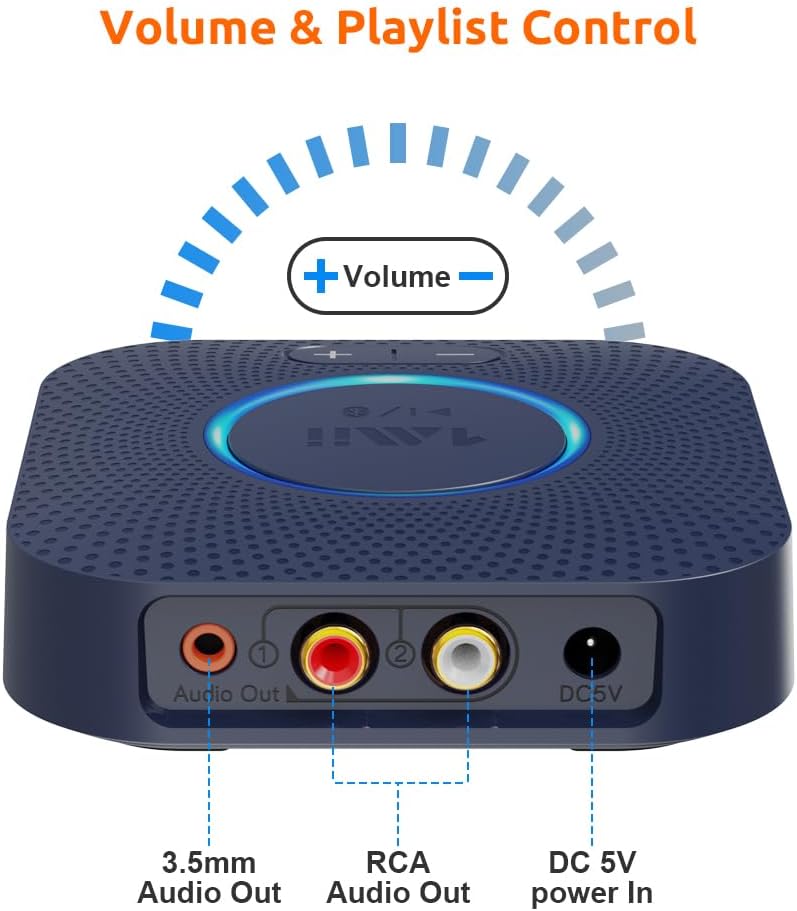
Figure 2: Rear view of the receiver, highlighting the 3.5mm audio output, RCA audio outputs (red and white), and the DC 5V power input.
Setup Instructions
- Power Connection: Connect the provided USB power cable to the DC 5V power input on the receiver. Plug the other end into a USB power adapter (not included) or a USB port on your stereo system for power.
- Audio Output Connection:
- Using RCA Cables: Connect the red and white RCA audio cables from the receiver's RCA outputs to the corresponding RCA input ports (e.g., AUX, CD, TAPE) on your home stereo system or amplifier.
- Using 3.5mm AUX Cable: Connect the 3.5mm audio cable from the receiver's 3.5mm audio output to the AUX input port on your stereo system or powered speakers.
- Power On: The receiver will automatically power on when connected to a power source. The central LED indicator will illuminate.
- Bluetooth Pairing:
- Ensure your Bluetooth-enabled device (smartphone, tablet, etc.) has Bluetooth activated.
- The receiver will automatically enter pairing mode, indicated by a flashing LED light.
- On your device, search for Bluetooth devices and select "1Mii B0C88R8JSB" (or similar name) from the list.
- Once connected, the LED indicator on the receiver will remain solid, indicating a successful connection.
- Select Input on Stereo: Set your home stereo system or amplifier to the correct input source (e.g., AUX, CD, TAPE) where the 1Mii receiver is connected.

Figure 3: Example setup showing the receiver connected to a stereo amplifier and ready for Bluetooth streaming.
Operating Instructions
Music Playback
- After successful pairing, play music from your Bluetooth-enabled device. The audio will be streamed to your connected stereo system.
- Adjust the volume using the volume buttons on the 1Mii receiver or directly from your connected device/stereo system.

Figure 4: The receiver's volume controls allow for easy adjustment of audio output.
Volume and Track Control
- Press the + button to increase volume.
- Press the - button to decrease volume.
- Press and hold the + button for 2 seconds for the next track.
- Press and hold the - button for 2 seconds for the previous track.
Voice Command Integration (Alexa)
The 1Mii receiver can be controlled using voice commands through Amazon Alexa. Ensure your Echo device is paired with the 1Mii receiver via Bluetooth in the Alexa app.
- Connect the 1Mii audio adapter to your stereo using a 3.5mm or RCA cable.
- Pair the 1Mii receiver with your Echo device via Bluetooth in the Alexa app.
- You can now use voice commands to control music playback through your stereo system.
- Note: The audio cable should connect the Bluetooth receiver to your stereo, not directly to the Echo device.

Figure 5: The receiver supports integration with voice command systems like Amazon Alexa for convenient control.
Maintenance
- Keep the device in a dry environment, away from moisture and extreme temperatures.
- Clean the device with a soft, dry cloth. Do not use liquid cleaners or aerosols.
- Avoid dropping or subjecting the device to strong impacts.
- Ensure proper ventilation around the device to prevent overheating.
Troubleshooting
| Problem | Possible Cause | Solution |
|---|---|---|
| No sound | Incorrect input selected on stereo; loose audio cables; receiver not powered on; device not paired. | Ensure stereo input matches receiver connection (AUX, CD, etc.). Check all cable connections. Verify receiver is powered and paired. Adjust volume on both receiver and stereo. |
| Cannot pair via Bluetooth | Receiver not in pairing mode; device too far; interference; previously paired device connected. | Ensure receiver LED is flashing (pairing mode). Move device closer to receiver. Turn off Bluetooth on other nearby devices. Disconnect from previously paired devices. Restart both receiver and source device. |
| Poor sound quality or intermittent connection | Distance too great; obstacles; interference from other wireless devices (Wi-Fi routers). | Reduce distance between receiver and source device. Remove obstacles. Move receiver away from Wi-Fi routers or other strong signal sources. |
| Volume buttons not responding | Device not actively playing music; temporary software glitch. | Ensure music is playing. Try restarting the receiver. Adjust volume directly from the source device. |
Specifications
- Model: 6976331140583
- Bluetooth Version: 5.0
- Connectivity Technology: Auxiliary, RCA
- Audio Output Mode: Stereo
- Compatible Devices: Smartphone, Speaker
- Connector Type: 3.5mm Jack, RCA
- Long Range: Up to 197ft (60m) line-of-sight outdoors, 50-70ft (20-30m) indoors (without obstacles)
- Product Dimensions: 4.33 x 3.54 x 0.79 inches
- Item Weight: 8.1 ounces
- Manufacturer: 1Mii
Warranty and Support
For warranty information and technical support, please refer to the official 1Mii website or contact their customer service directly. Keep your purchase receipt for warranty claims.


