
Agrestem TAC-10CHPD/NVSGBp
Agrestem 14,000 BTU Portable Air Conditioner User Manual
Model: TAC-10CHPD/NVSGBp
1. Introduction
Thank you for choosing the Agrestem 14,000 BTU Portable Air Conditioner. This manual provides important information for the proper installation, operation, and maintenance of your unit. Please read it thoroughly before using the appliance and retain it for future reference.
This portable air conditioner is designed to provide cooling, dehumidification, and fan-only functions for rooms up to 550 square feet.
2. Safety Information
Important Safety Instructions:
- Read all instructions before using the appliance.
- Always connect to a grounded power outlet.
- Do not operate the unit with a damaged cord or plug.
- Do not block air vents.
- Keep the unit on a flat, stable surface.
- Unplug the unit before cleaning or servicing.
3. Product Components
Familiarize yourself with the main components of your portable air conditioner.

Figure 3.1: Front view of the Agrestem Portable Air Conditioner with its remote control. The unit is white with a dark top panel and visible air vents, positioned on casters for mobility.
Included Components:
- Portable Air Conditioner Unit
- Remote Control (with AAA battery)
- Window Isolation Panel Kit
- 2 Exhaust Pipes
- Exhaust Pipe Joints
- Drainage Pipe
- Isolation Panel Joints
4. Setup and Installation
Follow these steps to properly set up your portable air conditioner.
4.1 Positioning the Unit
- Place the unit on a flat, stable surface.
- Ensure there is at least 20 inches (50 cm) of space around the unit for proper airflow.
- Position the unit near a window for exhaust hose installation.
4.2 Window Kit Installation

Figure 4.1: Visual guide demonstrating the assembly of the exhaust hose and window sealing kit. The images show connecting the hose to the unit, adjusting the window panel, and securing the hose in the window.
- Connect the exhaust pipe to the exhaust pipe joint.
- Attach the other end of the exhaust pipe to the window isolation panel joint.
- Insert the window isolation panel kit into the window opening. The kit is adjustable to fit windows from 26.5 inches to 48.5 inches.
- Secure the window isolation panel joint into the opening of the window kit.
- Ensure all connections are tight to prevent air leakage.

Figure 4.2: Diagram showing the product dimensions: 18.9 inches (width), 31.1 inches (height), 15.4 inches (depth), and an exhaust hose length of 63 inches.
5. Operating Instructions
Your portable air conditioner offers multiple operating modes and features.
5.1 Control Panel Overview
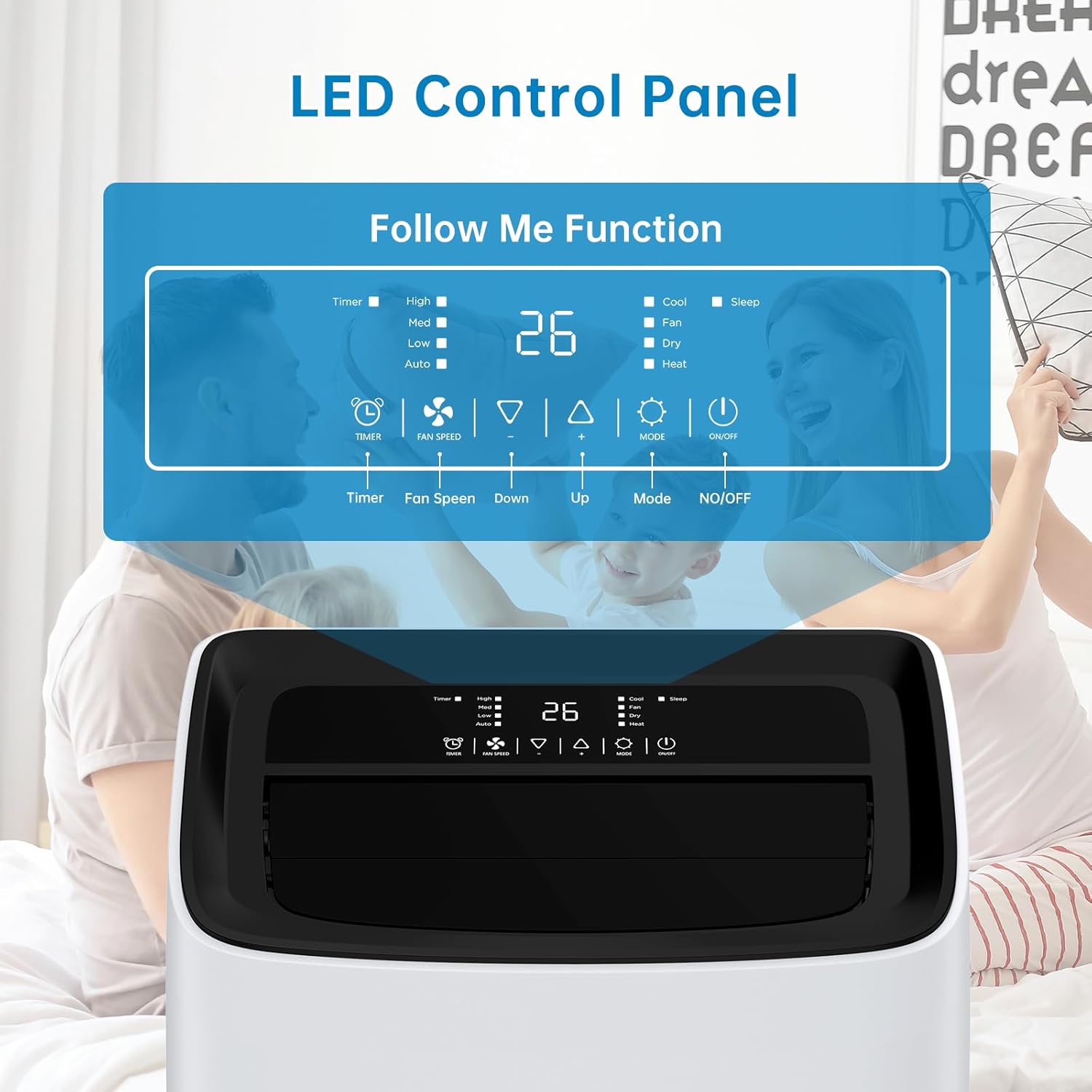
Figure 5.1: Close-up of the LED control panel on the top of the unit. It displays options for Timer, Fan Speed (High, Med, Low, Auto), Temperature (Up/Down), Mode (Cool, Fan, Dry, Sleep), and Power (NO/OFF).
The top-mounted LED display control panel allows you to adjust various settings.
- Timer: Set the auto-on/off time.
- Fan Speed: Adjust between High, Medium, Low, or Auto.
- Temperature: Use Up/Down arrows to set desired temperature.
- Mode: Select operating mode (Cool, Fan, Dry, Sleep).
- NO/OFF: Power the unit on or off.
5.2 Remote Control

Figure 5.2: An individual comfortably operating the portable air conditioner using the remote control from a sofa, illustrating the 20-foot range of the remote.
The included remote control allows convenient operation from up to 20 feet away. It mirrors the functions available on the main control panel.
5.3 Operating Modes
- Cool Mode: Provides cooling for the room. Set desired temperature and fan speed.
- Dehumidifier (Dry) Mode: Removes moisture from the air. The fan speed is typically fixed in this mode. Ensure the drainage pipe is properly connected for continuous drainage.
- Fan Mode: Circulates air without cooling. Select desired fan speed.
- Sleep Mode: Operates at a low noise level (≤ 42dB) and maintains an optimal temperature for comfortable sleep. This mode is energy-saving.
5.4 Energy Saving Features
- 24-hour Timer: Program the unit to turn on or off automatically to conserve energy.
- Sleep Mode: Optimizes temperature and fan speed for energy efficiency during sleep.
6. Maintenance
Regular maintenance ensures optimal performance and extends the lifespan of your unit.
6.1 Cleaning the Air Filter
- Turn off and unplug the unit before cleaning.
- Locate and remove the air filter (usually on the back or side).
- Clean the filter with a vacuum cleaner or wash it with warm, soapy water.
- Rinse thoroughly and allow it to air dry completely before reinstalling.
- Clean the air filter every two weeks or more frequently if used in dusty environments.
6.2 Draining Water
The unit collects condensate water during operation. It has a self-evaporative system, but in high humidity, manual drainage may be required.
- Continuous Drainage: For dehumidifier mode or high humidity, connect the drainage pipe to the drain outlet and route it to a floor drain or suitable container.
- Manual Drainage: When the internal water tank is full, the unit may stop operating and display an error code. Turn off the unit, place a shallow pan under the drain outlet, and remove the drain plug to empty the water. Reinsert the plug securely.
6.3 Storage
- Before storing, drain all condensate water from the unit.
- Clean the air filter.
- Unplug the power cord and wrap it neatly.
- Store the unit in a cool, dry place, away from direct sunlight.
7. Troubleshooting
Refer to this section for common issues and their solutions.
| Problem | Possible Cause | Solution |
|---|---|---|
| Unit does not turn on | No power; Power cord not plugged in; Circuit breaker tripped; Full water tank. | Check power outlet; Plug in power cord securely; Reset circuit breaker; Drain water tank. |
| No cooling or insufficient cooling | Window kit not properly installed; Room too large; Air filter dirty; Air intake/exhaust blocked; Doors/windows open. | Ensure window kit is sealed; Verify room size (up to 550 sq. ft.); Clean air filter; Clear obstructions; Close doors/windows. |
| Unit is noisy | Unit not on a flat surface; Air filter dirty. | Place on a flat, stable surface; Clean air filter. |
| Water leakage | Drain plug loose; Drainage pipe not connected properly (if using continuous drainage). | Ensure drain plug is secure; Check drainage pipe connection. |
If the problem persists after attempting these solutions, please contact customer support.
8. Specifications
| Model Number | TAC-10CHPD/NVSGBp |
| Cooling Capacity (ASHRAE) | 14,000 BTU |
| Cooling Capacity (SACC) | 10,000 BTU |
| Coverage Area | Up to 550 sq. ft. |
| Functions | Cool, Dehumidify, Fan |
| Noise Level | ≤ 42 dB (Sleep Mode) |
| Voltage | 115V |
| Product Dimensions (D x W x H) | 17.71" x 15.59" x 29.33" |
| Item Weight | 64.8 lbs |
| Exhaust Hose Length | 63" |
| Window Kit Adjustment Range | 26.5" - 48.5" |
9. Warranty and Support
This Agrestem Portable Air Conditioner comes with a 1-year warranty from the date of purchase.
For technical support, warranty claims, or service inquiries, please contact Agrestem customer service. Refer to your purchase documentation for specific contact details.
You can also visit the official Agrestem store on Amazon for more information: Agrestem Store
Ask a question about this manual
Ask about setup, troubleshooting, compatibility, parts, safety, or missing instructions. Manuals+ will review the question and use this page’s manual context to help answer it.