
Raddy PT-3
Raddy PT-3 Wi-Fi Pool Thermometer
User Manual
1. Introduction
The Raddy PT-3 Wi-Fi Pool Thermometer is a comprehensive monitoring system designed to provide accurate temperature and humidity readings for your pool and indoor/outdoor environments. It features a floating pool thermometer, two remote sensors, and a main display console, all controllable via a smart application.
Package Contents:
- Wireless Pool Sensor x 1
- Display Console x 1
- Remote Sensor x 2
- Wrench x 2
- Type-C Charging Cable x 1 (for console)
Key Features:
- Multifunctional Thermometer Set: Includes 2 remote sensors, 1 floating pool thermometer, and 1 large console for precise readings. Each sensor features a display and low battery alerts for added convenience, while offering a transmission range of up to 300 feet, ensuring comprehensive coverage across your pool area.
- Smart APP Monitor: With its Tuya APP, monitor temperature and humidity levels from anywhere, and effortlessly customize settings such as time format and temperature units to suit your preferences. Store up to a year's data and enjoy the convenience of automatic time synchronization. Note: Only compatible with 2.4GHz Wi-Fi.
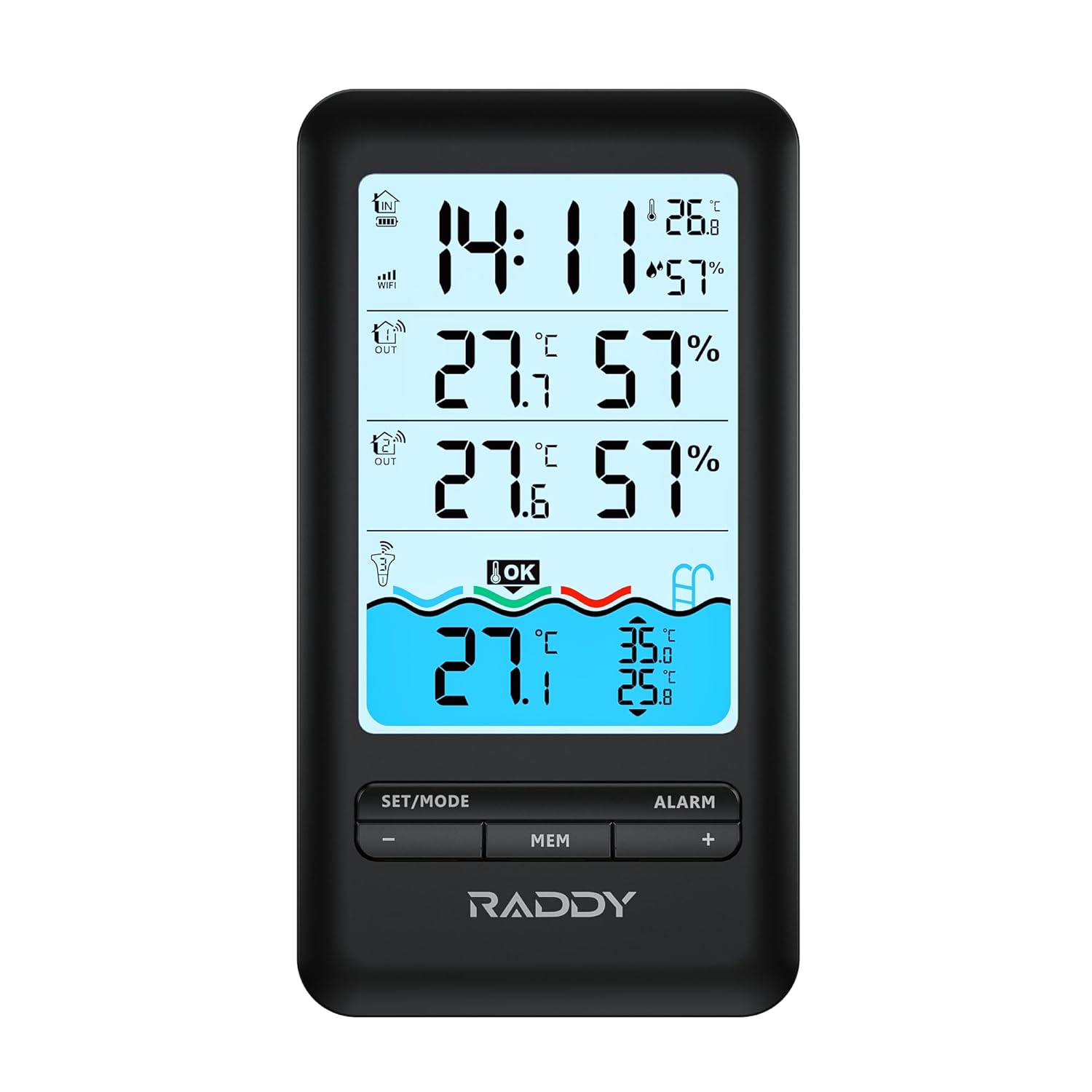
- Upgraded Indoor Monitor: Featuring a large LCD display, it monitors temperature and humidity in up to 4 areas simultaneously. With a backlight for easy reading, it also records the day's maximum and minimum temperature and humidity, ensuring comprehensive surveillance of your pool environment.
- Convenient Charging: The indoor monitor is powered by a 1200mAh rechargeable battery, ensuring long-lasting performance. Simply charge it using the included Type-C cable for continuous monitoring, guaranteeing uninterrupted surveillance of your pool environment. Additionally, enjoy the convenience of an alarm clock function with customizable snooze settings.
- Durable Design: This IPX7 waterproof and dustproof pool thermometer features an upgraded double Rubber gasket design and can be submerged up to 3.3 feet underwater. With a remarkable battery life of up to one year on a single replacement, enjoy uninterrupted pool monitoring without hassle, ensuring your pool is always at its best.
2. Safety Information
Please read and understand all safety instructions before using the Raddy PT-3 Wi-Fi Pool Thermometer. Failure to follow these instructions may result in injury or damage to the device.
- Do not disassemble or modify the device.
- Keep the main console and remote sensors away from extreme temperatures, direct sunlight, and excessive moisture.
- Ensure the pool sensor's battery compartment is securely sealed before placing it in water.
- Use only the specified battery type for remote sensors (AA batteries).
- Dispose of batteries properly according to local regulations.
- Keep out of reach of children.
3. Product Overview
The Raddy PT-3 system consists of a main display console, a floating pool sensor, and two remote sensors. Each component is designed for specific monitoring tasks.




4. Setup
4.1. Pool Sensor Battery Installation
The pool sensor requires 2 x AA batteries (included). Use the provided wrench to open the battery compartment.
- Unscrew the top cap of the pool sensor using the larger wrench.
- Carefully pull out the internal battery compartment.
- Insert 2 x AA batteries, ensuring correct polarity (+/-).
- Slide the battery compartment back into the sensor body.
- Securely screw the top cap back on, ensuring the double rubber gasket is properly seated for a waterproof seal. Use the wrench to tighten firmly but do not overtighten.
Video 4.1: This video demonstrates the process of installing batteries into the Raddy PT-3 floating pool thermometer, including using the provided wrench to ensure a secure, waterproof seal.
4.2. Remote Sensor Battery Installation
Each remote sensor requires 2 x AA batteries (not included). Open the battery cover on the back of the sensor and insert the batteries, observing polarity. Close the cover securely.
4.3. Main Console Setup
The main console has a built-in 1200mAh rechargeable battery. Before first use, fully charge the console using the provided Type-C cable and a standard USB power adapter (not included).
- Connect the Type-C cable to the console's charging port and the other end to a USB power source.
- The charging indicator on the console will show charging status.
- Once charged, the console will power on automatically or can be turned on by pressing the power button (if available).
4.4. App Installation and Device Pairing
The Raddy PT-3 connects to the Tuya Smart APP for remote monitoring and advanced settings. Ensure your Wi-Fi network is 2.4GHz, as the device is not compatible with 5GHz networks.
- Download the 'Tuya Smart' app from the App Store (iOS) or Google Play Store (Android).
- Register or log in to your Tuya Smart account.
- On the main console, press and hold the 'SET/MODE' button until the Wi-Fi icon flashes, indicating pairing mode.
- In the Tuya Smart app, tap '+' to add a device. Select 'Sensors' > 'Temperature and Humidity Sensor (Wi-Fi)'.
- Follow the on-screen instructions in the app to connect the device to your Wi-Fi network. This typically involves entering your Wi-Fi password.
- Once connected, the Wi-Fi icon on the console will become solid, and the device will appear in your app.
- The app will automatically detect and display data from the pool sensor and remote sensors once they are active and within range of the main console.
Video 4.2: This video illustrates the easy APP connection process for the Raddy PT-3, showing how to pair the device with the Tuya Smart app for remote monitoring and control.
5. Operating Instructions
5.1. Reading Temperatures and Humidity
- Main Console: The large LCD displays indoor temperature and humidity, as well as readings from the two remote sensors and the pool sensor.
- Remote Sensors: Each remote sensor has a small display showing its current temperature and humidity.
- Tuya Smart App: View all sensor data in real-time from anywhere. The app provides a clear overview of all monitored areas.
5.2. Unit Switching (℃/℉)
On the main console, press the 'SET/MODE' button briefly to toggle between Celsius (℃) and Fahrenheit (℉). This setting can also be adjusted within the Tuya Smart app.
5.3. Viewing Max/Min Records
Press the 'MEM' button on the main console to cycle through current, maximum, and minimum temperature and humidity records for all channels. The records reset daily.
5.4. Alarm Clock Function
The main console includes an alarm clock with snooze functionality.
- Press and hold the 'ALARM' button to enter alarm setting mode.
- Use the '+' and '-' buttons to adjust the hour and minute. Press 'ALARM' again to confirm each setting.
- To activate/deactivate the alarm, briefly press the 'ALARM' button. An alarm icon will appear/disappear on the display.
- When the alarm sounds, press any button to snooze, or press and hold 'ALARM' to turn it off.
5.5. App Features
- Remote Monitoring: View real-time temperature and humidity data from all sensors on your smartphone, anywhere with an internet connection.
- Data Storage: The app stores up to one year of historical data, allowing you to track trends.
- Customization: Adjust time format, temperature units, and backlight settings directly from the app.
- Alerts: Set custom alerts for temperature or humidity thresholds (refer to app settings for details).
6. Maintenance
6.1. Cleaning
Wipe all components with a soft, damp cloth. Do not use abrasive cleaners or solvents. Ensure the pool sensor is clean of debris to maintain accurate readings.
6.2. Battery Replacement
- Pool Sensor: Replace AA batteries annually or when the low battery indicator appears. Follow the installation steps in Section 4.1.
- Remote Sensors: Replace AA batteries when the low battery indicator appears on the sensor or main console.
- Main Console: Recharge the console when the low battery indicator appears. The 1200mAh rechargeable battery provides long-lasting performance.
6.3. Storage
If storing the device for an extended period, especially during off-season for the pool, remove all batteries from the pool sensor and remote sensors to prevent leakage. Store all components in a cool, dry place.
7. Troubleshooting
| Problem | Possible Cause | Solution |
|---|---|---|
| No readings from a sensor | Dead batteries; Sensor out of range; Interference; Sensor not paired. | Replace batteries. Move sensor closer to the main console. Reduce interference from other electronic devices. Re-pair the sensor if necessary (refer to app pairing instructions). |
| Console not connecting to Wi-Fi | Incorrect Wi-Fi password; 5GHz network; Weak Wi-Fi signal. | Ensure correct Wi-Fi password. Confirm your Wi-Fi is 2.4GHz. Move console closer to the router. Restart router and console. |
| Inaccurate temperature readings | Sensor placement; Calibration needed (rare). | Ensure sensors are not in direct sunlight or near heat sources. Compare readings with a known accurate thermometer. |
| Pool sensor leaking | Improperly sealed battery compartment. | Remove from water immediately. Dry thoroughly. Re-open and re-seal the battery compartment, ensuring the gasket is clean and properly seated. Tighten firmly with the wrench. |
| App not displaying data | No internet connection; App not refreshed; Device offline. | Check phone's internet connection. Pull down to refresh in the app. Ensure console is connected to Wi-Fi and sensors are transmitting. |
If you encounter issues not listed here or if the problem persists, please contact customer support.
8. Specifications
| Feature | Detail |
|---|---|
| Model Number | PT-3 |
| Power Source (Console) | 1200mAh Rechargeable Battery (Type-C) |
| Power Source (Pool Sensor) | 2 x AA Batteries (included) |
| Power Source (Remote Sensors) | 2 x AA Batteries (not included) |
| Connectivity Technology | Wi-Fi (2.4GHz only) |
| Transmission Range | Up to 300 feet (open air) |
| Waterproof Rating (Pool Sensor) | IPX7 (submersible up to 3.3 feet) |
| Display Type | Digital LCD (Console & Sensors) |
| Special Features | Backlit, Low Battery Indicator, App Companion, Rechargeable, High Accuracy, Alarm Clock |
| Product Care Instructions | Wipe Clean |
| Dimensions (Console) | 6.1 x 3.3 x 1 inches (15.5 x 8.4 x 2.5 cm) |
| Dimensions (Pool Sensor) | 7.8 x 3.7 x 3.7 inches (20 x 9.4 x 9.4 cm) |
| Dimensions (Remote Sensor) | 3.7 x 2.0 x 1 inches (9.4 x 5.0 x 2.5 cm) |
9. Warranty Information
Raddy products are manufactured to high quality standards. For specific warranty terms and conditions, please refer to the warranty card included with your product or visit the official Raddy website. Keep your purchase receipt as proof of purchase.
10. Customer Support
If you have any questions, require technical assistance, or need to report an issue with your Raddy PT-3 Wi-Fi Pool Thermometer, please contact our customer support team. Contact information can typically be found on the product packaging, the official Raddy website, or within the Tuya Smart app's support section.
Related documentsPT-3


Ask a question about this manual
Ask about setup, troubleshooting, compatibility, parts, safety, or missing instructions. Manuals+ will review the question and use this page’s manual context to help answer it.