
Introduction
This manual provides essential instructions for the safe and effective use of your DGFTB 25.2V Li-ion replacement battery, designed for LG CordZero A9 series cordless vacuum cleaners. Please read this manual thoroughly before installation and operation to ensure optimal performance and longevity of your battery.
Safety Information
Always observe the following safety precautions when handling and using the battery:
- Do not disassemble, crush, or puncture the battery.
- Do not expose the battery to high temperatures (above 60°C / 140°F) or direct sunlight.
- Keep the battery away from water, fire, and extreme humidity.
- Use only the original LG CordZero A9 charger or a compatible charger specifically designed for this battery type.
- If the battery shows signs of damage, leakage, or overheating, discontinue use immediately and dispose of it properly.
- Keep out of reach of children.
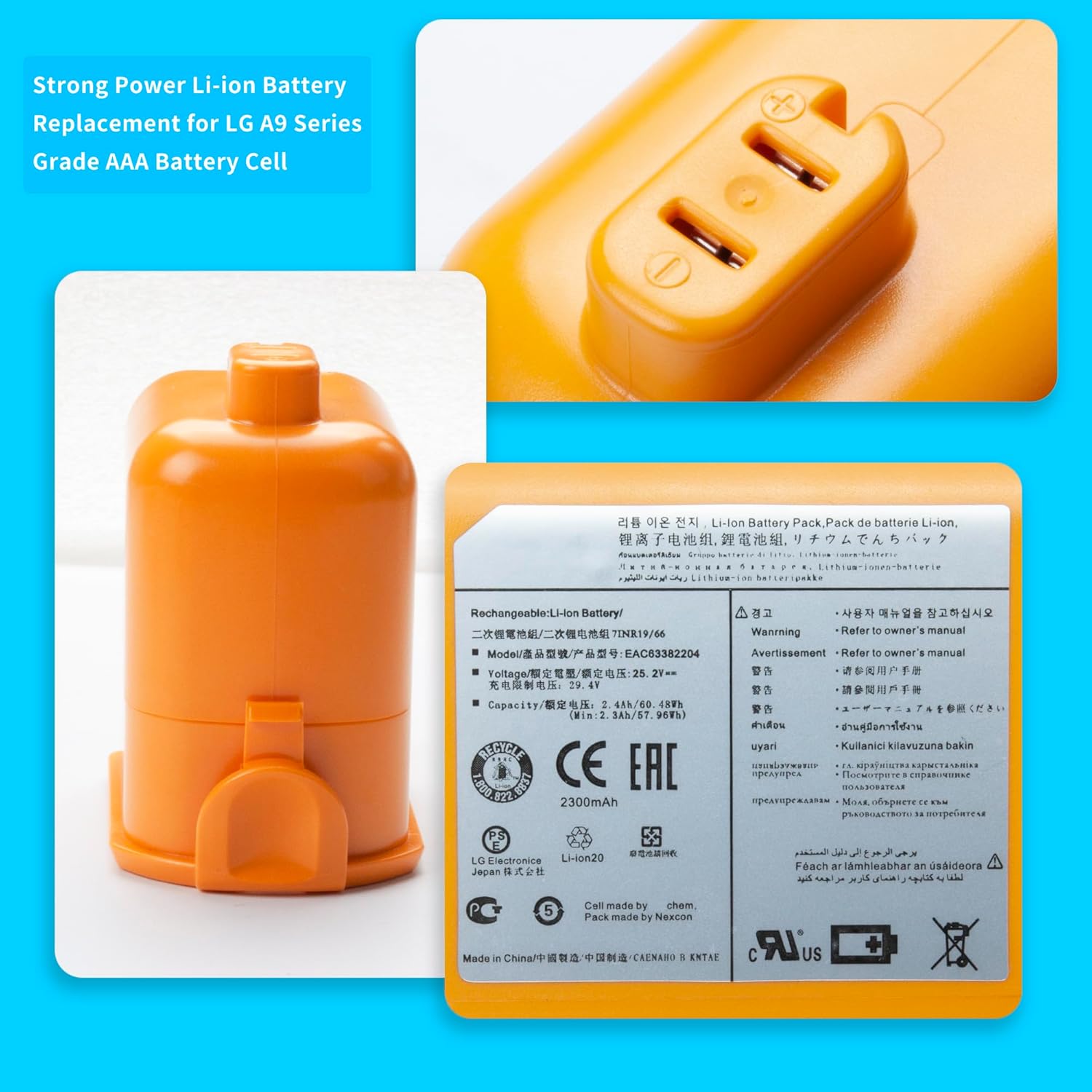
Image: Close-up of the DGFTB replacement battery label, displaying important safety warnings and technical specifications.
Setup: Battery Installation
Follow these steps to correctly install the DGFTB replacement battery into your LG CordZero A9 vacuum cleaner:
- Ensure the vacuum cleaner is turned off and unplugged from any power source.
- Locate the battery compartment on your LG CordZero A9 vacuum. This is typically on the main body of the vacuum.
- Press the battery release button or latch, if present, and carefully slide out the old battery.
- Align the DGFTB replacement battery with the battery slot, ensuring the connectors are properly oriented.
- Gently slide the new battery into the compartment until it clicks securely into place. Do not force the battery.
- For initial installation, ensure the interface is fully connected.

Image: A user demonstrating the simple process of installing the DGFTB replacement battery into the LG CordZero A9 vacuum cleaner.
Operating: Charging and Usage
To maximize the performance and lifespan of your DGFTB battery, follow these operating guidelines:
- Initial Charge Cycle: For the first 3-4 uses, fully discharge the battery to approximately 5% (avoiding 0%) and then charge it completely to 95%. This helps calibrate the battery for optimal performance.
- Regular Charging: Connect your LG CordZero A9 vacuum with the DGFTB battery installed to its charging station or adapter. The charging indicator on your vacuum will show the charging status.
- Avoid Overcharging: While the battery has built-in overcharge protection, it is generally good practice to disconnect the charger once the battery is fully charged if not in use.
- Optimal Usage: The battery is designed for consistent power delivery throughout its discharge cycle, providing reliable operation for your vacuuming tasks.

Image: A visual representation of the LG CordZero A9 vacuum cleaner in action, demonstrating the enduring power provided by the DGFTB replacement battery for comprehensive cleaning.
Maintenance
Proper maintenance can significantly extend the life of your DGFTB replacement battery:
- Regular Cleaning: Keep the battery contacts clean and free from dust or debris. Use a dry cloth to wipe them if necessary.
- Temperature Control: Store and operate the battery in a moderate temperature environment. Avoid extreme cold or heat, as these can degrade battery performance and lifespan.
- Long-Term Storage: If storing the battery for an extended period, charge it to approximately 50-60% capacity. Store it in a cool, dry place. Avoid storing a fully charged or completely depleted battery for long durations.
- Cycle Management: Periodically perform a full discharge (to 5%) and recharge cycle to help maintain battery health, especially if you notice a decrease in run time.
Troubleshooting
If you encounter issues with your DGFTB replacement battery, consider the following:
- Battery Not Charging:
- Ensure the battery is correctly seated in the vacuum and the charging dock/cable is securely connected.
- Verify that the power outlet is functional.
- Check for any visible damage to the battery or charger.
- Try re-inserting the battery to ensure a proper connection.
- Short Run Time:
- Perform the initial charge cycle recommendation (discharge to 5%, charge to 95%, repeat 3-4 times) to calibrate the battery.
- Ensure the battery is fully charged before use.
- Operating the vacuum on high power settings will naturally reduce run time.
- Battery capacity can degrade over time with extensive use.
- Battery Not Holding Charge:
- This could indicate a defective battery or an issue with the vacuum's charging system.
- Ensure proper charging procedures are followed as outlined in the 'Operating' section.
- If the issue persists after following all troubleshooting steps, contact customer support.
Specifications
Key technical details of the DGFTB replacement battery:
- Battery Type: Li-ion
- Voltage: 25.2V
- Capacity: 60.48Wh / 2400mAh
- Compatible Part Numbers: EAC63382201, EAC63382202, EAC63382204, EAC63758601, MEV65921201, 7ICR19/66
- Battery Cell Composition: Lithium Ion
- Item Weight: Approximately 1.15 pounds
- Package Dimensions: Approximately 5 x 4.29 x 3.31 inches
Advanced Protection Features
The DGFTB battery incorporates Grade A cells and built-in circuit protection to enhance safety and extend battery life:
- Charging Under-Voltage Protection
- Output Over-Current Protection
- Charging Over-Temperature Protection
- Output Short-Circuit Protection
- Charging Over-Charging Protection
- Output Over-Heat Protection
- Charging Over-Current Protection
- Output Over-Discharge Protection
- Over Discharge Protection
- Output Over-Voltage Protection
- Discharge Over-Temperature Protection
- Charging Over-Voltage Protection

Image: A detailed diagram showcasing the comprehensive suite of protection features integrated into the DGFTB battery, ensuring safe and stable operation.
Compatibility
The DGFTB replacement battery is compatible with a wide range of LG CordZero A9 series cordless vacuum cleaner models, including but not limited to:
- LG CordZero A9, A9+
- A902RM, A905RM, A906SM, A907GMS, A908VMR
- A927KGMS, A927KVMS, A929KVM
- A958, A958SA, A958SK, A9M, A9MASTER2X
- A9MULTI, A9MULTI2X, A9PETNBED, A9PETNBED2X
- A9 PLUS A905M, A907GMS, A908MVR
- A9K-PRO, A9 Kompressor, A9K-CORE, A9K MAX, A9T-ULTRA, A916

Image: A visual guide to several LG CordZero A9 vacuum models, confirming their compatibility with the DGFTB replacement battery.
Warranty and Support
For any questions, concerns, or warranty inquiries regarding your DGFTB replacement battery, please contact the seller or manufacturer directly through your purchase platform. Please refer to your purchase documentation for specific warranty terms and contact information.