
WLLKIY ST-9624A
Digital Air Pump User Manual
Model: ST-9624A
Brand: WLLKIY
Introduction
Thank you for choosing the WLLKIY Digital Air Pump. This intelligent air compressor is designed for efficient and convenient inflation of tires for motorcycles, bicycles, and other inflatables. With its wireless/wired capabilities, digital display, and safety features, it provides a reliable solution for your inflation needs. Please read this manual thoroughly before operation to ensure safe and optimal performance.
Safety Information
To prevent injury or damage, always observe the following safety precautions:
- Do not leave the inflator unattended during operation.
- Keep out of reach of children.
- Ensure the inflation port is handled with care; the internal sinking design helps reduce the risk of burns, but caution is still advised.
- Do not operate the device in wet conditions or near flammable liquids/gases.
- Always check the recommended pressure for the item you are inflating to avoid over-inflation.
- Disconnect the power source when not in use or before cleaning.
Package Contents
Verify that all items are present in your package:
- Digital Air Pump Unit
- Inflation Hose
- Car Power Cable (12V)
- Various Nozzle Adapters (e.g., for bicycles, balls)
- Storage Pouch
- User Manual (this document)

Image: The digital air pump unit, along with its flexible inflation hose, 12V car power cable, various nozzle adapters for different inflatables, and a storage pouch.
Product Overview
Familiarize yourself with the components of your digital air pump:
- Digital Display: Shows current pressure, target pressure, and unit (PSI, Bar, Kpa, Kg/cm²).
- Control Buttons: Power, Mode selection, Increase/Decrease pressure, SOS light.
- Inflation Port: Connects the inflation hose. Designed with anti-scald features.
- Hose: Flexible hose with a quick-connect chuck for tire valves. Features a multi-layered construction for durability, including rubber tube, reinforced protective layer, aluminum foil protection layer, and high-strength nylon braiding.
- Power Input: For wired operation (12V car power) or charging the internal battery.
- LED Light: Provides illumination for nighttime use or emergencies.
- High Precision Sensor Chip: Ensures accurate pressure measurement with zero error.

Image: A detailed view of the inflation hose, highlighting its robust multi-layer construction for enhanced durability and performance.

Image: An internal schematic view showcasing the high precision sensor chip, which ensures accurate tire pressure measurements.
Setup
Charging the Device (Wireless Operation)
Before first use, fully charge the internal 6000mAh battery. Connect the provided charging cable to the device's power input and a suitable USB power adapter (not included). The display will indicate charging status. A full charge ensures maximum portability and runtime.
Wired Operation
For continuous power or if the internal battery is low, connect the provided 12V car power cable to the device's power input and then to your vehicle's cigarette lighter socket.
Attaching the Inflation Hose
Screw the inflation hose securely into the inflation port on the top of the digital air pump.
Operating Instructions
Follow these steps to inflate your tires or other items:
- Power On: Press the power button to turn on the device. The digital display will light up, showing the current pressure unit and battery level.
- Select Pressure Unit: Press the 'Mode' button (often indicated by a unit symbol or 'M') to cycle through available pressure units: PSI, Bar, Kpa, Kg/cm². Select the unit appropriate for your needs.
- Set Target Pressure: Use the '+' and '-' buttons to adjust the desired target pressure. The display will show the set value. Refer to your vehicle's or item's recommended pressure.
- Connect to Valve: Securely attach the quick-connect chuck of the inflation hose to the tire valve stem. For other inflatables, use the appropriate nozzle adapter. Ensure a tight seal to prevent air leakage.
- Start Inflation: Press the power button again to begin inflation. The pump will automatically inflate to the preset pressure and then stop.
- Monitor Progress: The digital display will show the real-time pressure as it inflates.
- Disconnect: Once inflation is complete and the pump has stopped, quickly detach the hose from the valve stem. A small amount of air may escape, which is normal.
- Power Off: Press and hold the power button to turn off the device.
Using the LED Light
Press the light button (often indicated by a sun or light bulb icon) to turn on the LED light. This is useful for inflating in low-light conditions or as an emergency light. Press again to cycle through light modes (e.g., steady, flashing, SOS) or turn off.

Image: The digital air pump connected to a car tire, actively displaying the pressure reading during inflation.

Image: The compact digital air pump positioned next to vehicle tires, demonstrating its portability and readiness for use.
Maintenance
- Cleaning: Wipe the exterior of the pump with a soft, damp cloth. Do not use harsh chemicals or abrasive cleaners. Ensure the device is dry before storage.
- Storage: Store the air pump and its accessories in the provided storage pouch in a cool, dry place, away from direct sunlight and extreme temperatures.
- Battery Care: If storing for extended periods, charge the battery every 3-6 months to maintain its lifespan.
- Hose Inspection: Periodically check the inflation hose for any signs of wear, cracks, or damage. Replace if necessary.
Troubleshooting
| Problem | Possible Cause | Solution |
|---|---|---|
| Pump does not turn on. | Battery is depleted or not connected to power. | Charge the battery or connect to a 12V car power source. |
| Pump runs but no air inflates. | Hose not securely attached to valve or pump; valve core issue. | Ensure hose is tightly screwed onto pump and valve. Check valve core for blockages. |
| Inaccurate pressure reading. | Loose connection; sensor calibration needed. | Ensure connections are tight. If persistent, contact customer support. |
| Pump stops prematurely. | Target pressure reached; overheating; low battery. | Check target pressure setting. Allow pump to cool down. Recharge battery. |
Specifications
| Feature | Detail |
|---|---|
| Brand | WLLKIY |
| Model Name | ST-9624A |
| Model Number | 3256805965477585 |
| Product Dimensions (L x W x H) | 45mm x 82mm x 160mm (1.77in x 3.22in x 6.29in) |
| Product Weight | 10 Grams (Note: This weight seems unusually low for a pump. Please verify with product packaging if discrepancy is observed.) |
| Material | Plastic |
| Power Source | Wireless (6000mAh internal battery) / Wired (12V DC) |
| Maximum Pressure | 150 PSI |
| Operating Mode | Automatic |
| Display Type | Digital LED |
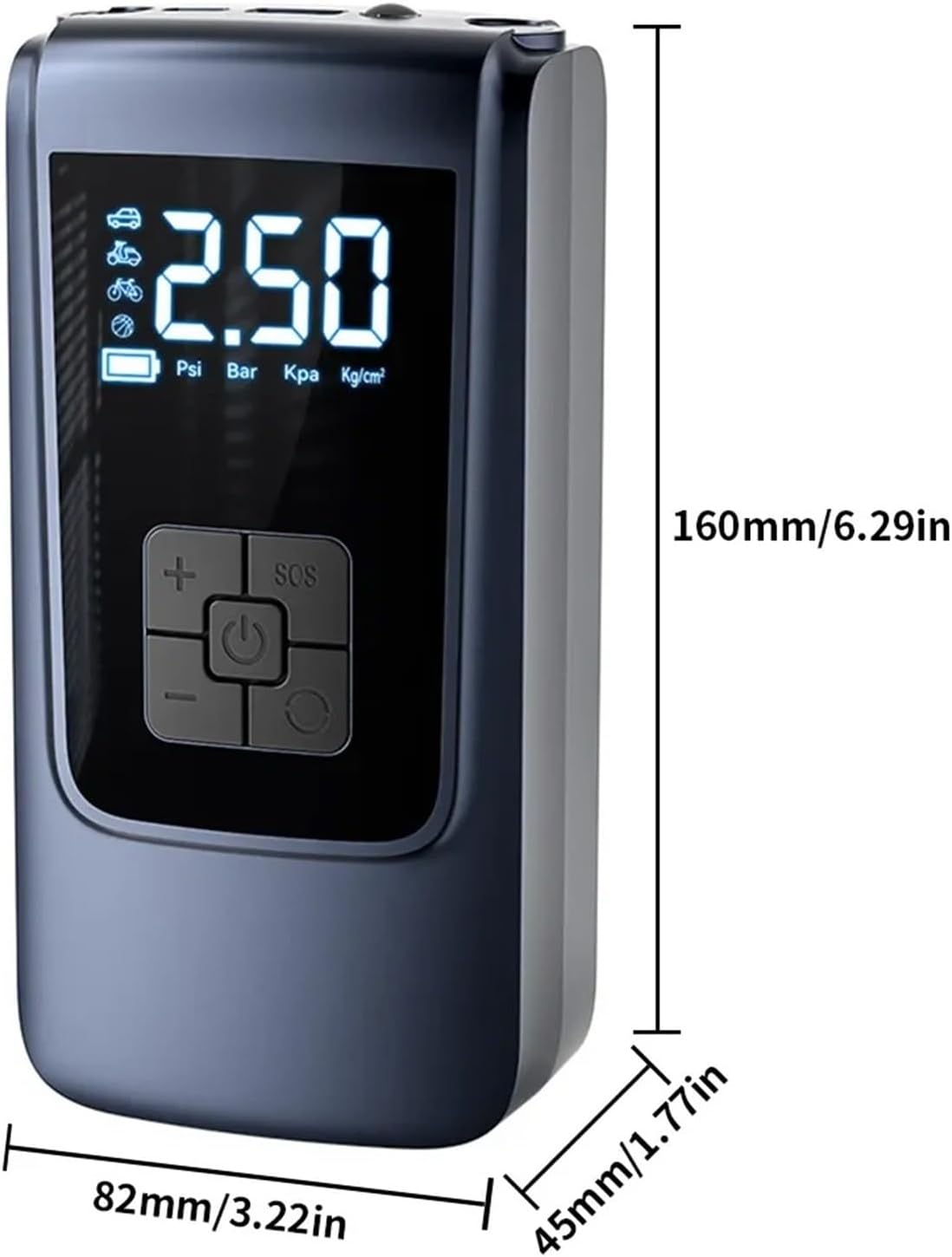
Image: Visual representation of the digital air pump's dimensions, showing its height, width, and depth in both millimeters and inches.
Warranty and Support
For warranty information or technical support, please refer to the contact details provided on your product packaging or the retailer's website. Keep your purchase receipt as proof of purchase.
For further assistance, you may also visit the WLLKIY brand store on Amazon: WLLKIY Amazon Store
Related documentsST-9624A


Ask a question about this manual
Ask about setup, troubleshooting, compatibility, parts, safety, or missing instructions. Manuals+ will review the question and use this page’s manual context to help answer it.