Introduction
The Sharper Image Slideways Racer RC Car is designed for dynamic remote-controlled entertainment, featuring versatile driving modes and innovative stunt capabilities. This manual provides essential information for setting up, operating, and maintaining your RC car to ensure optimal performance and enjoyment.
Package Contents
- Slideways Racer RC Car
- Remote Control
- Rechargeable Battery (pre-installed in car)
- Charging Cable
Setup
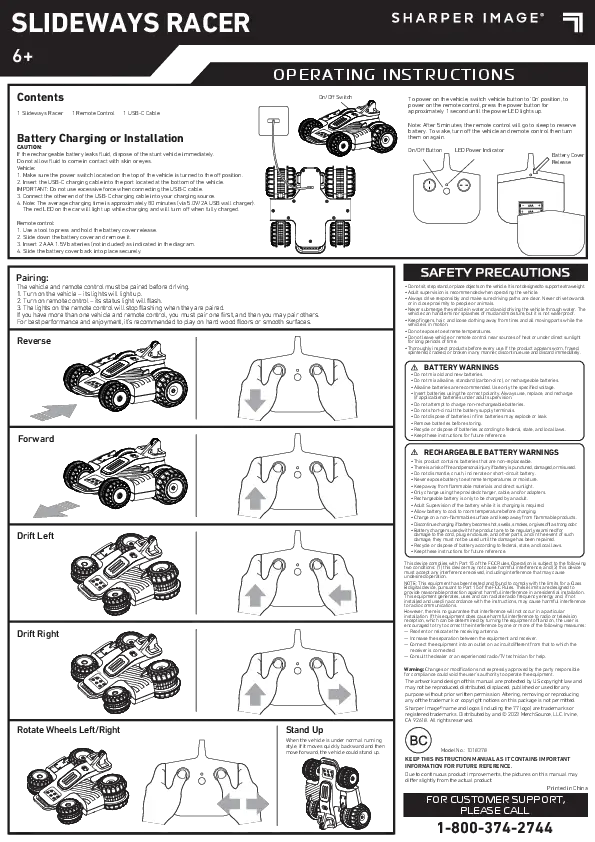
1. Charging the RC Car Battery
The Slideways Racer RC Car comes with a pre-installed rechargeable battery. Before first use, fully charge the car's battery.
- Locate the charging port on the RC car.
- Connect the provided charging cable to the car's charging port.
- Connect the other end of the charging cable to a USB power source (e.g., computer, USB wall adapter).
- The charging indicator light will illuminate during charging and turn off or change color when fully charged. Refer to the car's specific indicator behavior for details.
- Charging typically takes approximately 60-90 minutes. Do not overcharge.
2. Installing Remote Control Batteries
The remote control requires 2 AAA batteries (included).
- Open the battery compartment on the back of the remote control.
- Insert 2 AAA batteries, ensuring correct polarity (+/-).
- Close the battery compartment securely.
3. Pairing the RC Car and Remote Control
The RC car and remote control are typically pre-paired. If they do not connect automatically:
- Ensure both the RC car and remote control are powered off.
- Turn on the RC car. The LED lights on the car may flash.
- Turn on the remote control.
- The remote control and car should automatically pair. The car's LED lights will become solid when successfully paired.

Image: The Sharper Image Slideways Racer RC Car and its remote control, ready for use.
Operating Instructions
The Slideways Racer offers three dynamic driving modes and unique wheel rotation for advanced stunts.
Basic Controls
- Forward/Backward: Use the left joystick on the remote control to move the car forward or backward.
- Turn Left/Right: Use the right joystick to steer the car left or right.
Driving Modes and Stunts
The car features 90-degree wheel rotation, enabling unique maneuvers.

Image: Visual representation of the three driving modes: Race, Standing Crawl, and Hover Drift.
- Standard Racing Mode: In this mode, the car operates like a traditional RC car, moving forward, backward, and turning. The wheels are oriented for maximum grip and speed.
- Standing Crawl Mode: This mode allows the car to stand upright on its rear wheels and crawl. To activate, manipulate the controls to lift the front of the car, then use the joysticks to move it while standing. This mode is ideal for navigating tight spaces or performing unique vertical movements.
- Hover Drift Mode: Engage this mode to perform smooth, sideways drifts. The wheels rotate 90 degrees, allowing the car to glide horizontally across surfaces. This mode is activated by specific button combinations on the remote control (refer to remote control diagram for exact buttons).
LED Light Effects
The Slideways Racer is equipped with eye-catching LED lights that enhance visibility and add to the excitement, especially during nighttime play. These lights activate automatically when the car is powered on and may change patterns during certain stunts or modes.

Image: The Slideways Racer RC Car showcasing its illuminated LED lights.
Demonstration Video
Video: An official demonstration of the Sharper Image Slideways Racer, highlighting its various features and driving capabilities.
Maintenance
Battery Care
- Always ensure the car's battery is fully charged before each use for optimal performance.
- Do not leave the battery charging unattended for extended periods.
- If the car will not be used for a long time, fully charge the battery before storage and recharge every 3 months to prolong battery life.
- Remove AAA batteries from the remote control if not in use for an extended period to prevent leakage.
Cleaning and Storage
- Wipe the car and remote control with a soft, dry cloth to remove dust and dirt.
- Do not use harsh chemicals or abrasive cleaners.
- Store the RC car and remote control in a cool, dry place away from direct sunlight and extreme temperatures.
Troubleshooting
- Car not responding:
- Ensure both the car and remote control are powered on.
- Check if the car's rechargeable battery is charged.
- Verify that the remote control batteries are correctly installed and not depleted.
- Re-attempt the pairing process.
- Poor performance/short range:
- Ensure the car's battery is fully charged.
- Replace the remote control batteries if they are weak.
- Avoid operating near other 2.4 GHz devices, which may cause interference.
- Ensure there are no large obstacles between the remote and the car.
- Car not performing stunts correctly:
- Ensure the car is on a suitable surface (smooth, flat surfaces are best for drifting).
- Practice the control inputs for each specific stunt mode.
Specifications
| Brand | Sharper Image |
| Model Number | 1018378 |
| Power Source | Battery Powered (Rechargeable Lithium-Ion for car, 2 AAA for remote) |
| Age Range | 6+ Years |
| Dimensions | 7.13 x 4.45 x 7 inches |
| Material | Plastic |
| Features | 3 Driving Modes, 90-Degree Wheel Rotation, LED Lights, 2.4 GHz Remote Control |
Warranty and Support
For warranty information or technical support, please refer to the contact details provided on the product packaging or visit the official Sharper Image website. Keep your purchase receipt as proof of purchase.