
1. Introduction
Thank you for choosing the Anker Zolo Power Bank. This portable charger is designed to provide reliable and high-speed power for your mobile devices. Please read this manual carefully before use to ensure optimal performance and safety.
Key Features:
- High Capacity: 20,000mAh battery, capable of charging an iPhone 15 up to 4 times or a Samsung S24 3.79 times.
- 30W Two-Way Fast Charging: Delivers 30W output for rapid device charging and supports 20W input for quick recharging of the power bank itself.
- Built-in USB-C Cable: Features a durable 5.98-inch (15.2 cm) integrated USB-C cable, tested to withstand over 10,000 bends.
- Compact and Portable: Measures 4.72 × 2.89 × 1.23 inches and weighs only 12.45 oz, making it easy to carry.
- ActiveShield 2.0 Technology: Monitors temperatures over 3 million times per day to ensure safe and stable power delivery.
- Digital Display: Provides real-time battery percentage for precise power monitoring.
2. Package Contents
Ensure all items are present in your package:
- Anker Zolo Power Bank (20K, 30W)
- Built-in USB-C cable (5.98-inch / 15.2 cm)
- Welcome Guide
3. Product Overview
Familiarize yourself with the components of your Anker Zolo Power Bank.

Figure 3.1: Anker Zolo Power Bank (Black)
Components:
- Digital Display: Shows the remaining battery percentage.
- Power Button: Activates the power bank and trickle-charging mode.
- Built-in USB-C Cable: For charging devices and recharging the power bank.
- USB-A Output Port: For charging devices using a separate USB-A cable.
- USB-C Input/Output Port: For charging devices or recharging the power bank using a separate USB-C cable.

Figure 3.2: 30W High-Speed Charging
The power bank supports 30W high-speed charging, allowing you to quickly power up compatible devices like the iPhone 16 Pro Max.

Figure 3.3: Durable Built-in Cable
The integrated USB-C cable is designed for durability and convenience, eliminating the need to carry extra cables.

Figure 3.4: Compact Size and Weight
The power bank is designed to be lightweight and portable, comparable to the weight of a standard soda can.
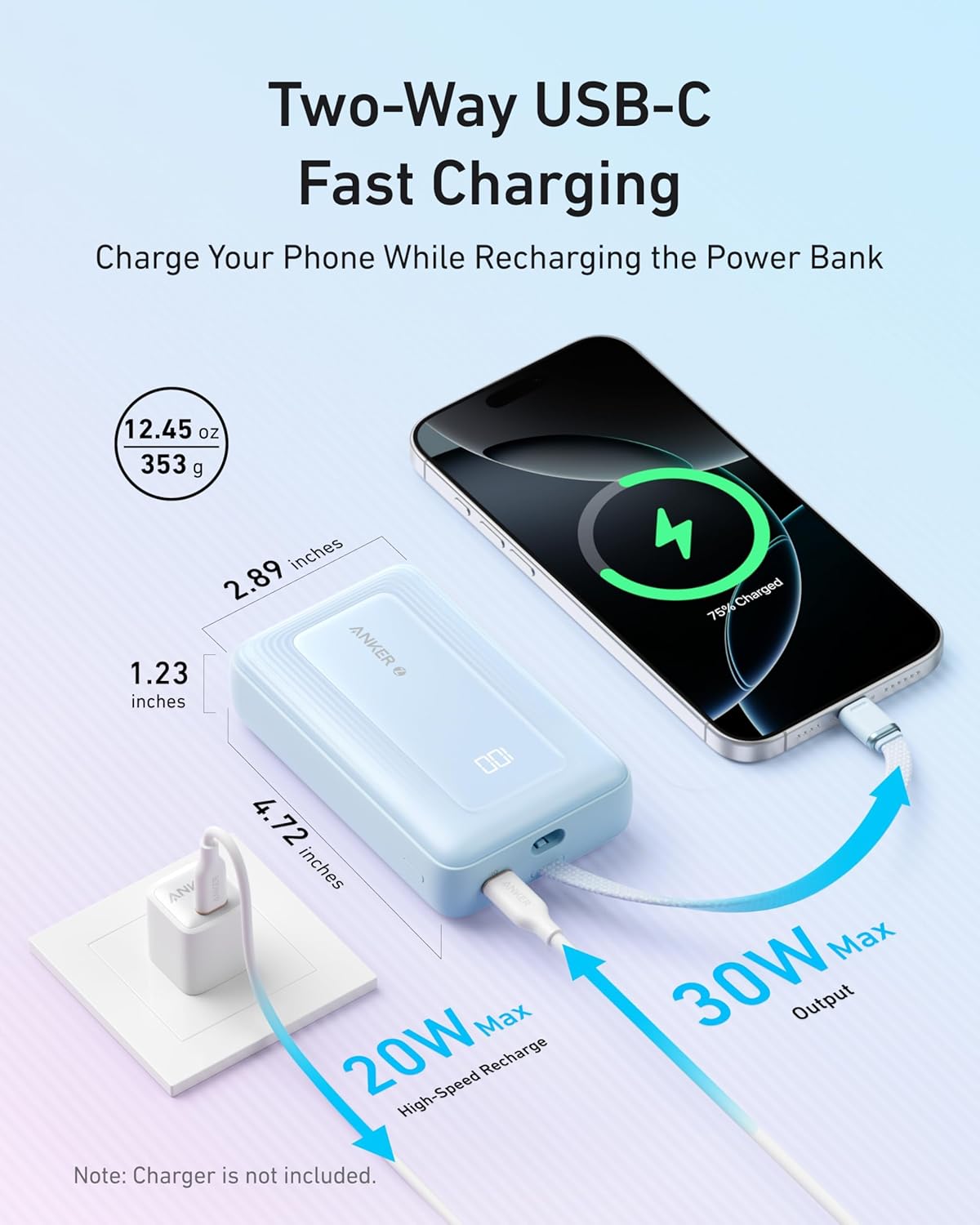
Figure 3.5: Two-Way Fast Charging
The power bank supports both fast charging your devices (30W output) and fast recharging itself (20W input).

Figure 3.6: ActiveShield 2.0 Protection
ActiveShield 2.0 technology provides advanced temperature monitoring for enhanced safety during charging.

Figure 3.7: 20,000mAh Capacity and Flight Approved
The 20,000mAh capacity ensures extended power, and the power bank is approved for air travel.
4. Setup
4.1 Initial Charging
Before first use, fully charge your Anker Zolo Power Bank. Connect the built-in USB-C cable or a separate USB-C cable to the power bank's USB-C port and then to a compatible wall charger (not included). The digital display will show the charging progress. A full charge typically takes approximately 5 hours.
4.2 Activating the Power Bank
To activate the power bank and view the battery level on the digital display, press the power button once.
5. Operating Instructions
5.1 Charging Your Devices
You can charge your devices using the built-in USB-C cable, the USB-A output port, or the USB-C input/output port.
- Using the Built-in USB-C Cable: Extend the built-in USB-C cable and connect it directly to your USB-C compatible device. The power bank will automatically begin charging.
- Using the USB-A Output Port: Connect a standard USB-A to your device's charging cable to the USB-A output port on the power bank, then connect the other end to your device.
- Using the USB-C Input/Output Port: Connect a USB-C to USB-C cable to this port and your device.
The digital display will show the remaining battery percentage during charging.
5.2 Recharging the Power Bank
To recharge the power bank, connect the built-in USB-C cable or a separate USB-C cable to the power bank's USB-C port and then to a compatible wall charger. The digital display will indicate charging status.
5.3 Trickle-Charging Mode
For charging low-power devices such as Bluetooth earbuds or smartwatches, activate trickle-charging mode:
- Press the power button twice.
- A green indicator will appear on the digital display, confirming trickle-charging mode is active.
- Connect your low-power device to the power bank.
To exit trickle-charging mode, press the power button once.
6. Maintenance
- Keep the power bank away from liquids, extreme heat, and direct sunlight.
- Store the power bank in a cool, dry place when not in use.
- Clean the power bank with a dry, soft cloth. Do not use corrosive cleaners or sprays.
- Recharge the power bank at least once every 3 months to maintain battery health.
7. Troubleshooting
| Problem | Possible Solution |
|---|---|
| Power bank not charging devices. |
|
| Power bank not recharging. |
|
| Slow charging. |
|
| Digital display not working. |
|
8. Specifications
| Feature | Detail |
|---|---|
| Model Number | A1688 |
| Battery Capacity | 20000 Milliamp Hours (mAh) |
| Battery Cell Type | Lithium Polymer |
| Output Power | 30W Max |
| Input Power | 20W Max |
| Connector Type | USB Type C (Built-in cable, Input/Output port) |
| Number of Ports | 3 (1x Built-in USB-C, 1x USB-A Output, 1x USB-C Input/Output) |
| Battery Charge Time | Approx. 5 Hours (with 20W charger) |
| Item Dimensions (L x W x Th) | 4.72" x 2.89" x 1.24" (119.9 x 73.4 x 31.4 mm) |
| Item Weight | 12.45 oz (365 Grams) |
| Compatible Devices | Smartphones, Tablets, Earbuds, Smartwatches, etc. |
| Color | Black |
| UPC | 194644038403 |
9. Safety Information
Please read and follow these safety instructions to prevent injury or damage to your device:
- Do not expose the power bank to fire, water, or extreme temperatures (above 40°C/104°F or below 0°C/32°F).
- Do not disassemble, crush, or puncture the power bank.
- Keep out of reach of children.
- Do not use the power bank if it has been damaged or modified.
- Dispose of the power bank according to local regulations. Do not dispose of it with household waste.
- Avoid dropping or subjecting the power bank to strong impacts.
- Use only original or certified cables for charging and recharging.
10. Warranty and Customer Support
10.1 Warranty
Anker provides an 18-month warranty for this product, covering manufacturing defects from the date of purchase. Please retain your proof of purchase for warranty claims.
10.2 Customer Service
For technical support, warranty claims, or other inquiries, please contact Anker customer service. Refer to the contact information provided in your Welcome Guide or visit the official Anker website.
11. Product Videos
Which Anker Zolo Power Bank to Buy? 20K vs 20K Dual
This video provides a comparison between different Anker Zolo Power Bank models, helping users understand the differences between the 20K and 20K Dual versions.
Honest Look at this Super Compact Powerbank from Anker
A detailed review offering an honest perspective on the compact design and features of the Anker Zolo Power Bank.
Fast charging Anker Power Bank
This video demonstrates the fast charging capabilities of the Anker Zolo Power Bank.
Review of the Anker Zolo 20K 30 Watt Power Bank
An in-depth review covering the features and performance of the Anker Zolo 20K 30 Watt Power Bank.


