
Introduction
The SinLoon PD 100W Laptop Charger Adapter is designed to convert power from a standard DC 6.3mm x 3.0mm charger to a USB Type C output, enabling charging for various devices such as laptops, mobile phones, and tablets. This adapter features a built-in PD automatic identification chip for efficient and safe power delivery.
Key features include:
- Input: DC6330 female connector, 15V-20.5V.
- Output: USB Type-C male connector, supporting PD 5V/9V 1.5A, 20V 5A. Note that PD output does not include 12V or 15V.
- Power Requirement: The input power from your DC charger must be greater than the output power required by your device. For example, if your DC charger and laptop are both 90W, the adapter will not function. It supports laptop power below 90W (e.g., 86W, 65W). Do not charge devices requiring over 100W.
- Built-in PD Chip: Ensures automatic identification and stable performance.
- Durable Construction: Features a high-quality metal connector head and a nylon braided wire body with a pure copper inner core.
- Portability: Compact design (cable length: 17.4cm/6.8inch/0.57ft) for easy transport.
Setup Instructions
Follow these steps to properly set up and use your SinLoon PD 100W Laptop Charger Adapter:
- Verify DC Charger Compatibility: Ensure your existing DC power adapter has a 6.3mm x 3.0mm output plug. This adapter is specifically designed for this DC plug size.
- Connect DC Charger: Insert the DC 6.3mm x 3.0mm plug from your power adapter into the female input port of the SinLoon adapter.
- Connect to Device: Plug the USB Type C male connector of the SinLoon adapter into the Type C charging port of your laptop, phone, or tablet.
- Power On: Ensure your DC charger is connected to a power source and turned on. The adapter will automatically identify the required power for your device.
Important Note on Power Compatibility:
- The input power from your DC charger must be greater than the power required by your device.
- If your DC charger and your device (e.g., laptop) both require or supply 90W, the adapter will not work.
- This adapter supports devices requiring power below 100W. Do not attempt to charge devices that require more than 100W.
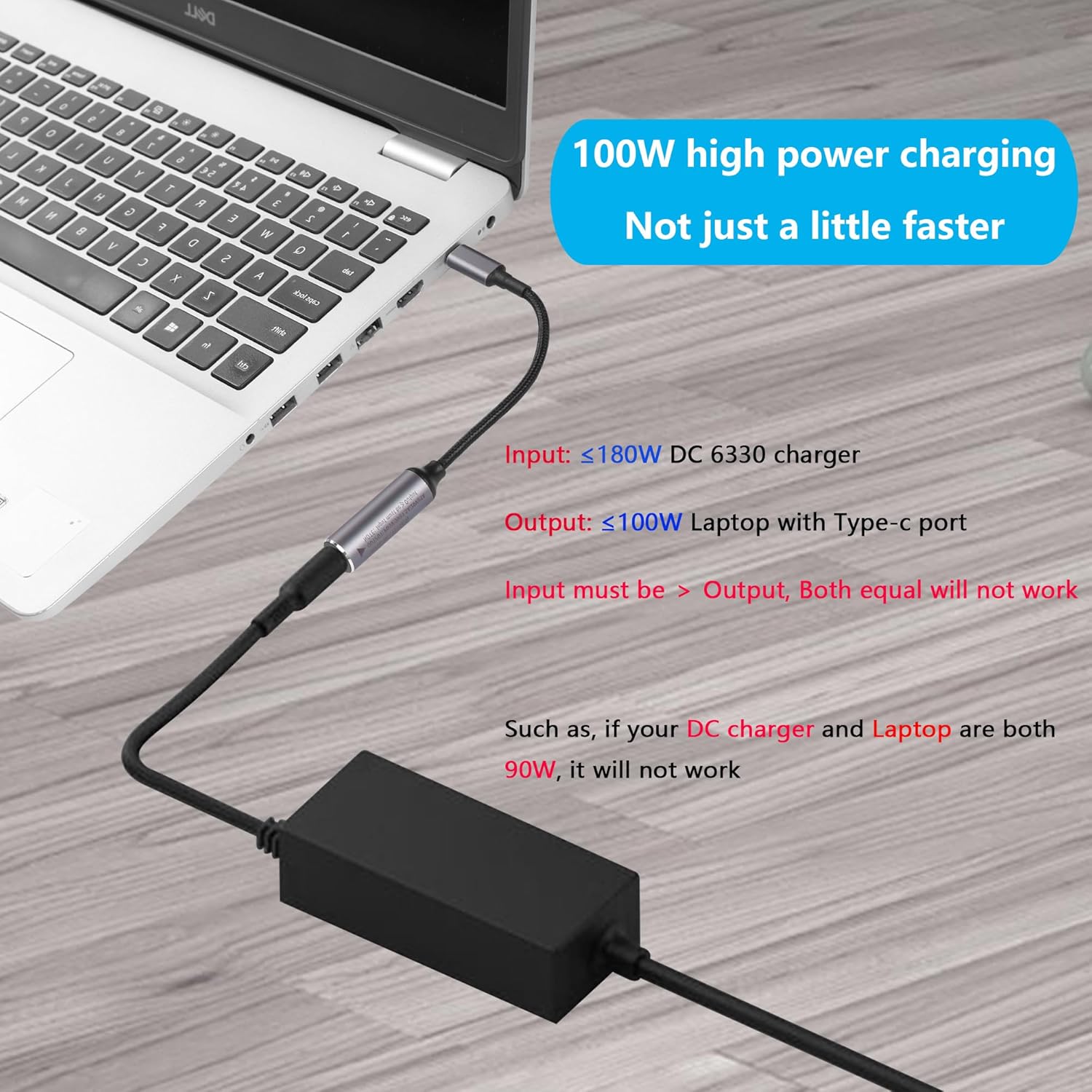
Figure 1: Connection diagram showing the adapter in use with a laptop and DC charger. Note the power input and output requirements.
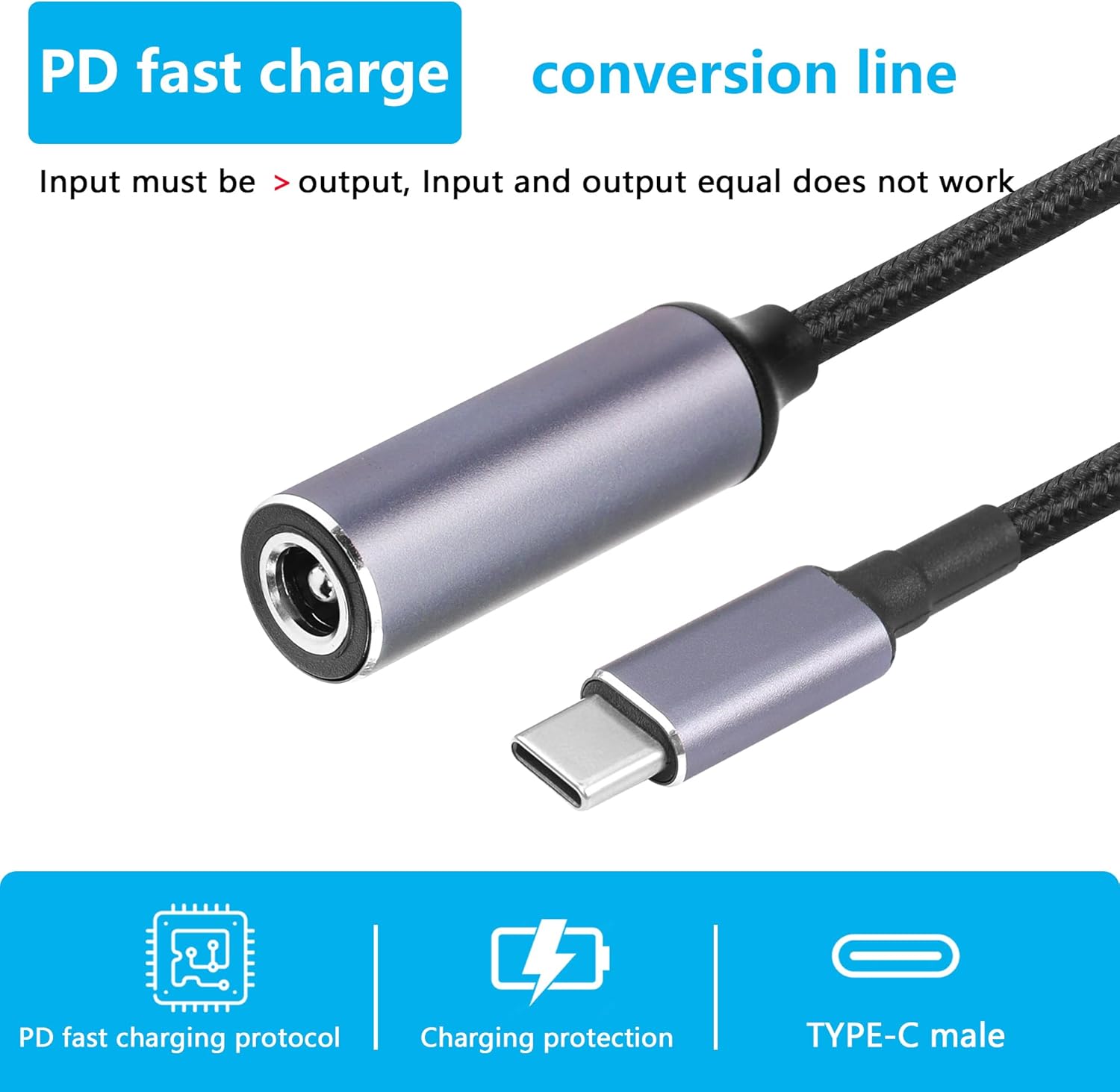
Figure 2: Detailed view of the adapter's connectors, highlighting its function as a PD fast charge conversion line.
Operating Instructions
The SinLoon PD 100W Laptop Charger Adapter operates automatically once connected, thanks to its built-in PD (Power Delivery) automatic identification induction chip.
- Automatic Voltage Detection: The integrated chip detects the power requirements of the connected USB Type C device and delivers the appropriate voltage and current.
- Supported Output Profiles: The adapter can output 5V/1.5A, 9V/1.5A, and 20V/5A. It does not support 12V or 15V output.
- Maximum Power: The adapter supports a maximum power output of 100W. Ensure your device does not require more than 100W.
- Charging Indication: Your device's charging indicator will typically show when it is receiving power.

Figure 3: Illustration of the PD chip, responsible for intelligent power delivery.

Figure 4: Visual representation of the adapter's supported PD output voltages and maximum power capacity.

Figure 5: The adapter providing 100W high power charging to a smartphone.
Maintenance
To ensure the longevity and optimal performance of your SinLoon PD 100W Laptop Charger Adapter, follow these simple maintenance guidelines:
- Cleaning: Gently wipe the adapter and connectors with a dry, soft cloth. Avoid using liquid cleaners or abrasive materials.
- Storage: Store the adapter in a cool, dry place away from direct sunlight and extreme temperatures when not in use.
- Handling: Avoid bending or twisting the cable excessively, especially near the connectors, to prevent internal wire damage. Do not pull the cable by the wire; always grasp the connector when plugging or unplugging.
- Protection: Keep the adapter away from water, moisture, and corrosive substances.

Figure 6: The adapter's dimensions and interface details, highlighting its durable design.
Troubleshooting
If you encounter issues while using your SinLoon PD 100W Laptop Charger Adapter, refer to the following common problems and solutions:
- Device Not Charging:
- Check Power Compatibility: Ensure your DC charger's output power is greater than your device's input power requirement. If both are, for example, 90W, the adapter will not work. The adapter supports devices requiring power below 100W.
- Verify Connections: Make sure both the DC 6.3mm x 3.0mm plug and the USB Type C plug are securely connected to their respective ports.
- Check DC Charger: Confirm that your DC charger is functioning correctly and is connected to a live power outlet.
- Device Compatibility: Ensure your device supports charging via its USB Type C port and is compatible with the adapter's output voltages (5V, 9V, 20V).
- Slow Charging:
- Power Source: Ensure your DC charger provides sufficient power. A lower-wattage DC charger will result in slower charging, or no charging if the power is insufficient.
- Cable Condition: Inspect the cable for any visible damage. A damaged cable can lead to inefficient charging.
- Adapter Overheating:
- Power Load: Ensure you are not attempting to charge a device that exceeds the adapter's 100W maximum capacity.
- Ventilation: Ensure the adapter is in a well-ventilated area and not covered, allowing for proper heat dissipation.
- Built-in PTC Protection: The adapter has built-in PTC protection to control abnormal heat conditions. If overheating persists, discontinue use and contact support.
Specifications
| Brand | SinLoon |
| Model Number | SL2024032803 |
| Input Connector | DC 6.3mm x 3.0mm Female |
| Output Connector | USB Type C Male |
| Input Voltage | 15V - 20.5V (DC) |
| Output (PD) | 5V/1.5A, 9V/1.5A, 20V/5A (Max 100W) |
| Current Rating | 5 Amps (Max) |
| Cable Length | 17.4 cm / 6.8 inches / 0.57 ft |
| Color | Black |
| Material | High-quality metal connectors, nylon braided wire, pure copper inner core |
| Compatible Devices | Laptops, Mobile Phones, Tablets (with USB Type C charging port) |
| Special Features | Built-in PD automatic identification chip, PTC protection |
Warranty Information
Specific warranty details for the SinLoon PD 100W Laptop Charger Adapter are typically provided at the point of purchase or on the manufacturer's official website. Please retain your proof of purchase for any warranty claims.
For the most current and detailed warranty information, please visit the official SinLoon website or contact their customer support directly.
Support
For further assistance, technical support, or inquiries regarding your SinLoon PD 100W Laptop Charger Adapter, please refer to the following resources:
- Online Store: Visit the official SinLoon Store on Amazon for product information and updates.
- Manufacturer Contact: Refer to the packaging or the official SinLoon website for direct contact information for customer service.