
Introduction
Welcome to the Baseus Eli Sport 1 Open-Ear TWS Earbuds. These earbuds are designed to provide a comfortable, open-ear listening experience, allowing you to stay aware of your surroundings while enjoying high-quality audio. This manual will guide you through the setup, operation, and maintenance of your new earbuds.

Image: Baseus Eli Sport 1 Open-Ear TWS Earbuds in use, highlighting their suitability for an active lifestyle.
What's in the Box
Please check the package contents to ensure all items are present:
- 2 x Baseus Eli Sport 1 Open-Ear TWS Earbuds
- 1 x Charging Case
- 1 x USB Charging Cable
- 1 x User Manual

Image: The Baseus Eli Sport 1 earbuds resting inside their transparent charging case.
Setup
1. Charging the Earbuds and Case
Before first use, fully charge the earbuds and the charging case.
- Place the earbuds into the charging case.
- Connect the USB charging cable to the charging port on the case and a power source.
- The indicator lights on the case will show the charging status. Once fully charged, the lights will indicate completion or turn off.
A full charge provides up to 7.5 hours of playback for the earbuds, with the charging case extending total playback time to approximately 30 hours.
2. Bluetooth Pairing
- Open the charging case. The earbuds will automatically enter pairing mode, indicated by a flashing LED light on the earbuds.
- On your device (smartphone, tablet, etc.), enable Bluetooth.
- Search for available Bluetooth devices and select "Baseus Eli Sport 1".
- Once connected, the LED indicator on the earbuds will stop flashing.
3. Wearing the Earbuds
The Eli Sport 1 features an open-ear design for comfort and situational awareness. It also supports a neckband mode for enhanced stability during intensive activities.
- Open-Ear Mode: Position the ear hooks over your ears, ensuring the audio drivers are comfortably placed near your ear canal without entering it.
- Neckband Mode: For added security during sports, attach the provided neckband cable to the earbuds. This prevents loss during vigorous movement.
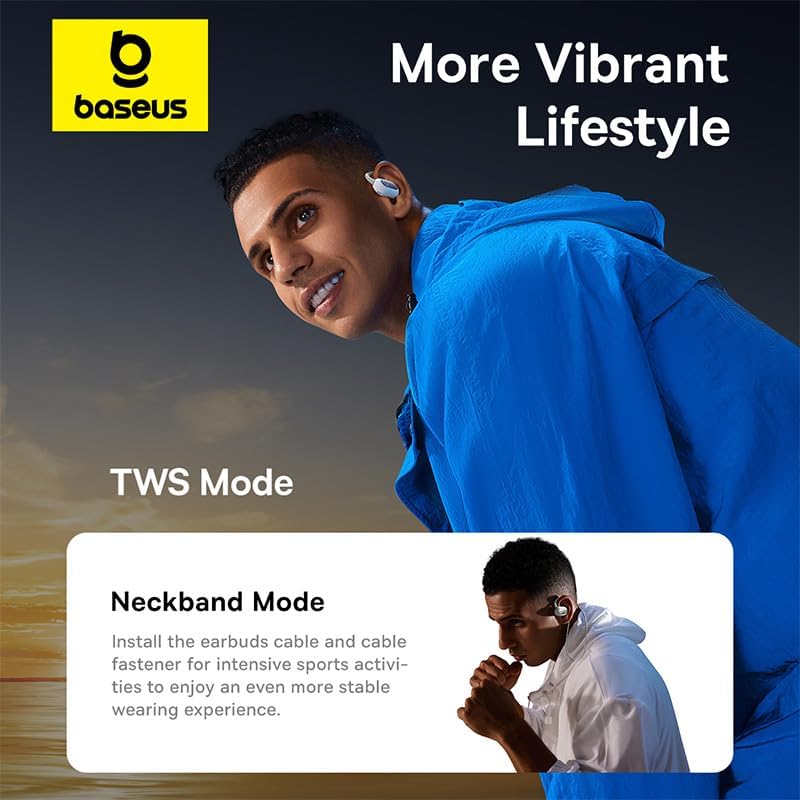
Image: Illustration of the Baseus Eli Sport 1 earbuds in both TWS (True Wireless Stereo) and Neckband configurations.

Image: Detailed view of the earbud's construction, highlighting the titanium memory wire, 'Baby Skin' friction silicon, and weight balance for stability and comfort.
Operating Instructions
Touch Controls
The Baseus Eli Sport 1 earbuds feature touch-sensitive controls on each earbud. Specific functions may vary slightly depending on your device and operating system.
| Action | Function |
|---|---|
| Single Tap (Left/Right) | Play/Pause Music, Answer/End Call |
| Double Tap (Left) | Previous Track |
| Double Tap (Right) | Next Track |
| Long Press (Left/Right) | Reject Call, Activate Voice Assistant |
| Triple Tap (Left/Right) | Switch between Noise Cancellation / Transparency Modes (if applicable) |
Sound Modes
The earbuds support different listening modes:
- Noise Cancellation: Reduces ambient noise for focused listening.
- Transparency Mode: Allows you to hear your surroundings clearly while listening to audio, enhancing safety.

Image: An internal view diagram illustrating the complete open-ear design of the Baseus Eli Sport 1, emphasizing no inner ear pressure or discomfort.

Image: Visual representation of the low-frequency enhancement feature, showing sound waves filling with depth and power.
Maintenance
Cleaning
- Wipe the earbuds and charging case with a soft, dry, lint-free cloth.
- Do not use abrasive cleaners, alcohol, or chemical sprays.
- Ensure charging contacts are clean and dry before placing earbuds in the case.
Storage
- Store the earbuds in their charging case when not in use to protect them and keep them charged.
- Avoid storing in extreme temperatures or high humidity.
Battery Care
- To prolong battery life, avoid fully discharging the earbuds and case frequently.
- Charge regularly, even if not used for extended periods.
Troubleshooting
| Problem | Possible Solution |
|---|---|
| Earbuds not pairing |
|
| No sound from one earbud |
|
| Charging case not charging |
|
| Poor sound quality |
|
Specifications

Image: A summary graphic showcasing the Baseus Eli Sport 1's main features: Open-Ear Design, 16.2mm Large Driver, Low-Frequency Enhancement, and TWS & Neckband Configuration.
| Feature | Detail |
|---|---|
| Brand | Baseus |
| Model Name | Eli Sport 1 |
| Model Number | A00064400221-00 |
| Connectivity Technology | Wireless |
| Wireless Technology | Bluetooth 5.3 |
| Bluetooth Range | Up to 10 meters (33 feet) |
| Earbud Playback Time | Up to 7.5 hours (single charge) |
| Total Playback Time (with case) | Up to 30 hours |
| Water Resistance Level | IPX4 (Splash-proof, sweat-proof) |
| Microphones | 4 built-in microphones |
| Impedance | 110 Ohm |
| Weight | 50 Grams (earbuds + case) |
| Material | Plastic |
| Ear Placement | Open-Ear (External to the ear) |
| Compatible Devices | Mobile phones, Computers, Laptops, Tablets (iOS, Android) |
Warranty and Support
For warranty information, please refer to the warranty card included in your product packaging or visit the official Baseus website. Warranty terms and conditions may vary by region.
If you encounter any issues or require further assistance, please contact Baseus customer support through their official website or the retailer from whom you purchased the product.
You can visit the Baseus store on Amazon for more information: Baseus Store


