
Maxesla 1670
Maxesla Super Bright LED XHP70 Torch User Manual
Model: 1670 | Brand: Maxesla
1. Introduction
Thank you for choosing the Maxesla Super Bright LED XHP70 Torch. This manual provides essential information for the safe and effective operation, maintenance, and troubleshooting of your new torch. Please read it thoroughly before use and retain it for future reference.
This high-performance LED torch features an XHP70+COB bulb, offering exceptional brightness and versatility. It is designed for various applications, from outdoor activities to emergency situations, with its durable, waterproof construction and multiple lighting modes.

Figure 1: Maxesla Super Bright LED XHP70 Torch with included accessories.
2. Product Features
- High Brightness: XHP70+COB bulb delivers up to 10,000 lumens, illuminating up to 500 meters.
- Adjustable Focus: Zoom mode allows switching between wide area illumination and focused long-distance beam.
- Multiple Lighting Modes: 7 modes including main light (Strong, Low, Strobe) and COB side light (Strong White, Weak White, Red, Red Strobe).
- USB Rechargeable & Power Bank Function: Equipped with a 3000 mAh battery and two-way charging port, can also charge other devices.
- Durable & Waterproof: IPX5 waterproof rating and high impact resistance (up to 10 feet).

Figure 2: The torch provides powerful illumination for long distances.

Figure 3: Overview of the 7 available lighting modes.
3. Setup and Initial Use
3.1 Battery Installation and First Charge
Your Maxesla torch comes with a 3000 mAh Lithium Ion battery. Before first use, it is crucial to ensure the battery is properly prepared and fully charged.
- Remove Protective Film: Unscrew the tail cap of the torch. The battery may have a clear plastic protective film over its terminals to prevent discharge during shipping. Remove this film before inserting the battery.
- Insert Battery: Insert the 26650 Lithium Ion battery into the torch with the positive (+) end facing towards the head of the torch.
- Secure Tail Cap: Screw the tail cap back on tightly.
- Initial Charge: Connect the torch to a USB power source (e.g., power adapter, laptop, car charger) using the provided USB-C cable. The battery indicator lights will show the charging progress. Ensure the torch is fully charged before its first use for optimal battery life.

Figure 4: USB charging port and battery indicator lights.

Figure 5: Battery installation and alternative battery options.
4. Operating Instructions
4.1 Power On/Off and Main Light Modes
- Power On: Press the On/Off button once to turn on the main light.
- Cycle Main Light Modes: With the main light on, press the On/Off button repeatedly to cycle through the main light modes: Strong Light → Low Light → Strobe.
- Power Off: Press and hold the On/Off button for 2 seconds to turn the torch off from any mode.
4.2 COB Side Light Modes
- Activate COB Light: Double-click the On/Off button to switch to the COB side light.
- Cycle COB Modes: With the COB light on, press the On/Off button repeatedly to cycle through the COB modes: Strong White Light → Weak White Light → Red Light → Red Light Strobe → Flashing.
- Power Off: Press and hold the On/Off button for 2 seconds to turn the torch off from any mode.

Figure 6: Visual representation of main and COB light modes and their applications.
4.3 Adjustable Focus (Zoom Function)
The torch features a telescopic focusing design, allowing you to adjust the beam from a wide floodlight to a narrow spotlight.
- Zoom In (Spotlight): Extend the head of the torch outwards to narrow the beam for long-distance illumination.
- Zoom Out (Floodlight): Push the head of the torch inwards to widen the beam for broad area illumination.
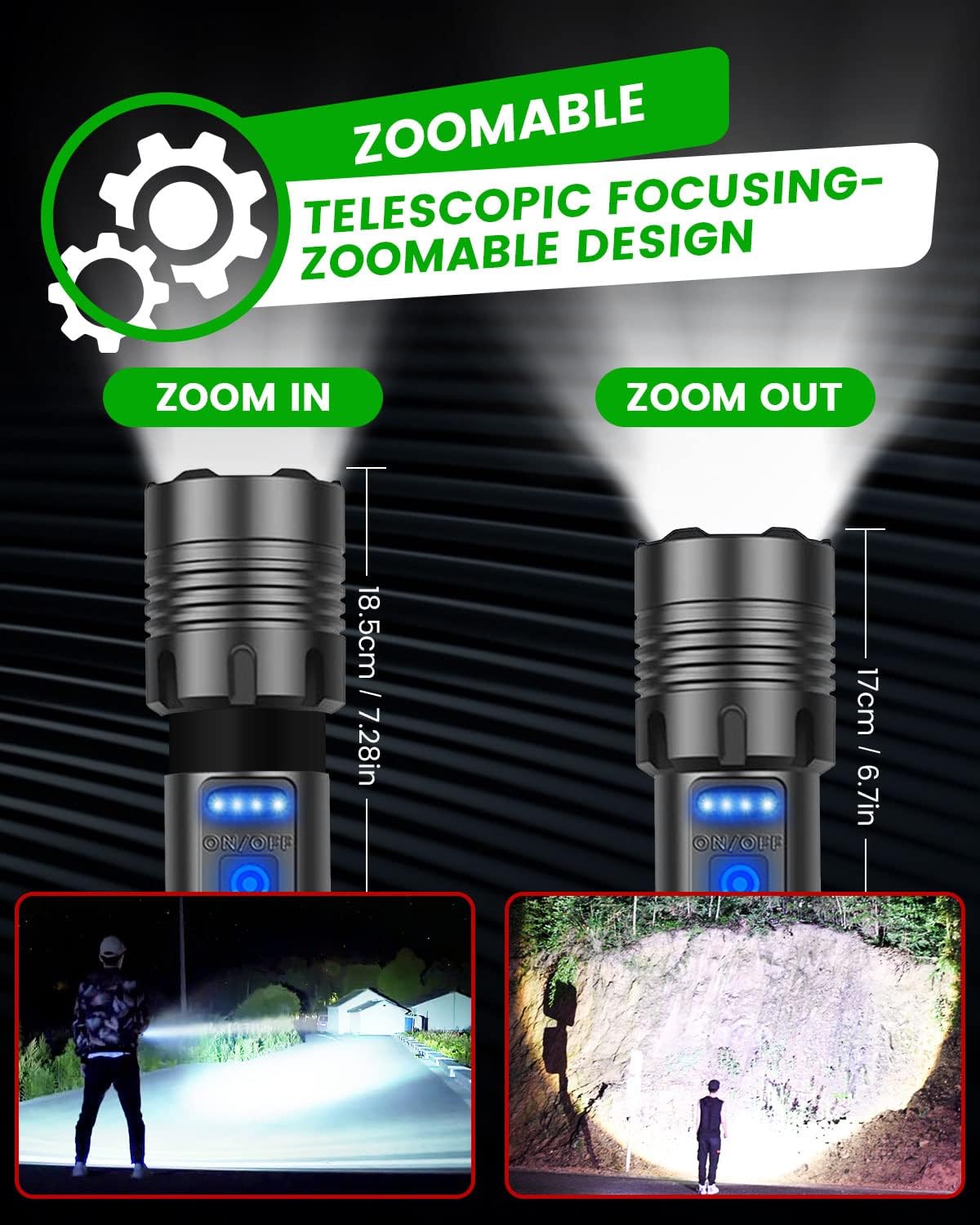
Figure 7: Adjusting the focus from zoom-in to zoom-out.

Figure 8: Instantly switch from focus zoom to wide mode.
4.4 Power Bank Function
The Maxesla torch can serve as a temporary power bank to charge other USB-powered devices.
- Locate the USB-A output port (larger port) under the rubber flap opposite the power button.
- Connect your device's charging cable to this USB-A port. The torch will begin charging your device.
- Note that this function is intended for emergency charging and may not provide a full charge to larger devices.

Figure 9: Using the torch as a temporary power bank.
5. Maintenance
- Cleaning: Wipe the torch body with a soft, damp cloth. Do not use abrasive cleaners or solvents.
- Battery Care:
- Recharge the battery when the power indicator shows 25% or less to prolong battery life.
- If storing the torch for an extended period, charge the battery to approximately 50-75% and recharge every 3-6 months to prevent deep discharge.
- Do not expose the battery to extreme temperatures.
- Water Resistance: While IPX5 waterproof, avoid submerging the torch in water for prolonged periods. Ensure the USB port cover is securely closed to maintain water resistance.
- Lens Care: Keep the lens clean and free of dust or debris to ensure maximum light output. Use a lens cleaning cloth if necessary.
6. Troubleshooting
| Problem | Possible Cause | Solution |
|---|---|---|
| Torch does not turn on. |
|
|
| Torch does not charge. |
|
|
| Light output is dim. |
|
|
7. Specifications
- Brand: Maxesla
- Model Number: 1670
- Product Dimensions: 12.5 x 2.5 x 3 cm
- Item Weight: 330 g
- Bulb Type: LED (XHP70 + COB)
- White Brightness: Up to 10,000 Lumens
- Luminous Flux: 1 Lumen
- Battery: 1 x 3000 mAh Lithium Ion (included)
- Power Source: Battery Powered
- Special Features: Adjustable Light Modes, Weatherproof, Adjustable Focus, Rechargeable
- Waterproof Rating: IPX5
- Country of Origin: China
8. Warranty and Support
Maxesla products are manufactured to high quality standards. For any issues or support inquiries, please contact Maxesla customer service through your purchase platform. Please retain your proof of purchase for warranty claims.
For information regarding light bulb recycling and breakage clean-up, please refer to local regulations and guidelines.
Ask a question about this manual
Ask about setup, troubleshooting, compatibility, parts, safety, or missing instructions. Manuals+ will review the question and use this page’s manual context to help answer it.