1. Introduction
Thank you for choosing the BAOFENG K5 Plus Six-Band Ham Radio. This device is a versatile and powerful communication tool designed for various applications, including outdoor adventures, professional use, and emergency response. This manual provides detailed instructions for the proper setup, operation, and maintenance of your radio to ensure optimal performance and longevity.
2. Package Contents
Please inspect the package carefully to ensure all items are present:
- 1x BAOFENG K5 Plus Portable Radio
- 1x Original High Gain Antenna
- 1x 48cm/18.89in Tactical Antenna
- 1x 2500mAh Li-ion Battery
- 1x Desktop Charger Cradle
- 1x Type-C USB Charging Cable
- 1x Belt Clip
- 1x Sling (Hand Strap)
- 1x Earpiece
- 1x Programming Cable
- 1x User’s Manual (this document)
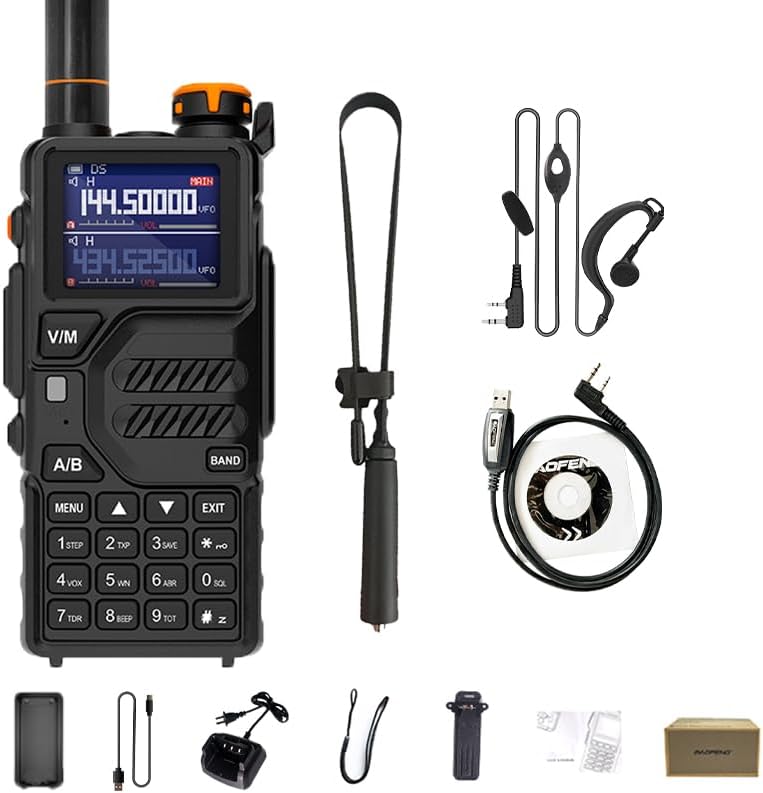
Image 2.1: Contents of the BAOFENG K5 Plus package, including the radio, two antennas, battery, charger, cables, belt clip, sling, earpiece, and programming cable.
3. Product Overview
The BAOFENG K5 Plus features a robust design with a 1.77-inch LCD display and a full keypad for intuitive operation. Key components include the antenna connector, power/volume knob, PTT (Push-to-Talk) button, and a USB-C charging port.
3.1 Key Features
- Six-Band Capability: Supports FM, AM, Police, VHF (144-146MHz), and UHF (420-450MHz) frequencies.
- 1.77-inch LCD Display: Provides clear visibility of operating parameters.
- 999 Memory Channels: Ample storage for frequently used frequencies.
- USB-C Charging: Convenient and fast charging.
- NOAA Weather Reception: Stay informed about weather alerts.
- DTMF Encoder and Dial: For advanced signaling.
- VOX Function: Voice-activated transmission for hands-free operation.
- Scanning Functions: Channel scan, frequency scan, and three recovery methods (TO, CO, SE).
- Frequency Hopping & Scramble: Enhances communication privacy.

Image 3.1: The BAOFENG K5 Plus radio highlighting its 1.77-inch LCD display and key functionalities such as 999 channels, frequency copy, and NOAA weather reception.
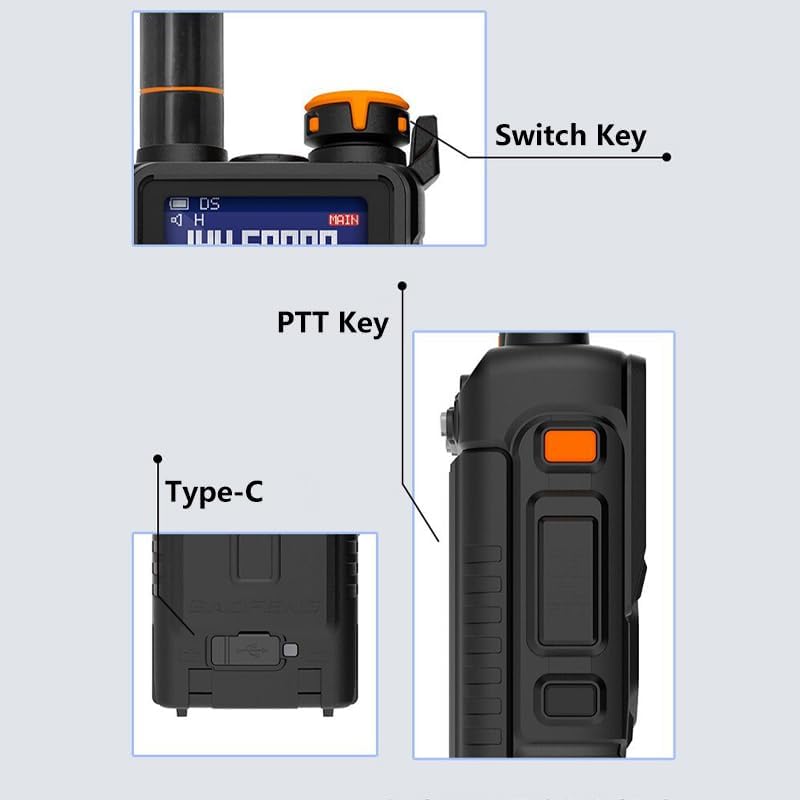
Image 3.2: Detailed view of the BAOFENG K5 Plus radio, indicating the location of the power/switch key, Push-to-Talk (PTT) button, and the Type-C USB charging port.
4. Setup
4.1 Battery Installation
- Align the battery pack with the grooves on the back of the radio.
- Slide the battery pack upwards until it clicks into place.
- To remove, press the release latch at the bottom of the battery and slide it downwards.
4.2 Charging the Battery
The radio comes with a 2500mAh Li-ion battery. It is recommended to fully charge the battery before first use.
- Insert the battery (or the radio with battery installed) into the desktop charger cradle.
- Connect the charger adapter to a power outlet. The indicator light on the charger will show charging status.
- Alternatively, connect the Type-C USB charging cable directly to the radio's USB-C port and a compatible USB power source.
4.3 Antenna Attachment
Screw the desired antenna (either the original high-gain or the tactical antenna) clockwise into the connector on top of the radio until it is finger-tight. Do not overtighten.
4.4 Initial Power-On
Rotate the power/volume knob clockwise to turn on the radio. Adjust the knob to set the desired volume level.
5. Operating Instructions
5.1 Power On/Off and Volume
Turn the top knob clockwise to power on and increase volume. Turn counter-clockwise to decrease volume and power off.
5.2 Channel and Frequency Mode
- Press the V/M button to switch between Frequency (VFO) mode and Channel (MR) mode.
- In Frequency mode, use the keypad to enter frequencies directly.
- In Channel mode, use the UP/DOWN arrow keys or keypad to select a stored channel.
5.3 Transmitting and Receiving
- To transmit, press and hold the PTT button on the side of the radio and speak into the microphone.
- Release the PTT button to receive.
5.4 Scanning Functions
The radio supports various scanning methods:
- Channel Scan: Scans through programmed memory channels.
- Frequency Scan: Scans a defined frequency range.
- Scan Recovery Methods (TO, CO, SE): Determines how the radio behaves when a signal is detected during scanning.

Image 5.1: The BAOFENG K5 Plus radio demonstrating its scanning capabilities, including subtone scanning and channel scanning.
5.5 VOX (Voice Operated Exchange)
The VOX function allows for hands-free transmission. When enabled, the radio will automatically transmit when it detects your voice.
- Access the menu to enable/disable VOX and adjust its sensitivity level.
5.6 DTMF (Dual-Tone Multi-Frequency)
The DTMF encoder allows for sending specific tones for various control functions, such as repeater access or remote control.
- Use the keypad to enter DTMF codes.

Image 5.2: Illustration of DTMF functionality with multiple BAOFENG K5 Plus radios, indicating their capability for advanced signaling.
5.7 NOAA Weather Reception
The radio can receive NOAA weather alerts to keep you informed of local weather conditions.
- Refer to the menu for NOAA weather channel selection and activation.
5.8 FM Radio
The BAOFENG K5 Plus includes a broadcast FM radio receiver.
- Activate the FM radio function through the menu and use the keypad or arrow keys to tune to desired stations.
5.9 Noise Reduction
The radio incorporates INC (Intelligent Noise Cancellation) technology to improve audio clarity during transmission and reception.
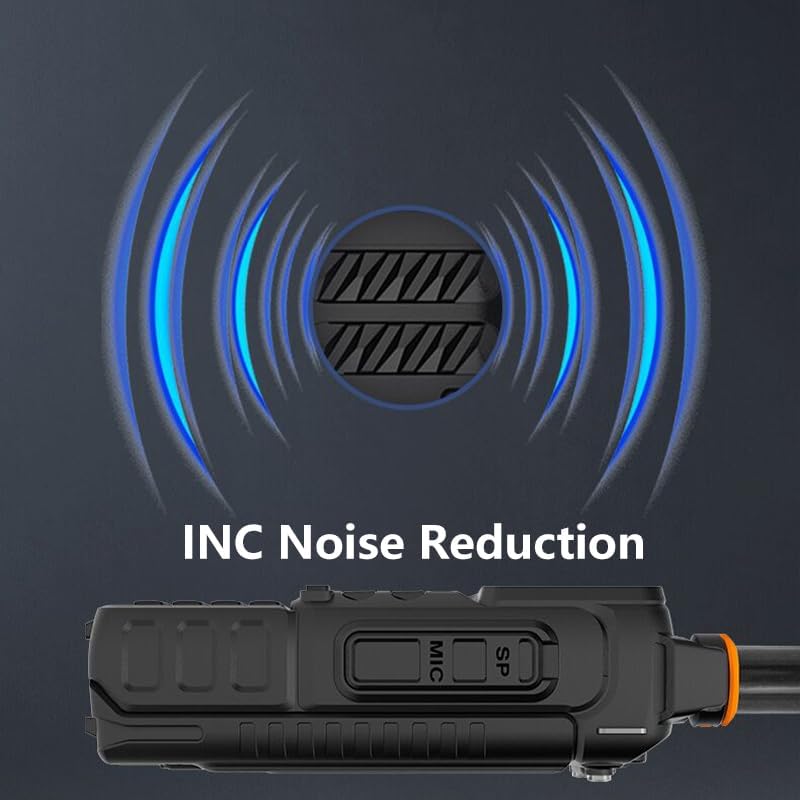
Image 5.3: The BAOFENG K5 Plus radio's microphone, illustrating its Intelligent Noise Reduction (INC) feature for clearer audio.
6. Maintenance
6.1 Cleaning
- Wipe the radio with a soft, damp cloth. Do not use harsh chemicals or abrasive cleaners.
- Ensure the USB-C port and antenna connector are free from dust and debris.
6.2 Battery Care
- Avoid fully discharging the Li-ion battery frequently.
- Store the battery in a cool, dry place when not in use for extended periods.
- Do not expose the battery to extreme temperatures or direct sunlight.
6.3 Storage
When storing the radio for a long time, remove the battery and store both components in a dry, dust-free environment.
7. Troubleshooting
| Problem | Possible Cause | Solution |
|---|---|---|
| Radio does not power on | Battery is low or not installed correctly | Charge the battery or re-install it securely. |
| Cannot transmit or receive | Incorrect frequency/channel, antenna not attached, low battery | Verify frequency/channel, attach antenna, charge battery. |
| Poor audio quality | Weak signal, incorrect squelch level, damaged antenna | Adjust squelch, check antenna connection, move to a better location. |
| Keypad unresponsive | Keypad lock enabled | Disable keypad lock (refer to menu settings). |
8. Specifications
| Feature | Detail |
|---|---|
| Model | K5 Plus |
| Frequency Range | AM, FM, UHF: 420MHz-450MHz, VHF: 144MHz-146MHz |
| Number of Channels | 999 |
| Display | 1.77-inch LCD |
| Battery Type | 2500mAh Lithium Ion (included) |
| Charging | USB Type-C |
| Dimensions (H x W x D) | 4.92 x 2.55 x 1.57 inches (12.5 x 6.5 x 4 cm) |
| Weight | Approx. 1.63 pounds (0.74 kg) |
| Water Resistance | Not Water Resistant |
| Special Features | One Key Match Frequency, Six Band, NOAA, DTMF, VOX |
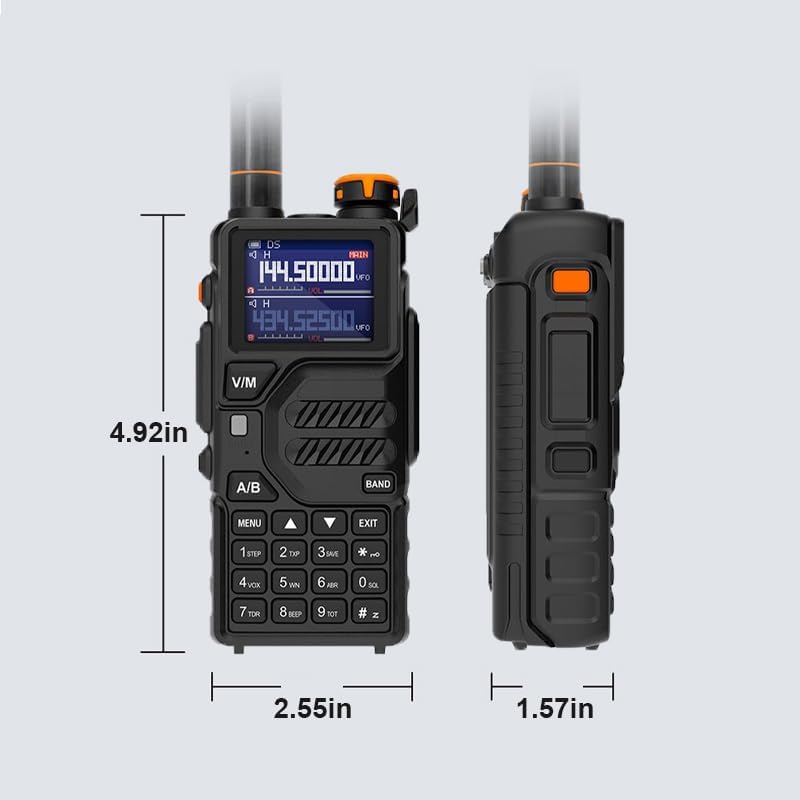
Image 8.1: Physical dimensions of the BAOFENG K5 Plus radio, indicating its height, width, and depth.
9. Warranty Information
The BAOFENG K5 Plus radio comes with a 1-year warranty. This warranty is provided exclusively through "Shiqun Electronics Co., Ltd." Please retain your proof of purchase for any warranty claims.
10. Support
For technical assistance, troubleshooting beyond this manual, or warranty inquiries, please contact the seller or manufacturer directly. Refer to your purchase documentation for specific contact details.


