
1. Introduction
The TP-Link Deco XE70 Pro is an advanced tri-band mesh Wi-Fi system designed to provide comprehensive and high-speed wireless coverage throughout your home. This system utilizes Wi-Fi 6E technology, including the new 6 GHz band, to deliver faster speeds, reduce congestion, and ensure smoother connections for a multitude of devices. It is ideal for large homes, supporting extensive coverage and a high number of connected devices for activities such as 4K/8K streaming, online gaming, and general internet use.

Figure 1.1: The TP-Link Deco XE70 Pro (3-pack) mesh Wi-Fi system units.
2. Key Features
- Supercharged Wi-Fi 6E: Utilizes the new 6 GHz band for congestion-free, high-speed connections, supporting more devices with less interference.
- Lightning-Fast Tri-Band Wi-Fi: Delivers Wi-Fi speeds up to 4.9 Gbps across 6 streams, optimized for 4K/8K streaming, online gaming, and rapid file downloads.
- AI-Powered Mesh: Seamlessly unifies your network under a single name, using AI-roaming technology for optimized Wi-Fi experience through advanced algorithms and self-learning.
- 2.5-Gigabit Connectivity: Features a 2.5 Gbps port and two Gigabit ports on each Deco unit for high-speed wired connections to devices like gaming PCs and NAS servers.
- Enhanced Security with HomeShield: TP-Link's premium security service provides advanced parental controls, network protection, and IoT device security.
- Extensive Coverage: Provides Wi-Fi coverage up to 7,200 sq. ft. and supports up to 200 devices simultaneously, eliminating dead zones.
- Robust Backhaul Performance: Leverages both wireless and wired backhaul simultaneously, including tri-band Wi-Fi 6E and 2.5-gigabit wired backhaul, for optimized network performance.
- Universal Compatibility: Backward compatible with all Wi-Fi generations and works with various internet service providers (ISPs).

Figure 2.1: High-speed Wi-Fi 6E performance for immersive experiences.
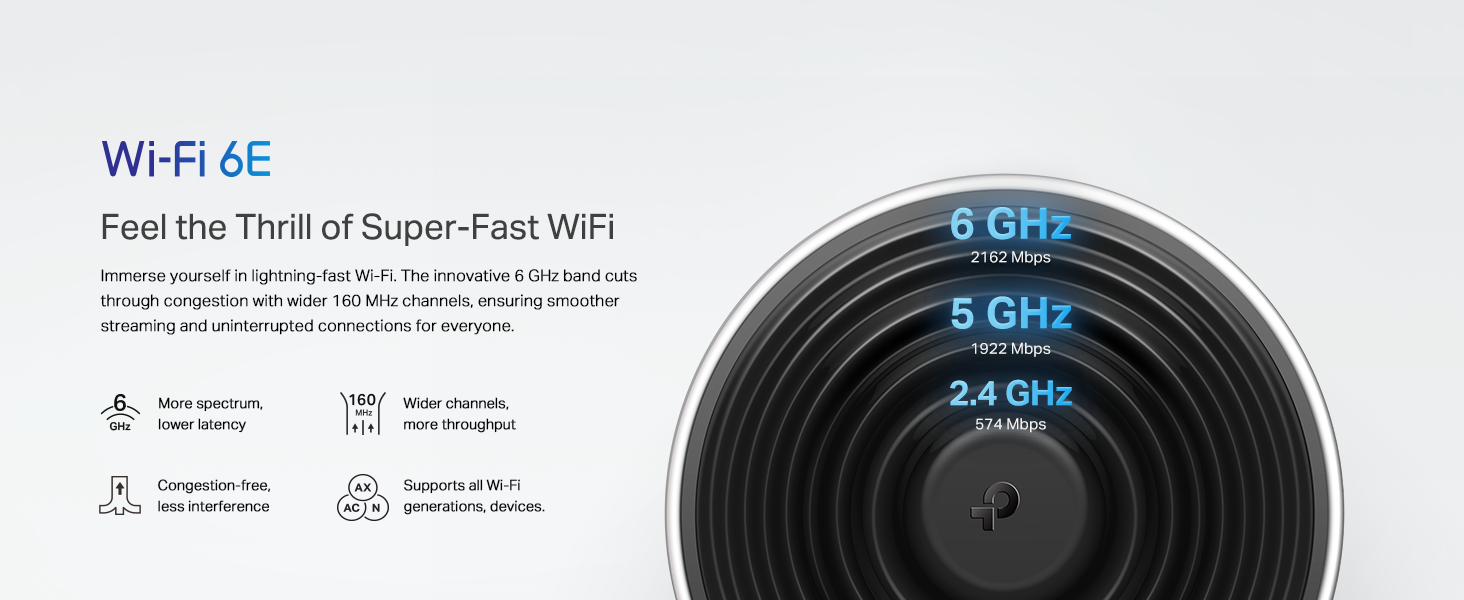
Figure 2.2: Detailed features of Wi-Fi 6E technology.
3. Package Contents
The TP-Link Deco XE70 Pro (3-pack) includes the following items:
- 3 x Deco XE70 Pro Mesh Units
- 1 x Installation Guide
- 1 x Ethernet Cable
- 3 x Power Adapters
4. Setup Guide
Setting up your Deco XE70 Pro mesh Wi-Fi system is a straightforward process using the Deco app. Follow these steps for a quick and easy installation:
- Download the Deco App: Search for "TP-Link Deco" in the App Store (iOS) or Google Play Store (Android) and download the application.
- Prepare Your Modem: Ensure your existing modem is connected to the internet and powered on. If your modem also functions as a router, it is recommended to enable "Bridge Mode" on your modem to avoid network conflicts and optimize performance. Consult your ISP or modem manufacturer's guide for instructions on enabling Bridge Mode.
- Connect the First Deco Unit:
- Power off your modem.
- Connect one of the Deco units to your modem using the provided Ethernet cable. Use the 2.5 Gbps WAN/LAN port on the Deco unit for the fastest connection if your modem supports it.
- Power on your modem, then power on the Deco unit. Wait for the Deco unit's LED to turn solid blue (or pulsing blue, depending on the model's initial state).
- Launch the Deco App: Open the Deco app on your smartphone or tablet. Log in with your TP-Link ID or create a new one.
- Follow In-App Instructions: The app will guide you through the process of setting up your first Deco unit, creating your Wi-Fi network name (SSID) and password.
- Add Additional Deco Units: Once the first unit is set up, the app will prompt you to add the remaining Deco units. Place them strategically around your home to maximize coverage. The app can help you find optimal placement locations.
- Verify Connection: After all units are set up, ensure their LEDs are solid green, indicating a successful connection and optimal performance.

Figure 4.1: Easy setup process using the TP-Link Deco app.

Figure 4.2: Visual representation of the three-step setup process.
5. Operating Your Mesh System
The Deco XE70 Pro system is designed for seamless operation, providing a single Wi-Fi network name (SSID) throughout your home. Your devices will automatically connect to the Deco unit with the strongest signal as you move around.
5.1 Using the Deco App
The Deco app is your primary tool for managing and monitoring your mesh network. Key functionalities include:
- Network Status: View connected devices, network speed, and overall system health.
- Parental Controls: Manage internet access for family members, set time limits, and block inappropriate content.
- QoS (Quality of Service): Prioritize bandwidth for specific devices or activities (e.g., gaming, streaming).
- Guest Network: Create a separate Wi-Fi network for guests, keeping your main network secure.
- Firmware Updates: Easily update your Deco units to the latest firmware for improved performance and security.
- Network Security: Access HomeShield features for real-time network protection.
5.2 AI-Driven Smart Mesh
The Deco system incorporates AI-driven smart mesh technology. This means the system continuously learns and adapts to your network environment, optimizing connections and ensuring the strongest possible signals for all your devices at all times. This self-learning capability minimizes interference and maximizes throughput.

Figure 5.1: AI-Driven Smart Mesh continuously optimizes your Wi-Fi.
5.3 Voice Control Integration
The Deco XE70 Pro is compatible with Amazon Alexa and Google Assistant. You can control certain network functions using voice commands, such as enabling the guest Wi-Fi network.

Figure 5.2: Voice control functionality with smart assistants.
6. Maintenance
Regular maintenance ensures optimal performance and longevity of your Deco XE70 Pro system.
- Firmware Updates: Periodically check for and install firmware updates via the Deco app. These updates often include performance improvements, new features, and security patches.
- Physical Cleaning: Keep the Deco units clean and free from dust. Use a soft, dry cloth to wipe the surfaces. Ensure ventilation holes are not obstructed.
- Optimal Placement: Ensure units are placed in open areas, away from large metal objects, thick walls, and other sources of interference (e.g., microwaves, cordless phones).
- Rebooting: If you experience network issues, a simple reboot of your modem and Deco units can often resolve them. Power off all devices, wait 30 seconds, then power on the modem first, followed by the Deco units.
7. Troubleshooting
This section addresses common issues you might encounter with your Deco XE70 Pro system.
7.1 No Internet Connection
- Check Cables: Ensure the Ethernet cable connecting the main Deco unit to your modem is securely plugged in.
- Modem Status: Verify that your modem is working correctly and has an active internet connection.
- Reboot System: Power cycle your modem and all Deco units.
- ISP Settings: If your modem is also a router, ensure it's in "Bridge Mode" to prevent double NAT issues.
7.2 Weak Wi-Fi Signal or Dead Zones
- Relocate Deco Units: Move Deco units closer to each other or to areas with weak signals. Avoid placing them behind large furniture, in cabinets, or near thick walls.
- Check for Interference: Keep Deco units away from other electronic devices that emit radio frequencies, such as microwaves, cordless phones, and Bluetooth devices.
- Add More Units: For very large homes or those with complex layouts, consider adding more Deco units to expand coverage.

Figure 7.1: Optimal placement for whole-home Wi-Fi coverage.
7.3 Devices Not Connecting or Slow Speeds
- Device Compatibility: Ensure your devices support Wi-Fi 6E for optimal performance on the 6 GHz band. Older devices will connect to 2.4 GHz or 5 GHz bands.
- Too Many Devices: While the system supports up to 200 devices, excessive simultaneous high-bandwidth activities can impact performance.
- Check Backhaul: Ensure the backhaul connection between Deco units is strong. The Deco app can show the signal strength between units.

Figure 7.2: The Deco system is engineered to handle a high volume of connected devices.
8. Specifications
| Feature | Detail |
|---|---|
| Model Name | Deco XE70 Pro (3-pack) |
| Brand | TP-Link |
| Product Dimensions | 4.1 x 4.1 x 6.7 inches (per unit) |
| Item Weight | 3.24 pounds (total for 3-pack) |
| Frequency Band Class | Tri-Band (2.4 GHz, 5 GHz, 6 GHz) |
| Wireless Standard | 802.11ax (Wi-Fi 6E), 802.11ac, 802.11n, 802.11g, 802.11b |
| Max Wireless Speed | Up to 4.9 Gbps (AXE4900) |
| Ethernet Ports | 1 x 2.5 Gbps WAN/LAN port, 2 x Gigabit WAN/LAN ports per unit |
| Processor | 1 GHz dual-core processor |
| Coverage Area | Up to 7,200 sq. ft. (3-pack) |
| Max Connected Devices | Up to 200 devices |
| Special Features | Access Point Mode, Alexa & Google Assistant Compatible, HomeShield Basic Security, Wireless and Wired Backhaul |
9. Warranty and Support
TP-Link provides comprehensive support for its products. For detailed warranty information, please refer to the warranty card included in your product packaging or visit the official TP-Link website.
9.1 Technical Support
If you encounter any issues or have questions regarding your Deco XE70 Pro system, please contact TP-Link Technical Support. Support resources typically include:
- Online knowledge base and FAQs
- Community forums
- Email support
- Phone support (check TP-Link's official website for regional contact numbers)
You can also find the official user guide in PDF format for more detailed instructions and information: TP-Link Deco XE70 Pro User Guide (PDF)
9.2 Cybersecurity Commitment
TP-Link is a signatory of the U.S. Cybersecurity and Infrastructure Security Agency’s (CISA) Secure-by-Design pledge. This commitment ensures that the device is designed, built, and maintained with advanced security as a core requirement.

Figure 9.1: TP-Link's commitment to cybersecurity and privacy.


