
Genérico A28B
Genérico A28B Smart WiFi Dual Lens Security Camera
User Manual
1. Introduction
Thank you for choosing the Genérico A28B Smart WiFi Dual Lens Security Camera. This advanced security device is designed to provide comprehensive surveillance for your indoor and outdoor spaces, offering high-definition video, wide-angle coverage, and smart features for enhanced protection.
Please read this manual carefully before installation and operation to ensure proper use and maximize the camera's performance.

Image: The A28B Smart WiFi Dual Lens Security Camera shown alongside a smartphone displaying its live feed.
2. Package Contents
Before proceeding with installation, please verify that all items listed below are included in your package:
- 01 - Dual WiFi Camera
- 01 - Bivolt Power Supply (110V or 220V)
- 01 - Kit of Screws and Wall Plugs
- 01 - Instruction Manual (this document)
3. Product Features
The Genérico A28B camera is equipped with a range of features designed for comprehensive security and ease of use:
- Dual Lens System: Combines a fixed wide-angle lens and a rotatable lens for a 360° panoramic view without blind spots.
- Split-Screen Viewing: Unique functionality allowing you to view feeds from both lenses simultaneously on a single screen.
- High Definition (3MP): Provides clear and detailed video capture.
- Infrared Night Vision: Ensures clear images even in complete darkness, with an effective range of up to 10 meters.
- IP66 Weatherproof Rating: Designed to withstand outdoor conditions, resistant to water and dust.
- Two-Way Audio: Built-in microphone and speaker for real-time communication.
- Motion Detection: Automatically detects suspicious movement and triggers alerts.
- PTZ Technology: Pan, Tilt, Zoom capabilities for flexible monitoring (355° horizontal rotation).
- Wireless Connectivity: Connects via Wi-Fi for remote access and control.
- Integrated Light: For enhanced visibility.
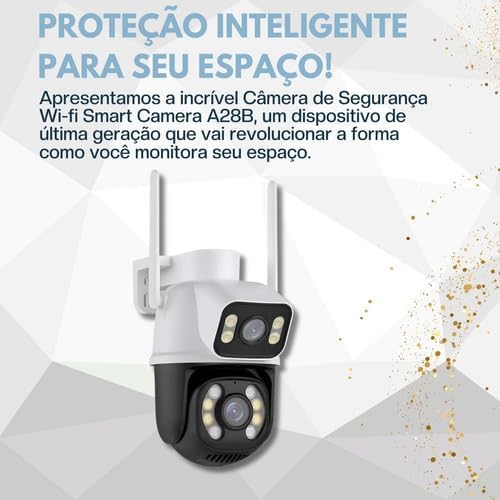
Image: The A28B camera highlighting its intelligent protection capabilities.

Image: The A28B camera demonstrating its robust, weather-resistant design suitable for both indoor and outdoor use.
4. Setup and Installation
Follow these steps to set up and install your Genérico A28B camera:
- Choose a Location: Select a suitable location for your camera, either indoors or outdoors. The camera is designed for wall mounting. Ensure the location provides a clear view of the area you wish to monitor and is within range of your Wi-Fi network.
- Mount the Camera: Use the provided screws and wall plugs to securely mount the camera to a wall. Ensure it is firmly attached to prevent accidental falls.
- Connect Power: Connect the included bivolt power supply (110V or 220V) to the camera and plug it into a power outlet. The camera will power on and initiate its startup sequence.
- Download the App: Download the "iCSee" application on your smartphone or tablet. The app is compatible with both Android and iOS devices. You can find it on the Google Play Store or Apple App Store.
- Register/Log In: Open the iCSee app and register a new account or log in if you already have one.
- Add Device: Follow the in-app instructions to add your new camera. This typically involves scanning a QR code on the camera or searching for nearby devices. Ensure your phone is connected to the 2.4GHz Wi-Fi network (the camera supports Wi-Fi connectivity).
- Configure Wi-Fi: During the setup process in the app, you will be prompted to connect the camera to your home Wi-Fi network. Enter your Wi-Fi password when requested.
- Final Adjustments: Once connected, use the app to adjust the camera's viewing angle and ensure optimal coverage.
5. Operating Instructions
Once your Genérico A28B camera is set up, you can begin using its various functions via the iCSee app:
5.1. Remote Monitoring and Control
Access your camera's live feed from anywhere using your smartphone or tablet. The app allows you to:
- View live video streams from both lenses.
- Utilize the split-screen feature for simultaneous viewing.
- Control the camera's pan (horizontal 355°) and tilt (vertical) movements to adjust the viewing angle.
- Zoom in on specific areas for more detail.
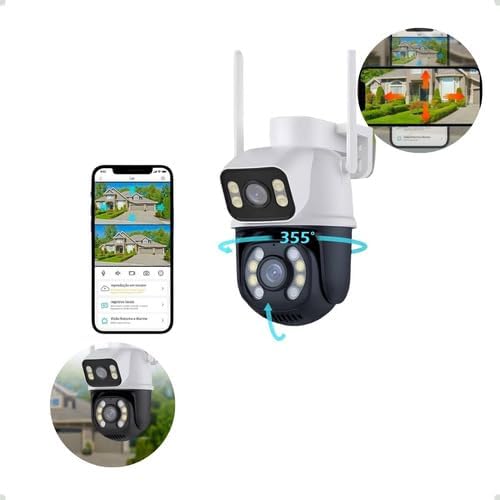
Image: The A28B camera demonstrating its 355-degree rotational capability, controlled remotely via the smartphone app.

Image: A smartphone screen showing the remote control interface for the camera, allowing users to monitor and adjust angles.
5.2. Night Vision Modes
The camera offers advanced night vision capabilities:
- Infrared Night Vision: Provides clear black and white images in low-light or no-light conditions.
- Full-Color Night Vision (if applicable): Some models may offer full-color night vision using integrated LED lights, providing more detailed and vivid nighttime footage.

Image: The A28B camera emphasizing its security features, including high-definition lenses and infrared night vision for clear images day and night.
5.3. Two-Way Audio
Use the two-way audio feature to communicate with individuals near the camera. Tap the microphone icon in the app to speak, and listen through the camera's speaker.
5.4. Motion Detection and Alerts
The camera is equipped with intelligent motion detection. When movement is detected, the camera can:
- Send push notifications to your smartphone.
- Trigger an alarm (if configured).
- Begin recording video footage.
You can adjust the sensitivity of motion detection and set up alert schedules within the iCSee app settings.
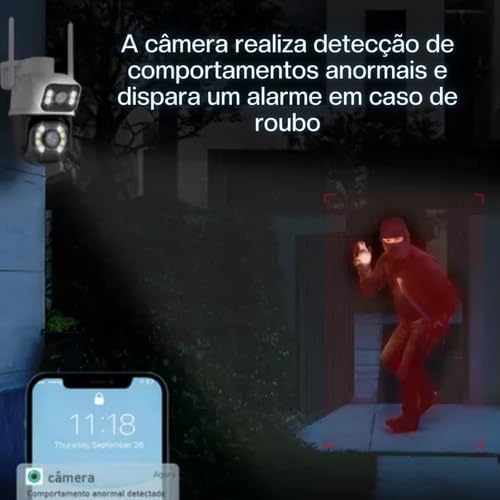
Image: The camera detecting abnormal behavior and triggering an alarm, with a smartphone notification shown.
6. Maintenance
To ensure the longevity and optimal performance of your Genérico A28B camera, follow these maintenance guidelines:
- Cleaning: Regularly wipe the camera lens and body with a soft, damp cloth to remove dust and dirt. Avoid using harsh chemicals or abrasive materials that could scratch the lens or housing.
- Weather Protection: While the camera is IP66 rated for water and dust resistance, avoid submerging it in water or exposing it to extreme weather conditions beyond its design limits.
- Power Supply: Ensure the power supply cable is not damaged and is securely connected.
- Firmware Updates: Periodically check the iCSee app for any available firmware updates for your camera. Keeping the firmware updated ensures you have the latest features and security enhancements.
7. Troubleshooting
If you encounter issues with your Genérico A28B camera, refer to the following common troubleshooting tips:
- Camera Offline:
- Check if the camera is properly powered on.
- Ensure your Wi-Fi network is active and the camera is within range.
- Restart the camera by unplugging and re-plugging the power supply.
- Verify your Wi-Fi password in the app settings if it was recently changed.
- Poor Video Quality:
- Clean the camera lens to remove any smudges or dirt.
- Ensure sufficient lighting in the monitored area, especially for color night vision.
- Check your Wi-Fi signal strength; a weak signal can affect streaming quality.
- Motion Detection Not Working:
- Verify that motion detection is enabled in the iCSee app settings.
- Adjust the motion detection sensitivity.
- Ensure there are no obstructions blocking the camera's view.
- Two-Way Audio Issues:
- Check the volume settings on your smartphone and in the iCSee app.
- Ensure there is no excessive background noise near the camera or your phone.
If problems persist, consult the iCSee app's help section or contact customer support.
8. Specifications
Detailed technical specifications for the Genérico A28B Smart WiFi Dual Lens Security Camera:

Image: The A28B camera alongside a summary of its key specifications.
| Feature | Detail |
|---|---|
| Model | A28B |
| Indoor/Outdoor Environment | Outdoor, Indoor |
| Compatible Devices | Computer, Digital Video Recorder, Notebook, Smartphone, Tablet |
| Power Source | AC (110V/220V Bivolt) |
| Connectivity Protocol | Wi-Fi (Wireless) |
| Controller Type | Android, iOS (via iCSee app) |
| Mounting Type | Wall Mount (Screwed) |
| Video Capture Resolution | 1080p (3MP) |
| Color | White and Black |
| Number of Channels | 4 |
| Viewing Angle | 355 Degrees (Pan) |
| Night Vision Range | 10 Meters |
| Material | Plastic |
| Water Resistance Level | Waterproof (IP66) |
| Dimensions (L x W x H) | 16.5 x 8.5 x 8.5 cm |
| Weight | 600 g |
| Lamp Type | Infrared, LED |
| Special Features | Integrated Light, Motion Sensor, PTZ Technology, Night Vision, 2-Way Audio |
9. Warranty and Support
For information regarding the product warranty, please refer to the purchase documentation or contact your seller directly. Keep your proof of purchase for any warranty claims.
For technical support or further assistance with your Genérico A28B camera, please refer to the help section within the iCSee application or contact the manufacturer's customer service channels as provided at the time of purchase.
Related documentsA28B

Ask a question about this manual
Ask about setup, troubleshooting, compatibility, parts, safety, or missing instructions. Manuals+ will review the question and use this page’s manual context to help answer it.