
Introduction
Thank you for purchasing the Technical Pro PLIT15 Portable Bluetooth Speaker. This manual provides essential information for the safe and efficient operation of your device. Please read it thoroughly before use and retain it for future reference.
The PLIT15 is a versatile, rechargeable 15-inch two-way loudspeaker designed for various indoor and outdoor applications, featuring Bluetooth connectivity, USB/SD playback, microphone inputs, and dynamic LED visual effects.

Image Description: The Technical Pro PLIT15 speaker is shown alongside four small images depicting various usage scenarios: watching TV, outdoor camping, business meetings, and social parties. This illustrates the speaker's versatility for different environments.
Safety Instructions
- Do not expose the unit to rain or moisture to prevent fire or electric shock.
- Do not open the cabinet. There are no user-serviceable parts inside. Refer servicing to qualified personnel.
- Avoid placing the unit near heat sources such as radiators, heat registers, stoves, or other apparatus (including amplifiers) that produce heat.
- Protect the power cord from being walked on or pinched, particularly at plugs, convenience receptacles, and the point where they exit from the apparatus.
- Only use attachments/accessories specified by the manufacturer.
- Unplug this apparatus during lightning storms or when unused for long periods of time.
- Ensure proper ventilation. Do not block any ventilation openings.
Package Contents
Please check that the following items are included in your package:
- Technical Pro PLIT15 Portable Bluetooth Speaker
- Remote Control
- Power Cable
- Instruction Manual (this document)

Image Description: The main product image shows the Technical Pro PLIT15 portable speaker with its front LED panel illuminated in multiple colors, and a remote control placed to its right. The speaker features a retractable handle and wheels.
Product Overview
Familiarize yourself with the various components and features of your PLIT15 speaker.
Front Panel and LED Effects

Image Description: A front view of the Technical Pro PLIT15 speaker, showcasing its large 15-inch woofer and the vibrant, multi-color LED lighting effects on the front grille. The speaker has a robust, portable design.
The front panel features a 15-inch LED woofer and an LED Glow Wall with various lighting modes, including burning mode and a running LED ring. These visual effects can be controlled via the LED Mode Button.
Rear Panel Controls and Inputs

Image Description: A detailed view of the speaker's rear control panel. It includes a display, USB and SD card slots, various knobs for volume, bass, treble, echo, and microphone volume, a 1/4'' microphone input, AUX input, and power switches. The model name "TPRO PLIT15" is visible.
The rear panel houses all essential controls and input/output ports:
- LCD Playback Hub: Displays current mode and track information.
- USB/SD Card Slots: For playing MP3 files from storage devices (up to 64GB).
- Volume Controls: Master volume, bass, treble, echo, and microphone volume.
- 1/4'' Microphone Input: For connecting a wired microphone.
- AUX Input: For connecting external audio devices via a 3.5mm cable.
- Power Switch: To turn the speaker on or off.
- LED Power Switch: To control the LED lighting effects.
- Mode Button: To switch between Bluetooth, USB, SD, FM Radio, and AUX modes.
Key Features
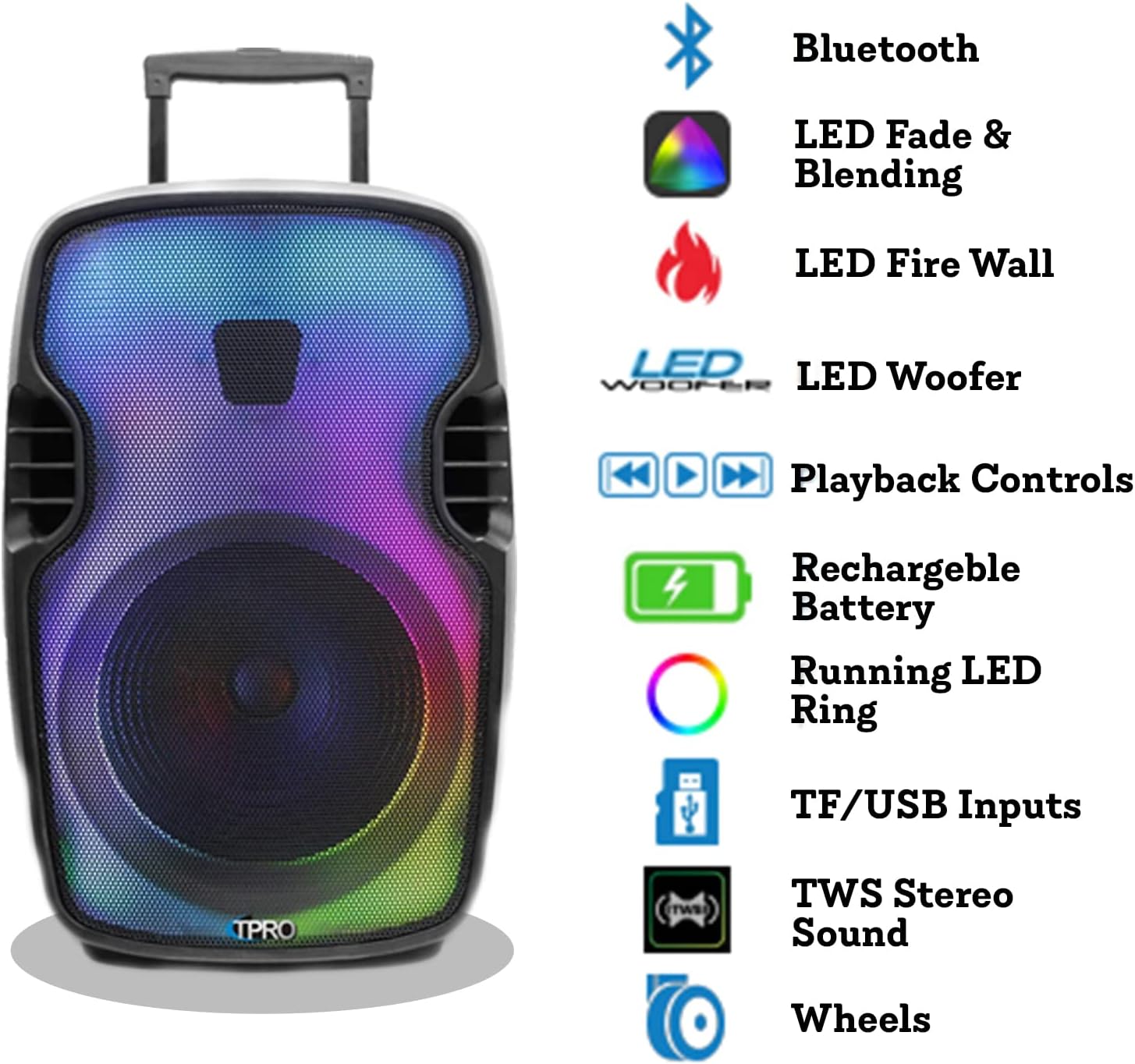
Image Description: An infographic showing the Technical Pro PLIT15 speaker on the left, with a list of its key features on the right, each accompanied by an icon. Features include Bluetooth, LED Fade & Blending, LED Fire Wall, LED Woofer, Playback Controls, Rechargeable Battery, Running LED Ring, TF/USB Inputs, TWS Stereo Sound, and Wheels.
- 2000W Peak Power: Delivers powerful audio output.
- Bluetooth Connectivity: A2DP & AVRCP stereo device compatible, range up to 30 feet.
- True Wireless Stereo (TWS): Connect two PLIT15 speakers wirelessly for stereo sound.
- Rechargeable Battery: Provides hours of continuous music playback.
- Integrated Pull-up Trolley & Wheels: For easy portability.
- Multiple Inputs: USB, SD, FM Radio, AUX, 1/4'' Microphone.
- LED Visual Effects: LED Glow Wall with burning mode and running LED ring.
Setup
Charging the Speaker
Before first use, fully charge the speaker's built-in rechargeable battery. Connect the provided power cable to the AC input on the rear panel and plug it into a standard wall outlet. The charging indicator (if available) will show the charging status. Once fully charged, disconnect the power cable.
Powering On/Off
Locate the Power Switch on the rear panel. Flip the switch to the "ON" position to power on the speaker. Flip it to "OFF" to power off the speaker.
Connecting a Microphone
Insert a 1/4'' microphone cable into the "MIC IN" jack on the rear panel. Adjust the "MIC VOL" knob to control the microphone's volume and the "ECHO" knob for echo effects.
Operating Instructions
Bluetooth Pairing
- Power on the speaker. The LCD display will show the current mode.
- Press the "MODE" button until "BLUETOOTH" or "BT" appears on the display. The speaker will enter pairing mode, indicated by a flashing Bluetooth icon or sound.
- On your mobile device (smartphone, tablet, etc.), enable Bluetooth and search for available devices.
- Select "TPRO PLIT15" from the list of devices.
- Once paired, the speaker will emit a confirmation sound, and the Bluetooth indicator on the display will stop flashing. You can now play audio from your device.
True Wireless Stereo (TWS) Function
To connect two PLIT15 speakers for TWS stereo sound:
- Ensure both PLIT15 speakers are powered on and in Bluetooth mode, but not yet paired to any device.
- On one of the speakers (this will be the primary speaker), press and hold the "TWS" button (if available, or a designated pairing button) for a few seconds. The speakers will attempt to connect to each other.
- Once successfully connected, you will hear a confirmation sound. The primary speaker's Bluetooth indicator will flash, while the secondary speaker's indicator will be solid.
- Now, pair your mobile device to the primary speaker as described in the "Bluetooth Pairing" section. Audio will play in stereo across both speakers.
USB/SD Card Playback
- Insert a USB flash drive or SD card (pre-loaded with .mp3 files, up to 64GB) into the respective slot on the rear panel.
- The speaker should automatically switch to USB or SD mode. If not, press the "MODE" button until "USB" or "SD" appears on the display.
- Use the playback controls (Play/Pause, Next/Previous Track) on the speaker or remote control to manage your music.
- The "Repeat" function is available for USB/SD inputs.
FM Radio Mode
- Press the "MODE" button until "FM" appears on the display.
- Press the Play/Pause button to initiate an automatic scan for FM stations. The speaker will save all found stations.
- Use the Next/Previous Track buttons to navigate between saved FM stations.
AUX Input Mode
- Connect an external audio device (e.g., MP3 player, laptop) to the "AUX IN" jack on the rear panel using a 3.5mm audio cable.
- Press the "MODE" button until "AUX" appears on the display.
- Control playback and volume from your connected device.
LED Visual Effects
The PLIT15 features dynamic LED lighting. Use the "LED Mode Button" on the speaker or the remote control to cycle through different lighting patterns, including LED Fade & Blending, LED Fire Wall, and the Running LED Ring. There is also a dedicated LED Power Switch on the rear panel to turn the lights on or off independently of the audio.
Remote Control Usage
The included remote control provides convenient access to various functions, including power, mode selection, volume adjustment, track control, EQ settings, and LED light modes. Ensure the remote has fresh batteries and is pointed towards the speaker's sensor for optimal operation.
Maintenance
Cleaning
Wipe the speaker's exterior with a soft, dry cloth. Do not use abrasive cleaners, waxes, or solvents as they may damage the finish. Ensure no liquids enter the speaker's openings.
Storage
When not in use for extended periods, store the speaker in a cool, dry place, away from direct sunlight and extreme temperatures. It is recommended to fully charge the battery before storing and to recharge it every few months to maintain battery health.
Troubleshooting
| Problem | Possible Cause | Solution |
|---|---|---|
| No power | Battery drained; Power cable not connected; Power switch off. | Charge the speaker; Ensure power cable is securely connected; Turn the power switch to "ON". |
| No sound | Volume too low; Incorrect mode selected; Device not paired (Bluetooth); Cable not connected (AUX/Mic). | Increase master volume and device volume; Press "MODE" to select correct input; Re-pair Bluetooth device; Check cable connections. |
| Bluetooth not connecting | Speaker not in pairing mode; Device too far; Interference; Already paired to another device. | Ensure speaker is in Bluetooth pairing mode; Move device closer (within 30 ft); Turn off other Bluetooth devices; Disconnect from previous device. |
| USB/SD card not playing | Incorrect file format; Card not inserted correctly; Card corrupted; Card size exceeds 64GB. | Ensure files are .mp3 format; Re-insert card; Try a different card; Use a card within the 64GB limit. |
| LED lights not working | LED power switch off; LED mode not selected. | Ensure LED Power Switch on rear panel is "ON"; Press the "LED Mode Button" to activate/change effects. |
Specifications

Image Description: A visual representation of the Technical Pro PLIT15 speaker with its dimensions labeled: 27.56 inches (height), 16.93 inches (width), and 14.37 inches (depth).
- Model: PLIT15
- Peak Power: 2000 Watts
- Woofer: 15-inch LED woofer
- Sensitivity: 80 ±2dB (1W@1M)
- Frequency Response: 80Hz - 18KHz
- Impedance: 3 ohms
- Bluetooth Range: 30 Feet
- USB/SD Card Max Size: 64GB
- Audio Inputs: USB, SD, FM Radio, AUX, 1/4'' Microphone
- Power Source: Battery Powered (Rechargeable)
- Product Dimensions (L x W x H): 16.93" x 14.37" x 27.56"
- Item Weight: 23 pounds
- Manufacturer: Technical Pro
- UPC: 610370153109
Warranty and Support
For warranty information or technical support, please refer to the documentation included with your purchase or visit the official Technical Pro website. Keep your proof of purchase for any warranty claims.
Technical Pro Website: Visit Technical Pro Store on Amazon


