1. Introduction
Thank you for choosing the Nikai NEM2990A 15 Bar Espresso/Cappuccino Coffee Maker. This manual provides essential information for the safe operation, maintenance, and troubleshooting of your appliance. Please read it thoroughly before first use and retain it for future reference.
Important Safety Instructions
- Read all instructions before using the appliance.
- Do not immerse the appliance, power cord, or plug in water or other liquids.
- Ensure the power supply voltage matches the rating label on the appliance.
- Close supervision is necessary when the appliance is used by or near children.
- Unplug from the outlet when not in use and before cleaning. Allow to cool before putting on or taking off parts, and before cleaning the appliance.
- Do not operate any appliance with a damaged cord or plug, or after the appliance malfunctions or has been damaged in any manner.
- The use of accessory attachments not recommended by the appliance manufacturer may result in fire, electric shock, or injury to persons.
- Do not use outdoors.
- Do not let the cord hang over the edge of a table or counter, or touch hot surfaces.
- Do not place on or near a hot gas or electric burner, or in a heated oven.
- Always attach the plug to the appliance first, then plug the cord into the wall outlet. To disconnect, turn any control to 'off', then remove the plug from the wall outlet.
- Do not use the appliance for other than intended use.
- Exercise extreme caution when using hot steam.
- This appliance is for household use only.
2. Product Overview
The Nikai NEM2990A is designed to prepare high-quality espresso and cappuccino beverages. It features a 15-bar pressure pump for optimal extraction and a high-pressure frothing function for milk-based drinks.
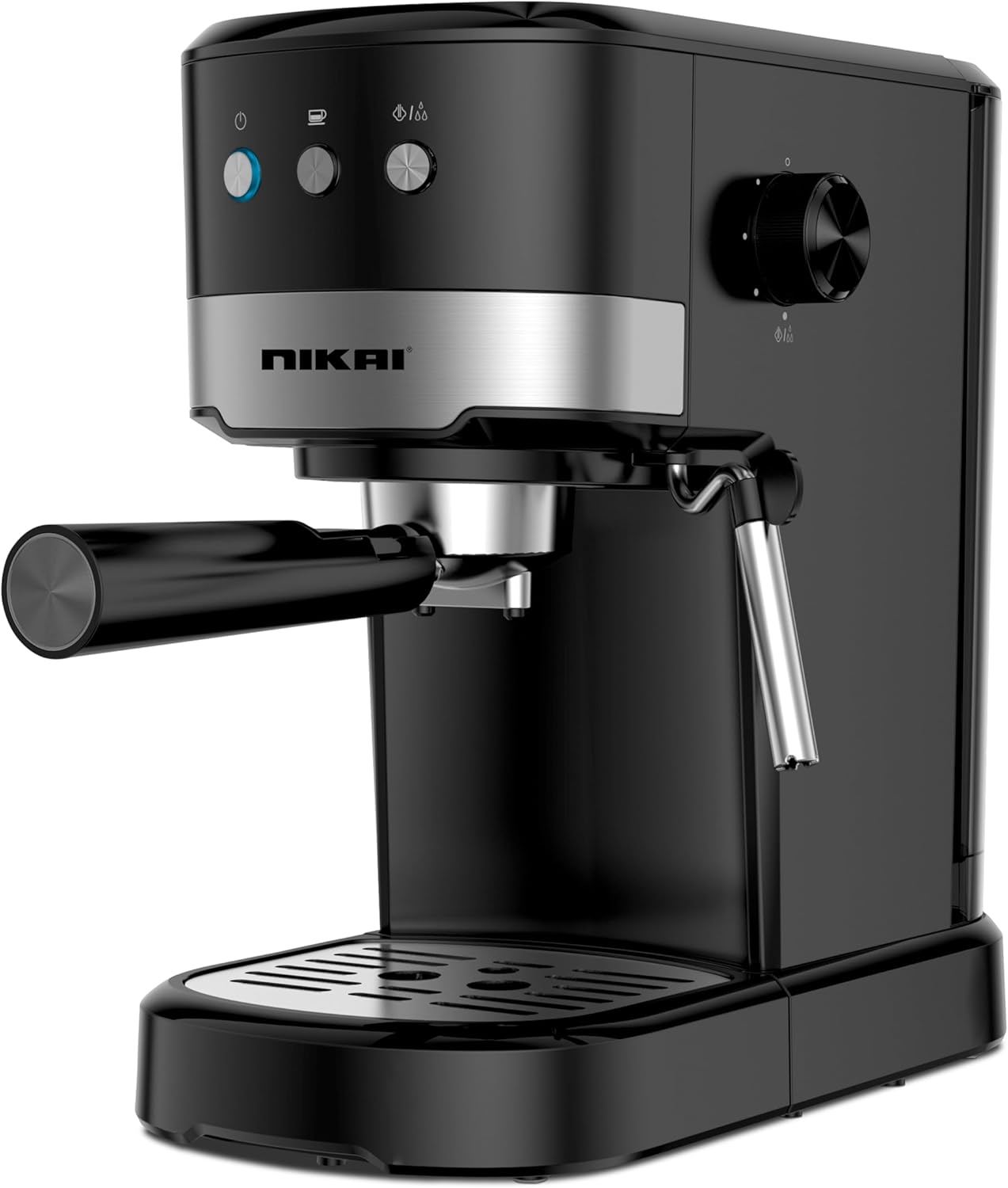
Figure 2.1: Nikai NEM2990A Espresso/Cappuccino Coffee Maker, front view.
Key Features
- 15 Bar Pressure Pump for rich espresso.
- High Pressure Frothing Function for creamy milk.
- Die-Cast Aluminum Alloy Boiler for durability.
- 1.2 Liter Detachable Water Tank for easy refilling.
- Detachable Drip Tray for simple cleaning.
- Overheat and Overpressure Protection for safety.

Figure 2.2: Diagram highlighting key features of the Nikai NEM2990A.
Components
- Water Tank (1.2 Liter, detachable)
- Control Panel (Power button, Espresso button, Steam button)
- Steam Wand / Frother
- Steam Control Knob
- Portafilter Handle
- Filter Basket (for 1 or 2 cups)
- Drip Tray (detachable)
- Cup Warming Plate (top surface)
3. Setup and First Use
Unpacking
- Carefully remove all packaging materials and accessories.
- Ensure all components listed in the 'Components' section are present.
- Clean all detachable parts (water tank, portafilter, filter basket, drip tray) with warm water and a mild detergent. Rinse thoroughly and dry.
Initial Preparation
- Place the coffee maker on a stable, flat, heat-resistant surface.
- Fill the detachable water tank with fresh, cold water up to the MAX level. Ensure the tank is properly seated.
- Insert the filter basket into the portafilter. Attach the portafilter to the brewing head by aligning it and turning it firmly to the right until it locks.
- Place an empty cup on the drip tray.
- Plug the power cord into a grounded electrical outlet.
Priming the Machine (First Use Cycle)
Before brewing coffee or frothing milk for the first time, or if the machine has not been used for a long period, it is necessary to prime the system to ensure proper water flow.
- Press the Power button. The indicator light will illuminate.
- Wait for the machine to heat up. The indicator light for brewing will stop flashing and remain steady, indicating it's ready.
- Press the Espresso button. Water will flow through the portafilter into the cup. Let it run for approximately 30 seconds, then press the Espresso button again to stop.
- Turn the Steam Control Knob to the steam position. Allow steam to release from the steam wand for about 15-20 seconds, then turn the knob back to the closed position.
- Repeat steps 3 and 4 once more. This primes both the brewing and steaming functions.
- Discard the water from the cup and drip tray. Your machine is now ready for use.
4. Operating Instructions
Making Espresso
- Ensure the water tank is filled with fresh water.
- Preheat the machine by pressing the Power button and waiting for the brewing indicator light to become steady.
- Add ground coffee to the filter basket. For a single shot, use one scoop (approx. 7g); for a double shot, use two scoops (approx. 14g).
- Evenly distribute and tamp the coffee grounds firmly using a tamper. Wipe any excess coffee from the rim of the filter basket.
- Insert the portafilter into the brewing head, aligning it and turning firmly to the right until it locks.
- Place one or two espresso cups on the drip tray directly under the portafilter spouts.
- Press the Espresso button. Coffee will begin to flow.
- Once the desired amount of espresso is brewed (typically 25-30ml per shot), press the Espresso button again to stop the flow.
- Carefully remove the portafilter by turning it to the left. Discard the used coffee grounds.
Frothing Milk for Cappuccino/Latte
- Fill a stainless steel frothing pitcher with cold milk (dairy or non-dairy) up to one-third full.
- Ensure the machine is powered on and the steam indicator light is steady, indicating it's ready for steaming.
- Position the steam wand into the milk, just below the surface.
- Slowly turn the Steam Control Knob to release steam.
- Move the pitcher up and down gently to create foam. As the milk heats and expands, lower the pitcher to keep the steam wand tip just below the surface.
- Once the milk reaches the desired temperature and consistency (approximately 60-70°C or 140-160°F), turn the Steam Control Knob to the closed position.
- Immediately wipe the steam wand with a damp cloth to prevent milk residue from drying.
- Gently tap the pitcher on a counter to remove large bubbles, then swirl the milk to integrate the foam.
- Pour the frothed milk over your freshly brewed espresso.
5. Maintenance and Cleaning
Regular cleaning ensures optimal performance and extends the lifespan of your coffee maker.
Daily Cleaning
- Portafilter and Filter Basket: After each use, remove the portafilter, discard coffee grounds, and rinse the portafilter and filter basket under running water.
- Steam Wand: Immediately after frothing milk, wipe the steam wand with a damp cloth. Briefly release steam to clear any internal milk residue.
- Drip Tray: Empty and rinse the drip tray and grid daily.
- Exterior: Wipe the exterior of the machine with a soft, damp cloth. Do not use abrasive cleaners or scouring pads.
Weekly Cleaning
- Water Tank: Remove the water tank, wash it with warm soapy water, rinse thoroughly, and refill with fresh water.
- Shower Screen: Periodically, remove the portafilter and wipe the shower screen (where water dispenses into the portafilter) with a damp cloth to remove coffee residue.
Descaling
Mineral deposits from water can build up in the machine over time, affecting performance. Descale your machine every 2-3 months, or more frequently if you have hard water.
- Prepare a descaling solution according to the descaler manufacturer's instructions (e.g., citric acid solution or commercial descaling agent).
- Fill the water tank with the descaling solution.
- Place a large container under the portafilter and another under the steam wand.
- Turn on the machine and allow it to heat up.
- Run approximately half of the descaling solution through the brewing head by pressing the Espresso button.
- Open the Steam Control Knob and let the remaining solution run through the steam wand.
- Turn off the machine and let it sit for 15-20 minutes.
- Empty and rinse the water tank. Fill it with fresh water.
- Repeat steps 3-6 with fresh water to thoroughly rinse the machine. Repeat this rinsing cycle at least twice to ensure no descaler residue remains.
6. Troubleshooting
This section addresses common issues you might encounter with your coffee maker.
| Problem | Possible Cause | Solution |
|---|---|---|
| No water flow from portafilter. | Water tank empty; machine not primed; clogged filter basket; scale buildup. | Fill water tank; prime the machine; clean filter basket; descale the machine. |
| Coffee brews too slowly or not at all. | Coffee grounds too fine or tamped too hard; clogged filter; scale buildup. | Use coarser grind; tamp less firmly; clean filter; descale. |
| Coffee brews too quickly, weak taste. | Coffee grounds too coarse or not enough coffee; not tamped enough. | Use finer grind; use more coffee; tamp more firmly. |
| No steam from steam wand. | Steam wand clogged; machine not heated to steam temperature; water tank empty. | Clean steam wand; wait for steam indicator light to be steady; fill water tank. |
| Machine leaks water. | Water tank not seated correctly; drip tray full; portafilter not locked properly. | Reseat water tank; empty drip tray; ensure portafilter is locked firmly. |
| Machine not turning on. | Not plugged in; power outlet issue. | Check power cord connection; test outlet with another appliance. |
7. Specifications
Technical details for the Nikai NEM2990A Espresso/Cappuccino Coffee Maker.
| Feature | Detail |
|---|---|
| Brand | Nikai |
| Model Number | NEM2990A |
| Color | Black |
| Product Dimensions | 15 x 36 x 28 cm |
| Capacity | 1.2 Liters (Water Tank) |
| Power / Wattage | 1100 watts |
| Material | Aluminum |
| Special Features | Milk Frother, Removable Tank |
| Item Weight | 2 Kilograms |
| Pressure | 15 Bar |
| Coffee Maker Type | Espresso Machine |
8. Warranty and Support
This product is covered by a manufacturer's warranty. Please refer to the warranty card included with your purchase for specific terms and conditions, including the warranty period and coverage details. For technical support, service, or spare parts, please contact Nikai customer service through their official website or the contact information provided in your product documentation.
Always retain your proof of purchase for warranty claims.


