1. Introduction
Thank you for purchasing the Technical Pro 1500 Watts Portable Bluetooth Speaker, model TPAPLIT12. This manual provides essential information for the safe and efficient operation of your device. Please read it thoroughly before use and retain it for future reference.
This portable loudspeaker features 1500 watts of peak power, Bluetooth connectivity, USB and SD card inputs, a 1/4'' microphone input, and integrated LED visual effects. It is designed for both indoor and outdoor use.
2. Safety Instructions
- Read all instructions before operating the speaker.
- Keep the speaker away from water or moisture to prevent electric shock.
- Do not block any ventilation openings.
- Do not place the speaker near heat sources such as radiators, heat registers, stoves, or other apparatus that produce heat.
- Use only attachments/accessories specified by the manufacturer.
- Unplug the speaker during lightning storms or when unused for long periods.
- Refer all servicing to qualified service personnel. Servicing is required when the apparatus has been damaged in any way.
- This product is not waterproof. Avoid exposure to rain or splashing water.
3. Package Contents
Verify that all items are present in the package:
- Technical Pro Portable Bluetooth Speaker (TPAPLIT12)
- Remote Control
- Power Cable
- User Manual (this document)

Figure 3.1: Front view of the Technical Pro TPAPLIT12 Portable Bluetooth Speaker with included remote control.
4. Product Overview
4.1 Front and Side View
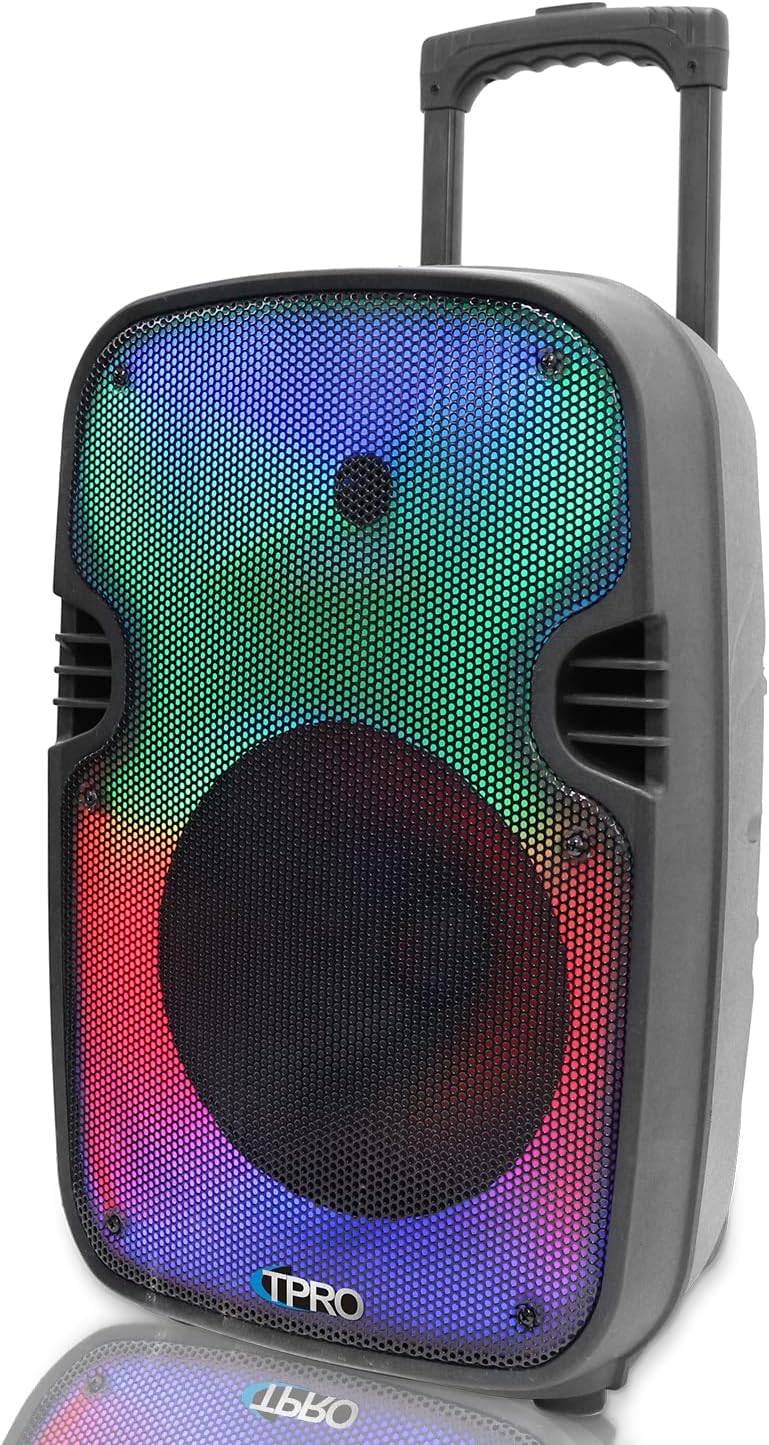
Figure 4.1: Side view of the speaker, showing the integrated pull-up trolley handle and wheels for portability.
4.2 Rear Control Panel
The rear panel houses all input connections and control knobs. Familiarize yourself with these controls before operation.

Figure 4.2: Detailed view of the rear control panel, including power switch, input ports, and volume controls.
4.3 Key Features Diagram

Figure 4.3: Visual representation of the speaker's main features, including microphone input, USB/TF card inputs, LED power switch, LED mode button, 12-inch LED woofer, Bluetooth, wheels, and telescoping handle.
4.4 Dimensions
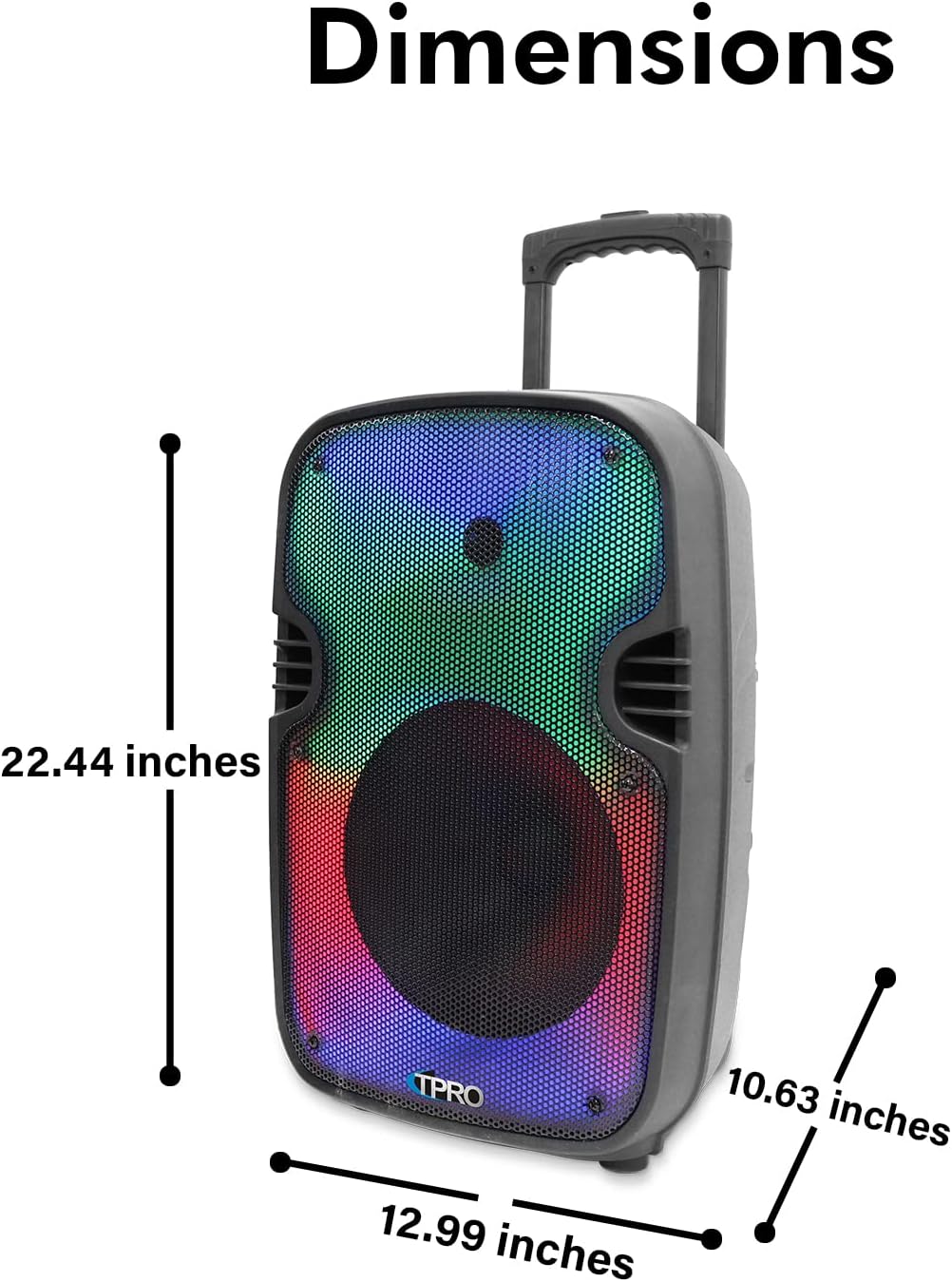
Figure 4.4: Speaker dimensions: 22.44 inches (height), 12.99 inches (depth), and 10.63 inches (width).
4.5 Feature Icons

Figure 4.5: Icons illustrating key functionalities: Bluetooth, LED Fade & Blending, LED Fire Wall, LED Woofer, Playback Controls, Rechargeable Battery, Running LED Ring, TF/USB Inputs, TWS Stereo Sound, and Wheels.
5. Setup and Initial Use
5.1 Charging the Speaker
Before first use, fully charge the speaker's built-in rechargeable battery. Connect the provided power cable to the speaker's power input and then to a standard electrical outlet. The charging indicator will illuminate. Once fully charged, disconnect the power cable.
5.2 Powering On/Off
Locate the power switch on the rear control panel. Flip the switch to the "ON" position to power on the speaker. Flip it to "OFF" to power off the speaker.
5.3 Bluetooth Pairing
- Power on the speaker. It will automatically enter Bluetooth pairing mode, indicated by an audible prompt or flashing LED.
- On your Bluetooth-enabled device (e.g., smartphone), navigate to the Bluetooth settings.
- Search for available devices. The speaker will appear as "TPRO PLIT12" (refer to the "BT Pairing Name" on the rear panel).
- Select "TPRO PLIT12" to connect. Once paired, you will hear a confirmation sound.
- The Bluetooth range is approximately 30 feet (9 meters).
5.4 True Wireless Stereo (TWS) Pairing
To achieve True Wireless Stereo sound, you can connect two TPAPLIT12 speakers wirelessly:
- Ensure both speakers are powered on and not connected to any other Bluetooth device.
- Press and hold the TWS button on one of the speakers (this will be your primary speaker).
- The speakers will attempt to pair with each other. A confirmation sound will indicate successful TWS pairing.
- Once TWS is established, connect your Bluetooth device to the primary speaker as described in Section 5.3. Audio will now play through both speakers in stereo.
6. Operation
6.1 Input Modes
The speaker supports multiple input modes:
- Bluetooth: For wireless audio streaming from compatible devices.
- USB/SD Card: Insert a USB flash drive or SD card (up to 64GB) into the respective slot on the rear panel. The speaker will automatically detect and play .mp3 files. Use the playback controls on the speaker or remote to manage tracks.
- AUX Input: Connect an external audio device using a 3.5mm AUX cable (not included) to the AUX input port.
- FM Radio: Switch to FM mode. The speaker will automatically scan and store available radio stations.
- 1/4'' Microphone Input: Connect a wired microphone (not included) to the 1/4'' input for vocal amplification. Adjust microphone volume using the dedicated knob on the rear panel.
6.2 Playback Controls
Use the controls on the speaker's LCD playback hub or the remote control for media management:
- Mode Button: Cycles through input modes (Bluetooth, USB, SD, FM, AUX).
- Play/Pause: Starts or pauses playback.
- Previous/Next Track: Skips to the previous or next track.
- Volume Control: Adjusts the overall speaker volume.
- Repeat Function: Available for USB/SD card inputs.
6.3 LED Visual Effects
The speaker features an LED Glow Wall with various lighting modes, including a burning mode and a running LED ring. Use the dedicated LED Mode Button on the speaker or remote control to cycle through the available visual effects.
7. Maintenance
- Cleaning: Use a soft, dry cloth to clean the speaker's exterior. Do not use abrasive cleaners or solvents.
- Storage: When not in use for extended periods, store the speaker in a cool, dry place.
- Battery Care: To prolong battery life, avoid fully discharging the battery frequently. Recharge the speaker regularly, even if not in active use.
8. Troubleshooting
| Problem | Possible Cause | Solution |
|---|---|---|
| No power | Battery is discharged; Power switch is off. | Charge the speaker; Ensure power switch is in the "ON" position. |
| No sound | Volume is too low; Incorrect input mode selected; Device not paired (Bluetooth). | Increase volume; Press the Mode button to select the correct input; Re-pair Bluetooth device. |
| Bluetooth not connecting | Speaker is too far from device; Speaker is already connected to another device; Device's Bluetooth is off. | Move device closer to speaker; Disconnect from other devices; Enable Bluetooth on your device and re-pair. |
| USB/SD card not playing | Unsupported file format; Card/drive not inserted correctly; Card/drive is corrupted or empty. | Ensure files are .mp3 format; Reinsert card/drive; Try a different card/drive. |
9. Specifications
| Feature | Detail |
|---|---|
| Model Number | TPAPLIT12 |
| Peak Power Output | 1500 Watts |
| Woofer Size | 12 Inches (LED Woofer) |
| Connectivity | Bluetooth, USB, SD Card, AUX, 1/4'' Microphone Input |
| Bluetooth Range | 30 Feet (approx. 9 meters) |
| USB/SD Card Max Size | 64GB |
| Supported Audio Files | .mp3 |
| Frequency Response | 80Hz - 18KHz |
| Sensitivity | 80 ±2dB (1W@1M) |
| Impedance | 3 ohms |
| Power Source | Battery Powered (Rechargeable) |
| Control Method | Manual, Remote Control |
| Product Dimensions (L x W x H) | 12.99" x 10.63" x 22.44" |
| Item Weight | 6.5 pounds |
| Special Features | LED Visual Effects (Glow Wall, Running Ring), TWS Function, Integrated Trolley & Wheels, LCD Playback Hub |
| Waterproof | No |
10. Warranty and Support
This Technical Pro product comes with a Limited Warranty. For specific terms and conditions, please refer to the warranty information provided with your purchase or contact Technical Pro customer support.
For further assistance, troubleshooting, or to inquire about warranty service, please visit the official Technical Pro store or contact their customer support channels.


