
Introduction
Thank you for choosing the Woputne LED Desk Lamp, Model JB510-D. This manual provides detailed instructions for the safe and efficient use of your new desk lamp. This lamp features dual adjustable heads, customizable light modes and brightness levels, and convenient USB charging ports, making it ideal for various tasks such as reading, working, studying, and crafting.

The Woputne LED Desk Lamp features dual heads and adjustable height, providing versatile lighting for various tasks. It is shown here fully extended on a desk.
Setup
- Unpack the Lamp: Carefully remove all components from the packaging. Ensure all parts listed in the 'What's in the Package' section are present.
- Position the Lamp: Place the lamp base on a stable, flat surface.
- Adjust Height and Heads: Extend the lamp to your desired height (adjustable from 38 cm to 56 cm). Adjust the dual lamp heads to the preferred angle. The heads can rotate 180 degrees.
- Connect Power: Insert the provided power cable into the DC 12V 2A input port at the back of the lamp base, then plug the mains adapter into a suitable power outlet.
Setup Demonstration Video
This video demonstrates the adjustable height feature of the Woputne LED Desk Lamp, showcasing how to extend and retract the lamp's main column to suit different desk setups and user preferences.
This video illustrates the height adjustment capabilities of the Woputne LED Desk Lamp, showing its flexibility to provide optimal lighting for various tasks and environments.
Operating Instructions
The lamp features intuitive touch controls located on the base.
Touch Controls
- Power On/Off: Touch the power icon (⏻) to turn the lamp on or off.
- Brightness Adjustment: Use the brightness control icons to cycle through 10 dimmable brightness levels (10%-100%).
- Light Modes: Touch the mode icon (often represented by a sun or color temperature symbol) to switch between 5 different color temperature modes (3000K-6000K).
- Reading Mode: Activate the dedicated reading mode for optimal light conditions for reading.
- 45-Minute Timer: Press the timer icon to set a 45-minute auto-off timer, ideal for night reading.

This image demonstrates the lamp's 5 color temperature modes, ranging from warm 3000K to cool 6000K, and 10 dimmable brightness levels from 10% to 100%, controlled by sensitive touch.
Adjusting the Lamp
- Dual Head Rotation: The lamp heads can be flexibly rotated 180° to direct light precisely where needed.
- Height Adjustment: The lamp's height can be adjusted from 38 cm to 56 cm to accommodate different desk setups and user heights.
- Arm and Base Flexibility: The lamp features a 180° flexible arm and a 135° base axis for versatile positioning and compact folding.

The lamp's dual heads can be rotated 180 degrees, allowing for wide illumination or focused light. This image shows the heads spread to cover a broad area.

The lamp features a highly flexible design with a 180° adjustable arm and a 135° rotating base axis, allowing for compact storage or precise light positioning.
USB Charging Ports
The lamp base includes dual charging ports:
- One standard 5V/2A USB-A port.
- One 5V/2A USB-Type-C port.
These ports allow you to charge your mobile phone or other compatible devices while using the lamp.
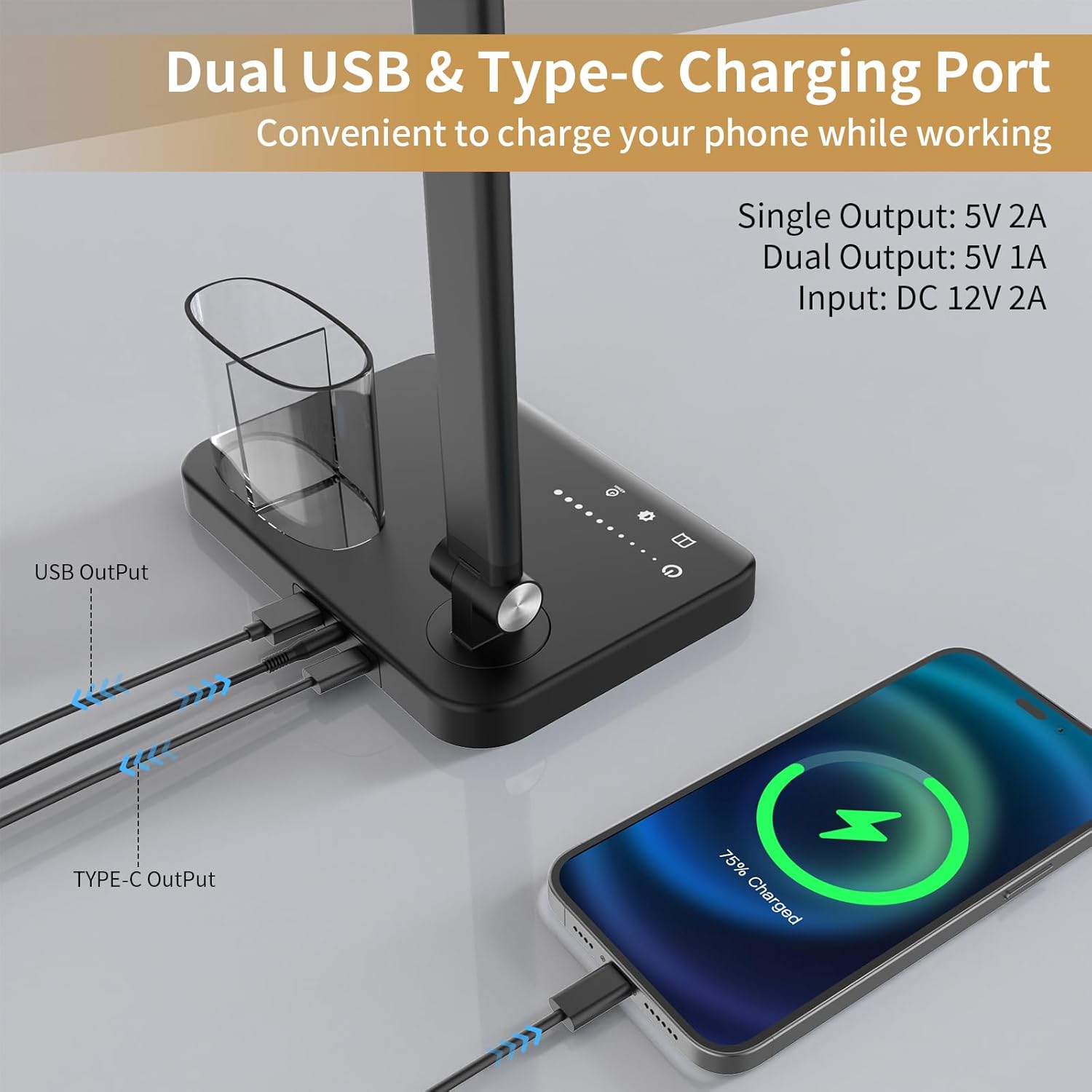
The lamp base includes a standard 5V/2A USB-A port and a 5V/2A USB-Type-C port, enabling convenient charging of mobile devices while the lamp is in use.
Integrated Pen Holder
The lamp base includes a clear, two-section cup for storing pens, pencils, or small office supplies, helping to keep your workspace organized.
Usage Scenarios Video
A brief overview video highlighting key features and functionality of the Woputne LED Desk Lamp, including its lighting modes and adjustable design.

The versatile design of the lamp makes it suitable for various activities, including focused work, studying, intricate crafting, and comfortable bedside reading.
Maintenance
- Cleaning: Ensure the lamp is unplugged before cleaning. Use a soft, dry cloth to wipe down the lamp. Avoid abrasive cleaners or solvents that may damage the finish.
- Safety: Do not attempt to disassemble or repair the lamp yourself. Refer to qualified service personnel for any repairs. Keep the lamp away from water or excessive moisture.
- Memory Function: The lamp has a memory function that remembers your last settings. However, if the power is unplugged or there is a power outage, the lamp will reset to factory settings, and the memory function will be lost.
Troubleshooting
- Lamp Not Turning On:
- Check if the power cable is securely connected to both the lamp and the power outlet.
- Ensure the power outlet is functional by testing it with another device.
- Brightness or Mode Not Changing:
- Ensure you are pressing the correct touch control icons.
- If the lamp was recently unplugged, it might have reset to default settings.
- USB Charging Not Working:
- Verify the lamp is powered on.
- Check if your device's charging cable is properly connected to the USB port.
- Ensure your device is compatible with 5V/2A charging.
If you encounter issues not covered here, please contact customer support.
Specifications
| Feature | Detail |
|---|---|
| Model Number | JB510-D |
| Power Source | Corded Electric |
| Working Voltage | 12V |
| Working Current | 2A |
| Wattage | 15 Watts |
| Light Source Type | LED (76 full spectrum lamp beads) |
| Color Temperatures | 5 Modes (3000K to 6000K) |
| Brightness Levels | 10 Dimmable Levels (10%-100%) |
| Control Method | Touch |
| Height Adjustment | 38 cm to 56 cm |
| Dual Head Rotation | 180° |
| Arm Flexibility | 180° |
| Base Axis Rotation | 135° |
| USB-A Output | 5V/2A |
| USB-Type-C Output | 5V/2A |
| Timer Function | 45-minute auto-off |
| Material | Acrylonitrile Butadiene Styrene, Aluminum |
| Item Weight | 958 Grams |
| Product Dimensions | 15.55"D x 7"W x 15"H |
| Included Components | Power Cable, Mains Plug, USB Cable, Manual |
Energy Efficiency
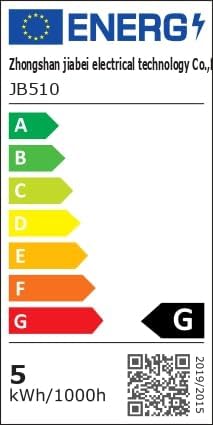
The energy label for the JB510 model indicates an energy efficiency class G with a consumption of 5 kWh per 1000 hours. A QR code is provided for more information. For detailed energy information, please visit: https://eprel.ec.europa.eu/qr/1481462
Warranty & Support
The Woputne LED Desk Lamp (Model JB510-D) comes with a 1-year manufacturer's warranty from the date of purchase. This warranty covers defects in materials and workmanship under normal use.
For warranty claims, technical support, or any questions regarding your product, please contact Woputne customer service through the retailer where you purchased the product or visit the official Woputne store online.