
1. Setup Guide
This section provides instructions for the initial setup of your TCL 50V6B 4K Ultra HD Smart LED Google TV.
1.1 Unpacking and Inspection
Carefully remove all components from the packaging. Ensure all items listed in the 'What's in the Box' section are present and undamaged. Retain packaging for future transport or service needs.
- 1N LED TV
- 1N Audio Cable
- 1N Stand
- 1N Power cord
- 1N Remote Control
- 2N AAA Batteries
1.2 Installing the TV Stand
If you are placing the TV on a table, attach the included stand. Ensure the stand is securely fastened to prevent the TV from tipping.
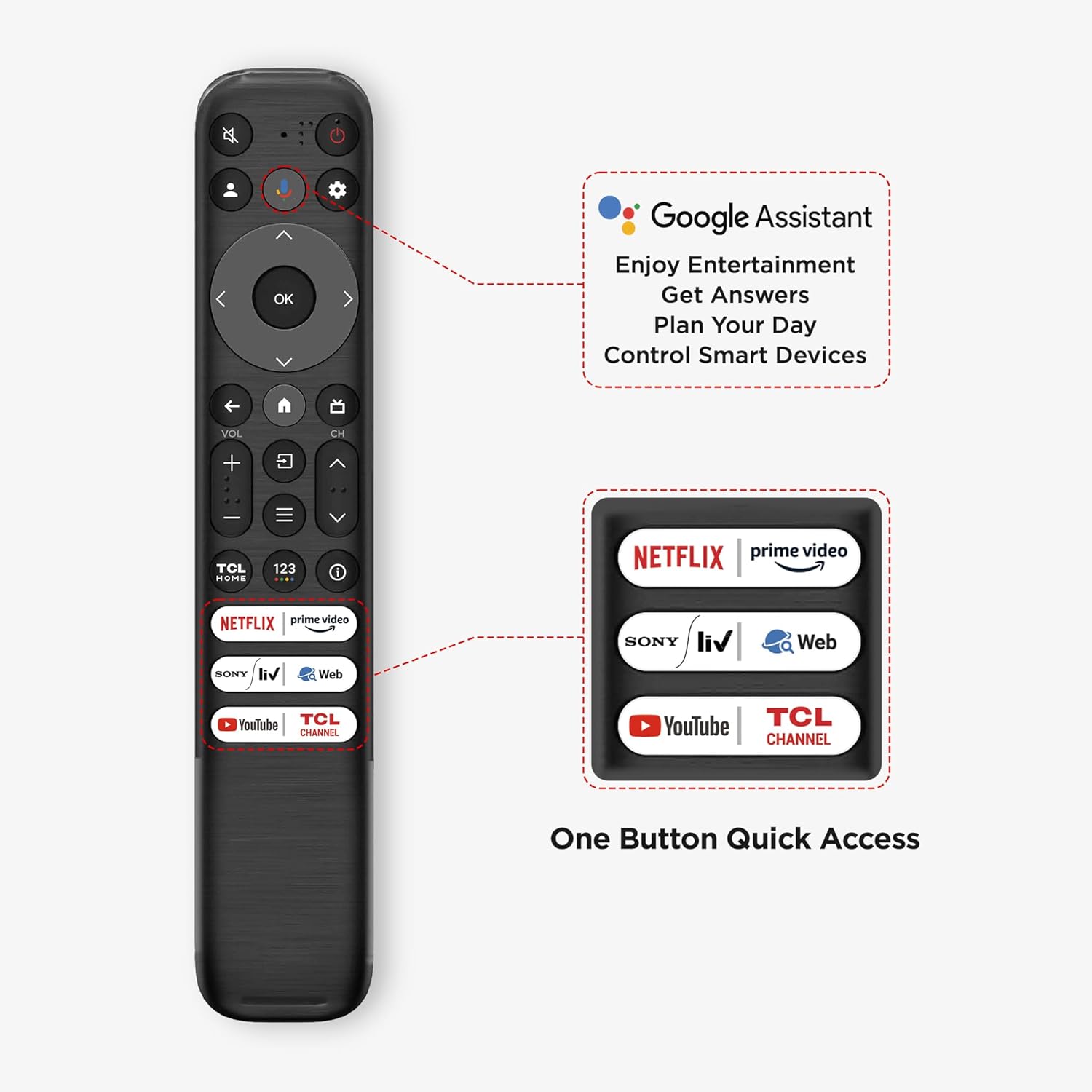
Image: The TCL 50V6B television displayed on its stand within a living room setting.
1.3 Wall Mounting (Optional)
For wall mounting, use a compatible VESA mount (not included) and follow the mount manufacturer's instructions. Ensure the wall can support the TV's weight (7.3 kg without stand). Professional installation is recommended for wall mounting.

Image: The TCL 50V6B television wall-mounted above a media console in a living room.
1.4 Connecting Devices
Connect your external devices such as set-top boxes, gaming consoles, or Blu-ray players to the TV's ports. Refer to the port diagram below for connection points.

Image: A detailed diagram illustrating the various input and output ports on the side of the TCL 50V6B television, including HDMI, USB, Antenna/Cable In, Satellite In, Headphone, Digital Audio Out (Optical), and LAN.
- HDMI Ports: 3 ports available for high-definition audio and video devices. HDMI 3 supports eARC/ARC.
- USB Port: 1 USB 2.0 port for connecting storage devices.
- Ethernet (LAN): For wired internet connection.
- Antenna/Cable In: For connecting an antenna or cable TV signal.
- Headphone Output: For connecting headphones.
- Digital Audio Out (Optical): For connecting to external audio systems.
1.5 Power On and Initial Setup
After connecting all devices and the power cord, press the power button on the remote control or TV. Follow the on-screen instructions to complete the initial setup, including network connection (Wi-Fi or Ethernet), Google account login, and channel scanning.
2. Operating Your TV
This section covers the basic operation and features of your TCL 50V6B Google TV.
2.1 Remote Control Functions
The smart remote control provides quick access to various functions and streaming services. Insert the two AAA batteries into the remote control.

Image: The TCL 50V6B smart remote control, highlighting dedicated hotkeys for popular streaming services like Netflix, Prime Video, Sony Liv, and YouTube, along with the Google Assistant button.
- Power Button: Turns the TV on or off.
- Navigation Pad: Use the directional buttons and OK button to navigate menus.
- Volume +/-: Adjusts the volume level.
- Channel +/-: Changes TV channels.
- Home Button: Returns to the Google TV home screen.
- Back Button: Returns to the previous screen.
- Google Assistant Button: Activates voice commands.
- Dedicated Hotkeys: Quick access to Netflix, Prime Video, Sony Liv, and YouTube.
2.2 Google TV Interface
Your TV runs on Google TV, offering a personalized experience with access to a vast library of content and apps.

Image: The Google TV home screen on the TCL 50V6B, showcasing recommended movies and TV shows, along with icons for installed applications like YouTube, Prime Video, Disney+ Hotstar, and Netflix.
- Home Screen: Displays personalized content recommendations, installed apps, and quick access to settings.
- Apps: Download and manage applications from the Google Play Store.
- Google Assistant: Use voice commands to search for content, control smart home devices, and get information.
- Chromecast Built-in: Cast content from your compatible mobile devices to the TV.
2.3 Picture and Sound Settings
Adjust picture and sound settings to optimize your viewing experience. Access these options through the TV's settings menu.
- Picture Modes: Select from various preset picture modes (e.g., Standard, Vivid, Movie, Sport) or customize settings like brightness, contrast, and color.
- Dynamic Color Enhancement: Enhances color vibrancy and saturation.
- HDR 10: Supports High Dynamic Range content for improved contrast and color detail.
- Sound Modes: Choose from preset sound modes (e.g., Standard, Music, Movie, Voice) or adjust equalizer settings.
- Dolby Audio: Provides immersive audio experience.
3. Maintenance
Proper maintenance ensures the longevity and optimal performance of your TCL TV.
3.1 Cleaning the TV
- Screen: Gently wipe the screen with a soft, dry, lint-free cloth. For stubborn marks, lightly dampen the cloth with water or a specialized screen cleaner. Do not spray liquid directly onto the screen.
- Frame and Stand: Use a soft, dry cloth to wipe dust and dirt from the TV frame and stand.
- Ventilation: Ensure the ventilation openings on the back of the TV are not blocked to prevent overheating.
3.2 Eye Care Features
The TV includes 'Multiple Eye Care' features designed to reduce eye strain during prolonged viewing. These settings can be adjusted in the TV's display menu.
4. Troubleshooting
This section addresses common issues you might encounter with your TCL 50V6B TV.
| Problem | Possible Cause | Solution |
|---|---|---|
| No power / TV does not turn on | Power cord disconnected, no power from outlet, remote control batteries depleted. | Check power cord connection. Ensure outlet is working. Replace remote control batteries. |
| No picture / Poor picture quality | Incorrect input source, loose HDMI/AV cables, incorrect picture settings, low signal quality. | Select correct input source. Check all cable connections. Adjust picture settings (brightness, contrast, sharpness). Check antenna/cable signal. |
| No sound / Poor sound quality | Volume too low or muted, incorrect audio output settings, loose audio cables. | Increase volume, unmute TV. Check audio output settings (e.g., internal speakers, external audio system). Ensure audio cables are securely connected. |
| Remote control not working | Batteries depleted or incorrectly inserted, obstruction between remote and TV, remote out of range. | Replace batteries, ensure correct polarity. Remove any obstructions. Ensure you are within the operating range (9 feet maximum). |
| Network connection issues (Wi-Fi/Ethernet) | Incorrect network settings, router issues, weak Wi-Fi signal. | Check network settings on TV. Restart your router/modem. Ensure TV is within Wi-Fi range or Ethernet cable is connected properly. |
| Cannot play 4K content | Content is not 4K, incorrect HDMI cable, TV settings not optimized for 4K. | Ensure the content source is genuinely 4K. Use a high-speed HDMI cable. Verify TV display settings are set to 4K resolution. |
5. Specifications
Detailed technical specifications for the TCL 50V6B 4K Ultra HD Smart LED Google TV.
| Feature | Detail |
|---|---|
| Model | 50V6B |
| Screen Size | 50 Inches (126 cm) |
| Display Technology | LED |
| Resolution | 4K Ultra HD (3840 x 2160 Pixels) |
| Refresh Rate | 60 Hz |
| Operating System | Google TV |
| Processor | 64-bit Quad Core Processor |
| RAM | 2 GB |
| Internal Storage (ROM) | 16 GB |
| Connectivity | 3 HDMI Ports (HDMI 3 eARC/ARC), 1 USB 2.0 Port, Ethernet, Wi-Fi (2.4GHz/5GHz dual-band), Bluetooth |
| Audio Output | 24 Watts, Dolby Audio MS12Y |
| Special Features | Dynamic Color Enhancement, HDR 10, T-Screen, AiPQ Processor, 178 Degree Wide Viewing Angle, Micro Dimming, Metallic Bezel-Less Design, Multiple Eye Care, Google Assistant, Chromecast Built-in |
| Product Dimensions (with stand) | 25.4 x 111.1 x 68.4 cm |
| Item Weight (with stand) | 7.3 kg |
| Power Consumption | 110 Watts (On-mode) |
| Model Year | 2024 |

Image: A technical diagram illustrating the precise dimensions of the TCL 50V6B television, including its height, width, and depth both with and without the stand, along with its weight.
6. Warranty & Support
Information regarding product warranty and how to obtain support.
6.1 Warranty Information
- Television: A 2-year manufacturer's warranty is provided from the date of purchase.
- Remote Control: A 6-month warranty is provided for the remote control.
Warranty claims can be processed using your Amazon e-invoice as proof of purchase.
6.2 Manufacturer Contact
For further assistance, technical support, or warranty claims, please contact TCL India customer service. Refer to the official TCL website for the most current contact information.


