
1. Introduction
This user manual provides essential information for the safe operation, setup, and maintenance of your Holy Stone HS600 drone. Please read this manual thoroughly before operating the drone to ensure proper use and to prevent damage or injury. Keep this manual for future reference.
2. Safety Guidelines
Operating a drone requires responsibility. Adhere to all local regulations and guidelines for drone flight. The Holy Stone HS600 is FAA Remote ID Compliant, ensuring safety and regulatory adherence without the need for an extra module.
- Pre-Flight Check: Always inspect the drone, remote controller, and batteries before each flight.
- Environmental Conditions: Avoid flying in strong winds (the HS600 has Level-6 wind resistance, but extreme conditions should be avoided), rain, snow, or fog.
- Line of Sight: Maintain visual line of sight with the drone at all times.
- Restricted Areas: Do not fly near airports, military bases, power lines, or other restricted airspace.
- Privacy: Respect the privacy of others when flying and recording.
- Battery Safety: Use only approved Holy Stone batteries and chargers. Do not overcharge or puncture batteries.

The Holy Stone HS600 features a built-in Remote ID system for enhanced safety and compliance with aviation regulations.
3. Package Contents
Verify that all items are present in your Holy Stone HS600 package:
- HS600 Drone × 1
- Drone Landing Pad × 1
- Remote Controller (RC) × 1
- Drone Battery × 3
- Spare Propellers × 4
- Gimbal Protector × 1
- Type-C Cable × 3
- Portable Case × 1
- User Manual × 1

Overview of the Holy Stone HS600 drone and its included accessories.

Detailed view of the Holy Stone HS600 package contents.
4. Product Overview
4.1. HS600 Drone
The HS600 drone features a foldable design for portability, a 2-axis gimbal with EIS (Electronic Image Stabilization) for stable 4K video capture, and powerful brushless motors for reliable flight performance.

The 2-Axis Gimbal and EIS 4K Camera provide stable and clear aerial footage.

Enhanced stability and sharper shots are achieved with the 2-axis gimbal and EIS.
4.2. Remote Controller
The remote controller provides intuitive control over the drone's flight and camera functions. It features a smartphone holder to display the live video feed and flight data via the Holy Stone app.
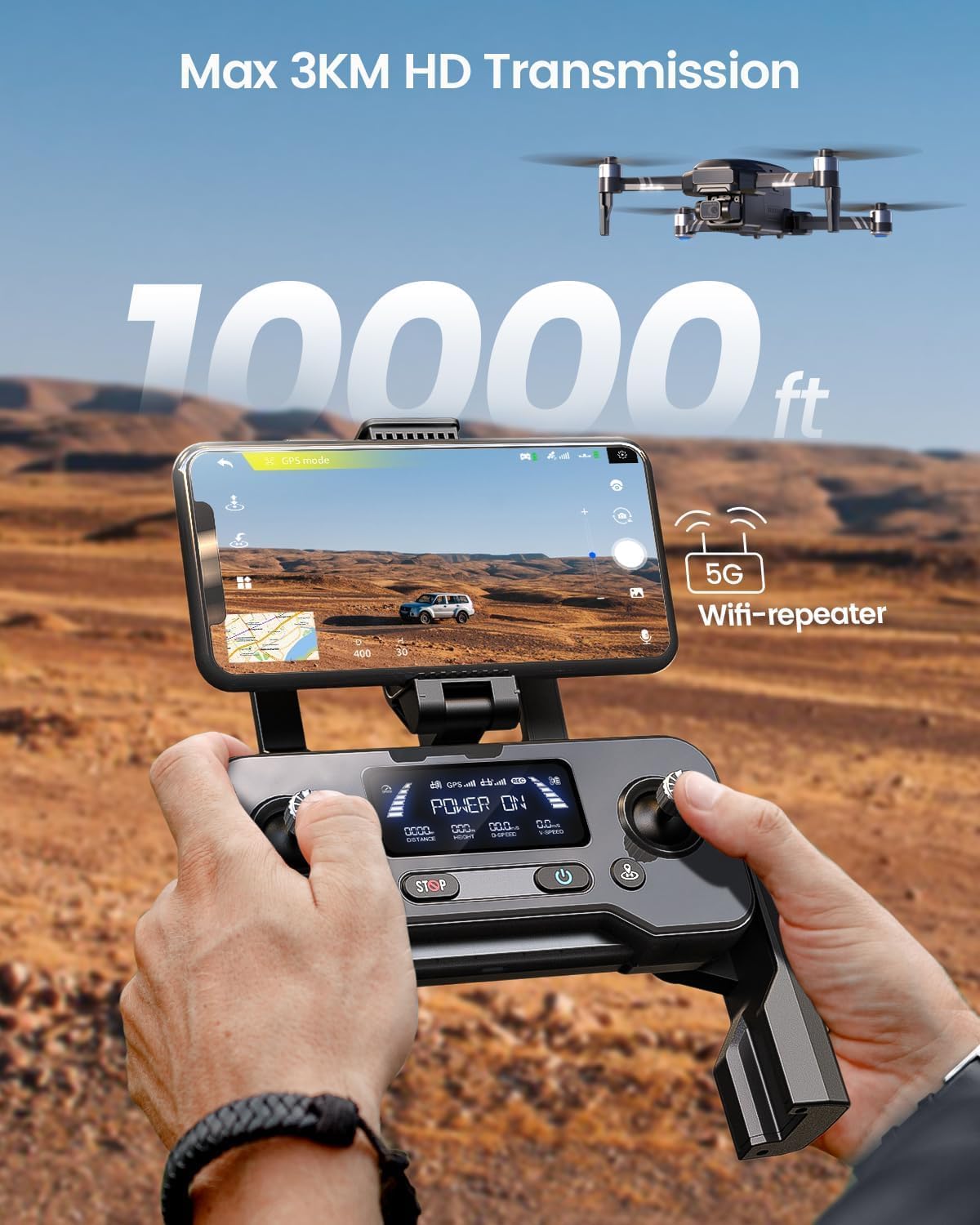
The remote controller offers an expansive 10,000 FT range transmission.
5. Setup
5.1. Charging Batteries
The HS600 comes with three intelligent flight batteries, providing up to 84 minutes of total flight time (28 minutes per battery). Use the provided Type-C cables to charge all batteries fully before first use.

Three batteries provide an impressive 84-minute flight time.

Ensure all three batteries are fully charged for maximum flight duration.
5.2. Installing Batteries
Insert the charged flight battery into the drone's battery compartment until it clicks securely into place. For the remote controller, ensure its internal battery is charged via the Type-C port.

Proper installation of the drone battery.

Remote controller details and battery compartment.
5.3. Propeller Installation
Attach the propellers according to the markings on the drone arms and propellers (e.g., A and B). Ensure they are securely fastened.
5.4. Gimbal Protector Removal
Remove the gimbal protector before powering on the drone to prevent damage to the camera and gimbal system.
5.5. App Download and Connection
Download the official Holy Stone app (refer to the manual for the specific app name) on your smartphone. Connect your smartphone to the drone's Wi-Fi network (usually named 'HolyStone-HS600-XXXXXX') and then open the app to establish a connection for live video feed and advanced controls.
6. Operating the Drone
6.1. Pre-Flight Procedures
- Place the drone on a flat, open surface, preferably on the included landing pad for stable takeoffs and landings.
- Power on the drone first, then the remote controller.
- Wait for the drone and remote to pair.

Utilize the drone landing pad for stable takeoffs and landings.
6.2. Calibration
Perform compass and gimbal calibration as instructed by the app or remote controller indicators before each flight, especially when flying in a new location.
6.3. Takeoff and Landing
Use the one-key takeoff/landing button on the remote controller or perform a manual takeoff by pushing both joysticks outwards and downwards to start the motors, then push the left joystick up to ascend.

The drone can be launched from a flat surface or by hand.
6.4. Flight Controls and Intelligent Modes
The HS600 offers various intelligent flight modes to enhance your flying experience:
- Follow Me Mode: The drone automatically follows the subject, keeping them in the frame.
- Waypoint Mode: Plan a flight path by setting multiple waypoints on the map, and the drone will fly along the designated route.
- Return to Home (RTH): The drone automatically returns to its takeoff point when activated or in case of low battery/signal loss.

Intelligent GPS functions include Return to Home, Waypoints Flight, and Follow Me.

The Follow Me mode keeps the subject centered in the frame.

Plan your flight path with the Waypoint mode.

The Return to Home function ensures a safe return to the takeoff point.
6.5. Camera Operation
Use the dedicated buttons on the remote controller or the app interface to capture 4K photos and videos. The 2-axis gimbal and EIS ensure smooth and stable footage even during dynamic flight.
7. Maintenance
- Cleaning: Gently wipe the drone and camera lens with a soft, dry cloth after each use. Avoid using harsh chemicals.
- Storage: Store the drone and batteries in a cool, dry place, away from direct sunlight and extreme temperatures. Ensure batteries are partially charged (around 50-60%) for long-term storage.
- Propeller Replacement: Replace damaged or bent propellers immediately. Refer to the propeller markings (A/B) for correct installation.
8. Troubleshooting
8.1. Drone Not Powering On
- Ensure the battery is fully charged and correctly inserted.
- Press and hold the power button for the specified duration (usually 2-3 seconds).
8.2. No GPS Signal
- Fly in an open area away from tall buildings or interference.
- Wait for the drone to acquire enough satellites (check app indicator).
8.3. Unstable Flight
- Perform compass and gimbal calibration.
- Check for damaged propellers and replace if necessary.
- Ensure flight is not attempted in strong winds beyond the drone's capability.
8.4. No Live Video Feed
- Ensure your smartphone is connected to the drone's Wi-Fi network.
- Restart the app and the drone.
- Check for app updates.
9. Specifications
| Feature | Specification |
|---|---|
| Model | HS600 |
| Dimensions | 46 x 33 x 9 cm |
| Weight | 541 g |
| Camera | 4K/30FPS with 2-Axis Gimbal & EIS Anti Shake (Sony Sensor) |
| Flight Time | Up to 84 minutes (with 3 batteries) |
| Transmission Range | 10,000 FT (approx. 3KM) |
| Batteries | 3 Lithium Polymer batteries (included) |
| Motor Type | Brushless Motors |
| Wind Resistance | Level-6 |
| Remote ID | FAA Compliant (Built-in) |
10. Warranty and Support
Holy Stone provides customer support for product inquiries and technical assistance. For warranty information, please refer to the documentation included with your purchase or visit the official Holy Stone website. For immediate assistance, you may contact Holy Stone customer service.

Holy Stone offers dedicated customer support for all your needs.


