
Important Safety Information
Read all instructions carefully before beginning installation. If you are unfamiliar with electrical wiring, consult a qualified electrician. Always disconnect power at the main circuit breaker before installation or servicing.
- Ensure the installation site can support the fan's weight.
- All wiring must be in accordance with national and local electrical codes.
- Do not connect the fan to a dimmer switch or rheostat.
- Maintain a minimum clearance of 7 feet from the floor to the fan blades.
Setup and Installation
This CJOY ceiling fan requires assembly and is designed for flush mount installation. Please review the following steps and diagrams carefully.
Required Tools and Components
Ensure all components listed in the accessories section are present before starting installation. You will need basic tools such as a screwdriver, wire strippers, and a ladder.

Image: Included accessories for the CJOY ceiling fan, including the motor, canopy, blades, light kit, remote control, and hardware.
Installation Steps
- Mounting the Bracket: Secure the mounting bracket to the ceiling junction box. Ensure it is firmly attached and can support the fan's weight.
- Wiring: Connect the fan's electrical wires to the household wiring according to the provided wiring diagram. Ensure all connections are secure.
- Attaching the Motor Assembly: Lift the fan motor assembly and attach it to the mounting bracket.
- Installing Blades: Attach the fan blades to the motor housing. This model features double-sided blades, allowing for a choice of finish.
- Installing the Light Kit: Connect the light kit wiring and secure the light kit to the fan motor assembly.
- Securing the Light Cover: Place the light cover over the light kit.

Image: Visual guide for the ceiling fan installation process.
Installation Video
Video: A detailed installation guide for the CJOY White Ceiling Fan with Light.
Room Size Suitability
This 52-inch ceiling fan is suitable for rooms ranging from 12ft x 12ft to 15ft x 15ft, including bedrooms, home offices, kitchens, living rooms, patios, and other indoor/outdoor spaces.
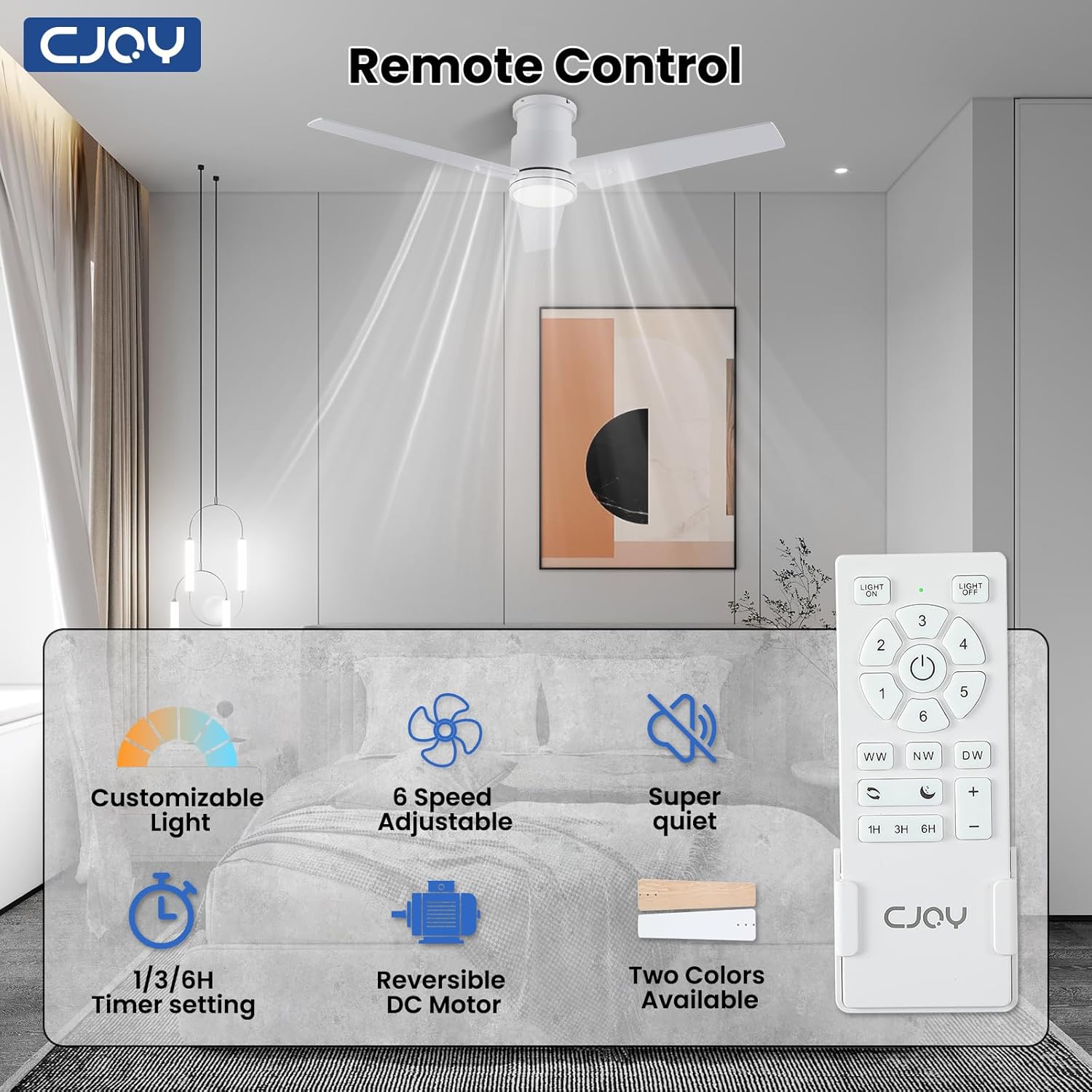
Image: Product dimensions of the 52-inch CJOY ceiling fan.
Operating Instructions
The CJOY ceiling fan is operated using the included remote control. Familiarize yourself with the remote's functions for optimal use.
Remote Control Functions

Image: Layout and functions of the CJOY ceiling fan remote control.
- Light ON/OFF: Turns the LED light on or off.
- Fan Speed (1-6): Adjusts fan speed from 1 (lowest) to 6 (highest).
- Light Color Temperature:
- "WW" for Warm Light (3000K). Long press to decrease color temperature.
- "NW" for Natural Light (4000K).
- "DW" for Day Light (6500K). Long press to increase color temperature.
- Brightness Adjustment (+/-): Adjusts light brightness from 10% to 100%.
- Forward/Reverse: Switches between summer (downward airflow) and winter (upward airflow) modes.
- Fan Timer (1H, 3H, 6H): Sets the fan to automatically turn off after 1, 3, or 6 hours.
- Sleep Wind Mode (Moon icon): Activates a gentle, alternating breeze by cycling through speeds 1, 2, and 3 every 20 seconds.
Light Functions: Dimmable LED and Memory
The integrated 24W LED light offers adjustable brightness and three color temperature options. The memory function retains your last light settings.

Image: Demonstration of the 10%-100% smooth dimmable feature and 3 color temperature selections.
To utilize the memory function, ensure the light is turned off for at least 10 seconds before turning it back on. If the light is turned off for less than 10 seconds, the color temperature may switch to the next setting.
Video: Demonstration of the 3 color temperature settings for the flush mount ceiling fan with lights.
Fan Speed Settings and Airflow
The fan offers 6 speed settings to control airflow intensity:
- Speeds 1-2: Soft wind, ideal for sleeping or reading.
- Speeds 3-4: Natural wind, suitable for general entertainment or gatherings.
- Speeds 5-6: Strong wind, effective for sports or fitness activities.

Image: Guide to the 6 adjustable fan speeds and their applications.
Reversible DC Motor for Year-Round Comfort
The reversible DC motor allows you to change the direction of the fan blades, optimizing air circulation for different seasons.
- Summer Mode (Downward Airflow): Blades rotate counter-clockwise, pushing cool air down to create a refreshing breeze.
- Winter Mode (Upward Airflow): Blades rotate clockwise, drawing cool air up and distributing warm air evenly throughout the room.

Image: Visual explanation of the reversible DC motor's summer and winter modes.
Timer Function
Set the fan to automatically turn off after a specified duration using the 1H, 3H, or 6H timer buttons on the remote control.
Video: Demonstration of the ceiling fan timer off setting.
Sleep Mode
Activate Sleep Mode by pressing the "Moon" button on the remote. This mode cycles the fan through speeds 1, 2, and 3 every 20 seconds to simulate a natural, gentle breeze for undisturbed sleep.
Video: Demonstration of the CJOY flush mount ceiling fan's sleep mode.
General Operation Overview
Video: An overview of the flush mount ceiling fan with lights and remote control in white.
Maintenance
Regular maintenance ensures optimal performance and longevity of your ceiling fan.
- Cleaning: Periodically wipe the fan blades and motor housing with a soft, damp cloth. Do not use abrasive cleaners or solvents.
- Blade Screws: Check all blade screws for tightness at least twice a year. Loose screws can cause noise and wobble.
- Light Cover: Clean the light cover with a soft, dry cloth.
- No Lubrication Required: The DC motor is permanently lubricated and does not require additional oiling.
Troubleshooting
If you encounter issues with your CJOY ceiling fan, refer to the following common problems and solutions:
| Problem | Possible Cause | Solution |
|---|---|---|
| Fan does not start | No power supply; Loose wire connections; Remote control battery low. | Check circuit breaker; Ensure all wires are securely connected; Replace remote control battery. |
| Fan wobbles | Loose blade screws; Unbalanced blades; Loose mounting bracket. | Tighten all blade screws; Use the included blade balancing kit; Ensure mounting bracket is secure. |
| Light does not work | Loose wire connection; LED driver issue. | Check light kit wiring; Contact customer support if LED driver is suspected. |
| Remote control not working | Battery low or incorrectly installed; Remote not paired. | Replace battery, ensure correct polarity; Refer to remote pairing instructions in the full manual. |
Specifications
| Feature | Detail |
|---|---|
| Brand | CJOY |
| Model Number | DY1235X-3B/52 |
| Size | 52 inches |
| Color | White |
| Material | Wood, Metal, Acrylic, Plywood |
| Indoor/Outdoor Usage | Indoor, Outdoor |
| Power Source | DC |
| Control Method | Remote Control |
| Light Source | LED |
| Wattage | 24 watts (LED Light) |
| Brightness | 2300 Lumens (Max) |
| Color Temperature | 3000K (Warm White), 4000K (Natural White), 6500K (Cool White) |
| Mounting Type | Flush Mount |
| Noise Level | Less than 35 decibels |
| Energy Efficiency | Grade A |
| Special Features | Dimmable, Memory Function, 6-Speed, Reversible DC Motor, Sleep Mode, Timer (1H/3H/6H) |
Warranty and Support
CJOY provides a 1-year worry-free warranty for this product. For technical assistance or any issues during use or installation, 24/7 technical support is available. Please refer to the contact information provided with your purchase or visit the official CJOY website for support details.
